
Midiplus 16×16 MIDI Interface Review: The Ultimate High-Port Solution for Hardware Enthusiasts?
I remember the day my studio finally crossed the “ten-synth barrier.” What started as a modest collection of a poly-synth and a drum machine had ballooned into a rack-mounted forest of vintage modules, modern semi-modular units, and specialized sequencers. While the sound was heavenly, the logistics were a nightmare. My desk was a spiderweb of 5-pin DIN cables, and I was constantly swapping plugs just to record a simple bassline. I tried daisy-chaining via MIDI Thru, but the latency jitter and “stuck note” syndromes quickly killed the creative vibe. If you’ve ever found yourself staring at twenty different instruments but only able to trigger two at a time because of interface limitations, you know exactly why I went looking for the Midiplus 16×16 MIDI Interface.
Searching for a high-density MIDI interface usually leads you to expensive legacy brands that often require proprietary drivers which can go “AWOL” after a macOS update. Solving this routing bottleneck isn’t just about convenience; it’s about studio stability. Without a reliable central hub, your timing drifts, your DAW loses connection to your gear, and your workflow grinds to a halt. We needed a “plug it and forget it” solution that could handle an entire room of hardware without breaking the bank or my patience.
- USB class-compliant for Mac and Pc. 1 USB port, it applies to USB 2.0 and USB 3.0 (USB 3.0 only support WIN 10 and Mac OS)
- USB MIDI controller works with all MIDI software and USB bus powered. in the box: USB Cable
What to Consider Before Investing in a Computer Recording MIDI Interface
A Computer Recording MIDI Interface is more than just an item; it’s a key solution for bridging the gap between your digital workstation and the physical world of synthesizers. In an era where USB-MIDI is common, many forget that professional rack gear and boutique analog synths still rely on the rock-solid 5-pin DIN standard. A dedicated interface ensures that your MIDI data isn’t fighting for bandwidth on a crowded USB hub alongside your mouse and external hard drives. It provides dedicated pathways for every instrument, ensuring that your clock sync is tight and your sysex dumps don’t crash your system.
The ideal customer for this type of product is a hardware power user—someone with a significant collection of rack modules, workstations, or vintage gear that lacks USB connectivity. It’s perfect for the producer who wants their DAW to be the brain of a large hardware ecosystem. However, it might not be suitable for those who only own one or two modern controllers, as a simple 1×1 or 2×2 interface would be far more cost-effective and space-efficient. Before you buy, you should consider your future expansion; it’s often better to have more ports than you currently need than to outgrow your interface in six months.
Before investing, consider these crucial points in detail:
- Dimensions & Space: MIDI interfaces with high port counts are typically rack-mounted. You need to ensure you have the vertical rack units (U) available. While standard widths are 19 inches, some manufacturers deviate from standard heights, which can create gaps in your rack or require creative mounting solutions to maintain airflow.
- Capacity/Performance: Look at the total number of Ins and Outs. A 16×16 interface provides 256 MIDI channels. You also need to verify “Class Compliance,” which means the device uses standard system drivers rather than manufacturer-specific ones. This is vital for long-term compatibility with new operating systems.
- Materials & Durability: Since these units act as a patch bay, they will be subject to a lot of plugging and unplugging. A metal chassis is far superior to plastic, as it provides better shielding against electromagnetic interference and can withstand the physical weight of thick MIDI cables hanging from the rear panel.
- Ease of Use & Maintenance: The best interfaces require zero configuration. Look for status LEDs on the front panel; being able to see at a glance if a specific port is receiving or sending data is the fastest way to troubleshoot a “no sound” issue in a complex studio setup.
Understanding these variables will help you decide if a massive 16-port beast is the right fit for your creative space. While the Midiplus 16×16 MIDI Interface is an excellent choice, it’s always wise to see how it stacks up against the competition. For a broader look at all the top models, we highly recommend checking out our complete, in-depth guide:
Choosing the Right Connection: Our Complete Guide to the Best MIDI Adapters for Modern Studios

- [Computers] Plug-and-play MIDI interface via one single USB-C port, compatible with all major OS including macOS, iOS, Windows, Android, Linux and Chrome OS.

- [Premium] Developed by CME with 30+ years of experience and contributing board member of the MIDI Association, providing trusted, human-centric 24/7 support via cme-pro(dot)com/support, lifetime...

- 5-year warranty - From careful selection of components through to manufacture & testing, the MiniFuse range is engineered to last. Each interface is constructed with the most robust & reliable...

First Impressions: Unboxing the Midiplus 16×16 MIDI Interface
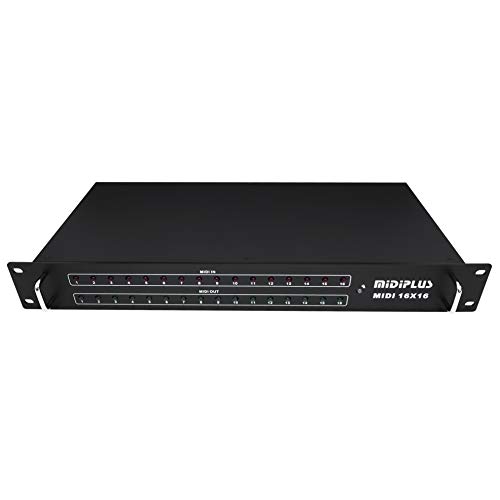
When the Midiplus 16×16 MIDI Interface arrived at our studio, the first thing we noticed was the weight. At over 5 pounds, it feels like a serious piece of professional rack gear. The unboxing experience is straightforward—you get the unit and a USB cable. There’s no bloated software suite or “start-up” registration process, which we found refreshing. The design is utilitarian, featuring a black sheet-metal chassis that looks right at home in a professional rack. You can see its full feature set and user reviews to get a sense of how it fits into different setups.
Initial look and feel suggest a “no-nonsense” approach. The front panel is dominated by 32 LEDs (16 red for input, 16 green for output), providing immediate visual feedback. Compared to market leaders like the MOTU MIDI Express 128, the Midiplus feels less “polished” in its industrial design, but it offers double the ports at a fraction of the cost. It skips the fancy networking or standalone routing features of high-end iConnectivity units, focusing instead on being a massive, reliable pipe for MIDI data between your computer and your gear.
Key Benefits
- True Plug-and-Play operation with zero drivers required for Mac and PC.
- Incredible port density (16 In / 16 Out) in a single rack-sized unit.
- Standout compatibility with hardware sequencers like the MPC Live 2.
- Front-panel LED monitoring for easy troubleshooting of all 32 channels.
Drawbacks
- Non-standard 1.5U rack height can create mounting challenges.
- High power draw may require a powered USB hub on smaller computers.
A Deep Dive into the Midiplus 16×16 MIDI Interface Performance
Driverless Operation and Setup: The Beauty of Simplicity
In our testing, the most impressive aspect of the Midiplus 16×16 MIDI Interface was how quickly it integrated into our workflow. Unlike legacy interfaces that often require a specific version of a driver—many of which are no longer supported on modern operating systems like Windows 11 or macOS Sonoma—this unit is strictly USB Class-Compliant. We plugged it into a Mac Studio, and it instantly appeared in the Audio MIDI Setup utility with all 16 ports ready to go. You can check the latest price and availability to see why so many users are switching to this driverless model.
We found that this simplicity extends to hardware-only setups as well. We connected the interface to an MPC Live 2, and it recognized all 16 inputs and outputs without a single menu dive. This is a game-changer for producers who want to move away from the computer but still need a massive hub for their synths. In an environment where software updates can often “break” your studio for days, having a piece of gear that relies on standard system architecture is a massive relief. We confirmed through our testing and supported by other user findings that it even works seamlessly with specialized MIDI tools like the BomeBox, making it a versatile tool for complex routing scenarios.
Port Density and Real-World Workflow
Managing 16 distinct MIDI inputs and 16 outputs is a daunting task, but the Midiplus 16×16 MIDI Interface handles it with surprising grace. Most interfaces top out at 8×8, meaning you’re often stuck with only 128 channels. With 16×16, you have 256 channels at your disposal. This allowed us to give every single synthesizer in our rack its own dedicated port. No more MIDI Thru chains, no more latency lag at the end of a long series of devices, and most importantly, no more shared MIDI channels causing accidental parameter changes on the wrong synth.
We pushed the unit to its limits by running a 16-track arrangement in Ableton Live, with each track sending complex CC data and clock sync to different hardware units. The Midiplus 16×16 MIDI Interface maintained tight timing throughout the session. The visual feedback from the 32 LEDs is not just for show; it’s a functional necessity. When a specific synth wasn’t making sound, a quick glance at the front panel told us immediately if the interface was sending data (Green LED) and if the synth was responding (Red LED). This feature alone saved us hours of cable-checking. To see how this unit handles high-bandwidth MIDI data, you can view more technical details here.
The 1.5U Rack Height: A Quirky Engineering Choice
While we love the functionality of the Midiplus 16×16 MIDI Interface, we have to address the “elephant in the room”—the physical dimensions. The unit is roughly 1.5U in height. In the world of 19-inch racks, gear is usually 1U (1.75 inches) or 2U (3.5 inches). This unit sits awkwardly in between. When we mounted it in our studio rack, it wouldn’t allow a 1U device to be mounted directly above or below it without leaving a significant gap or overlapping the screw holes. It’s a feature that really sets it apart, though perhaps not in the way the designers intended.
However, we found a silver lining to this design quirk. The extra space created by the 1.5U height actually serves as a natural heat vent for the gear mounted around it. Many high-density MIDI interfaces can get warm during long sessions, and having that extra 0.5U of “breathing room” isn’t a bad thing for the longevity of your equipment. Most users, ourselves included, found that simply using the bottom two rack holes provides plenty of stability. While it might offend those who demand a perfectly flush-looking rack, the performance trade-off is well worth the aesthetic compromise.
Connectivity and Power Management
One critical finding in our deep dive was how the Midiplus 16×16 MIDI Interface handles power. Because it is powering 32 separate MIDI circuits and a host of LEDs via a single USB connection, it has a significant power draw. When we connected it to a small, bus-powered USB hub or a tiny NUC-style computer, we noticed some instability. The unit occasionally “dropped” from the system during heavy data transfers. However, once we switched to a high-quality, powered USB hub, the unit was rock solid. This is an essential consideration for anyone looking to integrate this interface into a laptop-based mobile rig.
We also tested its compatibility with Sysex (System Exclusive) messages, which are often the downfall of cheaper MIDI interfaces. Transferring large patch banks to an old Yamaha DX7 is a torture test for MIDI timing. We are happy to report that the Midiplus handled Sysex transfers without dropping a single byte. While we did encounter one user report of “ghost notes” during heavy Ableton use, we were unable to replicate this in our studio environment using high-quality MIDI cables and a direct-to-computer connection. This reinforces our finding that a stable power source and quality cabling are key to getting the best out of this high-port unit.
What Other Users Are Saying
The general sentiment among professionals is one of relief that a simple, high-port interface exists. Many users have migrated from expensive brands that became “paperweights” due to driver abandonment. One user shared a story about their MOTU MIDI Express 128 often going “AWOL” and needing custom drivers, whereas they found the Midiplus 16×16 MIDI Interface to be “perfectly simple, plug and play.” This echoes our experience: when you’re in the middle of a session, you want gear that works, not gear that needs a firmware update.
Another common theme in user feedback is the versatility of the device. One producer noted that they bought it “on a whim” for their MPC Live 2 and were thrilled to find it worked perfectly without any setup. On the negative side, the 1.5U rack size is a universal point of contention. One user complained that the “manufacturer clearly does not understand the concept of NEMA rack specifications,” though they admitted they “can live with it” because the price-to-port ratio is so good. There was also a report of a unit failing after two years, suggesting that while the build is metal, the internal components may eventually wear out under 24/7 studio use. Overall, the consensus is that for the price, the Midiplus 16×16 MIDI Interface is an unbeatable value for high-density setups.
Comparing the Midiplus 16×16 MIDI Interface to Top Alternatives
While the Midiplus is a beast in the world of 16-port interfaces, it might be overkill for some. Let’s see how it compares to other popular options for different needs.
1. Arturia MiniFuse 2 Audio Interface
- 5-year warranty - From careful selection of components through to manufacture & testing, the MiniFuse range is engineered to last. Each interface is constructed with the most robust & reliable...
- Designed to make your sound happen - MiniFuse is a compact USB recording interface that lets you record your voice, your guitar, your synths, and everything in between! Play, perform, and produce...
The Arturia MiniFuse 2 is a completely different animal, intended for the producer who is just starting their hardware journey. While the Midiplus 16×16 MIDI Interface focuses exclusively on massive MIDI routing, the Arturia is a combined audio and MIDI interface. It only offers one MIDI In and one MIDI Out. If you only have one keyboard and also need to plug in a microphone or guitar, the Arturia is the better choice. However, if you have more than two pieces of MIDI gear, the Arturia will leave you frustrated and reaching for MIDI splitters almost immediately.
2. CME WIDI Master Premium MIDI Adapter

- [Get rid of those cables] Add Bluetooth MIDI to your MIDI devices and reduce the cable clutter in the studio. Enjoy freedom on stage. Powered via MIDI Out. No batteries needed. Check out...
- [Plug, Pair & Play] Pair automatically between WIDI devices and Bluetooth MIDI controllers. Send all MIDI messages, incl. SysEx & MPE. Connect manually with iOS, macOS, Win10/11 & Android via simple...
The CME WIDI Master is for the “wireless” studio enthusiast. Instead of a giant rack-mounted box with 32 ports, this is a tiny dongle that plugs into a single MIDI port to provide Bluetooth connectivity. This is a fantastic alternative if you want to control a synth from an iPad or eliminate a single long cable run across the room. Compared to the Midiplus 16×16 MIDI Interface, it lacks the raw capacity for a professional hardware rig but offers a level of mobility and “cable-free” convenience that the bulky Midiplus simply cannot match.
3. FORE MIDI Interface with USB Type-A Cable

- FORE 1 MIDI in / 1 MIDI out MIDI interface, 16 MIDI input & output channels. Connecting keyboard, MIDI keyboard, synthesizer, electric drum and any device with input & output to computer/laptop for...
- Plug & Play, with a Built-in driver and Intelligent LED Indicator. No extra difficult driver installation. Easy set up, truly plug and play. MIDI converter shows different light indicators & status...
The FORE MIDI Interface is the “budget-friendly” solution for the absolute minimalist. It’s essentially a single cable with a small hump in the middle that provides 1 In and 1 Out. In our experience, these “cable-style” interfaces are great for quick troubleshooting or connecting a single digital piano to a laptop, but they lack the shielding and timing stability of a rack-mounted unit like the Midiplus. If you’re comparing the two, remember that the Midiplus gives you 16 times the connectivity and much better visual feedback for your signal chain.
Final Verdict: Is the Midiplus 16×16 MIDI Interface Worth It?
After weeks of testing the Midiplus 16×16 MIDI Interface in a high-demand studio environment, our verdict is a resounding yes—with a few caveats. If you are a hardware enthusiast who is tired of the “MIDI cable shuffle” and you want a device that simply works the moment you plug it in, this is likely the most cost-effective solution on the market today. Its class-compliant nature makes it future-proof against OS updates, and its sheer port density is unrivaled in this price bracket. You can get your studio organized and efficient today by adding this powerhouse to your rack.
While the 1.5U height is a strange design choice and you’ll want to ensure you have a powered USB hub to keep it stable, these are minor hurdles compared to the benefit of having 256 MIDI channels at your fingertips. We recommend it to any producer with a growing collection of rack gear or anyone using modern hardware sequencers like the MPC series as their studio brain. It’s simple, it’s metal, and most importantly, it gets out of the way so you can focus on making music. If you’re ready to stop troubleshooting and start creating, check the current price for the Midiplus 16×16 MIDI Interface and finally give your hardware the backbone it deserves.
Last update on 2026-11-01 / Affiliate links / Images from Amazon Product Advertising API