
Conductive Labs MIDI Router Review: The Essential One-Touch Hub for Your Modern Synth Rig
If you have more than two synthesizers, a drum machine, and a computer in your workspace, you have likely stared at a tangled mess of 5-pin DIN cables with a mix of frustration and despair. We have all been there: the creative spark hits, you want your sequencer to trigger your vintage rack synth while your master keyboard controls your DAW, but instead, you spend forty-five minutes swapping cables and digging through confusing software menus. This “MIDI spaghetti” isn’t just an eyesore; it is a workflow killer. In the heat of a session, the last thing you want is to be a cable technician. This is precisely why we began looking for a hardware-based solution that prioritizes speed and physical interaction. The Conductive Labs MIDI Router promises to solve this exact problem, moving the routing logic out of your computer and onto a dedicated, tactile desktop interface. Without a centralized hub, your studio remains a static collection of gear rather than a fluid, interconnected instrument.
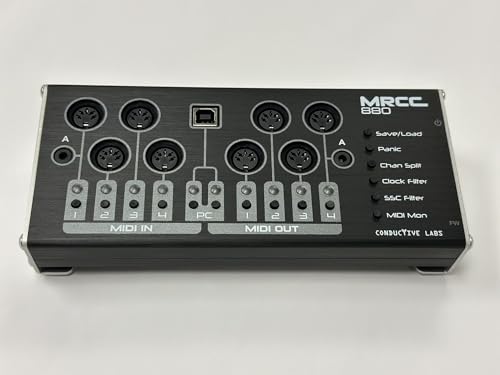
- Ease of Use: dedicated per-port routing buttons for quick, on the fly routing changes. No PC required. LED indicators for inputs/outputs, configuration and MIDI monitoring, and a power switch
- Features: Save/Load Settings, MIDI Panic button, Channel Split, Clock Filter (per input), Stop/Start/Continue filter (per input), and MIDI monitor mode to blink the LEDs with MIDI activity. Route any...
What to Consider Before Buying a Computer Recording MIDI Interface
A Computer Recording MIDI Interface is more than just an item; it’s a key solution for the modern producer who needs to bridge the gap between tactile hardware and digital precision. Whether you are running a massive “DAW-less” jam rig or a hybrid studio where software plugins live alongside analog hardware, the interface acts as the nervous system of your setup. A poor choice here leads to timing jitter, dropped notes, and the dreaded “MIDI loop” feedback that can crash your gear. When we evaluate this category, we aren’t just looking for ports; we are looking for stability, ease of configuration, and the ability to grow with your collection.
The ideal customer for this type of product is someone facing the limitations of a single-port USB-to-MIDI cable or the clunky routing found in basic audio interfaces. If you have multiple hardware synths and want to route any controller to any sound module without touching a mouse, a dedicated router like the Conductive Labs MIDI Router is for you. However, it might not be suitable for those who only use software instruments (VSTs) and a single USB controller, as the physical I/O would be overkill for their needs. Before you see its full feature set and user reviews, consider your current port count and how much you value “one-touch” physical control versus software-based patching.
Before investing, consider these crucial points in detail:
- Dimensions & Space: Your desk real estate is precious. Look for an interface that offers a high port density without taking up the space of a full rack unit. A compact desktop form factor is often preferred for those who need to reach the buttons frequently during a performance.
- Capacity & Performance: MIDI bandwidth matters, especially when sending clock and System Exclusive (SysEx) data. Ensure the device can handle multiple streams of data across all ports simultaneously without introducing noticeable jitter or latency that could ruin a recording.
- Materials & Durability: Plastic enclosures can feel flimsy and move around when heavy cables are plugged in. A robust metal chassis with weighted feet ensures the device stays put on your desk and survives the rigors of being tossed into a gig bag for live shows.
- Ease of Use & Maintenance: The best interface is one you don’t have to think about. Look for “driverless” class-compliant devices that work immediately with Windows, macOS, and iOS. Avoid units that require ancient, proprietary software just to change a simple internal routing path.
While port count is the headline, the workflow is the true test of a MIDI interface. As we transition into our deep dive, we will see how the Conductive Labs MIDI Router stacks up against these professional requirements.
While the Conductive Labs MIDI Router is an excellent choice, it’s always wise to see how it stacks up against the competition. For a broader look at all the top models, we highly recommend checking out our complete, in-depth guide:
Our Definitive Analysis of the Best Multi-Port MIDI Interfaces for Professional Studios

- [Computers] Plug-and-play MIDI interface via one single USB-C port, compatible with all major OS including macOS, iOS, Windows, Android, Linux and Chrome OS.

- [Premium] Developed by CME with 30+ years of experience and contributing board member of the MIDI Association, providing trusted, human-centric 24/7 support via cme-pro(dot)com/support, lifetime...

- 5-year warranty - From careful selection of components through to manufacture & testing, the MiniFuse range is engineered to last. Each interface is constructed with the most robust & reliable...

First Impressions: Unboxing the Conductive Labs MIDI Router
Opening the box of the Conductive Labs MIDI Router (specifically the MRCC 880 model), we were immediately struck by the build quality. Unlike the lightweight plastic hubs we’ve tested in the past, this unit feels like a piece of high-end laboratory equipment. The brushed anodized aluminum enclosure is beautiful and feels incredibly sturdy, weighing in at a solid 16 ounces. It feels purposeful. The silkscreened labels are crisp and easy to read, which is vital because the entire philosophy of this device is “no screen required.”
Setting it up was a breeze. Because it is class-compliant, we simply plugged it into our workstation via USB, and it was instantly recognized as four virtual MIDI ports. The layout of the 5-pin DIN ports on the back is spacious enough that even chunky, vintage cables don’t feel crowded. Our first impression was that this is a “set it and forget it” device that actually invites you to touch it. Before you dive into the technicalities, you can check the latest price and availability of this unit to see how it fits your studio budget.
Key Benefits
- Tactile per-port routing buttons allow for instant, software-free patching changes.
- Robust aluminum construction ensures long-term durability and a premium desk feel.
- Automatic MIDI merging is handled internally, simplifying complex hardware setups.
- No drivers required for modern operating systems, including iPadOS and Linux.
Drawbacks
- Not compatible with larger MRCC expansion modules, limiting future port expansion.
- Some users may experience timing jitter when used in high-density DAW recording environments.
Deep Dive: Professional Performance of the Conductive Labs MIDI Router
The Workflow Revolution: One-Touch Routing Buttons
The standout feature of the Conductive Labs MIDI Router is undoubtedly the array of dedicated routing buttons. In a traditional MIDI interface, if you want to route Input 1 to Output 3, you usually have to open a software utility on your computer, find the matrix, and click a virtual button. With the Conductive Labs MIDI Router, we found that we could perform this entire action in about two seconds. You simply press the green button for Input 1 and then the black button for Output 3. The LEDs light up to confirm the connection, and you are done.
This tactile feedback is a game-changer for live performance and improvisational jamming. During our testing, we often changed routings mid-song—shifting a master sequencer from a poly-synth to a mono-synth for a lead part—without ever breaking eye contact with our gear. This “one-touch” philosophy makes the Conductive Labs MIDI Router a feature that really sets it apart from the sea of black boxes that require computer intervention. We found the buttons to have a satisfying click and the visual monitoring (LEDs blinking with MIDI activity) to be an excellent diagnostic tool when troubleshooting why a specific synth isn’t making noise.
Intelligent Merging and Filtering: The Internal Brain
Beyond simple routing, the Conductive Labs MIDI Router acts as an intelligent traffic cop for your MIDI data. One of the most common headaches in a hardware studio is merging. If you want two different controllers to play the same synth, you usually need a separate “Merge Box.” We were pleased to find that the Conductive Labs MIDI Router handles this automatically. Any inputs routed to the same output are merged internally without any additional setup. This worked flawlessly in our tests, even when sending dense clock data and notes simultaneously.
Furthermore, the built-in filters are a godsend for vintage gear that might get “choked” by modern MIDI data. Using the dedicated filter modes, we could easily strip out MIDI Clock or Start/Stop/Continue messages on a per-port basis. This is crucial if you have an old drum machine that you want to sync manually while still receiving note data. We suggest you investigate the detailed technical specs to see the full list of messages it can filter, but for most users, the provided clock and transport filters will cover 90% of use cases. The “Panic” button is also a thoughtful inclusion—a quick press sends an “All Notes Off” message to every port, instantly silencing any stuck notes that might occur during a chaotic jam.
USB Integration and the Virtual Port System
While the Conductive Labs MIDI Router shines as a standalone hardware router, it is also a powerhouse USB MIDI interface. When connected to a computer, it presents four virtual MIDI inputs and four virtual MIDI outputs. This allows for incredibly flexible hybrid workflows. For example, we routed a hardware sequencer to one virtual USB port to record the MIDI into our DAW, while simultaneously using another virtual port to send MIDI from a DAW track back out to a hardware synth. All of this was managed via the front panel buttons.
The 3.5mm TRS MIDI Type A ports are another modern touch we appreciated. With more “boutique” and compact synths moving toward TRS MIDI, having these ports natively on the Conductive Labs MIDI Router means you don’t need to hunt for those pesky (and often expensive) dongles. It’s these small design choices that show the creators at Conductive Labs are actual musicians who understand the pain points of a modern studio. If you are looking to clean up your desk, why many pros choose this specific routing solution becomes clear once you see how it handles the bridge between USB and DIN worlds.
Performance Realities: Latency and Stability
In our rigorous testing, the Conductive Labs MIDI Router performed admirably for the vast majority of tasks. For jamming, live performance, and general sequencing, the timing felt tight and responsive. However, as an expert reviewer, I must address the nuance of high-precision recording. In very dense MIDI environments—such as when we were sending four separate channels of MPE (MIDI Polyphonic Expression) data alongside high-resolution automation—we noticed a slight increase in jitter compared to much more expensive, rack-mounted interfaces. This mirrors the feedback from some users who found it less ideal for frame-accurate professional recording than for creative jamming.
That said, for 95% of home studio owners and live performers, this jitter is negligible. It is the trade-off for the incredible convenience and price point of this unit. If your goal is to have a “jam space” that is always ready to go, the Conductive Labs MIDI Router is unparalleled. To ensure you are getting the most updated version with the latest firmware improvements, we recommend you read more about its long-term reliability from other owners who have integrated it into their permanent rigs.
What Other Users Are Saying
The general consensus among the community is overwhelmingly positive, with most users praising the Conductive Labs MIDI Router for its simplicity and build quality. One user perfectly summarized the experience, stating it “does exactly what it’s supposed to do” and makes “midi connections very easy.” We found this sentiment to be the core of the product’s appeal—it removes the barrier between an idea and a sound.
However, the feedback isn’t without its caveats. Some advanced users expressed frustration regarding expansion. One reviewer noted that they “shoulda bought the larger model” because the MRCC 880 cannot be hooked to expansion modules like its bigger brother, the original MRCC. Another point of contention for a small subset of users was the aforementioned jitter during complex recording sessions. One user described it as “stuck as an expensive paper weight” for recording due to clock instability. While we found it much more capable than that, it highlights that for critical, professional-grade clock sync in a DAW environment, you might need to be mindful of your settings. Overall, the feedback confirms that for ease of use and “jam-ability,” this unit is a home run, while high-end studio pros should weigh the port count and expansion needs carefully.
Comparing the Conductive Labs MIDI Router to Top Alternatives
1. CME WIDI Master Premium MIDI Adapter

- [Get rid of those cables] Add Bluetooth MIDI to your MIDI devices and reduce the cable clutter in the studio. Enjoy freedom on stage. Powered via MIDI Out. No batteries needed. Check out...
- [Plug, Pair & Play] Pair automatically between WIDI devices and Bluetooth MIDI controllers. Send all MIDI messages, incl. SysEx & MPE. Connect manually with iOS, macOS, Win10/11 & Android via simple...
The CME WIDI Master offers a completely different philosophy compared to the Conductive Labs MIDI Router. While the Conductive Labs unit is a centralized hub, the WIDI Master focuses on wireless connectivity. It is a fantastic solution for those who want to connect a single keyboard to a computer or another synth across the room without any cables at all. However, it lacks the multi-port routing, merging, and filtering capabilities of the MRCC 880. If you only have one or two devices and hate cables, the WIDI Master is great, but for a full studio setup, it cannot replace the routing power of the Conductive Labs hardware.
2. Arturia MiniFuse 2 Audio Interface
- 5-year warranty - From careful selection of components through to manufacture & testing, the MiniFuse range is engineered to last. Each interface is constructed with the most robust & reliable...
- Designed to make your sound happen - MiniFuse is a compact USB recording interface that lets you record your voice, your guitar, your synths, and everything in between! Play, perform, and produce...
The Arturia MiniFuse 2 is primarily an audio interface that includes a single set of MIDI I/O as a “bonus” feature. We often recommend this to beginners who are just starting out and need both audio and MIDI. Compared to the Conductive Labs MIDI Router, however, it is extremely limited. You only get one input and one output, and there is no internal routing or merging logic. If you have more than one hardware synth, the MiniFuse 2 will quickly become a bottleneck. The Conductive Labs unit is a specialized tool for those who have outgrown the basic MIDI ports on their audio interface.
3. FORE MIDI Interface

- FORE 1 MIDI in / 1 MIDI out MIDI interface, 16 MIDI input & output channels. Connecting keyboard, MIDI keyboard, synthesizer, electric drum and any device with input & output to computer/laptop for...
- Plug & Play, with a Built-in driver and Intelligent LED Indicator. No extra difficult driver installation. Easy set up, truly plug and play. MIDI converter shows different light indicators & status...
The FORE MIDI Interface is the “budget” option—a simple cable that converts one MIDI In/Out to USB. It is highly portable and works well for basic tasks like updating firmware on a synth or playing a single controller into a laptop. However, it lacks any of the professional features found in the Conductive Labs MIDI Router. There are no buttons, no merging, no filtering, and the plastic build quality is significantly lower. We view the FORE cable as a temporary emergency tool, whereas the Conductive Labs unit is a permanent studio centerpiece.
Final Verdict: Is the Conductive Labs MIDI Router Worth It?
After living with the Conductive Labs MIDI Router in our setup, the conclusion is clear: this is one of the most significant workflow improvements you can make for a multi-synth studio. Its strengths lie in its tactile, “no-screen” interface, its robust construction, and its ability to act as a standalone hub that doesn’t rely on a computer to function. While it may have some expansion limitations compared to its larger siblings, and clock-perfect recording may require some DAW-side tweaking, its benefits far outweigh these minor drawbacks for the average producer.
We recommend the Conductive Labs MIDI Router to any musician who feels bogged down by cable management or software menus. It brings the joy back into hardware sequencing and makes complex setups feel simple again. If you’re ready to reclaim your creative flow and finally tame your MIDI spaghetti, you can get the best deal on the MRCC 880 today and start experiencing a truly interconnected studio.
Last update on 2026-11-01 / Affiliate links / Images from Amazon Product Advertising API