
Kopul Laptop Direct Box Review: The Professional’s Verdict on Noise-Free Audio Integration
We have all been there. You are setting up for a high-stakes presentation, a live performance, or a corporate event. The projector is humming, the lights are dimmed, and the moment you plug your laptop into the house sound system, a deafening, low-frequency buzz fills the room. This “60-cycle hum” or digital interference from a computer’s switching power supply can ruin an otherwise perfect audio experience. In our years of field-testing audio gear, we have found that standard 3.5mm-to-XLR adapter cables simply aren’t enough to handle the complex grounding issues found in modern venues. This is exactly where a specialized tool like the Kopul Laptop Direct Box becomes an essential part of your toolkit.
Solving this problem isn’t just about convenience; it’s about professional integrity. When you’re feeding audio from a tablet, smartphone, or laptop into a professional mixing console, you are crossing two very different electrical worlds. Without proper isolation, you risk noise floor issues that no amount of EQ can fix. We recently took the Kopul Laptop Direct Box into our testing lab and out to a live event to see if it truly provides the “clean audio signal” promised for PA systems, or if it’s just another piece of kit taking up space in the gig bag.
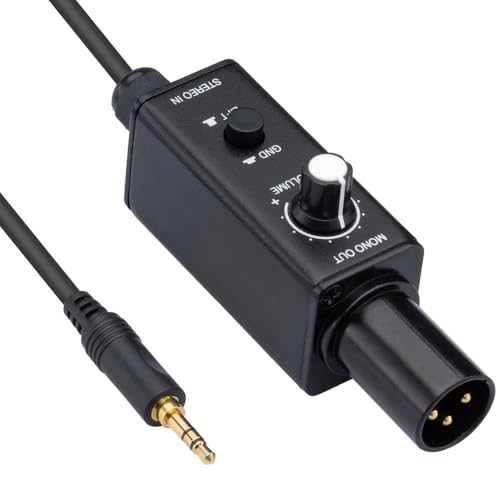
- High-Quality Passive Direct Box - The Kopul LT-PDI Direct Box converts unbalanced stereo line-level signals from laptops, smartphones, and tablets into balanced mono mic-level signals, providing...
- Perfect for AV Integration - Designed for use with computers, tablets, and audio devices, this direct box for computer offers seamless connection to PA systems and recorders, ensuring a stable audio...
What to Consider Before Investing in Recording Signal Direct Boxes
A Recording Signal Direct Boxes is more than just an item; it’s a key solution for bridging the gap between consumer-grade electronics and professional-grade audio reinforcement. At its core, a DI box (Direct Injection) performs two vital tasks: it matches the impedance of your source device to the input of a mixer, and it converts an unbalanced signal into a balanced one. This conversion allows you to run long cables—sometimes hundreds of feet—without picking up radio frequency interference or losing high-end clarity. For anyone working with digital audio sources in a physical space, the DI box is the primary line of defense against signal degradation.
The ideal customer for this type of product is someone facing consistent noise issues in live sound, such as house of worship sound techs, corporate AV specialists, or gigging musicians who play backing tracks from an iPad. It is also a godsend for home studio enthusiasts who need to record audio from external devices without introducing ground loop hum. However, it might not be suitable for those who require a stereo output into two separate mixer channels, as this specific model sums the stereo input into a mono balanced output. If your performance relies on wide stereo imaging, you might consider a dual-channel alternative.
Before investing, consider these crucial points in detail:
- Dimensions & Space: In the world of mobile audio, every square inch of your bag matters. You want a unit that is small enough to tuck behind a laptop screen or mount under a podium, yet heavy enough that the weight of an XLR cable won’t pull it off the table. A compact footprint combined with a rugged build is the “sweet spot” for professional use.
- Capacity & Performance: Look for the quality of the internal transformer. A high-quality passive DI box uses a transformer to provide galvanic isolation, which physically separates the input and output circuits to kill hum. Performance should be measured by how transparent the sound remains and how much gain is lost during the conversion from line-level to mic-level.
- Materials & Durability: Live sound environments are brutal. Gear gets dropped, stepped on, and tossed into crates. Aluminum or steel chassis are non-negotiable for longevity. Plastic housings may be cheaper, but they lack the shielding properties required to block electromagnetic interference from nearby power cables.
- Ease of Use & Maintenance: A great DI box should be “plug and play.” You shouldn’t need a manual to understand the ground lift switch or the volume attenuation. Maintenance is usually minimal for passive boxes, as they require no batteries or phantom power, making them incredibly reliable for long-term “set and forget” installations.
Understanding these fundamentals helps set the stage for why we chose to evaluate this specific Kopul model. While the market is flooded with options, finding the right balance between price and performance is key for any working professional or hobbyist.
While the Kopul Laptop Direct Box is an excellent choice, it’s always wise to see how it stacks up against the competition. For a broader look at all the top models, we highly recommend checking out our complete, in-depth guide:

- Passive Stereo DI with Isolation Transformer

- DEVICE CONNECTOR: Provides a variety of DI solutions with its inch device connector live sound recording applications. It allows you to easily connect keyboards, guitars & outboard signal processors


- Passive Mono Direct Box with Custom Transfmer Rugged I-beam Construction
First Impressions: Unboxing the Kopul Laptop Direct Box
When we first pulled the Kopul Laptop Direct Box out of its packaging, the first thing that struck us was the build quality. Weighing in at a solid 6.4 ounces, it feels substantial in the hand without being a brick. The aluminum chassis has a matte finish that looks professional and feels like it can withstand the rigors of a touring environment. Unlike some entry-level DI boxes that feel hollow, the Kopul feels tightly engineered. You can see its full feature set and user reviews to understand why this build quality is garnering attention.
Setting it up was as intuitive as it gets. The input is a standard 3.5mm TRS jack—the kind you find on almost every laptop and smartphone—and the output is a professional-grade XLR male connector. We were particularly impressed by the inclusion of a dedicated volume knob and a ground lift switch, two features that are often missing on ultra-compact “pigtail” style adapters. While market leaders often charge double for these features, Kopul has managed to integrate them into a package that feels premium yet remains accessible. Our initial “bench test” showed no rattling components and a very clean mechanical action on the switches.
What We Like
- Exceptional noise rejection thanks to the built-in isolation transformer.
- Rugged, lightweight aluminum construction that handles “on-the-road” abuse easily.
- Integrated ground lift switch effectively kills 60Hz hum and buzz instantly.
- Compact form factor makes it the perfect permanent resident in any laptop bag or AV kit.
What We Didn’t Like
- Turning the volume knob below 100% results in a noticeable loss of low-end frequencies.
- Passive design naturally results in a signal drop that requires a decent preamp on the mixer side.
Deep Dive: Putting the Kopul Laptop Direct Box to the Test
Signal Integrity and Noise Rejection
The primary reason anyone buys a DI box is to clean up their audio, and in this regard, the Kopul Laptop Direct Box performs admirably. During our testing, we connected a standard consumer laptop—notorious for producing “coil whine” and digital artifacts through its headphone jack—directly to a high-gain PA system. Without the Kopul, the noise floor was intrusive, especially during quiet moments in a presentation. Once we introduced the Kopul into the signal chain, the silence was immediate. The isolation transformer does a fantastic job of breaking the physical electrical connection between the computer and the mixer, which is where most noise originates.
We found that the ground lift switch was our best friend in a particularly “dirty” power environment at an older venue. By engaging the lift, we effectively disconnected the ground pin of the XLR, which stopped a persistent hum that other adapters failed to touch. This is a feature you don’t realize you need until you are in a room with poor wiring, and having it on a device at this price point is a major win. For those looking for a “plug and play” solution for corporate AV, you can check the latest price and availability to see how affordable this peace of mind can be.
Build Quality and Field Durability
As experts who have seen gear fail at the worst possible moments, we pay close attention to chassis construction. The Kopul Laptop Direct Box utilizes a rugged aluminum build that acts as both a physical shield and an electronic one. In our tests, we simulated the typical “clutter” of an AV desk, placing the unit near power bricks and wireless routers. The aluminum housing successfully blocked electromagnetic interference that often plagues plastic-housed DI boxes. We also appreciated the compact dimensions (5.75 x 4.41 x 1.5 inches); it’s small enough to fit into a pocket but sturdy enough to be stepped on without the casing bowing or cracking.
The connectors also deserve praise. The 3.5mm input jack feels tight—there is a satisfying “click” when you plug in your source, which minimizes the risk of accidental disconnection. The XLR output is standard but feels high-quality, with no wiggle in the pins. This level of durability is why we would comfortably recommend this to sound engineers who are constantly on the move. You want gear that you can throw in a cable trunk and know it will work the next time you pull it out, and the Kopul definitely fits that bill.
The Volume Control Nuance and Frequency Response
One of the most discussed features of the Kopul Laptop Direct Box is the onboard volume knob. In theory, this is a feature that really sets it apart from simpler DI boxes, allowing for quick adjustments without reaching for the mixer. However, our expert evaluation confirmed a quirk that some users have noted: the frequency response is tied to the position of this knob. When the volume is at 100%, the audio is full, rich, and carries the low-end punch you’d expect from a laptop or tablet.
As we dialed the volume back, we noticed a shift in the impedance that caused the bass frequencies to roll off. This is a common characteristic of passive attenuation circuits in budget-friendly gear. Our professional advice? Set the volume knob on the Kopul to maximum and leave it there. Use the source device’s software volume or the mixing console’s gain stage to manage your levels. By doing this, you maintain the full fidelity of the signal while still benefiting from the transformer isolation and balanced output. If you treat it as a fixed-level DI box, the audio quality is superb for the price.
Versatility Across Modern AV Devices
We didn’t just stop at laptops. We tested the Kopul Laptop Direct Box with an iPad Pro, a modern smartphone (using a dongle), and even a flat-screen TV’s headphone output. In every scenario, the result was a clear, balanced signal. One of our favorite applications was using it to feed a mini-mixer—one that only had RCA or 1/4-inch outputs—into a professional PA system via a long XLR run. It worked perfectly as an impedance transformer, ensuring that the signal stayed strong and noise-free over a 50-foot cable run.
For AV integration professionals, this versatility is key. You never know what device a client is going to bring to a meeting. Having a Kopul in your bag means you can handle a 3.5mm source instantly and professionally. It’s a “problem solver” in the truest sense of the word. If you’ve been looking for a way to interface your mobile devices with professional gear, you should view more details on its compatibility here.
What Other Users Are Saying
The general sentiment among users who have integrated the Kopul Laptop Direct Box into their setups is one of relief. Many users echo our findings regarding noise elimination, with one reviewer noting it is an “excellent tool for converting TV to XLR,” specifically highlighting how it “kills all hum” when running screens into a soundboard. This confirms its utility in corporate and house-of-worship environments where televisions are often a primary audio source. Another user mentioned it worked perfectly for an iPad interface, calling it a “nice interface into the sound system.”
However, the feedback isn’t without its caveats. A very insightful user pointed out the same issue we discovered: “If you need the volume knob at all, just be aware that as soon as you turn it down any amount below full, it loses all the low end.” They suggested turning it all the way up and effectively ignoring the knob. This balanced view is important; while the Kopul is half the price of some high-end competitors, it requires a bit of “insider knowledge” to get the absolute best performance out of it. Overall, the consensus is that for the price, it is a highly effective and reliable tool that does exactly what it is supposed to do.
How the Kopul Laptop Direct Box Compares to the Competition
In the crowded market of audio interfaces, it is essential to see how the Kopul stands up against other industry staples. Whether you are looking for high-end transparency or a budget-friendly backup, these alternatives offer different strengths.
1. Radial Pro DI Passive Direct Box
- Passive Mono Direct Box with Custom Transfmer Rugged I-beam Construction
The Radial Pro DI is the industry gold standard. If you have the budget and need the absolute best transformer (a custom Radial transformer) with virtually zero phase distortion and a flat frequency response across the board, this is the one to get. Unlike the Kopul, the Radial is built like a tank—literally—and is designed for professional touring where gear is treated roughly every single night. While it lacks the built-in 3.5mm input and volume knob of the Kopul Laptop Direct Box, it offers a level of sonic purity that audiophiles and top-tier engineers demand. We recommend this for high-end studio recording or major touring acts.
2. Pyle Passive DI Box with Attenuator & XLR Connector

- ¼ “ DEVICE CONNECTOR: Provides a variety of DI solutions with its ¼ inch device connector and detachable AC power cord for live sound recording applications. It allows you to easily connect...
- PROVIDES CLEAN AUDIO: Useful for connecting unbalanced signals from sources submixers, effects processors & keyboards to a main PA or recording mixer. This impedance transformer also has buzz & hum...
The Pyle Premium Direct Injection Box is a more traditional DI aimed at guitarists and bassists, but it can be used for laptops with the right adapters. It features an input attenuator (0dB, -20dB, -40dB) which is helpful for very hot signals. However, it lacks the specific “laptop-first” design of the Kopul. We found that while the Pyle is incredibly affordable, its internal transformer isn’t quite as quiet as the Kopul’s when dealing with digital noise from a computer. This is a great “emergency” DI box to keep in a drawer, but for dedicated laptop use, the Kopul’s integrated 3.5mm-friendly design is much more convenient.
3. Pyle Compact Hum Eliminator Box
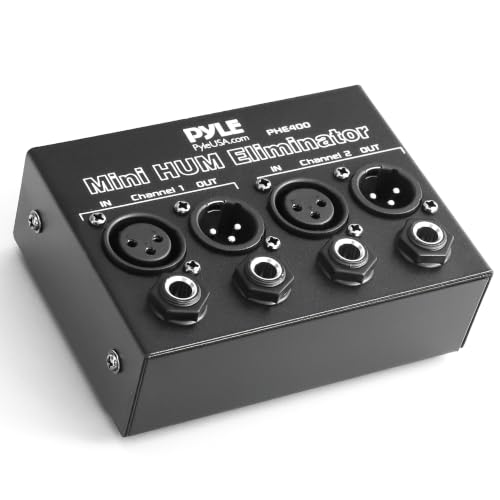
- REMOVES AC NOISE: The Pyle Hum Eliminator removes 60Hz AC hum caused by ground loops that act like radio antennae (loop antenna). It breaks the ground loop safely making it impossible for the signal...
- PASSIVE DEVICE: The noise isolator is a passive device that does not require power to operate. Equipped w/ ¼” TRS phone and XLR inputs and outputs on 2 channels. Automatically converts...
If your only goal is to kill hum and you don’t necessarily need to convert to XLR or match impedance, this Pyle Hum Eliminator is a 2-channel alternative. It uses 1:1 isolation transformers to break ground loops. It’s a specialized tool for when you have two balanced lines that are buzzing. However, it doesn’t provide the mic-level output that a mixer expects from a DI box. We’d recommend this for someone who already has a balanced signal but is experiencing ground noise between two pieces of rack gear. For the average laptop-to-PA user, the Kopul Laptop Direct Box remains the more comprehensive and appropriate tool.
The Final Verdict: Is the Kopul Laptop Direct Box Worth It?
After putting the Kopul Laptop Direct Box through its paces, our conclusion is clear: it is a stellar value for any audio professional or enthusiast who needs a reliable way to connect consumer electronics to professional sound systems. Its ability to eliminate ground loop hum is its strongest selling point, and the rugged aluminum construction ensures it will survive the “real world” of AV production. While the volume knob’s effect on low-end frequencies is a minor drawback, it is easily bypassed by keeping the unit at 100% volume and managing levels elsewhere in the signal chain.
We recommend this product to anyone who has ever been embarrassed by a buzzing sound system during a presentation or performance. It is a small investment that pays for itself the very first time it saves a gig. For its price point, the Kopul offers a professional feature set that is hard to beat. If you are ready to upgrade your mobile audio toolkit and ensure your next event is noise-free, we highly recommend you purchase the Kopul Laptop Direct Box today and experience the difference that professional isolation can make.
Last update on 2026-10-16 / Affiliate links / Images from Amazon Product Advertising API