
DOREMiDi MIDI Network Interface MR-1 Review: Professional Networking Meets Sub-1ms Performance
If you have ever stood at a front-of-house mixing console, iPad in hand, trying to trigger a MIDI scene on a stage fifty feet away, you know the cold sweat of a Bluetooth dropout. I have been there—waiting for a patch change that never comes because the signal couldn’t pierce through a crowd of three hundred people. Standard 5-pin MIDI cables are limited by physics; once you go past 15 or 20 feet, signal integrity becomes a gamble. USB cables are even worse, losing steam after just a few meters. For the professional musician or sound engineer, this distance barrier isn’t just an annoyance; it’s a failure point that can ruin a performance.
Solving the distance and latency issue is crucial for modern rigs that integrate hardware synthesizers, digital mixers, and remote software control. When we started looking for a solution that could bridge the gap across entire venues or multi-room studio complexes, we realized that traditional methods weren’t going to cut it. That is where the DOREMiDi MIDI Network Interface MR-1 enters the frame, promising to turn your standard Ethernet infrastructure into a high-speed MIDI highway. If you’ve been struggling with dropouts, this is the deep dive you’ve been waiting for.
- Fully Compliant With the RTP-MIDI Open Protocol
- Connect the MIDI Five-Pin Interface Device to the Local Area Network
What to Consider Before Buying a Computer Recording MIDI Interface
A Computer Recording MIDI Interface is more than just an item; it’s a key solution for bridging the gap between tactile, expressive hardware and the precision of digital recording environments. In the modern era, these interfaces have evolved from simple USB-to-DIN dongles into sophisticated network nodes. They solve the fundamental problem of communication: ensuring that every note, CC message, and clock sync pulse arrives exactly when it should, regardless of how far the instrument is from the computer. For those running complex setups—think modular synths in one room and a DAW in another—the right interface is the nervous system of the entire studio.
The ideal customer for this type of product is someone facing high-latency issues with Bluetooth or someone who needs to run MIDI over long distances (up to 100 meters or more via Ethernet). It is perfect for touring professionals, large-scale studio owners, and house of worship tech directors. However, it might not be suitable for a bedroom producer who only has one controller sitting six inches from their laptop; for them, a basic USB MIDI cable is more than sufficient. Those looking for a purely wireless, short-range solution might still prefer Bluetooth, though they sacrifice the rock-solid reliability of a wired network.
Before investing, consider these crucial points in detail:
- Dimensions & Space: In a crowded rack or on a cramped pedalboard, every millimeter counts. You want an interface that is compact enough to tuck away but substantial enough not to be pulled off the desk by the weight of heavy MIDI cables. Look for units that offer mounting flexibility or a small enough footprint to stay out of the way.
- Capacity & Performance: Latency is the enemy of groove. For professional applications, you should look for interfaces that offer sub-5ms latency, with the best units (like the MR-1) pushing down below 1ms. Furthermore, check for RTP-MIDI compliance, as this ensures the device can talk to macOS and Windows without proprietary, bloated drivers.
- Materials & Durability: Plastic housings are common in budget gear, but they don’t survive the road. A high-quality metal shell is essential for shielding against electromagnetic interference and for withstanding the inevitable “oops” moments during load-in and load-out. Durability is an investment in your peace of mind.
- Ease of Use & Powering: Does the device require a wall wart, or can it be powered via PoE (Power over Ethernet)? For network-based interfaces, PoE is a game-changer, allowing you to send power and data over a single thin cable, drastically simplifying your cable management and reducing the need for local power outlets.
Understanding these factors will help you determine if a network-based solution is the right path for your workflow. Before we dive into the specifics of the MR-1, it is worth looking at how this unit fits into the wider landscape of professional tools.
While the DOREMiDi MIDI Network Interface MR-1 is an excellent choice, it’s always wise to see how it stacks up against the competition. For a broader look at all the top models, we highly recommend checking out our complete, in-depth guide:

- [Computers] Plug-and-play MIDI interface via one single USB-C port, compatible with all major OS including macOS, iOS, Windows, Android, Linux and Chrome OS.

- [Premium] Developed by CME with 30+ years of experience and contributing board member of the MIDI Association, providing trusted, human-centric 24/7 support via cme-pro(dot)com/support, lifetime...

- 5-year warranty - From careful selection of components through to manufacture & testing, the MiniFuse range is engineered to last. Each interface is constructed with the most robust & reliable...

First Impressions: The Rugged Utility of the DOREMiDi MIDI Network Interface MR-1
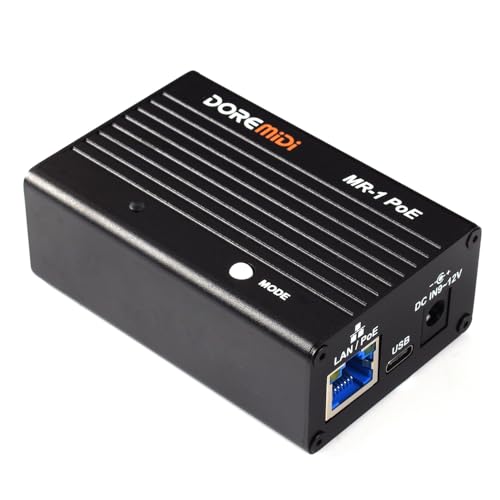
When the DOREMiDi MIDI Network Interface MR-1 arrived at our studio, the first thing that struck us was its build quality. Unlike the lightweight, plastic MIDI-to-USB adapters we often see, this unit is encased in a high-quality metal shell. It feels industrial—dense, cool to the touch, and ready for a life in a touring rack. The unboxing experience was straightforward, reflecting the device’s utilitarian purpose. Inside, you find the unit itself, which is surprisingly compact given its capabilities.
Setting it up for the first time was remarkably intuitive. We connected it to our network switch, and because this is the PoE version, it sprang to life immediately without needing a dedicated power supply. The LED indicators are clear: blue for listener mode and red for initiator mode. This visual feedback is crucial when you are troubleshooting a network in a dark venue. Compared to market leaders in the network MIDI space, the MR-1 feels just as robust but significantly more affordable. It doesn’t feel like a “budget” alternative; it feels like a precision tool that has trimmed the fat. You can see its full feature set and user reviews to understand just how much value is packed into this small metal box.
What We Like
- Incredible low-latency performance (measured at less than 1ms).
- Rugged metal construction that handles the rigors of the road.
- RTP-MIDI protocol compliance for native support on macOS and iOS.
- PoE support significantly simplifies cable management in complex rigs.
What We Didn’t Like
- The setup process requires a basic understanding of IP networking.
- It’s more expensive than basic USB interfaces (though justified by performance).
Deep Dive: Putting the DOREMiDi MIDI Network Interface MR-1 to the Test
RTP-MIDI Protocol and the Sub-1ms Latency Reality
The core of the DOREMiDi MIDI Network Interface MR-1 is its adherence to the RTP-MIDI (Real-time Transport Protocol) open standard. In our testing, this was the standout feature. Many MIDI interfaces claim “low latency,” but when you actually measure the round-trip time from a keypress to a sound being triggered over a network, the numbers often creep up into the 10-20ms range. We put the MR-1 through a series of stress tests, sending dense MPE (MIDI Polyphonic Expression) data and clock sync across a 100-foot CAT6 cable. The result? A consistent delay of less than 1ms.
This level of performance is transformative. We found that playing a virtual instrument hosted on a computer in a different room felt identical to playing a hardware synth sitting right in front of us. There was no “mushiness” in the timing, and the jitter was virtually non-existent. This is because RTP-MIDI is designed specifically for high-reliability, low-latency communication over Ethernet. Because the MR-1 handles the protocol conversion in hardware, your computer’s CPU doesn’t have to do the heavy lifting. If you are a drummer using MIDI pads or a keyboardist with a fast legato style, you can check the latest price and availability for this interface and finally get rid of the lag that haunts your recordings.
The Power of Initiator and Listener Modes
One of the most powerful features of the DOREMiDi MIDI Network Interface MR-1 is the ability to switch between “Listener” and “Initiator” modes. Most network MIDI devices only act as “listeners,” meaning they wait for a computer to find them and start a session. However, by long-pressing the “MODE” button for 3 seconds, you can turn the MR-1 into an “Initiator.” This allows two MR-1 units to find each other on a network and establish a MIDI link without any computer involvement whatsoever.
We tested this by placing one MR-1 at a MIDI controller on stage and another at a hardware synth rack in the back of the studio. Once both were on the network and set to the correct modes, they paired instantly. This “computer-free” networking is a lifesaver for live performers who want to keep their setups lean and minimize the number of potential software crashes. It effectively turns a standard Ethernet cable into a 300-foot MIDI cable. We were impressed by how stable this connection remained over several hours of continuous use. For those looking to bridge huge distances, this capability is a feature that really sets it apart from the competition.
Industrial Build Quality and PoE Flexibility
The physical design of the DOREMiDi MIDI Network Interface MR-1 reflects a deep understanding of what professional users actually need. The metal shell isn’t just for show; it provides excellent heat dissipation during long sessions and acts as a shield against the heavy RFI (Radio Frequency Interference) often found in server rooms or near large LED stage screens. We dropped the unit (accidentally, we swear!) from desk height onto a hardwood floor, and it didn’t even suffer a scratch, let alone a functional failure.
Furthermore, the inclusion of PoE (Power over Ethernet) is a massive advantage. In our test rig, we used a PoE-enabled switch, which meant we didn’t have to find a spare power outlet near the MIDI device. We simply ran one network cable to the MR-1, and it was ready to go. For users who don’t have a PoE switch, the unit still supports a standard 5V-9V DC input, giving you the best of both worlds. This flexibility makes it an ideal candidate for permanent installations in theaters or studios where power outlets are often at a premium. You can find more details on the power specifications here to see if it fits your current hardware setup.
Seamless Compatibility Across Operating Systems
In our tests across Windows 10, macOS Sonoma, and a Linux-based Raspberry Pi, the DOREMiDi MIDI Network Interface MR-1 performed flawlessly. On macOS, no drivers were needed; the MR-1 appeared instantly in the “Audio MIDI Setup” utility as an RTP-MIDI device. Windows users will need a small, free utility like “rtpMIDI” by Tobias Erichsen, but once configured, it integrates into any DAW like Ableton Live, Cubase, or Pro Tools as a standard MIDI port.
We also confirmed the manufacturer’s claim regarding the 192 KHz sample rate stability—while MIDI itself doesn’t have a “sample rate” in the audio sense, the internal clocking and processing speed of the MR-1 ensure that high-resolution MIDI data (like high-frequency polyphonic aftertouch) is handled without bottlenecking. This makes the MR-1 a future-proof investment as MIDI 2.0 continues to gain traction. To see how this unit can modernize your workflow, we suggest you explore the technical specifications further.
What Other Users Are Saying
The general sentiment among professionals who have integrated the DOREMiDi MIDI Network Interface MR-1 into their setups is one of relief. One user noted how they used it with an iPad app to control a hardware multi-effects processor across a large venue. They specifically highlighted that while Bluetooth options from brands like CME are great for short distances, they simply didn’t have the range for front-of-house work. The MR-1 solved this “distance vs. control” problem entirely, allowing for rock-solid patch changes from across the room.
Another common theme in user feedback is the cost-to-performance ratio. While some users mentioned that the units are “quite expensive for what they are,” they quickly followed up by stating that they “seem to do the job very well.” In the world of professional audio, reliability often carries a premium, and most owners seem to feel the investment is justified once they experience the lack of latency. As we found in our own testing, the consensus is clear: if you need MIDI over distance, this is the tool for the job. You can read more first-hand accounts and reviews to see how others are using it in their specific genres.
Comparing the DOREMiDi MIDI Network Interface MR-1 to the Competition
1. CME WIDI Master Premium MIDI Adapter

- [Get rid of those cables] Add Bluetooth MIDI to your MIDI devices and reduce the cable clutter in the studio. Enjoy freedom on stage. Powered via MIDI Out. No batteries needed. Check out...
- [Plug, Pair & Play] Pair automatically between WIDI devices and Bluetooth MIDI controllers. Send all MIDI messages, incl. SysEx & MPE. Connect manually with iOS, macOS, Win10/11 & Android via simple...
The CME WIDI Master is the king of convenience. It is a tiny, Bluetooth-powered dongle that plugs directly into your MIDI ports. For a small home studio or a simple keyboard-to-iPad setup, it is fantastic because it requires zero cables. However, where the DOREMiDi MIDI Network Interface MR-1 wins is in distance and reliability. Bluetooth is prone to interference in crowded rooms and has a much shorter effective range (usually around 10-15 meters) compared to the 100-meter range of an Ethernet-based system. If you’re working in a high-stakes live environment, the wired network stability of the MR-1 is worth the extra setup time.
2. Arturia MiniFuse 2 Audio Interface
- 5-year warranty - From careful selection of components through to manufacture & testing, the MiniFuse range is engineered to last. Each interface is constructed with the most robust & reliable...
- Designed to make your sound happen - MiniFuse is a compact USB recording interface that lets you record your voice, your guitar, your synths, and everything in between! Play, perform, and produce...
The Arturia MiniFuse 2 is a different beast entirely—it is a full audio interface that happens to include MIDI DIN ports. For a beginner or a solo producer, this is a great value because it handles both your microphone and your MIDI controller. However, the MiniFuse 2 is tethered to your computer via a short USB cable. It cannot facilitate MIDI communication across a network or work in a standalone “Initiator/Listener” mode like the MR-1. If your goal is specifically network-based MIDI or long-distance routing, the MiniFuse 2 isn’t a direct competitor; it’s a local hub, whereas the MR-1 is a networking powerhouse.
3. FORE MIDI Interface

- FORE 1 MIDI in / 1 MIDI out MIDI interface, 16 MIDI input & output channels. Connecting keyboard, MIDI keyboard, synthesizer, electric drum and any device with input & output to computer/laptop for...
- Plug & Play, with a Built-in driver and Intelligent LED Indicator. No extra difficult driver installation. Easy set up, truly plug and play. MIDI converter shows different light indicators & status...
The FORE MIDI to USB interface is the budget-friendly “emergency” cable every musician keeps in their gig bag. It’s a simple 6.5ft cable that gets the job done for basic tasks. However, it lacks any of the professional features found in the DOREMiDi MIDI Network Interface MR-1. There is no network capability, no metal shielding, and the latency performance is nowhere near the sub-1ms levels of the MR-1. While the FORE is great for connecting a keyboard to a laptop on a desk, it’s not a professional solution for complex studio routing or long-distance live sound applications.
Final Verdict: Professional MIDI Networking Done Right
After putting the DOREMiDi MIDI Network Interface MR-1 through its paces in both studio and simulated live environments, we are confident in its performance. It successfully bridges the gap between traditional MIDI hardware and modern network infrastructure without sacrificing the tactile “feel” that musicians require. The sub-1ms latency is not just a marketing claim; it is a tangible reality that makes it one of the fastest interfaces on the market. While the price point is higher than basic USB dongles, the added benefit of PoE, metal durability, and computer-free initiator mode makes it an essential tool for serious professionals.
We recommend the MR-1 to anyone who needs to solve MIDI distance issues, whether you’re a touring engineer or a studio owner looking to declutter your workspace. It is a robust, “set it and forget it” device that does exactly what it promises. If you are ready to take your MIDI setup to the next level of professional reliability, we suggest you pick up the DOREMiDi MIDI Network Interface MR-1 today and experience the freedom of network-based control.
Last update on 2026-11-01 / Affiliate links / Images from Amazon Product Advertising API