
ddrum NIO 9 Surface Percussion Pad Review: A Versatile Hybrid Solution for Every Stage
For many of us, the transition from a traditional acoustic setup to a hybrid or fully electronic environment feels like a daunting leap. I remember my first residency at a small lounge where space was so tight I could barely fit a snare and a hi-hat, let alone a full kit. I needed textures—tambourines, electronic claps, and deep 808 kicks—but I didn’t have the “real estate” or the budget for a massive flagship workstation. This is the common plight of the modern drummer: how do we expand our sonic palette without breaking our backs or our bank accounts? Failing to find a reliable, compact trigger pad often means being stuck with stagnant sounds or carrying around heavy hardware that simply doesn’t fit the venue. When we set out to test the ddrum NIO 9 Surface Percussion Pad, we wanted to see if it could truly bridge that gap between affordability and professional performance.
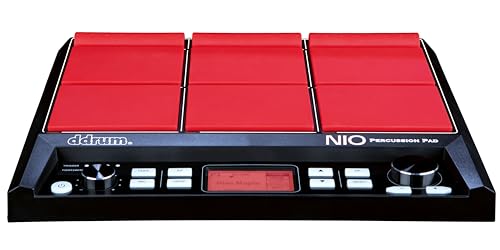
- Broad surface of responsive pads
- Designed with nine isolated rubber pads and comes pre-loaded with 30 preset kits

What to Consider Before Buying Electronic Drum Pads
An Electronic Drum Pad is more than just an item; it’s a key solution for drummers who need versatility, portability, and a way to integrate digital sounds into an analog world. Whether you are a bedroom producer or a touring professional, these devices act as the brain of a hybrid setup. They allow you to trigger samples that a physical drum simply cannot produce, such as cinematic swells or pre-recorded loops, giving you a competitive edge in modern music production.
The ideal customer for this type of product is someone facing limited stage space or a drummer looking to add specific electronic textures to their live shows without investing in a $1,000+ flagship module. It is also perfect for home studio owners who want a tactile way to input MIDI drum parts. However, it might not be suitable for those who require hundreds of hours of internal storage for full backing tracks, as these pads usually have specific memory limits, or for purists who only want the rebound of a Mylar drumhead.
Before investing, consider these crucial points in detail:
- Dimensions & Space: You need to ensure the unit fits within your existing hardware setup. Most percussion pads are designed to be mounted on a snare stand or a dedicated multiclamp. Check if the footprint allows for comfortable striking without hitting your cymbals or toms.
- Capacity/Performance: Look at the number of pads and the internal memory. Having nine pads is generally the “sweet spot” for a full kit layout (kick, snare, hats, three toms, two crashes, and a ride). Also, check the sample storage; 512 MB is usually plenty for individual hits but may limit long loops.
- Materials & Durability: Since you will be hitting this device with wooden sticks, the quality of the rubber and the chassis is paramount. Look for reinforced housing and responsive rubber that doesn’t “ghost trigger” or vibrate adjacent pads.
- Ease of Use & Maintenance: A complicated menu system can kill creativity during a rehearsal. You want a device where you can quickly swap kits or adjust pad sensitivity. Maintenance usually involves keeping the sensors dust-free and ensuring the firmware is updated regularly.
While the ddrum NIO 9 Surface Percussion Pad is an excellent choice, it’s always wise to see how it stacks up against the competition. For a broader look at all the top models, we highly recommend checking out our complete, in-depth guide:
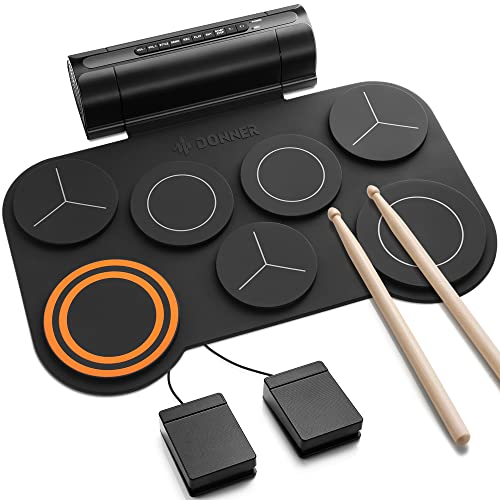
- [Fun Drum Pad Machine] DED-20 electronic drum pad 's high-quality sound source sample is taken from a real drum source, faithfully reproducing the acoustic drum's sound. 7 drum sets(1 SNARE, 1 CRASH...
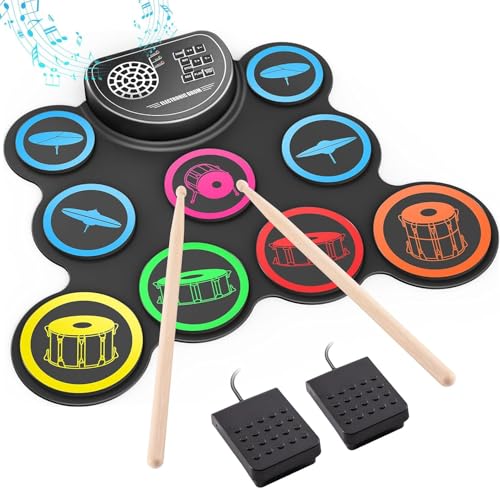
- 【Professional 9 Pads Electric Drum Pad】Sboet electronic drum set includes 3 TOMS, 2 CRASHES, 1 HI-HAT, 1 RIDE, 1 SNARE, 1 BASS and 2 Pedals, offers 7 Timbres, 10 DEMO Songs and 9 Rhythms, it...
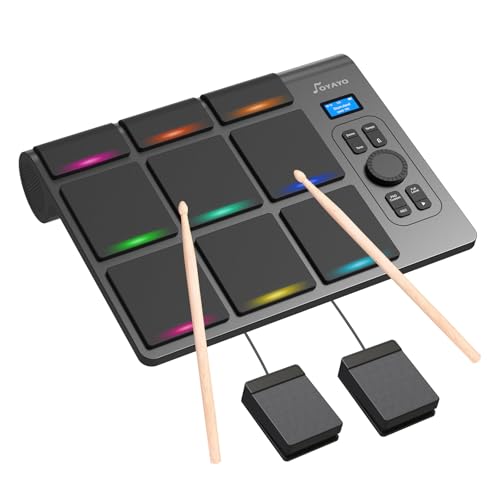
- 【Versatile Tabletop Drum Kit】The Portable Electronic Drum Kit features 9 Velocity-Sensitive Pads with LED light, hi-hat and kick bass drum pedal controller to reproduce full drum set sound with...
First Impressions and Key Features of the ddrum NIO 9 Surface Percussion Pad
When we first pulled the ddrum NIO 9 Surface Percussion Pad out of the box, the immediate standout was the striking red accents against the dark chassis. It feels incredibly sturdy, weighing in at a substantial 6.25 pounds, which suggests that ddrum didn’t cut corners on the internal build quality. The stainless steel elements mentioned in the specs give it a premium weight that keeps it from sliding around if you place it on a tabletop. Before you even plug it in, you can see its full feature set and user reviews to understand the value it offers compared to higher-priced industry standards.
The layout is intuitive. Nine isolated rubber pads are arranged in a 3×3 configuration, with the top three being slightly narrower, perfect for auxiliary percussion or “set and forget” samples. One feature we immediately loved was the glow-in-the-dark buttons. If you’ve ever played a dimly lit stage at a dive bar or a dark theater pit, you know the struggle of finding the “kit up” button between songs. This small design choice makes a massive difference in real-world usability.
Key Benefits
- Nine highly responsive, isolated rubber pads that minimize crosstalk.
- 512 MB of user sample storage for custom WAV files and loops.
- Comprehensive connectivity, including two external trigger inputs and foot pedal support.
- Stunning aesthetic with glow-in-the-dark controls for low-light environments.
Limitations
- The menu screen is somewhat small and can feel cluttered during deep editing.
- Preset kits may require some EQ and sensitivity tweaking to sound their best.
Deep Dive: Putting the ddrum NIO 9 Surface Percussion Pad to the Test
Pad Response and Trigger Sensitivity: Can It Handle Your Rolls?
The primary concern with any electronic pad is how it feels under the stick. We spent several hours testing the ddrum NIO 9 Surface Percussion Pad specifically for its “triggering intelligence.” In our experience, the pads offer a medium-firm rebound that feels very similar to a high-quality practice pad. The isolation between pads is impressive; we struck the center pad with significant force and didn’t see any “ghost” triggers from the surrounding pads, which is a common flaw in budget-friendly units.
However, we noticed—and some users have pointed out—that high-speed rolls can sometimes be tricky if the sensitivity isn’t dialed in correctly. Out of the box, the threshold might be set a bit high for very delicate ghost notes. We found that by diving into the “Advanced Trigger” menu, we could adjust the velocity curves to better match a light touch. Once we calibrated the unit to our playing style, the ddrum NIO 9 Surface Percussion Pad captured the nuances of our fills much more accurately. If you are a heavy hitter, you will love the durability of these pads, but jazz or fusion players should plan to spend about 20 minutes fine-tuning the settings to ensure every note of a press roll is accounted for. You can check the latest price and availability to see if this fits into your current rig upgrade plan.
Sound Library and Custom Sample Integration
The ddrum NIO 9 Surface Percussion Pad comes pre-loaded with 30 kits, including five kits specifically modeled after ddrum’s famous acoustic series. These sounds have a punchy, mid-forward character that cuts through a mix, making them ideal for rock and pop. We particularly enjoyed the electronic “80s-style” kits, which felt nostalgic yet high-fidelity. The internal library houses hundreds of sounds, ranging from orchestral timpani to experimental industrial textures.
The real magic, however, happens when you use the 512 MB of internal storage. We loaded several custom 16-bit WAV samples via the USB hardware interface, and the process was remarkably straightforward. Being able to “layer” sounds—assigning two different samples to a single pad—allows for immense sonic depth. For example, we layered a dry acoustic snare hit with a subtle electronic clap, creating a “fat” hybrid sound that was perfect for a modern R&B track. This flexibility makes the ddrum NIO 9 Surface Percussion Pad a feature that really sets it apart from simpler “toy” pads that only offer non-editable presets. The ability to carry your studio drum sounds with you to the stage in a single 6-pound unit is a game-changer for any gigging musician.
Navigating the Interface and Workflow
Let’s talk about the control panel. The center digital screen is functional, but as we found during our testing, it is definitely on the smaller side. The menu architecture is logical, but because of the screen size, some of the sub-menus can look a bit cramped. We spent some time navigating the “Edit” and “Utility” buttons, and while there is a slight learning curve, it becomes second nature after a few sessions. The glow-in-the-dark buttons are not just a gimmick; they provide a clear tactile response that we appreciated when jumping between kits in a dark studio.
One aspect of the workflow that we found particularly useful was the inclusion of dedicated “Kit +/-” buttons. When you are in the middle of a setlist, you don’t want to be scrolling through a wheel; you want a single click to get to your next sound. We also tested the compatibility with foot pedal controllers. By plugging in a kick and hi-hat controller, we essentially turned the ddrum NIO 9 Surface Percussion Pad into a miniature electronic drum kit. This is a massive benefit for drummers who do “cajon-style” acoustic gigs but want the option to play a full beat when the energy picks up. It’s a level of versatility that justifies its place in any percussionist’s arsenal.
Expansion and Professional Connectivity
The back of the ddrum NIO 9 Surface Percussion Pad is where the “pro” features really shine. You have two dual-zone trigger inputs, meaning you can add two extra drum pads or four single-zone triggers using Y-splitters. We connected an external snare pad and a dedicated kick trigger, and the NIO 9 handled the additional inputs without any latency issues. This expansion capability means the unit can grow with your needs. You could start with just the pad and eventually build a full “brain-and-pad” hybrid kit around it.
The USB-B port allows for easy MIDI communication with your DAW. We used the NIO 9 as a MIDI controller for Superior Drummer and Ableton Live, and it performed flawlessly. The pads felt more musical than a standard plastic MIDI keyboard for inputting drum parts. Whether you are using it as a standalone sound source or a controller for your software instruments, the ddrum NIO 9 Surface Percussion Pad offers professional-grade connectivity that rivals units nearly double its price. For those who want to record their performances, the stereo outputs provide a clean, noise-free signal that requires very little post-processing.
What Other Users Are Saying
The general sentiment surrounding the ddrum NIO 9 Surface Percussion Pad is quite positive, particularly regarding its value proposition. Many users have noted that for the price point, the build quality and the aesthetic “red and black” design are top-notch. One user mentioned that it is a “great pad for the price considering price points of other brands,” highlighting that it fills a gap in the market for those who want a 9-pad layout without the “pro-tier” price tag.
On the other hand, some critical feedback has surfaced regarding the out-of-the-box settings. One user expressed that they were “underwhelmed by the quality and preset kits” and noted that “many times where I would strike the pad with a roll… it would not trigger every note.” We confirmed this can happen if the sensitivity settings aren’t adjusted, but it’s important to note that this user may have had a defective “used” unit, as they also mentioned “burnt-in pixels” on the screen. Generally, users find the menu navigation to be the biggest hurdle, with some calling it “confusing” or “cluttered.” However, for most, these are minor trade-offs for a device that offers custom sample loading and robust hardware at this price. This feedback confirms that while it is a powerful tool, it does require a bit of “menu diving” to reach its full potential.
Comparing the ddrum NIO 9 Surface Percussion Pad to Top Alternatives
While the ddrum NIO 9 Surface Percussion Pad is a powerhouse, it’s essential to see how it compares to other options in the portable electronic drum category. Depending on your specific needs—whether it’s more pads, a smaller footprint, or a tighter budget—one of these might be the better fit.
1. Pyle Electronic Drum Pad Set with 8 Touch Sensitive Pads

- 8 TOUCH-SENSITIVE DRUM PADS - Experience the ultimate drum set with 8 touch-sensitive pads, allowing for dynamic and expressive playing. Store up to 10 custom user kits and explore different cymbal...
- COMPLETE ELECTRIC DRUM SET - The electric drum set Includes 4x5" rubber drums, 4x3.5" rubber cymbals, (2) digital foot pedals, and (2) drumsticks. Customize your sound with built-in EQ effects, making...
This Pyle set is a fantastic alternative for those who want a “ready-to-play” kit experience right out of the box. Unlike the ddrum NIO 9, which focuses on being a professional trigger pad for a larger rig, the Pyle Electronic Drum Pad Set comes with pedals and 8 touch-sensitive pads, making it feel more like a tabletop drum kit. With 600 sounds and 80 preloaded kits, it offers a wider variety of internal sounds than the ddrum presets. However, it lacks the professional “isolated rubber” feel and the custom sample loading capability (512 MB) of the ddrum NIO 9 Surface Percussion Pad. We recommend the Pyle for beginners or casual home practice, while the ddrum remains the superior choice for live performers and studio creators who need custom samples.
2. Alesis Sample Pad 4 Compact Percussion Instrument
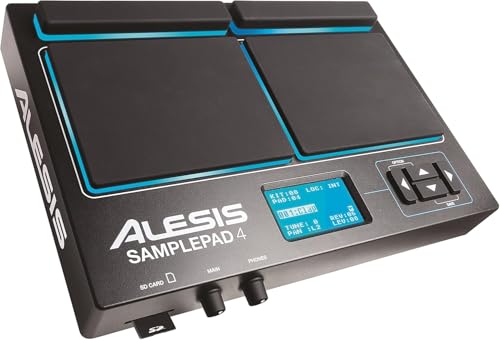
- Expand Your Performance - Add any sound sample to your drum or percussion setup via standard SD card
- In-Demand Sound - Built-in library of the 25 most-commonly requested percussion and electronic drum sounds mapped across 8 ready-to-play kits
The Alesis Sample Pad 4 is the go-to for drummers who have absolutely no space left on their kit. As the name suggests, it features only four pads, making its footprint significantly smaller than the ddrum NIO 9 Surface Percussion Pad. It is incredibly straightforward to use and features an SD/SDHC card slot for sample loading. While it is more portable, you lose five pads of “real estate,” which can be limiting if you want to play a full beat. If you only need to trigger a kick drum and a few claps, the Alesis is a great, reliable “micro” solution. However, for a full hybrid experience where you can map toms and cymbals, the nine pads on the ddrum NIO 9 Surface Percussion Pad offer much more creative freedom.
3. Pyle Pro Electronic Drum Kit

- COMPLETE DRUMSET SOUND: This electronic drum kit has 7 drum pad and hi-hat and kicks bass drum digital pedal controller to reproduce full drumset sound with tom-toms, hi-hat, snare, crash and ride...
- PRESET DRUM KITS: Pyle portable electric tabletop drum set machine comes packed with 55 preset plus 10 custom preloaded drum kits, 300 plus cymbal or drum sounds, and it also has a drum trainer...
The Pyle Pro (PTED06) is a budget-conscious 7-pad unit that is designed more for portability and hobbyist use. It includes a digital panel and comes with pedals, making it a “kit-in-a-box.” It’s quite lightweight and easy to move around. Compared to the ddrum NIO 9 Surface Percussion Pad, the Pyle Pro feels more like a consumer electronic device rather than a professional musical instrument. It lacks the stainless steel durability and the “isolated pad” technology that prevents crosstalk. If you are looking for a fun gift or a very basic way to practice on your desk, the Pyle Pro is a solid value. But for someone playing in a band or recording, the ddrum’s superior trigger response and layering functions are worth the extra investment.
Final Verdict: Is the ddrum NIO 9 Surface Percussion Pad Right for You?
After a deep dive into the features, performance, and user feedback, we can confidently say that the ddrum NIO 9 Surface Percussion Pad is one of the most versatile and value-driven units on the market today. It strikes a rare balance between “entry-level price” and “professional feature set.” Its strengths lie in its robust build, the ability to load 512 MB of custom samples, and the inclusion of expansion inputs that allow it to grow into a full electronic kit. While the menu system has a slight learning curve and the screen is small, these are minor hurdles that are easily overcome with a bit of practice.
We recommend the ddrum NIO 9 Surface Percussion Pad for any drummer looking to modernize their sound, church musicians needing a compact rig, or home producers who want a tactile MIDI input device. It offers the “pro” feel of more expensive brands without the prohibitive cost. If you are ready to take your percussion game to the next level and want a device that looks as good as it sounds, we highly suggest you get the ddrum NIO 9 Surface Percussion Pad today and start building your custom sound library.
Last update on 2026-09-26 / Affiliate links / Images from Amazon Product Advertising API