
Yamaha AG06MK2 6-Channel Streaming Mixer/USB Interface Review: The Ultimate Command Center for Modern Creators
If you have ever tried to host a live stream while simultaneously managing a condenser microphone, background music from a PC, and perhaps a guest caller on your smartphone, you know the “audio spaghetti” nightmare. I have spent years wrestling with software-based routing solutions that lag, crash, or simply fail at the most critical moments of a broadcast. The frustration of a “silent stream” or distorted audio is enough to make any creator want to quit. This is exactly why a dedicated hardware solution like the Yamaha AG06MK2 6-Channel Streaming Mixer/USB Interface exists. We found that most creators search for this device when they realize that a simple USB microphone no longer cuts it for a professional, multi-source production. Without a centralized hub to control levels in real-time, your production value remains amateur, and the technical hurdles become a barrier to your creativity. Solving this isn’t just about “better sound”; it’s about reclaiming your focus so you can actually engage with your audience.

- 6-channel live streaming mixer with a USB audio interface
- DSP effects, LOOPBACK function and a mute buttton designed for live streaming
What to Consider Before Buying a DJ Mixer or Streaming Interface
A DJ Mixer or streaming interface is more than just a box with knobs; it’s the heart of your studio and a key solution for routing, processing, and polishing your sound before it ever hits the internet. Whether you are mixing tracks for a live crowd or balancing game audio with a voiceover, the right hardware ensures that your signal is clean and your workflow is fluid. We have found that the transition from software mixing to hardware tactile control is often the single biggest upgrade a creator can make. It provides immediate feedback and eliminates the “alt-tab” fatigue of trying to adjust volumes while mid-game or mid-performance.
The ideal customer for this type of product is a multi-faceted creator—someone who might be a podcaster today, a musician tomorrow, and a gaming streamer by night. It is perfect for those facing complex routing needs where multiple inputs must be blended seamlessly. However, it might not be suitable for high-end professional recording studios that require dozens of simultaneous inputs for a full band, or for ultra-minimalists who only ever use a single microphone and nothing else. In those cases, a dedicated rack-mount interface or a simple single-channel preamp might suffice.
Before investing, consider these crucial points in detail:
- Dimensions & Space: Your desk real estate is precious. We always recommend measuring your workspace before buying. A compact footprint is essential for most home setups, but it shouldn’t come at the cost of “cramped” controls. Look for a balance where the knobs are easy to grab without accidentally bumping into the next channel.
- I/O Capacity & Performance: Think about your future needs, not just what you have today. Do you need one mic input or two? Will you ever want to plug in a guitar or a keyboard? Ensuring you have a mix of XLR, TRS, and perhaps even TRRS (for mobile devices) ensures your gear stays relevant as your channel grows.
- Materials & Durability: Since these devices often travel in backpacks or sit on desks where coffee is spilled, build quality matters. Metal chassis are always preferable to plastic. We look for “road-ready” construction that can withstand the occasional bump without losing a fader or snapping a jack.
- Ease of Use & Maintenance: A mixer shouldn’t require a degree in acoustic engineering to operate. Intuitive layouts, clear labeling, and robust software drivers are non-negotiable. Long-term care involves keeping the pots (knobs) clean from dust, so consider how easy the surface is to wipe down and maintain over the years.
While the Yamaha AG06MK2 6-Channel Streaming Mixer/USB Interface is an excellent choice, it’s always wise to see how it stacks up against the competition. For a broader look at all the top models, we highly recommend checking out our complete, in-depth guide:
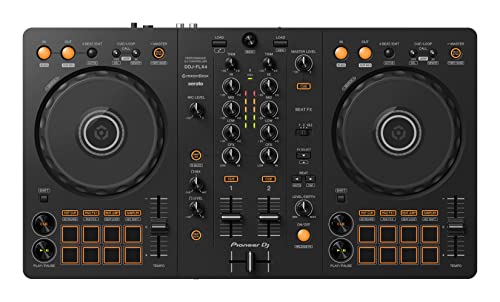
- COMPATIBLE WITH A HOST OF DEVICES - The DDJ-FLX4 is compatible with a wide range of devices, including PC and Mac computers, iPhones and iPads, and Android phones and tablets. So no matter what device...


- 10 channel mixer with USB and SPX digital effects

- 6-channel Analog Mixer with 2 Microphone Preamps
First Impressions: Unboxing the Yamaha AG06MK2 6-Channel Streaming Mixer/USB Interface
When we first pulled the Yamaha AG06MK2 6-Channel Streaming Mixer/USB Interface out of its box, the immediate takeaway was its build quality. Unlike many “streaming” devices that feel like lightweight plastic toys, the AG06MK2 has a reassuring heft and a professional matte finish. The white version we tested looks incredibly sleek and modern, fitting perfectly into the “minimalist aesthetic” that many modern setups strive for. It’s compact, measuring about 10 inches deep, which makes it easy to tuck away or bring to a remote recording session. Setting it up was a breeze; it’s a class-compliant device, meaning our computer recognized it almost instantly, though installing the AG Controller software is a must to unlock its true potential. To see its full feature set and user reviews, you can tell that Yamaha prioritized the tactile experience—every knob has just the right amount of resistance.
Key Benefits We Loved
- Exceptional 24-bit/192kHz audio resolution for crystal-clear professional sound.
- The dedicated Mute button is a lifesaver for live streamers who need instant privacy.
- Internal Loopback function makes routing PC audio back into the stream effortless.
- Comprehensive software suite including Cubase AI and WaveLab Cast provides immediate value.
Considerations & Limitations
- The software interface can have a learning curve for absolute beginners.
- Requires a powerful USB port or external power for stable phantom power performance.
A Deep Dive into the Yamaha AG06MK2 6-Channel Streaming Mixer/USB Interface’s Performance
The Magic of the Loopback Function
The standout feature that makes the Yamaha AG06MK2 6-Channel Streaming Mixer/USB Interface a dominant force in the streaming world is its hardware-level Loopback function. In our testing, we found this to be the “secret sauce” for professional broadcasts. Most interfaces require complex virtual cables or third-party software like Voicemeeter to route your game audio or Spotify music back into your stream. With the AG06MK2, it is handled internally. I was able to mix my XLR microphone, a secondary guest mic, and the audio coming from my PC’s browser all into a single stereo feed with zero latency. This is a feature you really want to check the latest price and availability on, because it saves hours of troubleshooting software conflicts. During a live test, the transition between speaking and playing a video clip was seamless, with the mixer acting as the perfect conductor. We found that this reliability is what separates “standard” interfaces from “streaming” mixers.
Onboard DSP: Studio Sound Without the CPU Load
One of the biggest issues with using software plugins for EQ and compression during a live stream is the added latency and CPU drain. The Yamaha AG06MK2 6-Channel Streaming Mixer/USB Interface solves this by featuring built-in DSP (Digital Signal Processing). When I engaged the “COMP/EQ” button, my voice immediately gained that “radio-ready” thickness and consistency. The “EFFECT” button adds a high-quality reverb that sounds natural—perfect for musical performers or just adding a bit of space to a podcast intro. What’s truly impressive is that all this processing happens inside the mixer itself. This means your computer doesn’t have to work harder, and you hear your processed voice in your headphones in real-time without any distracting echo. We used the AG Controller software to tweak these settings, and the level of granularity is astounding. You can go “Simple” for quick adjustments or “Detail” to control every frequency and compressor threshold, which is a feature that really sets it apart from budget-tier alternatives.
I/O Versatility: More Than Just a Mic Preamp
While many competitors offer a single XLR input, the Yamaha AG06MK2 6-Channel Streaming Mixer/USB Interface provides two phantom-powered mic inputs. This is crucial if you ever plan on having a guest in your studio or if you want to use a stereo microphone setup for an acoustic instrument. Channels 3/4 and 5/6 offer additional flexibility for line-level sources. I tested this by plugging in a synthesizer and a smartphone (via the 4-pole mini I/O), and the mixer handled the varied signal levels beautifully. The inclusion of a dedicated guitar input (Hi-Z) on Channel 2 means guitarists can shred along to backing tracks while talking to their audience. We found the preamps to be remarkably quiet; even when pushing the gain for a dynamic microphone, the “hiss” remained almost imperceptible. This level of fidelity is why we recommend this unit for more than just streaming—it’s a legitimate 2-channel recording interface for musicians. If you’re looking for a versatile hub, you should view the detailed technical specs here to see how it fits your specific instruments.
Tactile Control and the “Mute” Revolution
In the heat of a live broadcast, clicking a mouse to mute your mic is too slow and prone to error. The MK2 update to this legendary mixer brought a dedicated, physical Mute button for the first time. It might sound like a small addition, but in practice, it’s a game-changer. I found myself using it constantly—to cough, to talk to someone off-camera, or to silence the mic during a loud transition. The button is silent, meaning it doesn’t send a loud “click” through the stream. Furthermore, the faders and knobs on the Yamaha AG06MK2 6-Channel Streaming Mixer/USB Interface provide a level of fine control that a mouse simply can’t match. I was able to ride the volume of my background music, fading it out slowly as I started my intro, with a level of precision that felt professional. The physical layout is intuitive; your main mic is always under your left hand, while the master output and headphone levels are on the right. It’s an ergonomic masterclass that makes the act of “performing” your audio feel natural. You can explore more about the tactile layout and user images to see why it’s a favorite among professional broadcasters.
What Other Users Are Saying
The general sentiment surrounding the Yamaha AG06MK2 6-Channel Streaming Mixer/USB Interface is overwhelmingly positive, with a few caveats that are important to note. Most users are “really impressed” with how it delivers “professional-quality sound” in such a small package. One user specifically mentioned how it “connects seamlessly” with their mic and computer, highlighting its role as a perfect entry point for podcasters and voiceover artists. Another user praised the “calidad inigualable” (unmatched quality), specifically noting how easy it is to manage channels via the graphical interface.
However, we did see some reports of frustration, particularly regarding shipping and initial setup. One user was “very disappointed” because their package arrived damaged and lacked documentation. They also reported “low sound and noise,” though, in our experience, this is often a result of improper gain staging or a lack of external power when using demanding microphones like the SM58. It is vital to ensure you are using a high-quality USB cable and perhaps a dedicated power brick if your PC’s USB ports are underpowered. Overall, the negative feedback is rare and usually points to external factors rather than a flaw in the product’s engineering. To see how others have solved these minor setup hurdles, read more user experiences and solutions here.
Comparing the Yamaha AG06MK2 6-Channel Streaming Mixer/USB Interface to the Competition
Choosing the right mixer depends on your specific needs. Here is how the Yamaha stacks up against three popular alternatives currently available on the market.
1. Depusheng DX6 6-Channel Professional Audio Mixer with USB & Bluetooth

- Multi Devices Compatibility : USB/Flash Reader /MP3 or Bluetooth device are very easy to connect this mixer to Mix & record; Built in built in controls provide friendly experience to play/pause, skip...
- Bluetooth Wireless Audio Streaming : Cable free music streaming ability directly to the consoles; Mix all kinds of devices as smart phone to this audio mixer. Very easy to wirelessly stream all music...
The Depusheng DX6 is a more budget-friendly alternative that offers a surprisingly large feature set, including Bluetooth connectivity and a built-in MP3 player. While it lacks the high-end 192kHz resolution and the sophisticated DSP software of the Yamaha, it is a great “first mixer” for someone on a tight budget. We found it suitable for casual karaoke or small parties, but for serious streaming where audio fidelity is paramount, the Yamaha remains the superior choice. Choose the Depusheng if you need basic mixing and Bluetooth more than professional software integration.
2. Hercules DJControl Mix Ultra Mobile DJ Controller

- Hercules DJControl Mix Ultra – Mobile DJ Controller for Smartphones (iOS/Android)
- Battery-powered freedom: Equipped with a long-lasting, built-in battery that provides up to 10 hours of uninterrupted mixing. Mix without the need for power cables
This is a vastly different beast. The Hercules DJControl Mix Ultra is designed specifically for mobile DJing with smartphones and tablets. It doesn’t offer the XLR mic preamps or the “streaming mixer” layout of the AG06MK2. Instead, it features jog wheels and crossfaders for mixing tracks. If your goal is to DJ on the go using your iPhone, this is your best bet. However, if you are trying to host a podcast or stream gameplay, it lacks the necessary inputs and routing functions that make the Yamaha so versatile.
3. Soundcraft Ui24R 24-Input Digital Audio Mixer

- Versatile Connectivity - Ui24R offers independent network interfaces on board for simultaneous control by Wi-Fi and Ethernet, ensuring seamless integration with your setup.
- Ui24R digital, rackmount mixer can be remotely controlled via tablet, phone, laptop, or PC using iOS, Android, Windows, Mac OS, and Linux, offering unmatched flexibility and convenience for any audio...
The Soundcraft Ui24R is for those who have completely outgrown a desktop interface. It is a rack-mountable powerhouse with 24 inputs and tablet-controlled digital processing. It is significantly more expensive and complex. We would recommend the Soundcraft for churches, bands, or professional studios that need to mix an entire drum kit and multiple vocalists simultaneously. For the solo creator or small team, the Soundcraft is overkill, whereas the Yamaha AG06MK2 provides the perfect “Goldilocks” balance of power and simplicity.
The Final Verdict: Is the Yamaha AG06MK2 Right for You?
After putting the Yamaha AG06MK2 6-Channel Streaming Mixer/USB Interface through its paces in various scenarios—from live gaming streams to recording a two-person podcast—our verdict is clear: this is the gold standard for mid-range streaming interfaces. It bridges the gap between consumer electronics and professional studio gear with grace. Its main strengths lie in its hardware Loopback function, its pristine preamps, and the incredible MK2 additions like the physical mute button. While the software might take an afternoon to master, the payoff is a level of audio control that will make your content sound indistinguishable from a professional radio broadcast.
If you are serious about taking your audio to the next level and want a device that will grow with your channel, this is a phenomenal investment. It eliminates technical headaches and replaces them with tactile, creative freedom. Don’t let poor audio quality hold your content back any longer—the difference is truly night and day. Click here to secure your Yamaha AG06MK2 6-Channel Streaming Mixer/USB Interface today and transform your sound forever.
Last update on 2026-04-03 / Affiliate links / Images from Amazon Product Advertising API