
Walrus Audio Canvas MIDI Clock Review: The Ultimate Master Pulse for Your Pedalboard
We have all been there: you are mid-set, the atmosphere is perfect, and you step on your favorite dotted-eighth delay only to realize it is slightly out of sync with the drummer. Or perhaps you have a board full of high-end MIDI-enabled pedals, but you are still manually tapping in tempos on three different devices between every song. This lack of synchronization is more than just a minor annoyance; it is a barrier to professional-grade performance. When your delays, tremolos, and sequencers are not locked together, your sound becomes cluttered and unprofessional. Musicians search for a device like the Walrus Audio Canvas MIDI Clock because they need a single, authoritative “brain” to command their entire rig. Without a centralized clock, you are constantly fighting your gear rather than making music. Solving this synchronization puzzle is crucial for anyone who wants to transition from a collection of pedals to a cohesive, professional sonic workstation.

- Tempo Out - Connect to any pedal or device that accepts external tap inputs or analog time controls (ex: our Arp-87 Delay or Monument Tremolo). Canvas Clock can send analog clock and MIDI clock at the...
- CV (Control Voltage) Out - Control any device that accepts CV. Good for Analog Synths, Drum Machines, or similar devices.

What to Consider Before Investing in a Professional Utility Controller
A Multieffects Processor or MIDI utility is more than just an item; it is a key solution for the modern performer who demands precision. In an era where ambient swells, rhythmic delays, and perfectly timed modulation define modern guitar and synth textures, having a central hub is no longer a luxury—it is a necessity. This category of gear solves the “tap dance” problem, allowing you to focus on your playing while the hardware handles the technical heavy lifting of BPM management and preset switching. By integrating a master clock, you ensure that every time-based effect on your board is breathing in unison, creating a polished, studio-quality sound in a live environment.
The ideal customer for this type of product is the “power user”—someone with at least two or three MIDI-enabled pedals or analog devices that require external tap tempo. It is perfect for session players, church musicians, and touring guitarists who need to jump between specific BPMs instantly. Conversely, it might not be suitable for the minimalist who uses only a handful of drive pedals and a simple reverb. If your rig doesn’t rely on time-based effects, a sophisticated controller might be overkill. For those users, a simple standalone tap switch might suffice, but for the rest of us, the deep control offered by this unit is a game-changer.
Before investing, consider these crucial points in detail:
- Dimensions & Space: When adding a utility pedal, board real estate is at a premium. You need a device that offers maximum connectivity without requiring its own zip code. Look for a compact form factor that fits into the “utility” row of your board while still being accessible for mid-song adjustments.
- Capacity/Performance: In the world of MIDI, capacity means preset slots and macro capabilities. A high-performing controller should offer at least 100 slots to cover a full touring setlist. It must also handle MIDI and analog signals simultaneously without introduces latency or jitter, which can ruin the feel of a song.
- Materials & Durability: This device will be stepped on, spilled on, and tossed in a gig bag. Look for a rugged aluminum chassis and high-quality footswitches. Since it acts as the “brain” of your rig, a hardware failure here could shut down your entire show, making build quality paramount.
- Ease of Use & Maintenance: Complex MIDI gear can be a nightmare to program. You want a device with an intuitive interface—ideally a clear OLED screen—and a web-based editor for deep dives. Consider how easy it is to update firmware; as we have found, outstanding manufacturer support is vital when technical hurdles arise during setup.
Selecting the right controller is about finding the balance between deep functionality and stage-ready simplicity. Before you make your final choice, check the latest price and availability to see how it fits your budget.
While the Walrus Audio Canvas MIDI Clock is an excellent choice, it’s always wise to see how it stacks up against the competition. For a broader look at all the top models, we highly recommend checking out our complete, in-depth guide:

- The DP-26 is a 1U rack-mountable, high-performance audio processor that combines the functions of multiple conventional devices into one unit, including a crossover, equalizer, limiter, delayer, and...

- Advanced Digital Audio Processing with Dual Wireless Microphones: Equipped with a professional pre-effects processor and dual wireless microphones, this system features built-in DSP digital reverb and...

- Professional DSP Audio Processing with 4-Level FBX Suppression: Built-in professional DSP sound engine delivers clearer vocals, richer music detail, and more immersive audio. The 4-level FBX feedback...
First Impressions: The Brain Your Pedalboard Was Waiting For
Unboxing the Walrus Audio Canvas MIDI Clock, the first thing that strikes you is its professional aesthetic. Walrus Audio has moved away from their typical illustrative art for the Canvas line, opting for a clean, industrial look that screams “utility.” It feels incredibly sturdy in the hand, featuring the high-quality enclosure we have come to expect from the brand. Compared to older, bulkier MIDI clocks, this unit is surprisingly compact, easily fitting into the small gaps on a crowded Templeboard or Pedaltrain. Setting it up for the first time, the OLED screen is a standout feature—bright, crisp, and readable even under the harsh glare of stage lights. While some MIDI controllers require a degree in computer science to navigate, our initial walk-through of the menus felt logical and streamlined. This isn’t just a clock; it’s a command center. To get a better sense of its physical presence, you can see its full feature set and user reviews to understand how it integrates into various setups.
What We Like
- Simultaneous MIDI and analog clock output for total rig synchronization.
- Powerful MIDI Macros that can send up to 15 messages per slot.
- Dedicated Setlist feature with 128 song slots for easy navigation.
- Highly responsive and bright OLED screen for clear visibility.
What We Didn’t Like
- Firmware updates can be finicky depending on your computer’s USB configuration.
- Learning the “Macro” logic requires a bit of an initial time investment.
A Deep Dive into the Walrus Audio Canvas MIDI Clock’s Performance
The Walrus Audio Canvas MIDI Clock is designed to be the central nervous system of a modern guitar rig. Over the course of our testing, we pushed this unit beyond just simple BPM control to see if it could truly handle the demands of a complex, multi-device setup. What we found was a device that bridges the gap between old-school analog hardware and cutting-edge digital control with remarkable grace.
Masterful Synchronization: MIDI and Analog Harmony
The core strength of the Walrus Audio Canvas MIDI Clock is its ability to talk to everything at once. In our testing, we connected a variety of devices: a modern digital delay via MIDI, an old-school BOSS pedal via the analog tap input, and a boutique synth via the CV (Control Voltage) output. Usually, syncing these would require multiple tap-tempo pedals or a messy web of cables. The Walrus Audio Canvas MIDI Clock handled all of them simultaneously. When we dialed in 120 BPM on the main encoder, every device locked in instantly. We found the analog clock output particularly impressive; it doesn’t just send a pulse, it sends a *reliable* pulse that older pedals actually “understand” without drifting. This is a feature that really sets it apart from basic MIDI controllers that often neglect the analog needs of vintage-inspired boards.
The Power of the Setlist and MIDI Macros
Where this pedal truly earns its keep is in the “Song” and “Setlist” modes. We spent significant time programming the 128 song slots, and the process is surprisingly intuitive. For each song, you can define a BPM and create MIDI Macros. A macro is essentially a “super command.” For example, we programmed a single click of the footswitch to: 1) change our Strymon BigSky to a “Cloud” reverb, 2) set our Timeline to a 1/8th note delay, and 3) start the metronome. Having the ability to send up to 15 MIDI messages (PCs and CCs) with a single press is a workflow revolution. As one user noted, being able to “step through” a setlist with one click is perfect for environments like Sunday morning services where transitions need to be seamless. We found that once the macros are set, the Walrus Audio Canvas MIDI Clock becomes an invisible assistant, ensuring your sounds are always exactly where they need to be.
Customizability and Control Surface
The hardware interface of the Walrus Audio Canvas MIDI Clock is built for the “heat of the moment.” The main knob is notched and tactile, making it easy to dial in a specific BPM even with sweaty hands. However, the real depth lies in the customizable footswitches. We configured ours so that the left switch toggled the metronome while the right switch advanced to the next song in our setlist. You can even connect an external expression pedal to send MIDI CC messages. We tested this by mapping the expression pedal to the “Mix” parameter of a delay pedal connected downstream. It worked flawlessly, turning the Walrus Audio Canvas MIDI Clock into a MIDI-over-expression bridge. This level of customization ensures that the pedal adapts to your workflow, rather than forcing you to adapt to it. If you want to dive deeper into the technical specs, check the detailed technical breakdown here.
The Metronome and Sync Integration
Finally, we have to talk about the built-in metronome. It sounds like a small addition, but for practice and live performance, it’s a lifesaver. You can adjust the type, volume, and even the accent notes. We found the “Sync” jack to be another hidden gem. It allows the Walrus Audio Canvas MIDI Clock to accept a BPM from an external source—like a drummer’s click track—and then redistribute that tempo to all your MIDI and analog pedals. During our evaluation, this feature proved to be rock-solid, with no detectable “jitter” in the tempo. It transforms the pedal from a master clock into a sophisticated tempo translator. For anyone looking to tighten up their band’s sound, this functionality is worth the price of admission alone.
What Other Users Are Saying
The general sentiment among users is overwhelmingly positive, with many praising the Walrus Audio Canvas MIDI Clock for its reliability and the “peace of mind” it provides on stage. One user mentioned that for their specific needs in a worship environment, it was “absolutely perfect,” specifically highlighting the ability to apply MIDI PCs and CCs through customizable macros. They noted how easy it was to simply “step through” a setlist, which reduced their cognitive load during a performance. We found these reports to be highly accurate based on our own time with the unit.
However, it is not without some minor hurdles. The same user mentioned having “a little difficulty updating the firmware” initially. While they weren’t sure if it was a pedal or computer issue, they were quick to point out that Walrus Audio’s customer support was “outstanding” and helped them resolve the issue quickly. This aligns with our experience—while the technology is powerful, it does rely on a stable USB connection for updates. Overall, users agree that once the Walrus Audio Canvas MIDI Clock is set up, it becomes an indispensable part of their signal chain, with the build quality and support making it a safe long-term investment.
How Does it Compare to the Competition?
While the Walrus Audio Canvas MIDI Clock is a powerhouse of synchronization, it exists in a market with several other processing and utility options. Depending on your specific needs—whether you need deep DSP processing or just basic multi-effects—these alternatives might catch your eye.
1. Behringer VIRTUALIZER 3D FX2000 3D Multi-Engine Effects Processor

- Awesome modulation, dynamic, psychoacoustic and EQ algorithms
- Authentic amp simulation, distortion and special effects
The Behringer VIRTUALIZER 3D FX2000 is a rack-mount multi-effects processor rather than a dedicated pedalboard clock. While it offers a vast array of effects like reverb, delay, and modulation, it lacks the specialized “Master Clock” and “Setlist” features found in the Walrus Audio Canvas MIDI Clock. We recommend this for studio setups or rack-based guitar rigs where you need high-performance 3D effects processing on a budget. It is a great alternative if you are looking for a variety of sounds rather than a central timing controller for other pedals. However, for a pedalboard-focused musician who needs to sync multiple external devices, the Walrus Audio unit remains the superior choice.
2. Dayton Audio DSP-408 Digital Signal Processor
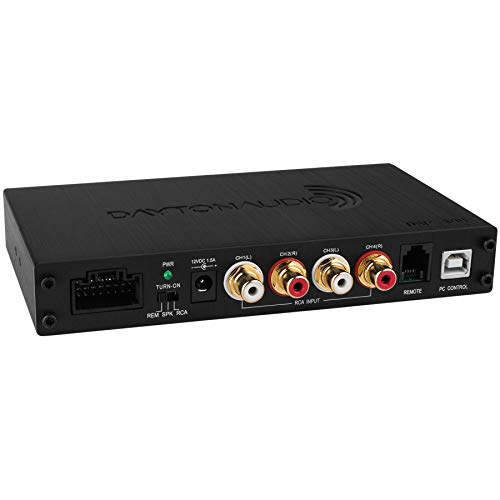
- Real-time signal processing for ultimate control
- Complete audio customization for application specific installations
The Dayton Audio DSP-408 is a completely different beast, focusing on signal routing, EQ crossovers, and time alignment. It is primarily designed for home and car audio enthusiasts who need to fine-tune the acoustics of their environment. While it is a “processor,” it doesn’t send MIDI clock or control guitar pedals. We include it here to show the diversity of the category, but unless you are building a high-end audio system in your tour van, it won’t replace the Walrus Audio Canvas MIDI Clock on your board. If your goal is signal management and EQ for speakers, this is a top-tier budget choice, but it lacks the performance features a guitarist needs for tempo control.
3. SONICAKE Pocket Master Multi Effects Pedal

- White-Box Digital Modeling Technology delivering organic living tone, 3rd party IR support (5 user slots) for creating Custom Unique Sounds; Supports NAM A2 files (Soniclink APP V1.7.2/Sonicake...
- 100+ Built-in Guitar/Bass/Acoustic Effects with 20 legendary amp models, 24-bit 44.1kHz signal processing, 99 Built-in Drum Rhythms and Looper, 100 Presets, adjustable signal chain with maximum...
The SONICAKE Pocket Master is a portable, all-in-one multi-effects pedal that is fantastic for practice and travel. It features amp modeling and over 100 effects in a tiny footprint. For someone just starting out or a musician who needs a “backup board” in their pocket, this is an incredible value. However, it does not offer the sophisticated MIDI macro or analog clock output capabilities of the Walrus Audio Canvas MIDI Clock. It is an “effect generator,” whereas the Walrus is an “effect commander.” If you need an affordable way to get many sounds in one box, check our multi-effects guide for more options like this, but for professional rig synchronization, stick with the Canvas.
The Final Verdict: Is the Walrus Audio Canvas MIDI Clock Worth It?
After weeks of testing, we can confidently say that the Walrus Audio Canvas MIDI Clock is one of the most significant utility upgrades you can make for a modern pedalboard. It successfully solves the problem of “tempo drift” and simplifies the complex world of MIDI control into an intuitive, stage-ready package. Its ability to simultaneously command analog and MIDI devices makes it a bridge between two worlds of guitar technology. While the firmware update process might require a moment of patience, the resulting control over your sound—via macros, setlists, and a rock-solid master clock—is simply unparalleled in this price bracket.
We recommend this pedal to any musician who feels limited by the manual control of their time-based effects. Whether you are a worship leader needing to step through a Sunday setlist or a touring pro requiring millisecond-perfect delays, this device will transform your workflow. Stop fighting your pedals and start leading them. For those ready to take total control of their rig’s pulse, we highly suggest you purchase the Walrus Audio Canvas MIDI Clock today and experience the power of a perfectly synced board.
Last update on 2026-11-07 / Affiliate links / Images from Amazon Product Advertising API