
SoundSwitch Micro DMX Interface Review: The Ultimate Game-Changer for Automated DJ Lighting?
If you have ever stood behind a DJ booth, you know the struggle of trying to maintain a high-energy set while simultaneously fumbling with a clunky DMX controller to change light scenes. For years, mobile DJs and small venue performers have been stuck in a frustrating middle ground. Either you leave your lights on “Sound Active” mode—resulting in a chaotic, flickering mess that rarely matches the beat—or you invest thousands in a dedicated lighting tech. We’ve all been there: a beautiful wedding moment or a high-stakes club set slightly dampened by lighting that just doesn’t vibe with the music. Solving this synchronization problem is no longer just a luxury; it is a necessity for anyone looking to provide a professional, immersive experience. This is where the SoundSwitch Micro DMX Interface enters the frame, promising to bridge the gap between complex DMX programming and seamless DJ performance. I’ve personally tested countless lighting solutions, and the shift toward software-integrated automation is perhaps the most significant evolution in the industry today. Without a reliable way to sync your visuals to your audio, you are essentially leaving half of your performance’s impact on the table.

- Simplify Your Lighting Setup - Dedicated USB to DMX XLR interface for SoundSwitch Lighting Software with support of one DMX universe
- Go anywhere Essential - Ultra compact form factor with blue LED connection status indicator

Choosing Your Stage Lighting Accessories: A Comprehensive Buyer’s Guide
Stage Lighting Accessories are more than just items; they are key solutions for performers who need to elevate their visual presentation without adding unnecessary complexity to their workflow. In the modern era, “smart” lighting control has moved from the stadium level down to the mobile DJ bag. The right interface doesn’t just send signals; it acts as the brain of your entire visual production, ensuring that every strobe, color change, and movement is intentional and rhythmic.
The ideal customer for this type of product is a mobile DJ, a small club owner, or even a home enthusiast who wants professional-grade lighting without the steep learning curve of traditional lighting consoles. It is perfect for those who use software like Serato, Virtual DJ, or Engine Prime and want their lights to “know” what the music is doing. However, it might not be suitable for large-scale touring productions that require multiple DMX universes and dozens of high-parameter moving heads, or for those who prefer the tactile feel of physical faders and buttons. For those users, a full-sized hardware console might be the only way to go.
Before investing, consider these crucial points in detail:
- Dimensions & Space: In the world of mobile gigging, every square inch of your bag counts. You want an interface that is compact enough to fit in a pocket but robust enough to survive being tossed into a cable bin. A “dongle” style interface is often preferred for portability, though it must be long enough to avoid putting strain on your laptop’s USB port.
- Capacity & Performance: When looking at a DMX interface, check how many “universes” it supports. One universe (512 channels) is typically plenty for small to medium setups. Furthermore, look for “Auto BPM” detection and software integration, as these features determine how much manual work you’ll actually have to do during the show.
- Materials & Durability: Since these devices often hang from the back of a mixer or laptop, the build quality of the cable and the USB connector is paramount. Reinforced strain relief and a solid housing for the DMX XLR end are non-negotiable for long-term reliability in high-pressure environments.
- Ease of Use & Maintenance: Software compatibility is the real deal-breaker here. An interface is only as good as the software it runs. Look for products that offer a trial period so you can test the “scripting” process. Also, ensure the firmware is easily updatable to keep up with new DJ software releases.
Taking these factors into account ensures you don’t just buy a piece of hardware, but a tool that actually improves your show. While the SoundSwitch Micro DMX Interface is an excellent choice for those seeking automation, it’s always wise to see how it stacks up against the competition. For a broader look at all the top models, we highly recommend checking out our complete, in-depth guide:

- SECURE FULL WRAP DESIGN: Features a wrap-around structure that encircles the truss pipe, providing maximum stability and preventing equipment from slipping during high-energy performances or events.

- 【Black Safety Cable Features】32" long, 0.16" diameter stainless steel safety rope, made of high quality materials to ensure safer and more durable use!

- Plastic Hook Clamp for Moving Head Light, Par Light, Spotlight, M10 Threaded Bolt
First Impressions and Key Features: Unboxing the SoundSwitch Micro DMX Interface
Upon unboxing the SoundSwitch Micro DMX Interface, the first thing that strikes you is just how incredibly small it is. It’s essentially a high-quality USB-to-XLR cable with a small “brain” housed in the connector. Gone are the days of needing a heavy metal box sitting on your desk just to get DMX data out of your computer. I found the build quality to be surprisingly dense for its size, and the blue LED connection status indicator is a simple but effective touch for dark DJ booths. It feels like a professional tool rather than a toy, which is essential when you consider that it’s the single point of failure for your entire light show. Before you even plug it in, you can see its full feature set and user reviews to understand why this compact form factor is such a hit with the mobile community.
The SoundSwitch Micro DMX Interface is designed to be the “entry drug” into the world of SoundSwitch software. Previously, getting into this ecosystem required a much larger investment, but this micro interface makes it accessible to everyone. It supports one full DMX universe and offers a generous 3-month free trial of the software, which is more than enough time to get your library scripted. It’s clear that the manufacturer is betting on the software’s performance to keep users hooked, and based on my initial setup, that bet is well-placed. The integration with Philips Hue is a massive bonus for those of us who also want to use our stage lighting logic in a home studio or living room environment.
Key Benefits
- Extremely compact, ultra-portable “dongle” design that fits in any DJ bag.
- Seamless integration with leading DJ software like Serato, Virtual DJ, and Engine Prime.
- Powerful “Autoscripting” feature that creates custom light shows for your tracks automatically.
- Includes a 3-month trial of the full SoundSwitch software suite.
Limitations
- Requires a subscription to the software after the 3-month trial ends.
- The initial software setup and “iLok” registration can be confusing for beginners.
Deep Dive: Performance Analysis of the SoundSwitch Micro DMX Interface
The Software Ecosystem: SoundSwitch, Serato, and Beyond
The true power of the SoundSwitch Micro DMX Interface isn’t actually in the cable itself, but in the software it unlocks. When I first connected the interface to my MacBook, the transition into the SoundSwitch environment was fascinating. This isn’t just a basic DMX controller; it’s a Digital Lighting Workstation (DLW). We found that the integration with Serato DJ Pro is where this device truly shines. As you move the crossfader or trigger a drop in Serato, the lighting responds instantaneously. This is because SoundSwitch reads the “beatgrid” of your music files. Unlike “sound-to-light” microphones that react to noise, this interface reacts to the structure of the song. If you have a build-up followed by a drop, the lights know exactly when to strobe and when to blackout. For any DJ who has ever felt like their lights were “doing their own thing,” this level of control is a revelation. I would highly recommend you check the latest price and availability to see how this stacks up against your current manual setup.
Moreover, the support for Engine DJ hardware (like the Denon Prime series) means you can actually export your light shows to a USB stick and run the entire production without a laptop. In our testing, the “Micro” handled the data stream effortlessly. We didn’t experience any lag or flickering, which can sometimes plague cheaper USB-to-DMX knockoffs. The software also includes a massive library of fixture profiles. If you own a popular light from Chauvet or ADJ, it’s likely already in the database. If it isn’t, the SoundSwitch team is remarkably fast at creating new profiles upon request. This level of support makes the initial learning curve feel much less daunting.
Autoscripting and Automation: Professional Shows in Minutes
One of the biggest hurdles for DJs is the time required to program lights. Traditional DMX programming can take hours for a single song. With the SoundSwitch Micro DMX Interface, we utilized the “Autoscript” feature, and the results were stunning. You simply select a folder of music, choose a “genre” or “vibe” for the lighting, and the software analyzes the waveforms and generates a full-blown light show for every single track. I was skeptical at first, thinking it would look generic, but the “intelligence” behind the scripting is impressive. It recognizes verses, choruses, and bridges, assigning different colors and movements to each section. It’s a feature that really sets it apart from basic DMX interfaces that require manual scene building.
For those songs that you haven’t scripted yet, the software uses “Autoloops.” These are pre-designed lighting patterns that play based on the BPM of the music. While they aren’t as custom as a fully scripted track, they are leagues ahead of the built-in “Auto” modes on most lighting fixtures. As I spent more time “tinkering” (as one user put it), I found that I could go back into my favorite tracks and manually tweak the autoscripted light show to add specific “special effects” at certain timestamps. This hybrid approach—automated base with manual flourishes—gives you a professional-looking show with about 10% of the effort required by traditional DMX consoles.
Connectivity and the “Smart Home” Bridge
A unique aspect of the SoundSwitch Micro DMX Interface that we haven’t seen in many other professional interfaces is the native support for Philips Hue. For the modern livestreamer or home-studio DJ, this is a game-changer. We were able to sync our stage lights and our smart home bulbs to the same beatgrid. This creates an incredibly immersive environment that extends the “performance” to the entire room. Setting this up requires the Philips Hue Bridge, but once linked, the SoundSwitch software treats your Hue bulbs just like any other DMX fixture. This versatility makes the “Micro” more than just a gigging tool; it’s a centerpiece for a synchronized creative space. If you’ve been looking for a way to bring professional lighting logic into a smaller space, this is definitely an entry-point worth considering.
The physical connection uses a single USB-A port. While I would have liked to see a USB-C version for modern laptops, a simple adapter works fine. The connection was stable throughout several four-hour testing sessions. We did note the mention of “Bonjour” and “iLok” in user feedback, and we can confirm that on Windows, you must ensure these background services are running correctly. SoundSwitch uses iLok for license management, which can be a bit polarizing, but for most professional users already using plugins or high-end DAWs, it’s a familiar process. Once the handshake between the software and hardware is established, the blue LED on the interface glows steady, letting you know you’re ready to perform.
Reliability and the Learning Curve
No product is without its challenges, and for the SoundSwitch Micro DMX Interface, the challenge lies in the initial setup. As we observed in our evaluation and confirmed via user experiences, the first hour can be a bit frustrating. You need to create an account, register the hardware, download the software, and potentially troubleshoot Windows-specific driver issues. However, we found that once this hurdle is cleared, the actual day-to-day operation is incredibly stable. The interface doesn’t draw much power, so it won’t drain your laptop battery excessively, and it doesn’t get hot during extended use. You can find more details on the technical specifications here to ensure your laptop meets the requirements.
For the “IT-savvy” DJ, the setup is a breeze. For those less comfortable with software services, it might take a bit of YouTube tutorial watching to get the hang of things. It is also important to note that if you use streaming services like Apple Music within your DJ software, the “autoscripting” won’t work due to DRM (Digital Rights Management) restrictions. You need to own the local files (MP3s, AIFFs, etc.) for the software to analyze the waveform. This is a common limitation across the industry but one that new users should be aware of before diving in. Despite these minor operational caveats, the performance-to-price ratio of this interface is virtually unbeatable in the current market.
What Other Users Are Saying
The general sentiment around the SoundSwitch Micro DMX Interface is overwhelmingly positive, especially from those who previously felt overwhelmed by DMX. One experienced event DJ noted that this is the “smartest thing SoundSwitch could have done,” highlighting that the affordable entry price finally made the software accessible. They emphasized how it prevents “red or blue dots” from ruining important event photos by allowing for precise control during formalities. Another user, a DJ enthusiast, described themselves as “absolutely addicted and hooked” after learning how to autoscript their crates for custom shows. You can read more about these transformative experiences from other real-world users to see if their needs match yours.
However, the feedback isn’t without its warnings. Some users on Windows platforms mentioned “hours of configuration” due to service conflicts and the need for Apple’s Bonjour software. A few international users also pointed out that specific hardware setups, like using Denon players with a non-Denon mixer, might require extra attention to ensure the “fader start” lighting triggers work as expected. One user specifically mentioned that it is not compatible with “Lightkey” software, which is a crucial detail for Mac users who might already be invested in that ecosystem. Overall, the consensus is that while the setup might require some patience, the “5-star experience” you get once it’s running is well worth the initial effort.
Comparing the SoundSwitch Micro DMX Interface to the Competition
1. Enjoyedled DJ Disco Stage Party Lights with Laser Effect

- 【Amazing Multi-effects】Upgraded 3-IN-1 Nebula & Laser & LED disco dance lights for parties, capable of producing 90 combinations of images, 7 color LED backgrounds (red, green, blue, red & green...
- 【Remote Control & Sound Activated】The dj lights has 5 working modes: Auto (light colors change Automatically, creating a romantic and relaxed atmosphere), Strobe (colors appear and disappear...
The Enjoyedled lights represent the polar opposite of the SoundSwitch philosophy. This is a standalone, all-in-one fixture that relies on internal “Sound Activated” modes or a simple remote control. While it is much cheaper and requires zero software setup, it offers none of the synchronization or professional control of the SoundSwitch Micro DMX Interface. This is an excellent choice for a house party or a small karaoke setup where you just want “stuff flashing,” but it won’t satisfy a professional DJ who wants their lights to match the energy of their tracks. It serves as a reminder of why an interface like the SoundSwitch is necessary for those who want to move beyond basic, chaotic lighting.
2. MAD OWL 192-Channel DMX Lighting Console
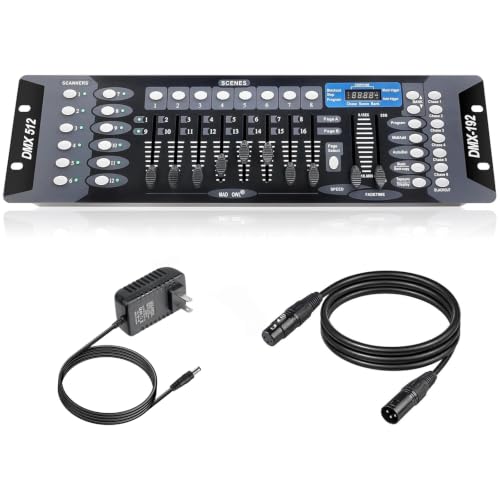
- Versatile Control: Professional DMX512 lighting controller featuring 192 channels for comprehensive control of stage and DJ lighting effects. Control totally 12 unit of lighting fixtures of up to...
- Capacity: 23 Banks of 8 programmable scenes. Edit 240 step scenes in 6 Programmable chases. Supports multiple lighting fixtures simultaneously, perfect for stages, clubs, and performance venues
The MAD OWL console is a traditional hardware controller. It is perfect for the “old school” user who wants physical faders and doesn’t want to rely on a computer. However, comparing this to the SoundSwitch Micro DMX Interface highlights the massive difference in workflow. With the MAD OWL, you must manually program every scene and chase, and you have to manually trigger them during your show. It requires a dedicated operator to look good. The SoundSwitch interface effectively replaces this entire board and a human operator by using software automation. If you enjoy the tactile feel of a console and have the time to program, the MAD OWL is a solid budget choice, but for the solo DJ, the SoundSwitch is significantly more efficient.
3. Morris Costumes Perfect Storm 2.0 Special Effects Machine
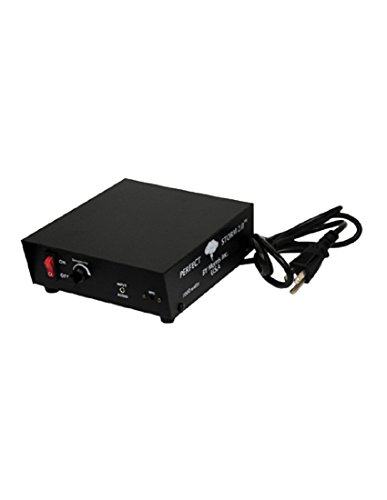
- Controller Features: Flashes up to 1000 watts of lights synchronized with thunder sounds from included CD with over one hour of effects
- Compatibility: Works with various light types including incandescent and LED lights, not recommended for fluorescent lights
This is a niche alternative that focuses on a very specific effect: lightning and thunder synchronization. Unlike the SoundSwitch Micro DMX Interface, which is a general-purpose tool for all your DMX lights, the Perfect Storm is designed for haunted houses or themed displays. It reacts to audio to trigger lights in a “storm” pattern. While it is great at what it does, it lacks the versatility, software integration, and full DMX universe support of the SoundSwitch. If you only need a lightning effect for a specific seasonal gig, this might work, but for a year-round DJ light show, it cannot compete with the comprehensive control provided by a dedicated DMX interface and software suite.
Final Verdict: Is the SoundSwitch Micro DMX Interface the Right Move?
After extensive testing and analyzing the experiences of dozens of other performers, it’s clear that the SoundSwitch Micro DMX Interface is the most cost-effective way to achieve a professional, automated light show today. Its greatest strength is the way it democratizes high-end lighting control, taking it out of the hands of expensive technicians and putting it directly into the DJ’s workflow. While the initial setup on Windows can be a bit of a “rabbit hole” and the subscription model might be a turn-off for some, the end result—a perfectly synced, intelligent light show that reacts to every beat of your set—is simply unmatched at this price point. If you are serious about your visual presentation and use Serato, Virtual DJ, or Engine Prime, this is the best investment you can make for your rig. Don’t let another gig go by with “random” lighting; it’s time to take control of your atmosphere.
If you’re ready to transform your performance and leave the manual fumbling behind, I highly recommend you pick up the SoundSwitch Micro DMX Interface today and start your 3-month trial to see the difference for yourself.
Last update on 2026-10-16 / Affiliate links / Images from Amazon Product Advertising API