
PreSonus Monitor Station V2 Studio Control Center Review: The Ultimate Nerve Center for Your Home Studio?
If you have ever found yourself crawling under your desk to swap cables just because you wanted to hear your mix on a different pair of speakers, you know the struggle. We have all been there—your studio starts with a single pair of monitors, but as your skills grow, so does your gear. Suddenly, you have a set of reference monitors, a pair of “vibe” speakers for clients, and perhaps even a dedicated subwoofer. Managing these, along with multiple input sources like your DAW, a smartphone for reference tracks, and a CD player or turntable, becomes a logistical nightmare. Without a central hub, your creative flow is constantly interrupted by technical friction. This is exactly where the PreSonus Monitor Station V2 Studio Control Center steps in. It is designed to act as the “brain” of your monitoring environment, eliminating the cable spaghetti and giving you tactile, immediate control over every sound that reaches your ears.

- 4 stereo input pairs plus one S/PDIF digital input into three selectable sources
- 3 stereo pairs of individually selectable speaker outputs with level controls

What to Consider Before Buying a Studio Control Center
A Studio Audio Monitor controller is more than just a volume knob; it’s a key solution for workflow efficiency, signal integrity, and professional communication. In a modern production environment, accuracy is everything. If you cannot quickly switch between monitor sets to check phase relationships or low-end translation, your mixes will suffer. A dedicated control center allows you to maintain a consistent calibrated listening level, which is vital for preventing ear fatigue and ensuring your masters translate across different playback systems. By centralizing your inputs and outputs, you reduce the wear and tear on your audio interface’s physical ports and streamline the process of recording artists.
The ideal customer for this type of product is a project studio owner or a professional producer facing the “mid-sized studio” dilemma—having more gear than a standard 2-channel interface can comfortably manage. It is perfect for those who regularly record vocalists and need a dedicated talkback system. However, it might not be suitable for those who work exclusively “in the box” with a single pair of headphones and one set of monitors, as the additional hardware could be overkill. For those users, a simple passive volume attenuator might suffice.
Before investing, consider these crucial points in detail:
- Dimensions & Space: The PreSonus Monitor Station V2 Studio Control Center sits on your desktop, so you need to ensure you have enough real estate. At roughly 16 inches deep and 12 inches wide, it has a significant footprint. We found that its ergonomic, slanted design actually helps save space by putting all controls within reach, but you should measure your desk before committing.
- Input/Output Capacity: You must evaluate how many sources you actually use. This unit offers four stereo input pairs and three speaker outputs. If you plan on expanding to a 5.1 surround setup, this unit won’t be enough, as it is strictly designed for stereo switching. However, for most stereo production needs, this capacity is industry-leading.
- Internal Signal Path & Transparency: When you put a device between your interface and your monitors, you don’t want it to color the sound. Look for high-quality components and a wide frequency response. The 50 KHz response on this unit ensures that your high-end transients remain crisp and uncolored.
- Built-in Features (Talkback & Dim): If you are building a vocal booth, a built-in talkback mic is non-negotiable. Check the quality of the internal mic and whether there is an option for an external foot switch or microphone. Additionally, a “Dim” switch is essential for quickly lowering levels to speak with someone in the room without losing your specific volume position.
Choosing the right controller can make or break your studio’s usability. While the PreSonus Monitor Station V2 Studio Control Center is an excellent choice, it’s always wise to see how it stacks up against the competition. For a broader look at all the top models, we highly recommend checking out our complete, in-depth guide:

- HONEST. Eris 3.5 near field studio monitors deliver studio-quality, accurate sound perfect for music production, hi-fi audio listening, or multimedia reference.

- PACKAGE INCLUDES: (2) 305P MkII 5 2-Way Powered Studio Reference Monitor Monitoring Speaker
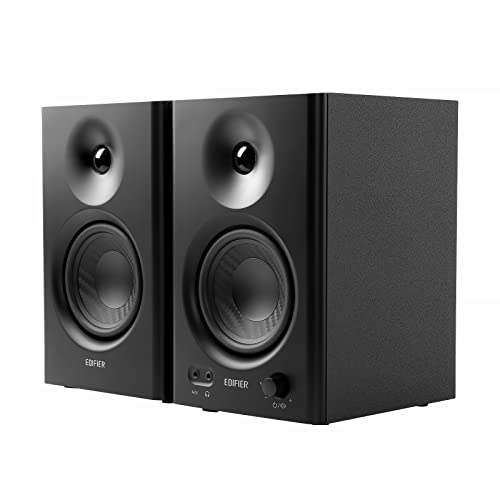
- TRUE STUDIO MONITOR - Based on the highly rated Edifier bookshelf speakers professionally tuned to a responsive almost flat curve for artists and music creators.
First Impressions and Key Features of the PreSonus Monitor Station V2 Studio Control Center
Upon unboxing the PreSonus Monitor Station V2 Studio Control Center, the first thing we noticed was its solid, professional build. While the chassis is largely high-grade plastic, it feels incredibly sturdy and weighted (nearly 5 pounds), which prevents it from sliding around when you’re punching buttons. The knobs have a satisfying resistance, especially the large main level control, which is the centerpiece of the unit. Unlike some budget controllers that feel “loose,” the V2 feels like a piece of serious studio furniture. It’s a significant upgrade over the original V1, with a sleeker layout and improved LED metering.
Before you even plug it in, you can see its full feature set and user reviews to understand why it’s a staple in so many home setups. The integration of S/PDIF digital input is a standout feature here, allowing you to bypass the digital-to-analog converters on cheaper interfaces and use the Monitor Station’s internal 96 KHz converters for a cleaner signal path. It’s rare to find digital connectivity in a desktop unit at this price point, giving it a distinct advantage over competitors like the Mackie Big Knob series.
Key Benefits
- Comprehensive switching for up to 3 sets of monitors with individual level trims.
- Four high-power headphone amplifiers with independent source selection (Main or Cue).
- Integrated talkback microphone that is clear and easy to engage.
- Built-in S/PDIF digital input for high-quality 24-bit/96kHz audio conversion.
Limitations
- The unit can run a bit warm after hours of continuous use due to the internal power draw.
- Occasional reports of quality control issues with the main volume knob in some shipping batches.
A Deep Dive into the PreSonus Monitor Station V2 Studio Control Center’s Performance
Unrivaled Connectivity and Input Management
The core strength of the PreSonus Monitor Station V2 Studio Control Center lies in its ability to juggle multiple audio streams without breaking a sweat. During our testing, we connected a high-end Universal Audio interface via the TRS balanced inputs, a turntable for sampling via the RCA inputs, and a secondary computer via the S/PDIF digital port. Switching between these sources is instantaneous and silent—there are no audible “pops” or clicks that could potentially damage your speakers. This level of seamless integration is what makes it a true “control center.”
We particularly appreciated the flexibility of the input mapping. You can select which inputs are routed to the “Main” bus and which go to the “Cue” bus. This is a game-changer for recording. For example, I can listen to the master mix on my main monitors while sending a specific click track and “more-me” vocal mix to the artist’s headphones. Because the unit handles the routing internally, you don’t have to fight with complicated software mixers in your DAW. To ensure your setup can handle this level of routing, you might want to check the latest price and availability to get started on your studio upgrade.
Precision Monitoring and Speaker Calibration
One of the biggest mistakes home engineers make is not calibrating their monitors to the same output level. If Speaker A is naturally louder than Speaker B, you will almost always prefer the sound of Speaker A, even if it isn’t as accurate. The PreSonus Monitor Station V2 Studio Control Center addresses this by providing individual recessed trim pots for each of the three speaker outputs. We spent an afternoon using a Sound Pressure Level (SPL) meter to match all our monitors to 85dB at the listening position. Once calibrated, we could switch between our KRKs, our Avantone MixCubes, and our sub with the confidence that the volume remained consistent.
The “Mono” button is another tool we found indispensable. Many modern producers forget to check mono compatibility, leading to phase issues when tracks are played on club systems or phone speakers. Having a physical Mono button right under your hand encourages you to check your mix frequently. The “Dim” switch is equally useful, featuring an adjustable attenuation knob on the back so you can decide exactly how much the volume drops when you need to talk to someone. This attention to detail is a feature that really sets it apart from more basic desktop volume controllers.
The “Screaming-Loud” Headphone Amps and Talkback System
PreSonus isn’t exaggerating when they call their headphone amplifiers “screaming-loud.” In our tests with high-impedance headphones like the Sennheiser HD600s, which often sound thin on standard interface outputs, the Monitor Station V2 provided plenty of headroom and a full, rich low end. Having four independent amplifiers means you can host a small band or a podcasting crew without needing an external headphone distribution box. Each person can even choose whether they want to hear the Main mix or the Cue mix, which is a professional touch rarely seen at this price point.
The talkback system is the cherry on top. We evaluated the built-in electret condenser microphone and found it to be surprisingly clear. It effectively cuts through the mix so the artist can hear instructions without having to take their headphones off. One user review mentioned a “hum” in their previous setup, but we found the PreSonus Monitor Station V2 Studio Control Center to be exceptionally quiet, providing a clean communication path. If you’ve ever had to yell through a studio glass window, you will realize that you need this for your sanity. You can explore more details on the talkback routing here.
Ergonomics and Long-Term Reliability
In a long mixing session, the “feel” of your gear matters. The large main volume knob on the PreSonus Monitor Station V2 Studio Control Center is smooth and allows for very fine adjustments. The 8-segment LED meters are bright and responsive, providing a clear visual of your signal levels before they hit your speakers. This helps in preventing clipping and ensuring that your gain staging is correct throughout the analog chain. We also noted the inclusion of a “Mute” button, which is a life-saver for those moments when a plugin glitches and creates a feedback loop.
While we did notice the unit gets warm, it never reached a temperature that caused concern for the internal components. The build quality suggests it can withstand years of daily use. However, some users have reported issues with knobs coming off during shipping or stuck buttons. We recommend inspecting the unit immediately upon arrival to ensure your specific unit is in perfect working order. Despite these rare shipping-related gripes, the consensus among professionals is that this is one of the most reliable pieces of kit PreSonus has ever produced. If you’re ready to declutter your desk, you should consider adding this to your setup today.
What Other Users Are Saying
The general sentiment among users is overwhelmingly positive, with many praising the PreSonus Monitor Station V2 Studio Control Center for its incredible value for money. One user noted, “I like it a lot! The talkback feature is a plus and I love the way it allows 3 sets of monitoring.” Another reviewer, who recently built a vocal booth, highlighted that this unit solved their communication issues and eliminated the “hum” they experienced with a competitor’s product. This confirms our findings regarding the clean signal path and the utility of the talkback mic.
However, it is important to address the negative feedback to get a balanced view. Some users have experienced quality control frustrations, with one person mentioning that their unit arrived with “stuck knobs” and a “main knob that came off.” Another user reported static in the talkback mic and poor responsiveness from specific sellers. These reviews suggest that while the design of the product is excellent, the physical handling and shipping can sometimes be a weak point. We highly recommend purchasing from a reputable source to ensure you receive a genuine, brand-new unit. Even with these outliers, the majority of users agree that “you need this” if you are serious about your studio workflow.
Comparing the PreSonus Monitor Station V2 Studio Control Center to Top Alternatives
While the Monitor Station V2 is a control hub, it’s often compared to the very speakers it is meant to manage. If you are looking to build out your monitoring chain, here is how the PreSonus Monitor Station V2 Studio Control Center fits into a setup featuring these popular alternatives.
1. KRK Rokit 5 G4 Powered Studio Monitor Pair
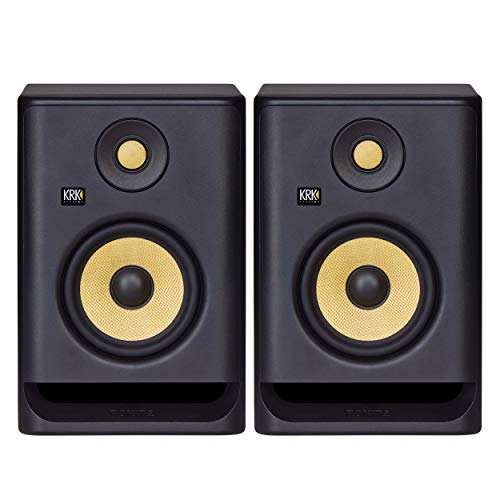
- The KRK ROKIT G4 line has been scientifically re-engineered from the ground up for the way modern artists work—in all genres and environments
- The ROKIT RP5 G4 is an incredibly versatile and sonically accurate bi-amp monitor takes music and sound creativity to a whole new industry-level
The KRK Rokit 5 G4 is a staple in home studios, known for its iconic yellow woofer and punchy low end. When paired with the PreSonus Monitor Station V2 Studio Control Center, the Rokits become much more versatile. Because the Rokits have built-in DSP and an LCD screen for tuning, using the Monitor Station allows you to set your KRKs to a fixed volume and handle all your level changes from the desktop. This preserves the digital calibration of the speakers while giving you the tactile control of an analog knob. This is a perfect setup for electronic music producers who need both accuracy and “vibe” switching.
2. JBL 305P MkII Powered Studio Monitors
- PACKAGE INCLUDES: (2) 305P MkII 5 2-Way Powered Studio Reference Monitor Monitoring Speaker
- CRYSTAL-CLEAR IMAGING: 305P MkII’s patented Image Control Waveguide delivers precise, immersive sound with a wide sweet spot, ideal for music production and podcasting.
The JBL 305P MkII is famous for its “Image Control Waveguide,” which provides a wide sweet spot. These monitors are excellent for those who move around their studio while mixing. Using the PreSonus Monitor Station V2 Studio Control Center with the JBLs is a match made in heaven because it allows you to easily toggle between the wide-stage JBLs and a more focused secondary pair of monitors. Since the JBLs can sometimes be sensitive to input gain, the precise trim controls on the Monitor Station ensure you are feeding them the perfect signal level for optimal performance.
3. IK Multimedia iLoud Micro Monitor Portable Bluetooth Studio Monitors

- The smallest active studio reference monitoring system in the world, iLoud Micro Monitor provides you with ultra-accurate true linear frequency response with no coloration, and does so in every...
- Whether you’re recording, editing, mixing or mastering audio, editing video, sound designing or gaming, iLoud Micro Monitor ensures your production will translate well to the huge variety of...
For those in very small rooms or who need a portable setup, the iLoud Micro Monitors are surprisingly capable. If you are using these as your “B” or “C” speakers, the PreSonus Monitor Station V2 Studio Control Center is essential. The iLouds use RCA and 1/8″ inputs, which the Monitor Station can easily accommodate alongside your main TRS-connected monitors. This allows you to check how your mix translates to a smaller, “real-world” speaker system with the push of a single button. It’s a professional way to integrate “small-format” monitoring into a large-format workflow.
Final Verdict: Is the PreSonus Monitor Station V2 Studio Control Center Worth It?
After putting the PreSonus Monitor Station V2 Studio Control Center through its paces, our verdict is a resounding yes. It is one of the most cost-effective ways to professionalize your studio’s workflow. By centralizing your inputs, providing crystal-clear monitor switching, and offering a robust headphone and talkback system, it removes the technical barriers between you and your music. While the occasional shipping or quality control issue is a minor concern, the actual performance of the unit—its transparency, headroom, and features—far outweighs these risks.
We recommend this unit for any producer who has moved beyond the “one pair of speakers” stage. It will save you time, protect your hearing through calibrated listening, and make your recording sessions with artists much smoother. It is a tool that grows with you, providing the connectivity you need for years to come. If you are ready to take control of your audio environment, don’t wait—click here to see why the PreSonus Monitor Station V2 is a must-have for your studio.
Last update on 2026-03-28 / Affiliate links / Images from Amazon Product Advertising API