
Nektar Impact LX mk3 Review: The New Gold Standard for Affordable DAW Control?
I’ve been there. You’re in the middle of a creative flow, a melody is forming in your head, and suddenly you’re hunched over your desk, squinting at a screen, trying to drag a virtual fader with a mouse. The moment is gone. For years, I struggled with the disconnect between my musical ideas and the digital tools used to capture them. This “mouse-clicking fatigue” is the silent killer of inspiration. Whether you are a seasoned producer or a beginner just starting your journey, the need for a physical, tactile interface is undeniable. Without one, you’re not playing an instrument; you’re operating a spreadsheet. Finding a controller that bridges this gap without breaking the bank or requiring a degree in MIDI programming is the ultimate challenge. This is where the Nektar Impact LX mk3 enters the frame, promising to turn your DAW into a hardware workstation. Before you commit to your next piece of gear, see its full feature set and user reviews to understand how it addresses these common frustrations.
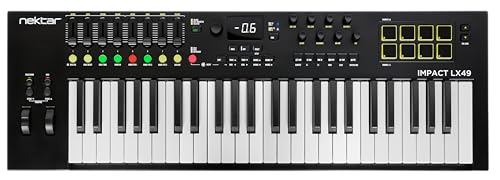
- 49 note velocity sensitive "clean action" keybed.
- Global encoder, 8 x full-resolution encoders, 8 faders, 8 LED buttons, 8 dynamic pads with looper button.
What to Consider Before Buying a Digital Audio Workstation Controller
A Digital Audio Workstation (DAW) controller is more than just an item; it’s a key solution for bridging the tactile world of performance with the infinite possibilities of modern software. In my experience, the right controller acts as the central nervous system of your studio. It allows you to step away from the computer monitor and engage with your music through touch, pressure, and physical movement. This leads to more expressive performances and a significantly faster mixing workflow. By mapping software functions to physical buttons and faders, these devices eliminate the “decision fatigue” that comes with navigating complex menus, allowing you to focus entirely on the sound.
The ideal customer for this type of product is the home studio producer who needs deep integration with software like Cubase, Logic, or Bitwig but doesn’t have the budget for a full-scale mixing console. It’s perfect for the composer who wants “clean action” keys for fast synth lines and the beatmaker who needs responsive pads for finger drumming. However, it might not be suitable for those who require fully weighted, hammer-action keys for a traditional piano feel, or for touring professionals who need a heavy-duty metal chassis that can withstand extreme road abuse. If you fall into the latter category, you might consider high-end boutique controllers or dedicated digital pianos with MIDI functionality.
Before investing, consider these crucial points in detail:
- Dimensions & Space: Your studio real estate is precious. Before buying, measure your desk and consider if you need 25, 49, 61, or 88 keys. The Nektar Impact LX mk3 comes in various sizes, so ensure the footprint fits your workflow without cluttering your workspace. A controller that is too large can become an obstacle rather than a tool.
- Capacity & Performance: Look beyond just the number of keys. Evaluate the resolution of the faders and encoders. High-resolution controls (like the 10-bit resolution found in this model) provide smoother parameter sweeps without “stepping” noises, which is critical for professional-grade automation and mixing.
- Materials & Durability: While many controllers in this price bracket are plastic, the quality of that plastic matters. Look for “clean action” keybeds that don’t feel “mushy” over time. Check user feedback regarding the longevity of the USB ports and the tactile response of the pads, as these are the parts that typically fail first under heavy use.
- Ease of Use & Maintenance: The best controller is one you don’t have to think about. Check if the device offers “Nektar DAW Integration” or similar “plug-and-play” features. You want a device that requires minimal driver installation and offers automatic mapping so you can spend your time making music, not troubleshooting MIDI CC assignments.
Choosing the right controller is a highly personal decision based on your specific genre and workflow. While the Nektar Impact LX mk3 is an excellent choice, it’s always wise to see how it stacks up against the competition. For a broader look at all the top models, we highly recommend checking out our complete, in-depth guide:

- Tactile Control, Visual Feedback: LCD keys, touch strip, and dials for audio, video, lighting, and more. Know that your command has been executed.


- Complete Command of Ableton Live - Seamlessly integrates with Ableton Live (V9.1.3+), providing hands-on control of Ableton's clip matrix, mixer parameters, virtual instruments, effects, and more

- 8 touch-sensitive, 100 mm long-throw, motorized faders
First Impressions: Unboxing the Nektar Impact LX mk3
When the Nektar Impact LX mk3 arrived at our studio, the first thing I noticed was the weight. At 1.9 kg for the 49-key version, it’s remarkably portable but feels surprisingly dense. It doesn’t have that “hollow plastic” feel that plagues many budget controllers. The matte black finish is sleek, and the redesigned “clean action” keys look professional and inviting. Unboxing was a breeze—just the unit, a high-quality USB cable, and the software license cards. Setting it up was equally painless; it’s a USB Class Compliant device, so my PC recognized it instantly.
Comparing it to its predecessor, the LX+, the mk3 feels like a significant evolution. The encoders feel more robust, and the new looper button is a genius addition for those of us who use DAWs as live performance tools. Within five minutes of plugging it in, I had the Nektar DAW integration installed, and I was already controlling the mixer in Bitwig without touching my mouse once. For anyone looking to jump straight into production, you should check the latest price and availability for this impressive piece of kit.
Key Benefits
- Exceptional DAW integration that works out of the box with most major software.
- New “Clean Action” keybed feels expressive and faster than previous generations.
- Native Instruments NKS support opens up a world of plugin control.
- Massive software bundle including Bitwig 8-track and NI Komplete Select.
Limitations
- Synth-style keys may feel too light for traditional pianists.
- Housing is high-quality plastic, not metal, which may concern heavy touring users.
Deep Dive: Putting the Nektar Impact LX mk3 Through Its Paces
Seamless DAW Integration and Workflow Efficiency
The “secret sauce” of any Nektar product is their custom DAW integration, and with the Nektar Impact LX mk3, they have refined this to an art form. I tested this unit with Cubase, Studio One, and Bitwig. In every instance, the setup was as simple as downloading a small integration file from the Nektar website. Once installed, the 8 faders automatically mapped to my tracks, the 8 encoders controlled my pan pots, and the transport buttons felt like they were part of the software itself. This isn’t just basic MIDI mapping; it’s a deep, two-way communication. When I changed tracks in my software, the Nektar Impact LX mk3 updated its internal focus immediately.
We found that the addition of the “Looper” button and dedicated timeline navigation features transformed how we approached song arrangement. Instead of clicking and dragging regions, I could set loop points and navigate the playhead directly from the keyboard. This tactile feedback allows you to “perform” your arrangement. For podcasters or producers working in fast-paced environments, this level of control is a game-changer. It allows you to keep your eyes on the performers or the meters rather than the interface. If you’re tired of fighting your software, this integration is a feature that really sets it apart.
The “Clean Action” Keybed and Performance Features
Let’s talk about the keys. Nektar describes this as a “clean action” velocity-sensitive keybed. In practice, this means the keys have a slightly firmer tension than a standard cheap synth-action keyboard but remain light enough for rapid-fire percussion or fast lead lines. I spent several hours playing through various Kontakt libraries, and the velocity curves felt very natural. I didn’t find myself accidentally triggering maximum velocity, nor did I have to “pound” the keys to get a decent sound. You can even adjust the velocity curves internally to match your playing style, which is a pro-level feature at this price point.
Beyond the keys, the performance features like Scale and Chord modes are incredibly intuitive. As someone who isn’t a classically trained pianist, having the ability to lock the keyboard to a specific scale (like G-Minor) meant I could never play a “wrong” note. The Chord mode allows you to trigger complex harmonies with a single finger, which is fantastic for sparking new songwriting ideas. The pads are equally impressive; they are sensitive enough for light finger drumming but sturdy enough to take a beating. They also feature a “Hold” function, which I found invaluable for sustained ambient textures. This level of expressiveness helps you streamline your studio setup while maintaining a high level of musicality.
Advanced Control: High-Resolution Encoders and NKS Support
One of the most significant upgrades in the Nektar Impact LX mk3 is the resolution of the controls. Most budget controllers use 7-bit MIDI, which gives you 128 steps of movement. This can lead to “zipper noise” when you’re sweeping a filter. Nektar has implemented fine control with up to 10-bit resolution. While it’s still MIDI, the way the Nektar Impact LX mk3 interprets the data makes the parameter changes feel significantly smoother. This was particularly noticeable when I was using the encoders to tweak the cutoff frequency on the included MOK Miniraze synth plugin.
Furthermore, the inclusion of Native Instruments NKS support is a massive win. This allows you to control thousands of third-party plugins (like those from Waves, Arturia, or NI) directly from the keyboard with pre-mapped parameters. I loaded up a complex patch in NI Massive, and the most important controls were already mapped to the 8 encoders. The display feedback on the unit provides just enough information to let you know what parameter you’re changing without forcing you to look at the screen. This tactile feedback and response is why we believe the Nektar Impact LX mk3 offers some of the best tactile feedback and response in its class.
Build Quality and Longevity in the Modern Studio
While some might dismiss a plastic-chassis controller, we must look at the quality of construction. The Nektar Impact LX mk3 uses a high-grade, reinforced polymer that feels rigid. There is very little flex in the body when you’re playing intensely. The buttons have a satisfying “click” to them, and the faders have just the right amount of resistance—they aren’t too loose, which prevents accidental changes if you bump them. The USB-C connection is a modern touch that ensures compatibility with the latest computers without needing flimsy adapters.
Maintenance is straightforward; the matte finish doesn’t attract fingerprints as badly as glossy controllers, and the “clean action” design of the keys prevents dust from easily entering the mechanism. We also appreciated the inclusion of a 1-year warranty for parts and labor, which provides peace of mind for an investment in your production workflow. As one user mentioned, the keys feel “quiet, solid, and direct,” which is exactly what you want in a professional environment. To ensure you’re getting the best deal on this durable piece of hardware, you should invest in your production workflow today.
What Other Users Are Saying
The general consensus among the community is overwhelmingly positive, with many users praising the Nektar Impact LX mk3 for its incredible value-to-performance ratio. One long-term producer noted that after their previous controller from a competing brand broke, they switched to the Nektar and were “impressed by the level of control” and the “flawless integration” with Cubase and Reason. Another user, who is a beginner, mentioned that they have been “pounding on the keys for hours a day” and the unit still “feels like it’s brand new,” highlighting the sturdy build quality.
However, no product is perfect. We did see a report from one user who experienced a defective unit with MIDI signal drops, and another who found the edges of the keys to be slightly sharp for their playing style. It’s important to note that these seem to be isolated incidents or quality control outliers. As one experienced user put it, this keyboard “intuits needs and provides controller latitudes only available for hundreds more.” This verified performance and value makes it a top contender for anyone looking to upgrade their home studio setup.
Comparing the Nektar Impact LX mk3 to Top Alternatives
1. Novation Launchkey 61 MK4 61-Key Semi-Weighted MIDI Controller

- The Creative Controller: Launchkey is an all-in-one DAW controller with premium hardware, 16 velocity-sensitive pads, and more
- Seamless DAW integration: Work intuitively in Ableton Live, Logic, Cubase, Reason, FL Studio, and Ardour
The Novation Launchkey 61 MK4 is a formidable opponent, particularly for Ableton Live users. While the Nektar Impact LX mk3 excels in broad DAW integration (especially for Cubase and Bitwig), the Launchkey offers a more tailored experience for the Ableton ecosystem with its 16 RGB pads designed for clip launching. The Launchkey also features an on-board arpeggiator, which the Nektar lacks. However, if you prefer a more traditional mixing console layout with longer faders and don’t exclusively use Ableton, the Nektar might feel more “universal” in your workflow. The Launchkey is better for those who prioritize live performance and clip-based composition.
2. Akai Professional APC40 MKII USB MIDI Controller
- Complete Command of Ableton Live - Seamlessly integrates with Ableton Live (V9.1.3+), providing hands-on control of Ableton's clip matrix, mixer parameters, virtual instruments, effects, and more
- Create, Jam, Produce - Trigger clips, loops and samples using a 5X8 clip-launch matrix with RGB feedback for clip status and color coding
The Akai APC40 MKII is a completely different beast, as it lacks a keyboard altogether. It is a dedicated performance controller with a massive 5×8 clip launch matrix. We include it here because some producers may find that a dedicated controller for mixing and clip launching—paired with a simple piano—is better than an all-in-one unit. Compared to the Nektar Impact LX mk3, the Akai is much more specialized. If you are a DJ or a live electronic performer who rarely “plays” melodies but constantly “mixes” and “launches,” the Akai is the industry standard. For the songwriter and traditional producer, however, the Nektar remains the more versatile choice.
3. Elgato Stream Deck + Production Console
- Tactile Control, Visual Feedback: LCD keys, touch strip, and dials for audio, video, lighting, and more. Know that your command has been executed.
- Fully Customizable: Use as an audio mixer, studio controller, production console, etc.
This might seem like a wild card, but for podcasters and content creators, the Stream Deck + is a serious alternative to a traditional DAW controller. It features customizable LCD keys and touch strips that can be programmed to perform complex macros in your DAW. While it lacks keys and traditional faders, its ability to trigger sound effects, change camera angles, and adjust gain via tactile dials makes it a powerhouse for modern production. If your “DAW work” is primarily editing podcasts or streaming, the Elgato offers a level of customization the Nektar Impact LX mk3 can’t match. But for actual music creation, the Nektar’s keys and MIDI features are indispensable.
The Final Verdict: Is the Nektar Impact LX mk3 Right for You?
After weeks of testing, I can confidently say that the Nektar Impact LX mk3 is one of the most well-rounded MIDI controllers on the market today. It successfully balances affordability with a “pro” feel that is often missing in this price bracket. Its greatest strength lies in its integration; it truly removes the barrier between your creative mind and your software. While it may not have the heavy metal chassis of a boutique unit, its “clean action” keys and high-resolution encoders provide a level of precision that will satisfy even demanding producers.
I would highly recommend this to any home studio owner who wants to stop clicking their way through a mix and start “playing” their DAW. It’s a perfect mid-ground for those who need versatility without the staggering price tag of high-end workstations. If you’re ready to take your production workflow to the next level and reclaim your creative focus, I strongly suggest you invest in your production workflow today. You won’t regret having this tactile powerhouse at the center of your studio.
Last update on 2026-10-17 / Affiliate links / Images from Amazon Product Advertising API