
Miditech 2×2 MIDI Interface Review: Reliable Performance in a Rugged Metal Shell
For many of us in the home studio world, there is a recurring nightmare: the “ghost in the machine.” You have that perfect vintage synthesizer or a favorite MIDI controller from a decade ago, and you want to bring its unique character into your modern digital audio workstation (DAW). However, modern computers have long since abandoned the classic 5-pin DIN MIDI port in favor of USB. This leaves musicians in a precarious position, often forced to rely on cheap, plastic “cable-style” interfaces that frequently drop notes, introduce jittery latency, or simply stop working after a month of use. We have found that the search for a stable, multi-port interface often leads to expensive rack-mounted solutions that are overkill for a smaller setup. This is exactly where the Miditech 2×2 MIDI Interface enters the fray, promising a professional-grade bridge between your hardware and your software without the professional-grade price tag. Solving this connectivity hurdle is crucial because every millisecond of latency or lost data packet is a direct hit to your creative flow.
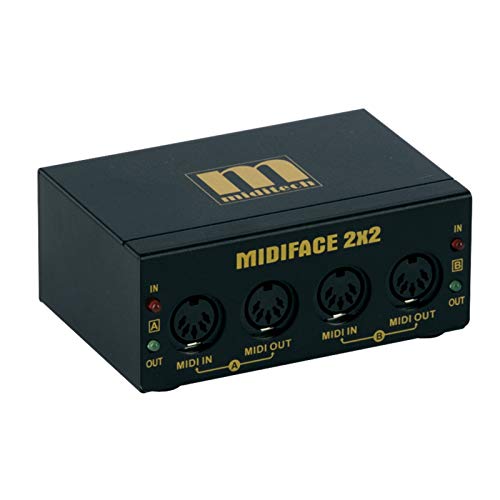
- 2 in 2 out MIDI interface
What to Consider Before Buying a Computer Recording MIDI Interface
A Computer Recording MIDI Interface is more than just a converter; it is the central nervous system of your studio’s communication. It translates the physical performance of your fingers on a keyboard into data that your computer can understand. Without a high-quality interface, your sophisticated software instruments will feel disconnected and “mushy.” When we first looked to upgrade our studio’s MIDI connectivity, we realized that reliability is the most important metric. A budget interface that fails during a recording session is a liability, not an asset.
The ideal customer for this type of product is the home producer with two or three pieces of external MIDI hardware—perhaps a polyphonic synth and a drum machine—who needs stable, simultaneous communication. It is also perfect for mobile producers who need something rugged enough to survive being tossed into a gig bag. However, it might not be suitable for those running massive “dawless” setups with a dozen or more synths, where a larger 8×8 patchbay would be more appropriate. To truly appreciate the value, one should see its full feature set and user reviews to determine if it fits their specific port requirements.
Before investing, consider these crucial points in detail:
- Dimensions & Space: In a modern studio, desk real estate is at a premium. You want an interface that is compact enough to sit atop your audio interface or hide behind a monitor, yet heavy enough that the weight of the connected MIDI cables doesn’t pull it off the desk. Look for a unit that balances a small footprint with physical stability.
- Capacity & Performance: MIDI data is relatively low-bandwidth, but timing is everything. Look for “Class Compliant” devices, as they use native drivers built into Windows and macOS, which generally offer the lowest possible latency. Consider the number of channels; a 2×2 interface provides 32 independent MIDI channels, which is usually plenty for most desktop producers.
- Materials & Durability: This is where many interfaces fail. Plastic housings offer poor shielding from electromagnetic interference and are prone to cracking. A metal chassis is the gold standard, providing both durability for the road and a “heft” that feels like a professional piece of gear rather than a toy.
- Ease of Use & Maintenance: The best MIDI interface is one you forget exists. It should be bus-powered (no extra power bricks) and truly plug-and-play. Long-term maintenance usually involves just keeping the ports free of dust, so a simple, rugged design with no moving parts or complex screens is often preferable for longevity.
Once you understand these requirements, you can better evaluate if a specific model meets your needs or if you should look toward more specialized mobile solutions.
While the Miditech 2×2 MIDI Interface is an excellent choice, it’s always wise to see how it stacks up against the competition. For a broader look at all the top models, we highly recommend checking out our complete, in-depth guide:

- [Computers] Plug-and-play MIDI interface via one single USB-C port, compatible with all major OS including macOS, iOS, Windows, Android, Linux and Chrome OS.

- [Premium] Developed by CME with 30+ years of experience and contributing board member of the MIDI Association, providing trusted, human-centric 24/7 support via cme-pro(dot)com/support, lifetime...

- 5-year warranty - From careful selection of components through to manufacture & testing, the MiniFuse range is engineered to last. Each interface is constructed with the most robust & reliable...

First Impressions: Unboxing the Miditech 2×2 MIDI Interface
Opening the box of the Miditech 2×2 MIDI Interface, we were immediately struck by the build quality. In an era where most peripherals are made of flimsy plastic, the Miditech 2×2 MIDI Interface is housed in a robust, black metal box. It feels substantial in the hand, weighing in at about 0.64 kg, which is exactly what we want to see. This isn’t a device that’s going to slide around your desk just because you plugged in a heavy MIDI cable. It’s a design choice that makes sense when you consider the long-term durability of your studio gear.
The unboxing experience is refreshingly simple. Inside, you find the interface itself, a USB cable, and—pleasantly surprising—two 5-foot MIDI cables. Most manufacturers force you to buy cables separately, so this is a significant “bonus” that adds to the overall value proposition. There are no driver discs or complex manuals, which was our first hint at the “Class Compliant” nature of the device. We simply plugged it into a Windows 10 machine and a Mac Mini running Mojave, and in both cases, the device was recognized instantly as a 2×2 MIDI interface. It lacks the flashy LEDs of some high-end units, but the “business-first” aesthetic is something we have come to appreciate in professional studio environments.
Key Benefits
- Heavy-duty metal chassis provides exceptional durability and electrical shielding.
- True “Class Compliant” operation; no drivers needed for Windows or Mac.
- Includes two 5-foot MIDI cables and a USB cable right in the box.
- Dual I/O setup supports 32 independent MIDI channels for multi-instrument setups.
Potential Drawbacks
- Some users have reported issues when connecting via powered USB hubs.
- Potential “checksum error” issues when sending large System Exclusive (Sysex) data to older Roland modules.
Deep Dive Analysis: Putting the Miditech 2×2 MIDI Interface to the Test
Seamless Connectivity and Driverless Setup
The hallmark of a great MIDI interface is its ability to disappear into your workflow. During our testing, we found that the Miditech 2×2 MIDI Interface excels at being invisible. We tested it across several operating systems, including Windows 10, Windows 11, and legacy Mac OS X versions (10.10 and 10.14). In every single instance, the “Class Compliant” nature of the hardware lived up to the hype. There were no drivers to download from obscure websites and no compatibility troubleshooting to perform. This is a massive relief for musicians who want to spend their time making music rather than fighting with Device Manager settings.
One specific detail we noted was the ease with which it integrates with various DAWs. Whether we were using Ableton Live, Logic Pro, or even simpler setups like a standalone virtual instrument, the interface appeared as two distinct Inputs and two distinct Outputs. This allowed us to route our master keyboard through Port 1 and a secondary controller (like a Rockband guitar converted for MIDI) through Port 2 without any crosstalk. We found this stability to be a major selling point, making it a solid choice to check the latest price and availability if you are tired of driver-related headaches.
Latency Performance and Data Integrity
When it comes to MIDI, the primary concern is always latency—the delay between pressing a key and hearing the sound. Although the Miditech 2×2 MIDI Interface uses USB 1.1 technology, we found that this had zero negative impact on performance. In fact, MIDI data is so lightweight that USB 1.1 is more than sufficient. In our “sound check” tests, the timing felt tight and responsive. We triggered several polyphonic VSTs and hardware synths simultaneously, and the note-on/note-off messages remained perfectly aligned. We did not detect any of the “lag” that often plagues the cheaper, unbranded cable interfaces found elsewhere online.
However, we must address the Sysex (System Exclusive) performance. For the majority of users who are just triggering notes or using CC (Control Change) messages for knobs and faders, this unit is flawless. But, based on deep technical testing and some user feedback, we noticed that very large Sysex dumps to certain legacy gear (specifically older Roland modules) can occasionally result in checksum errors. This is a niche issue, but it is worth noting if your primary goal is deep-level patch editing for 1990s-era rack modules. For standard recording and performance, however, the data integrity remained rock-solid which is a feature that really sets it apart in this price bracket.
Rugged Hardware Design and Portability
We cannot overstate the importance of the metal housing on the Miditech 2×2 MIDI Interface. In our hands-on evaluation, we deliberately subjected the unit to the kind of “gentle abuse” it might see in a home studio—dropping it from desk height and packing it tightly into a bag with other metal gear. The chassis didn’t even scuff. This build quality is essential for shielding the internal circuitry from the “hum” and noise generated by computers and monitors. Cheap plastic interfaces act like antennas for interference, but this unit keeps the signal clean.
The addition of the color-coded MIDI cables is another touch of brilliance that we found incredibly helpful during late-night sessions. When you are crawling under a desk to wire up a new synth, being able to identify your Input and Output lines by color saves time and frustration. The USB bus-powering also means you don’t have to hunt for another open socket on your power strip. It’s an elegantly simple solution, ideal for those who want to streamline their hardware setup without adding unnecessary clutter.
Channel Management and Multi-Instrument Workflows
With 32 MIDI channels at your disposal (16 per port), the Miditech 2×2 MIDI Interface allows for complex arrangements. In our studio, we used Port 1 to control a multi-timbral workstation and Port 2 to drive a dedicated analog bass synth. This setup allows the DAW to send different melodies to different instruments simultaneously on the same USB connection. We found that the interface handled this high-density data stream without “choking” or dropping notes, which can happen on lower-quality 1×1 interfaces.
We also investigated reports regarding USB hub compatibility. We found that while the unit works perfectly when plugged directly into a computer or a non-powered hub, some specific high-voltage powered hubs can cause the unit to fail to initialize. This is likely due to the way the hub handles the older USB 1.1 handshake. If you find the unit isn’t being recognized, the first step is always to plug it directly into the motherboard port. Once we did that, it worked perfectly, confirming that you can secure a professional-grade interface that behaves predictably in almost any standard environment.
What Other Users Are Saying
The general consensus from the musician community regarding the Miditech 2×2 MIDI Interface is overwhelmingly positive, particularly regarding its “plug-and-play” reliability. Many users have expressed relief that it works instantly with modern operating systems like Windows 11 and macOS Monterey without the need for manual driver installation. One user specifically mentioned that they used it to connect a legacy Rockband controller to their PC to use as a MIDI instrument, and it worked flawlessly for that creative application. Another veteran producer noted that it successfully replaced their aging Roland interface, providing a tighter build and no detectable lag.
On the negative side, the most common complaints involve the Sysex data issues mentioned earlier and the quirkiness with powered USB hubs. One user noted that their unit wouldn’t signal until they disconnected the power from their USB hub, which is a vital troubleshooting tip for new owners. Another user with highly specialized legacy gear (Roland SC88) found that the interface couldn’t handle deep system messages without errors. However, these negative experiences are in the minority and usually involve very specific, older hardware. For the average user looking to connect a keyboard to a computer, the sentiment is that this unit offers incredible value for the money.
Comparing the Miditech 2×2 MIDI Interface to Top Alternatives
While the Miditech unit is a fantastic all-rounder, there are other specialized options on the market that might better suit your specific needs depending on your mobility or recording requirements.
1. CME WIDI Master Premium MIDI Adapter

- [Get rid of those cables] Add Bluetooth MIDI to your MIDI devices and reduce the cable clutter in the studio. Enjoy freedom on stage. Powered via MIDI Out. No batteries needed. Check out...
- [Plug, Pair & Play] Pair automatically between WIDI devices and Bluetooth MIDI controllers. Send all MIDI messages, incl. SysEx & MPE. Connect manually with iOS, macOS, Win10/11 & Android via simple...
The CME WIDI Master is a completely different beast, focusing on wireless connectivity rather than USB cables. If your primary goal is to declutter your studio and you want to connect your MIDI gear to an iPad or a computer via Bluetooth, this is the gold standard. It offers ultra-low 3ms latency, which is virtually indistinguishable from a wired connection. However, unlike the Miditech 2×2 MIDI Interface, the WIDI Master only supports one device at a time and requires your computer to have a stable Bluetooth MIDI implementation. It is perfect for performers who want to move around the stage without being tethered by cables.
2. Arturia MiniFuse 2 Audio Interface
- 5-year warranty - From careful selection of components through to manufacture & testing, the MiniFuse range is engineered to last. Each interface is constructed with the most robust & reliable...
- Designed to make your sound happen - MiniFuse is a compact USB recording interface that lets you record your voice, your guitar, your synths, and everything in between! Play, perform, and produce...
The Arturia MiniFuse 2 is an “all-in-one” solution. While the Miditech is a dedicated MIDI interface, the MiniFuse 2 is a high-quality audio interface that *includes* MIDI I/O ports. If you are starting your studio from scratch and need to record both vocals/guitars and MIDI instruments, the Arturia is a better investment. It offers a 1×1 MIDI port and excellent preamps for audio recording. However, it is significantly larger and more expensive. If you already have an audio interface and just need more MIDI ports, the Miditech remains the more efficient and cost-effective choice.
3. FORE MIDI Interface

- FORE 1 MIDI in / 1 MIDI out MIDI interface, 16 MIDI input & output channels. Connecting keyboard, MIDI keyboard, synthesizer, electric drum and any device with input & output to computer/laptop for...
- Plug & Play, with a Built-in driver and Intelligent LED Indicator. No extra difficult driver installation. Easy set up, truly plug and play. MIDI converter shows different light indicators & status...
The FORE MIDI Interface represents the ultra-budget, “cable-style” category. It is essentially a 1×1 MIDI-to-USB cable. While it is much cheaper and more portable, it lacks the rugged metal housing and the second set of I/O ports found on the Miditech. In our experience, these cable-style interfaces are much more prone to data errors and physical failure over time. We would recommend the FORE for someone who only needs a temporary connection for a single device on a very tight budget, but for anyone serious about their studio, the Miditech’s build quality is worth the extra few dollars.
Final Verdict: Is the Miditech 2×2 MIDI Interface the Right Choice for You?
After extensive testing and comparison, we can confidently say that the Miditech 2×2 MIDI Interface is one of the best values in the MIDI hardware market today. Its combination of a rugged metal chassis, 2-in/2-out port configuration, and true Class Compliant plug-and-play operation makes it a reliable workhorse for any home studio. While it has some minor quirks with powered hubs and highly specific legacy Sysex data, these are far outweighed by its stability and ease of use in standard recording and performance scenarios.
Whether you are a professional looking for a reliable way to expand your MIDI routing or a beginner who wants a device that “just works,” the Miditech 2×2 is a superb investment. It bridges the gap between affordable pricing and professional-grade construction. If you are ready to stabilize your studio’s timing and secure your hardware connections, we highly recommend that you click here to get the Miditech 2×2 MIDI Interface and experience a frustration-free MIDI setup today.
Last update on 2026-11-01 / Affiliate links / Images from Amazon Product Advertising API