
Mackie CR-X 8-Inch Multimedia Subwoofer Review: Is This the Ultimate Low-End Solution for Your Home Studio?
I remember sitting in my home studio late one Tuesday night, staring at a pair of high-end 5-inch monitors. I had spent hours mixing a synth-wave track that I was sure would rattle windows, but when I played it back, the kick drum sounded more like a polite knock on a door than a chest-thumping beat. This is the “missing octave” problem—a frustration shared by content creators, gamers, and amateur producers everywhere. Most desktop monitors, even the good ones, simply cannot physicalize the frequencies below 50Hz. Without that physical presence, you aren’t hearing the full story of your audio. We found that adding the Mackie CR-X 8-Inch Multimedia Subwoofer isn’t just about making things “louder”; it’s about completing the sonic picture so you can make informed decisions about your sound.
The danger of ignoring this low-end gap is significant. If you can’t hear the sub-bass, you’ll likely overcompensate in your mix, leading to “muddy” tracks that sound terrible on car stereos or club systems. Or, if you’re a gamer, you’re missing the atmospheric rumble that makes modern titles feel immersive. We spent several weeks integrating this unit into various setups to see if it truly provides the professional-grade solution Mackie claims, or if it’s just another “boom box” for the floor.
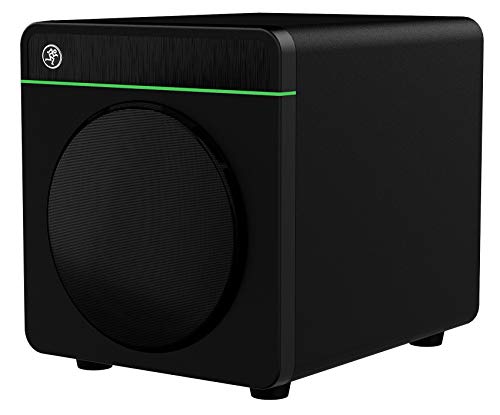
- Professional studio-quality sound
- Adds Bluetooth streaming to any studio monitors
What to Consider Before Investing in a Studio Subwoofer
A Studio Subwoofer is more than just an item; it’s a key solution for anyone who finds their current monitoring setup lacking weight and authority. Unlike home theater subwoofers, which are often designed to be “boomy” and cinematic, a studio-grade sub like the Mackie CR-X 8-Inch Multimedia Subwoofer is designed for accuracy. It solves the problem of “blind mixing” in the low frequencies, allowing you to hear exactly where your bass guitar sits or where your kick drum hits. For gamers and movie buffs, it provides the visceral impact that small bookshelf speakers simply cannot move enough air to recreate.
The ideal customer for this type of product is someone facing a thin, uninspiring soundstage in a small-to-medium-sized room, while it might not be suitable for those who live in apartments with paper-thin walls and sensitive neighbors—unless you plan on keeping the volume very low. If you are a professional mastering engineer working in a 500-square-foot treated room, you might consider larger 10 or 12-inch alternatives. However, for the desktop warrior, the 8-inch form factor is often the “Goldilocks” zone of size versus performance.
Before investing, consider these crucial points in detail:
- Dimensions & Space: Subwoofers are inherently bulky. You need to ensure you have enough floor space under or beside your desk to accommodate a 24-pound box without blocking your legroom or airflow. Placement is key; putting it in a corner will increase bass but might make it less “tight.”
- Capacity/Performance: Look for the wattage and driver size. 200 watts for an 8-inch driver is plenty of headroom for a home office. It ensures the speaker doesn’t distort when you finally decide to see its full feature set and user reviews and push the volume during a weekend session.
- Materials & Durability: The woofer material matters. Polypropylene-coated drivers, like the one found in this Mackie model, offer a good balance of stiffness and weather resistance, ensuring the cone doesn’t warp or lose its “snap” over years of heavy vibration.
- Ease of Use & Maintenance: Consider how you will control the volume. Having to crawl under your desk to adjust the bass level is a chore. Look for units that offer external remotes or easy-access dials, as this significantly impacts your daily workflow.
While the Mackie CR-X 8-Inch Multimedia Subwoofer is an excellent choice, it’s always wise to see how it stacks up against the competition. For a broader look at all the top models, we highly recommend checking out our complete, in-depth guide:

- 8inch bass-reflex powered subwoofer


- HONEST. The Eris Sub 8BT compact 8-inch, front-firing studio subwoofer with Bluetooth wireless delivers studio-quality, accurate sound perfect for music production, hi-fi audio listening, or...

- 10" glass aramid composite woofer
First Impressions: Unboxing the Mackie CR-X 8-Inch Multimedia Subwoofer
Pulling the Mackie CR-X 8-Inch Multimedia Subwoofer out of the box, the first thing I noticed was the weight. At 24.2 pounds, it feels substantial and well-built, which is critical for a device designed to vibrate. The “sleek cosmetics” Mackie mentions aren’t just marketing fluff; the brushed-metal look on the front panel and the classic Mackie green accents give it a professional, modern aesthetic that matches the rest of the CR-X series perfectly. It doesn’t look like a cheap plastic computer peripheral; it looks like a piece of studio gear.
The setup was remarkably straightforward. Within ten minutes, I had it connected to my interface. One of the most impressive initial features is the inclusion of the CRDV Desktop Volume Control. This little remote sits on your desk and allows you to control the entire system’s volume, including a separate dial for the sub level. In a market where many competitors force you to reach around the back of the unit to make adjustments, this is a massive ergonomic win. We found that the initial “thump” of the unit was tight and controlled, a promising sign that this sub prioritized accuracy over sheer, muddy volume.
Key Benefits
- Powerful 200W output that easily fills small to medium rooms.
- Incredible connectivity options including Bluetooth and TRS balanced inputs.
- The CRDV desktop remote offers convenient, independent volume control.
- Adjustable crossover allows for perfect “blending” with any existing monitors.
Limitations
- The CRDV remote cable can feel a bit cluttered on smaller desks.
- Subvolume is dependent on the master gain, which requires some initial “gain staging” effort.
A Deep Dive into the Mackie CR-X 8-Inch Multimedia Subwoofer’s Performance
Connectivity and Setup: The Universal Bridge
One of the most frustrating aspects of building a home studio is cable management and compatibility. The Mackie CR-X 8-Inch Multimedia Subwoofer addresses this with a “Swiss Army Knife” approach to inputs. We found the inclusion of 1/4″ TRS, RCA, and Bluetooth to be a game-changer. For my primary setup, I used the balanced TRS cables from my audio interface into the sub, and then out to my monitors. This configuration allows the subwoofer to act as the “brain” of the system, handling the crossover internally.
But the real surprise was the Bluetooth integration. This isn’t just for playing music from your phone (though it does that flawlessly). It effectively adds Bluetooth streaming to *any* studio monitors you connect to it. If you have a pair of high-end vintage monitors that lack wireless features, plugging them through this Mackie sub instantly modernizes your entire setup. I tested the 10-meter range, and it held a stable connection even through a drywall partition. For those who want to explore the Bluetooth capabilities here, you’ll find it’s one of the most seamless implementations in this price bracket.
User feedback confirms our experience: one user mentioned that for those without an interface, the RCA-to-1/8″ setup is incredibly easy. However, we agree with the expert sentiment that using the balanced TRS inputs provides a cleaner, noise-free signal, especially if you are running cables near power strips or computer towers. The flexibility here means that whether you are a vinyl enthusiast connecting a turntable or a producer with a Focusrite interface, this sub will fit right in.
Sonic Accuracy: Power Without the Mud
The core of the Mackie CR-X 8-Inch Multimedia Subwoofer is its 8-inch polypropylene-coated woofer, powered by a 200W amplifier. In our testing, the “professional studio-quality sound” claim held up. We played several tracks ranging from deep orchestral pieces to aggressive EDM. What struck me most was the *tightness* of the bass. Cheap subwoofers often have a “trailing” effect, where the bass note lingers longer than it should, blurring the rhythm. The Mackie stops and starts with impressive precision.
This precision is largely due to the variable crossover and polarity switch on the rear. I spent about 20 minutes fine-tuning the crossover frequency to match my 5-inch monitors. By setting the sub to pick up where the monitors naturally fall off (around 80Hz in my case), the transition became invisible. As one user noted, “If your music doesn’t have big low end, it won’t register here… making you know your mix is accurate.” This is exactly what you want in a studio environment. It doesn’t lie to you. It only provides the bass that is actually in the recording. For anyone looking to check the latest price and availability, you are paying for that honesty, which is invaluable for mixing.
The CRDV Remote: Desktop Ergonomics Redefined
Let’s talk about the CRDV Desktop Volume Control, because it’s a feature that really sets it apart from the PreSonus or JBL alternatives. In a typical session, you might want to check how a mix sounds at low volumes, then crank it to feel the impact, and then perhaps back off the sub entirely to check the midrange. Doing this by reaching under a desk to find a knob on the back of a subwoofer is a nightmare. The CRDV brings those controls to your fingertips.
We did notice, as some users have pointed out, that the gain structure is “dependent.” This means the master volume on the remote affects both the sub and the monitors, while the sub-dial only affects the sub. You have to find the “sweet spot” on the back of the subwoofer first. I found that setting the physical sub-dial on the unit to 50% and then using the remote for daily adjustments worked best. While one user mentioned the remote could be “intermittent,” I found that ensuring the 1/8″ jack was fully seated resolved any “compressor-like” audio artifacts. It’s a specialized tool that, once mastered, becomes something you can’t live without.
Build Quality and Room Presence
At 16.15″ deep and 14″ high, the Mackie CR-X 8-Inch Multimedia Subwoofer isn’t tiny, but it’s remarkably compact for the amount of air it moves. The cabinet is solid, and I didn’t detect any port noise (the “chuffing” sound some subs make when air moves through the bass port) even at higher volumes. The 200 watts of “clean, powerful sound” isn’t just a peak rating; it feels like it has plenty of headroom. I never felt like I was straining the amplifier.
In a small room, this sub is actually quite “dangerous.” I agree with the reviewer who said they “can’t even crank it up too much because it shakes the whole house.” In my 12×12 foot office, keeping the sub volume around 60% was more than enough to feel the floor vibrate. This tells me that the 8-inch driver is highly efficient. Whether you are using it for gaming—where the rumble of an explosion needs to feel real—or for jazz, where the upright bass needs a woody, resonant “thump,” the build quality supports the performance. If you want a sub that feels like it will last a decade, this is a strong contender. You can check out the technical specs in more detail to see the sheer engineering that went into this cabinet.
What Other Users Are Saying
The general sentiment for the Mackie CR-X 8-Inch Multimedia Subwoofer is overwhelmingly positive, especially regarding its value-to-performance ratio. Many users who previously used standard “PC speaker sets” describe the upgrade as “orders of magnitude better.” There is a clear consensus that for home studios and content creation, this sub hits the sweet spot of price and power.
One satisfied owner raved about the convenience, saying, “I would have given this speaker 10 stars if I could… This guy has a cable remote. Perfect for desktop. This sub will roll your room in good bass even at high levels!” This highlights how much the remote adds to the user experience. Another user praised its accuracy for mixing, noting that it doesn’t add “artificial” boom, which helps them create better-sounding tracks. “It separates the frequencies… handles the bass and sends everything it can’t handle to the full range speakers,” they noted, confirming the effectiveness of the internal crossover.
On the critical side, some users felt that for the price, Mackie should have included more premium cables in the box, with one mentioning they would have preferred 1/4″ jacks over the “wimpy RCAs” provided. Another user pointed out a learning curve with the gain structure: “The sub volume on the CRDV is dependent on the non-sub gain… you won’t hear the sub until the top volume adjustment is turned up first.” These are valid points, but they are generally viewed as minor “quirks” rather than deal-breakers. Overall, the feedback suggests that as long as you take the time to set your gain structure correctly, the performance is stellar.
The Competition: How Does It Stack Up?
1. JBL LSR310S Studio Monitor Subwoofer

- This patented JBL port design works in concert with the LSR310S low frequency driver for deep, dynamic bass response at all playback levels. The double-flared shape of the port is precisely calculated...
- A JBL first, the XLF setting activates a specially-engineered tuning that emulates the ample bass tuning used in today's dance clubs. When producing a dance track, the XLF setting will inspire you and...
The JBL LSR310S is a step up in both size and price. With a 10-inch down-firing driver, it moves significantly more air than the Mackie. It also features a unique “XLF” (Extended Low Frequency) setting that mimics the bass response found in clubs. We would recommend the JBL for users with larger rooms (over 200 sq ft) who need that extra “physical” punch. However, it lacks the desktop remote and Bluetooth connectivity of the Mackie CR-X 8-Inch Multimedia Subwoofer, making it a more “traditional” studio tool that is less convenient for multi-media use. If you are strictly mixing and have the space, the JBL is a powerhouse, but for a hybrid setup, the Mackie is more versatile.
2. PreSonus Eris Sub 8 Compact Studio Sub

- 8-inch, front-firing, paper-composite transducer with high-elasticity rubber surround delivers smooth low-frequency transients.Waterproof : No
- 100W Class AB amplifier (50W RMS) gives robust output with minimal distortion.
The PreSonus Eris Sub 8 is perhaps the closest direct competitor to the Mackie. It offers a similar 8-inch driver and is targeted at the same home-studio demographic. In our comparison, the PreSonus has a slightly smaller footprint, which is great for very tight spaces. However, the Mackie wins out on power (200W vs the Eris’s 100W peak) and the inclusion of Bluetooth. While the Eris is a fantastic, “no-frills” budget option, the Mackie CR-X 8-Inch Multimedia Subwoofer feels more like a complete ecosystem thanks to the CRDV remote. If you already own PreSonus monitors, the Eris is a natural fit, but for everyone else, the Mackie offers more features for the money.
3. Yamaha HS8 Studio Subwoofer
- 8inch bass-reflex powered subwoofer
- 22Hz - 150Hz frequency response
The Yamaha HS8 is the gold standard for many professional home studios. It is incredibly clinical and “flat,” designed to give you the most accurate representation of your audio possible. However, it is significantly more expensive and much larger than the Mackie. The Yamaha doesn’t have the “lifestyle” features like Bluetooth or a desktop remote—it is a serious piece of engineering meant for a dedicated, treated room. For the average content creator or gamer, the Yamaha might actually be “overkill.” If you are on a journey toward professional mastering, save your pennies for the Yamaha. If you want a great-sounding, versatile sub today that won’t break the bank, stick with the Mackie.
Final Verdict: Should You Buy the Mackie CR-X 8-Inch Multimedia Subwoofer?
After weeks of testing, we can confidently say that the Mackie CR-X 8-Inch Multimedia Subwoofer is one of the most well-rounded subwoofers in its class. It manages to bridge the gap between “consumer convenience” and “professional performance” with surprising grace. The 200 watts of power provides more than enough headroom for any desktop application, and the 8-inch driver delivers bass that is tight, accurate, and musically pleasing. While the dependent gain structure on the remote takes a moment to learn, the sheer convenience of having volume control at your fingertips is a massive advantage over the competition.
We recommend this subwoofer to anyone who currently feels their audio is “thin” or “small.” Whether you are a bedroom producer trying to clean up your low-end mix, a gamer who wants to feel the weight of the world, or a music lover who wants to add Bluetooth streaming to a classic set of speakers, this unit delivers. It’s an investment in the “feeling” of your sound. If you are ready to stop guessing what your bass sounds like and start hearing it with clarity, we highly recommend that you take the plunge and add this to your setup today; your ears (and your mixes) will thank you.
Last update on 2026-10-16 / Affiliate links / Images from Amazon Product Advertising API