
Mackie Big Knob Studio 3×2 Monitor Controller Review: The Command Center Your Studio Has Been Missing
In the modern home studio, we often find ourselves trapped in a “software-first” bottleneck. We have incredible DAWs, world-class plugins, and high-end monitors, yet the simple act of switching from a main pair of speakers to a secondary reference set—or even just dimming the volume when the phone rings—becomes a clumsy dance of mouse clicks and menu diving. This lack of tactile control doesn’t just slow down the creative process; it creates a mental barrier between the artist and the audio. We’ve all been there: reaching for a physical knob that isn’t there, or worse, accidentally blasting our ears because the software volume slider jumped. Solving this ergonomic nightmare is crucial for maintaining flow state during a long session. Without a dedicated hardware interface like the Mackie Big Knob Studio 3×2 Monitor Controller, your studio remains a collection of parts rather than a cohesive instrument. You can see its full feature set and user reviews to understand how it bridges that gap.
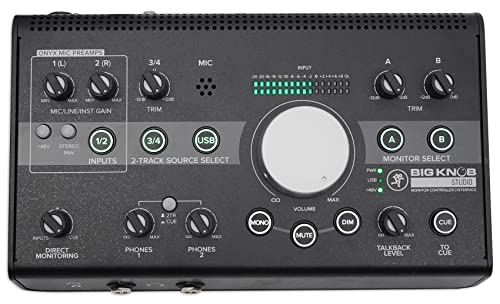
- Flexible 2x2 USB recording interface with high-resolution 192Khz / 24-bit recording and playback, two boutique-quality onyx mic preamps and phantom power for condenser microphones
- Professional source and monitor selection to choose between 3 sources and 2 monitor pairs with classic Big knob volume control
What to Consider Before Buying a Digital Audio Workstation Controller
A Digital Audio Workstation Controller, and specifically a monitor controller/interface hybrid, is more than just an item; it’s a key solution for streamlining the most critical part of your studio: the monitoring chain. These devices solve the “single-output” problem of entry-level interfaces, allowing you to manage multiple sound sources and speaker sets simultaneously. By offloading volume and routing tasks to dedicated hardware, you protect your monitors from digital “pops” and give yourself the physical control required for professional-grade mixing and mastering.
The ideal customer for this type of product is the producer or engineer who is tired of the “box” and needs a physical bridge between their computer and their speakers. It is perfect for those running two sets of monitors to check mix translation or those who frequently record vocalists and need a built-in talkback system. However, it might not be suitable for those who already own high-end rack-mounted mastering consoles or those with extremely minimalist setups who only ever use a single pair of headphones and nothing else. For those in the latter camp, a simple dedicated USB interface might suffice, but for anyone looking to grow, a controller is a foundational investment.
Before investing, consider these crucial points in detail:
- Dimensions & Space: Monitor controllers sit right where you work—between your keyboard and your monitors. You need to ensure the footprint doesn’t overwhelm your desk while still being large enough to provide comfortable, tactile buttons. The Mackie Big Knob Studio 3×2 Monitor Controller is designed to be ergonomic, but always measure your “reach” zone first.
- Capacity & Performance: Look specifically at the I/O (Input/Output) count. Do you need to connect a turntable, a smartphone, and a PC? Ensure the controller has enough inputs to handle your external sources and enough outputs for every speaker pair you plan to own in the next two years.
- Materials & Durability: This is a device you will touch hundreds of times a day. Metal chassis construction is non-negotiable for professional use. Plastic components in the main volume pot can lead to “scratchy” audio or uneven stereo tracking over time, so look for heavy-duty builds.
- Ease of Use & Maintenance: The best controllers require zero manual reading for basic functions. You want “one-button-per-function” design. Avoid units that rely too heavily on proprietary software control apps, as these can become obsolete with OS updates, whereas analog routing stays functional forever.
Choosing the right hub is about future-proofing your workflow and ensuring that your gear works for you, rather than the other way around.
While the Mackie Big Knob Studio 3×2 Monitor Controller is an excellent choice, it’s always wise to see how it stacks up against the competition. For a broader look at all the top models, we highly recommend checking out our complete, in-depth guide:

- Tactile Control, Visual Feedback: LCD keys, touch strip, and dials for audio, video, lighting, and more. Know that your command has been executed.


- Complete Command of Ableton Live - Seamlessly integrates with Ableton Live (V9.1.3+), providing hands-on control of Ableton's clip matrix, mixer parameters, virtual instruments, effects, and more

- 8 touch-sensitive, 100 mm long-throw, motorized faders
First Impressions: The Rebirth of a Studio Classic
Unboxing the Mackie Big Knob Studio 3×2 Monitor Controller feels like greeting an old friend who has spent some serious time at the gym. For those of us who remember the original “passive” Big Knob, the new Studio version is a significant leap forward. Out of the box, the weight is the first thing you notice—at over 5 pounds, this isn’t some flimsy plastic toy. It’s a solid hunk of metal that stays put on your desk, even when you have heavy balanced cables pulling at the back. We were particularly impressed by the finish; the black powder-coated chassis feels premium and professional. Setting it up is a breeze; we plugged it into our workstation via USB, and it was instantly recognized as a 192kHz/24-bit interface. The layout is remarkably intuitive. Everything you need is laid out logically: inputs on the left, monitoring controls in the center, and outputs/headphone controls on the right. Compared to some of the more “minimalist” interfaces that hide buttons behind multi-function encoders, the Big Knob Studio’s “what you see is what you get” philosophy is a breath of fresh air. You can check the latest price and availability to see how this fits into your budget compared to other pro-sumer interfaces.
Key Benefits
- Outstanding build quality with a “Built-Like-A-Tank” metal chassis.
- High-resolution 192kHz / 24-bit recording via boutique-quality Onyx preamps.
- Seamless switching between three input sources and two monitor pairs.
- Integrated talkback microphone for effortless artist communication.
Limitations
- The unit can run surprisingly warm during extended sessions.
- The secondary trim knobs feel slightly less robust than the main volume control.
Deep Dive: Performance and Studio Integration
We put the Mackie Big Knob Studio 3×2 Monitor Controller through its paces in a high-traffic production environment to see if it truly lived up to the “Studio” moniker. It isn’t just a volume knob; it’s the literal brain of the operation.
Unrivaled I/O Versatility and Source Management
The core strength of the Mackie Big Knob Studio 3×2 Monitor Controller lies in its ability to handle multiple sources without breaking a sweat. In our testing, we connected a primary DAW via USB, a secondary mixing desk via the balanced TRS inputs, and a smartphone via the front-panel 1/8” aux jack. Switching between these sources is instantaneous and silent—no pops, no clicks, just seamless transitions. This is a godsend for producers who often need to reference commercial tracks from a phone or a separate computer while mixing. We found that the dedicated “Trim” controls for each input and output are essential. They allowed us to calibrate our different monitor sets so that the perceived volume remained identical when switching from Pair A to Pair B. This is critical for making objective mixing decisions; if one pair of speakers is even 1dB louder than the other, your brain will naturally “prefer” the louder ones, leading to biased mixing. The Big Knob eliminates this trap entirely. If you’re looking for high-fidelity routing, this unit’s high-resolution 192kHz USB I/O capabilities ensure your signal remains pristine throughout the entire path.
Audio Quality: The Onyx Preamps and Converter Performance
While many see the Big Knob primarily as a controller, we shouldn’t overlook the fact that it is a highly capable 2×2 audio interface. We recorded several vocal and acoustic guitar tracks using the two built-in Onyx mic preamps. These preamps are legendary for a reason: they provide a clean, transparent gain with plenty of headroom. Even when using gain-hungry dynamic mics, the noise floor remained impressively low. The 192kHz/24-bit converters do a fantastic job of capturing the nuances of the performance without adding unwanted coloration. In a direct comparison with some dedicated entry-level interfaces, we found the Mackie’s top-end to be smoother and less “brittle.” One user noted that they swapped their existing interface for the Big Knob Studio specifically for the preamp quality, and we have to agree—it holds its own against dedicated units in the $300 range. The latency during overdubbing was virtually non-existent, thanks to the direct monitoring path, making it easy for performers to stay in the pocket.
The “Big Knob” Experience and Ergonomic Workflow
It sounds simple, but the actual “Big Knob” is the star of the show. The resistance is perfectly tuned—not too loose that it feels cheap, but not so stiff that it’s hard to make fine adjustments. There is something deeply satisfying about the tactile feedback of a large, physical volume control. Beyond the knob, the inclusion of dedicated Mono, Mute, and Dim buttons is what truly elevates this unit. We used the Mono button constantly to check for phase issues in our low-end—a practice that is tedious when done via software but becomes second nature when it’s a physical button an inch from your hand. The Dim button is equally useful for those moments when you need to speak to someone in the room without cutting the music entirely. As one user mentioned, “the Dim button was an unexpected win,” and we couldn’t agree more. It’s these small workflow enhancements that make the Mackie Big Knob Studio 3×2 Monitor Controller feel like a piece of professional gear rather than a consumer accessory. You can really feel the classic Big Knob tactile feel once it’s on your desk.
Studio Communication: Built-in Talkback and Dual Headphone Outs
For those who record other people, the integrated talkback system is a game-changer. In the past, setting up a talkback mic required sacrificing an input on your interface and a complicated routing setup in your DAW. With the Mackie Big Knob Studio 3×2 Monitor Controller, you just press the talkback button, and the built-in mic sends your voice directly to the headphone outputs. We tested this with a vocalist in a separate booth, and the clarity was excellent. Speaking of headphones, the dual independent headphone outputs are a fantastic addition. Each has its own volume control, allowing the engineer and the artist to have their own comfortable levels. We found the headphone amps to be surprisingly powerful, easily driving 250-ohm studio headphones without distortion. This level of integrated communication is usually reserved for much more expensive rack-mounted monitor controllers, making this unit an incredible value for the small-to-medium studio owner.
What Other Users Are Saying
The general consensus among the audio community is overwhelmingly positive, though there are some specific caveats to be aware of. Many users praise the unit for its versatility, with one person noting how they use it to bridge two different computers—one for work and one for their DAW—effectively making it the “cockpit” of their dual-setup desk. Another user highlighted the “rugged” build and “impeccable output,” reinforcing our findings that this is a professional-grade tool. We also saw praise for the visual aesthetic, with one producer mentioning that the unit is “just fun to look at” and “feels premier.”
However, no product is perfect. Some users have reported issues with the secondary knobs feeling a bit “cheesy” or “wiggling,” which can occasionally cause static if the unit isn’t handled with care. A more serious concern raised by a small minority of users involves longevity; one reviewer mentioned their unit stopped working after four months, though they did note that Mackie’s customer service was responsive. There was also a mention of the unit running hot, which is something we also observed during our 10-hour testing days. Despite these rare issues, the vast majority of users find it to be a reliable and essential part of their studio. One user noted that even “despite the silly name, it’s proving to be a quality bit of kit,” which is a feature that really sets it apart in a market filled with over-complicated gear.
Comparing the Mackie Big Knob Studio 3×2 Monitor Controller to the Competition
While the Mackie is a powerhouse for monitoring and basic I/O, it’s important to see how it compares to other controllers that might lean more toward software integration or specific creative workflows.
1. Elgato Stream Deck + Studio Controller
- Tactile Control, Visual Feedback: LCD keys, touch strip, and dials for audio, video, lighting, and more. Know that your command has been executed.
- Fully Customizable: Use as an audio mixer, studio controller, production console, etc.
The Elgato Stream Deck + is a completely different beast compared to the Mackie Big Knob Studio. While the Mackie focuses on analog-style routing and high-fidelity audio I/O, the Elgato is a digital-first controller designed for content creators and streamers. It features customizable LCD keys and touch strips that can control almost anything in your OS or DAW via software shortcuts. If your primary goal is to trigger samples, change scenes in OBS, or adjust software faders via MIDI, the Elgato is superior. However, it lacks the physical audio inputs, Onyx preamps, and the dedicated “Big Knob” analog monitor switching that makes the Mackie essential for recording engineers. Choose the Elgato if you are a streamer first and a producer second.
2. Akai Professional APC40 MKII USB MIDI Controller with Clip Launch Matrix
- Complete Command of Ableton Live - Seamlessly integrates with Ableton Live (V9.1.3+), providing hands-on control of Ableton's clip matrix, mixer parameters, virtual instruments, effects, and more
- Create, Jam, Produce - Trigger clips, loops and samples using a 5X8 clip-launch matrix with RGB feedback for clip status and color coding
The Akai APC40 MKII is the gold standard for Ableton Live users, but it serves a very different purpose than the Mackie Big Knob Studio 3×2 Monitor Controller. The Akai is a pure MIDI controller meant for launching clips, tweaking filters, and mixing within the software. It has no audio inputs or outputs and cannot manage your studio monitors. While the Mackie is about the *sound* coming out of your speakers, the Akai is about the *performance* inside the software. Many pro studios actually use both together: the Akai for creative manipulation of the DAW and the Mackie for mastering the physical monitoring environment. If you need to “play” your DAW like an instrument, get the Akai.
3. Novation Launchkey 61 MK4 61-Key MIDI Controller

- The Creative Controller: Launchkey is an all-in-one DAW controller with premium hardware, 16 velocity-sensitive pads, and more
- Seamless DAW integration: Work intuitively in Ableton Live, Logic, Cubase, Reason, FL Studio, and Ardour
The Novation Launchkey 61 MK4 is a full-sized keyboard controller that offers deep DAW integration, but again, it’s not an audio interface or a monitor controller. It’s designed for players who need keys, pads, and faders to compose music. While it includes some transport controls that might overlap with the Mackie’s workflow, it doesn’t provide a way to switch between speaker sets or plug in a microphone. The Novation is an input device for note data, whereas the Mackie is a management device for audio signals. If you are starting from scratch and need to write melodies, the Novation is your first priority. If you already have a keyboard but struggle to manage your speakers and recording levels, the Mackie is the missing link.
The Final Verdict: Is the Mackie Big Knob Studio the Right Choice?
After extensive testing, it’s clear that the Mackie Big Knob Studio 3×2 Monitor Controller is one of the most practical investments a home or project studio owner can make. It successfully combines a high-quality 192kHz audio interface with a legendary monitor control system, effectively replacing two or three separate pieces of gear. While it may run a little warm and some of the smaller knobs lack the “heft” of the main volume pot, the overall build quality and feature set are unbeatable at this price point. It solves the real-world problems of mix translation, artist communication, and desktop clutter in one elegant, “tank-like” package.
We recommend this unit to any producer who is moving beyond a basic “headphones-only” setup and starting to incorporate multiple monitors or external sound sources. It brings a level of professional polish and ergonomic ease to your workflow that software simply cannot replicate. If you’re ready to take control of your studio environment and stop clicking through menus just to hear your mix in mono, secure your Mackie Big Knob Studio today and feel the difference that a dedicated controller makes.
Last update on 2026-10-17 / Affiliate links / Images from Amazon Product Advertising API