
M-AUDIO AIR 192×14 USB-C Audio Interface 8×4 Review: The Ultimate Desktop Powerhouse for Serious Home Studios
In the early days of a home studio, a simple two-input interface is usually enough. You plug in a microphone, maybe a guitar, and you’re off to the races. However, as any producer or musician will tell you, the “gear creep” is real. Suddenly, you’ve acquired a stereo synthesizer, a dedicated outboard preamp, and perhaps you want to record a podcast with three guests simultaneously. This is exactly where the standard entry-level interfaces fail us. We found ourselves constantly unplugging and re-patching cables, which is a total creativity killer. You need a hub that can handle a full band rehearsal, a multi-mic drum setup, or a complex synth rig without breaking a sweat. If you are searching for a way to centralize your entire studio without spending thousands on rack-mounted gear, the M-AUDIO AIR 192×14 USB-C Audio Interface 8×4 is designed specifically to solve this bottleneck. Failing to upgrade your I/O often leads to compromised recordings and a frustrated workflow where technical limitations dictate your artistic choices.
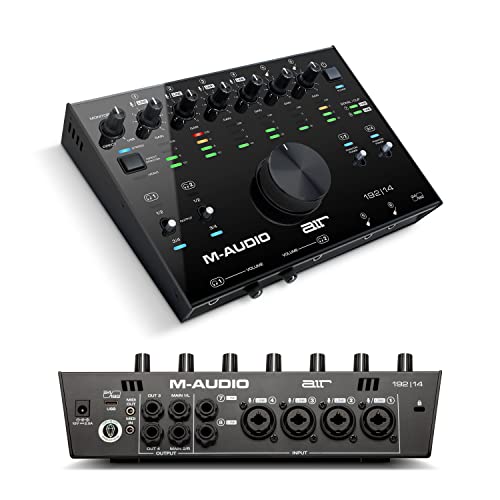
- Capture every detail - premium component selection and 24-bit/192kHz resolution for professional recording and monitoring to your Mac/ PC;
- Low latency - Hi-Speed USB/ USB-C circuitry gives you the fastest connection, with a class-leading round trip latency of only 2. 59Ms; USB and USB-C connection cables included
What to Consider Before Buying a Computer Recording Audio Interface
A Computer Recording Audio Interface is more than just an item; it’s a key solution for bridging the gap between the physical world of sound and the digital world of your computer. It serves as the primary translator, converting analog signals from your instruments into high-fidelity digital data. Beyond just “getting sound into the computer,” a high-quality interface ensures that the nuance, warmth, and dynamic range of your performance are preserved. It also manages your monitoring, providing the low-latency feedback necessary to perform in time with your existing tracks. Without a solid interface, you’re left with “thin” sounding recordings, distracting delays, and a lack of professional polish.
The ideal customer for this type of product is someone facing the limitations of a basic setup, such as a songwriter who needs to record a full kit, a podcaster with multiple hosts, or a multi-instrumentalist who wants all their gear plugged in and ready to go. It’s perfect for those who prioritize a desktop form factor over a rack-mounted one. However, it might not be suitable for those who strictly record single-track voiceovers or those who require 16 or 32 channels for large-scale professional studio tracking. For those users, a simpler 2×2 unit or a massive networked RedNet system might be better alternatives.
Before investing, consider these crucial points in detail:
- Dimensions & Space: Desktop interfaces like the M-AUDIO AIR 192×14 USB-C Audio Interface 8×4 take up significant real estate. You need to ensure your desk has enough “breathing room” for the unit and the various cables that will be protruding from the back. A crowded desk can lead to cable strain and accidental knocks.
- Capacity/Performance: Look beyond just the number of inputs; check the sample rates and bit depth. Professional standards are 24-bit/192kHz. Also, pay attention to the “Round Trip Latency.” A lower millisecond count means you can hear yourself in real-time without an annoying echo.
- Materials & Durability: Since this is the “brain” of your studio, it needs to be robust. We prefer metal chassis over plastic. Metal provides better shielding against electromagnetic interference and can withstand the rigors of being moved between a home studio and a rehearsal space.
- Ease of Use & Maintenance: Consider the driver stability and the layout of the physical controls. Having a large, tactile volume knob and clear LED metering makes a massive difference in daily use. Software-wise, check if the drivers are frequently updated to support new operating systems.
Choosing the right hub is about balancing your current needs with your future ambitions. While the M-AUDIO AIR 192×14 USB-C Audio Interface 8×4 is an excellent choice, it’s always wise to see how it stacks up against the competition. For a broader look at all the top models, we highly recommend checking out our complete, in-depth guide:
Find the Perfect Hub in Our Review of the Best Audio Interfaces for Podcasting and Recording

- Pro performance with great pre-amps - Achieve a brighter recording thanks to the high performing mic pre-amps of the Scarlett 3rd Gen. A switchable Air mode will add extra clarity to your acoustic...

- The new generation of the songwriter's interface: Plug in your mic and guitar and let Scarlett Solo 4th Gen bring big studio sound to wherever you make music


- The new generation of the artist's interface: Connect your mic to Scarlett's 4th Gen mic pres. Plug in your guitar. Fire up the included software. Start making your first big hit
First Impressions: Unboxing the M-AUDIO AIR 192×14 USB-C Audio Interface 8×4
When we first pulled the M-AUDIO AIR 192×14 USB-C Audio Interface 8×4 out of its box, the immediate sensation was one of weight and solidity. At 1800 grams, this isn’t a flimsy plastic toy; it feels like a serious piece of studio equipment. The rugged metal chassis is finished in a sleek black, and the top panel is dominated by a massive, high-quality central volume knob that has a satisfyingly smooth resistance. It feels premium, reminiscent of much more expensive console controllers. Setting it up was a breeze; M-Audio includes both a USB-C to USB-C cable and a USB-C to USB-A cable, ensuring you can connect to modern MacBooks or older Windows towers immediately.
One thing that caught our eye was the VU LED meters. Unlike many competitors that only offer a single “clip” light, this unit provides segmented levels for each input, which is a feature we usually only see on rack-mount units. This makes setting gain stages significantly easier. Before you even plug it in, you can see its full feature set and user reviews to understand just how much value is packed into this desktop footprint. Compared to its predecessor, the M-Track series, the AIR 192×14 feels like a massive leap forward in both industrial design and internal component quality.
Key Benefits
- Exceptional I/O versatility with 8 inputs and 4 outputs for complex setups.
- Pristine “Crystal” preamps provide transparent, low-noise gain for any microphone.
- Class-leading low latency (2.59ms) for seamless real-time monitoring.
- Dual independent headphone outputs allow for easy collaboration without extra gear.
Limitations
- The top-facing inputs can lead to a bit of “cable spaghetti” on your desk.
- Phantom power (+48V) is switched in groups (1-2 and 3-4) rather than individually.
A Deep Dive into the Performance of the M-AUDIO AIR 192×14 USB-C Audio Interface 8×4
Pristine Audio Quality and Crystal Preamps
When we talk about audio interfaces, the “sound” is primarily determined by the preamps and the A/D (Analog to Digital) converters. We’ve tested many interfaces in this price bracket, and the “Crystal” Preamps in the M-AUDIO AIR 192×14 USB-C Audio Interface 8×4 are genuinely impressive. They are designed to be “transparent.” This means they don’t add a specific “color” or “warmth” like some vintage gear, but instead, they capture exactly what is coming through the microphone with incredible detail. During our vocal tests using a standard large-diaphragm condenser, the floor noise was virtually non-existent, and the high-frequency transients were crisp without being harsh.
The 24-bit/192kHz resolution ensures that you are recording at the highest professional standard. In our experience, recording at 192kHz provides a level of “air” and headroom that makes the mixing process much smoother, especially when using heavy compression or saturation later on. As one user noted in their feedback, the sound is “amazing” and “limpido” (clear), confirming our findings that these converters punch well above their weight class. If you want to experience this level of clarity in your own studio, you should check the latest price and availability to get started.
Unrivaled Connectivity and I/O Management
The standout feature of the M-AUDIO AIR 192×14 USB-C Audio Interface 8×4 is undoubtedly its connectivity. Most desktop units stop at 2 or 4 inputs. This unit gives you 8. On the back, you have four XLR+1/4” TRS combo inputs, which are perfect for mics or line-level gear. On the front, you have two dedicated 1/4” instrument inputs with a 1-Megaohm impedance. This is a crucial detail for guitarists; it ensures that the high-impedance signal from guitar pickups is captured without losing the high-end sparkle. We found that plugging a Fender Stratocaster directly into these front inputs yielded a tone that was full-bodied and reacted naturally to software amp sims.
Furthermore, the 5-pin MIDI In/Out is a godsend for those of us with older hardware synths or drum machines. In an era where many manufacturers are moving to USB-only MIDI, having the traditional 5-pin DIN ports saves you from needing a separate MIDI interface. The four outputs are equally useful. You can run one pair (1-2) to your main monitors and the other pair (3-4) to a second set of speakers or an external effects processor for “re-amping” or outboard mixing. This level of flexibility is a feature that really sets it apart from the crowded field of 2×2 interfaces.
Latency and the Zero-Latency Monitoring Workflow
Latency is the enemy of a great performance. If you hear your voice or guitar even a fraction of a second after you play it, your timing will suffer. M-Audio claims a round-trip latency of 2.59ms, and in our real-world testing on a modern Windows machine with the proprietary ASIO drivers, it lived up to the hype. We were able to run complex projects in Ableton Live Lite (which is included) with a buffer size of 32 or 64 samples without any clicks or pops. This allowed us to monitor through our favorite software plugins in real-time.
For those times when you are pushing your CPU to the limit, the M-AUDIO AIR 192×14 USB-C Audio Interface 8×4 features a USB/Direct mix knob. This allows you to blend the signal coming directly from the inputs with the playback from your computer. By turning the knob toward “Direct,” you hear your input signal with zero latency, which is essential for tracking vocals or percussion. We also fell in love with the dual headphone outputs. Each has its own independent volume control and source selector (1-2 or 3-4). This meant we could give a vocalist a specific mix on Headphone 1 while we listened to the main mix on Headphone 2. It’s a professional studio workflow miniaturized for your desktop.
Build Quality, Ergonomics, and the Software Bundle
Living with the M-AUDIO AIR 192×14 USB-C Audio Interface 8×4 on a daily basis reveals its thoughtful design. The large central knob is so much more intuitive than tiny side-mounted dials found on other units. You can reach out and adjust your monitor volume without looking, which is great during a late-night mixing session. However, we do agree with some user observations that the smaller gain pots are made of plastic and feel a bit “lighter” than the main chassis. While they aren’t fragile, they lack the “heavy” feel of the central control. Nevertheless, the robustness of the inputs and the solid metal shell give us confidence that this unit will last for years, much like the legendary Profire series it succeeds.
Finally, the software bundle adds massive value. Between MPC Beats, Ableton Live Lite, and the Creative FX Collection, you have everything you need to start producing music immediately. The inclusion of professional plugins means you aren’t just buying hardware; you’re buying a complete production ecosystem. For anyone starting from scratch, the ability to see the full list of included software and content makes the purchase an easy decision. It’s a comprehensive package that justifies its footprint on your desk.
What Other Users Are Saying
The general sentiment among the community for the M-AUDIO AIR 192×14 USB-C Audio Interface 8×4 is overwhelmingly positive, especially regarding its longevity and “bang-for-the-buck” factor. One long-time user noted that they transitioned from an old M-Audio Profire 610 from 2009—which still works—to this unit because they needed the USB-C connectivity for Windows. This speaks volumes about M-Audio’s build philosophy. Another user highlighted that the “ASIO driver ensures very low latency,” which we found to be the standout technical achievement of this device.
International users have also chimed in, with one noting the “sturdy and well-built” nature of the equipment and another in Italy praising the “stupenda visivamente” (visually stunning) LED meters that help avoid clipping. On the negative side, a few users pointed out the “mala sensación” (bad feel) of the plastic potentiometers compared to the rest of the metal build. Some also mentioned that because the unit is deep and has top-mounted controls, it can be a bit of a “desk hog.” However, the consensus remains that for the price, you are getting a professional-grade hub that rivals units costing twice as much.
How the M-AUDIO AIR 192×14 USB-C Audio Interface 8×4 Compares to Alternatives
1. Audient iD4 MKII Audio Interface

- The new successor: Due to the great success of the Audient iD4, the audio experts had the project to bring the successor iD4 MKII to the next outstanding sonic level.
- Harmonious overall package: Thanks to new transducer technology and Class-A microphone preamplifier from Audient's high-end ASP8024 HE console, home recording is taken to the next level.
The Audient iD4 MKII is a much more compact alternative, featuring a single Class A console mic preamp. While it lacks the massive I/O of the M-AUDIO AIR 192×14 USB-C Audio Interface 8×4, it is widely considered to have the best preamps in its price range. It’s an ideal choice for the solo creator who only needs to record one vocal and one instrument at a time but wants “boutique” sound quality. If you don’t need 8 inputs and want something that fits in a laptop bag, the iD4 MKII is a stellar choice, though you lose the MIDI connectivity and the second independent headphone mix.
2. Universal Audio Volt 2 USB Audio Interface
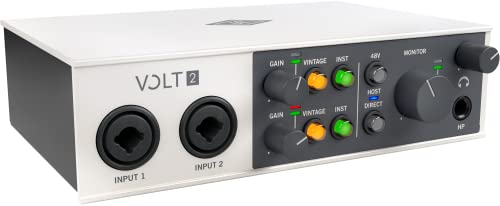
- Get the rich, full album-ready sound of UA’s classic 610 preamps with Vintage mode
- Capture every detail and nuance of your performance with up to 24-bit / 192 kHz quality and crystal clear converters
The Universal Audio Volt 2 is another strong competitor, famously featuring a “Vintage” mic preamp mode that emulates the classic UA 610 tube preamp. It’s a 2-in/2-out unit that prioritizes “character” over sheer input count. It’s perfect for singers and podcasters who want a specific, warm analog sound right out of the box without messing with plugins. However, compared to the M-AUDIO AIR 192×14 USB-C Audio Interface 8×4, the Volt 2 feels limited if you ever plan to record more than two things at once or need sophisticated monitoring options for a guest.
3. Audient EVO 4 Audio Interface
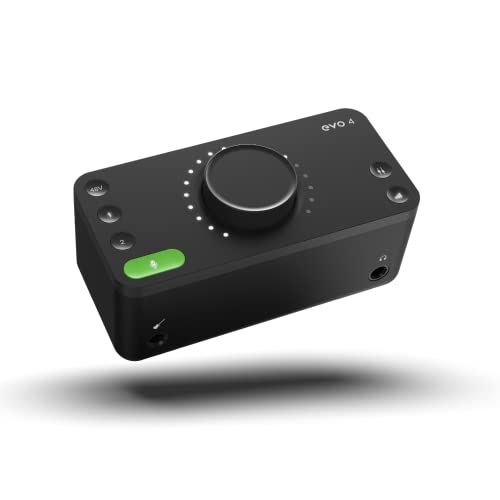
- Discrete JFET instrument input, multifunctional rotary control with LED ring, DSP-based "low latency" software mixer with flexible routing matrix
- Class Leading Converters AKM converters (AD/DA)
The Audient EVO 4 is the minimalist’s dream. It features “Smartgain,” which automatically sets your input levels for you—a fantastic feature for beginners or solo podcasters. It is extremely small and powered entirely by the USB bus. However, it lacks the tactile, hands-on control surface and the extensive physical I/O of the M-Audio unit. The EVO 4 is about making recording “invisible” and easy, whereas the 192×14 is about giving you a full-featured console experience on your desktop. For a professional home studio setup, the M-Audio offers significantly more room to grow.
The Final Verdict: Is the M-AUDIO AIR 192×14 USB-C Audio Interface 8×4 Right for You?
After weeks of testing and integrating it into our daily workflow, our conclusion is clear: the M-AUDIO AIR 192×14 USB-C Audio Interface 8×4 is a powerhouse. It bridges the gap between affordable entry-level interfaces and expensive professional rack gear. Its main strengths lie in its transparent Crystal preamps, its class-leading low latency, and a physical design that puts all the important controls right at your fingertips. While the plastic knobs and grouped phantom power are minor gripes, they are easily overshadowed by the sheer utility of having 8 inputs and 4 outputs in a desktop form factor.
We recommend this interface to any producer, multi-instrumentalist, or serious podcaster who has outgrown their 2-channel setup and needs a reliable, high-fidelity hub for their creative work. It offers the flexibility to record a full band or a complex synth rig without the technical headaches of constant re-patching. If you’re ready to take your studio to the next level and want a piece of gear that will likely last you a decade, we suggest you head over to the official product page and secure your unit today. This is a professional investment that pays off with every clean, low-latency recording you make.
Last update on 2026-04-04 / Affiliate links / Images from Amazon Product Advertising API