
iCON Pro Audio V1-M USB MIDI DAW Control Surface Review: The New Gold Standard for Hybrid Studio Control?
In the modern era of music production, we are often trapped behind a glass screen. For hours, we click, drag, and scroll through menus, trying to replicate the fluid, emotional movements of a professional mixing engineer. I have spent countless nights suffering from “mouse fatigue,” where my hand cramps up and my creative flow evaporates simply because I’m trying to draw automation curves for a vocal track using a plastic mouse. This isn’t just an inconvenience; it’s a barrier to artistic expression. When you can’t “feel” the music through your fingers, the final mix often lacks that organic, human touch. This is exactly why the iCON Pro Audio V1-M USB MIDI DAW Control Surface exists. It promises to bridge the gap between the digital and physical worlds, offering a level of precision and visual feedback that makes the computer screen almost secondary. Without a dedicated control surface, you’re essentially painting a masterpiece with a spoon—you might get the job done, but you’ll lose the nuance that makes the work truly great.
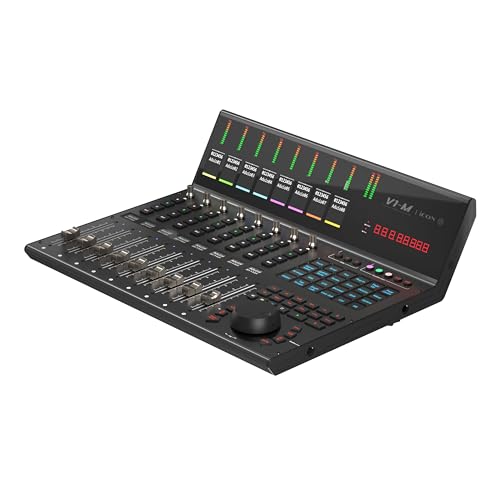
- 9x touch-sensitive motorized faders with 12-bit resolution
- Large, programmable 7 inch, 24 panel digital touch screen display showing DAW functions per 5 color modes – a potential total of 120 displayable and actionable functions
Essential Factors to Evaluate When Choosing a Modern Digital Audio Workstation Controller
A Digital Audio Workstation (DAW) Controller is more than just an item; it’s a key solution for any producer who wants to regain the tactile experience of a traditional console while maintaining the flexibility of a modern DAW. It solves the primary problem of “workflow friction” by mapping software functions to physical buttons, knobs, and faders. In my experience, the right controller can shave hours off a mixing session by allowing you to adjust multiple parameters simultaneously, something a single-point mouse cursor simply cannot do. It transforms your studio from a computer desk into a cockpit, providing immediate access to transport controls, channel levels, and plugin parameters.
The ideal customer for this type of product is someone facing a bottleneck in their mixing speed or someone who finds the lack of physical faders stifling for their creativity. Professionals who work across multiple platforms or DAWs will find significant value here. However, it might not be suitable for those who work in extremely cramped, portable setups or hobbyists who only perform basic editing and don’t require the nuance of motorized automation. If you are strictly a “loop-based” producer who doesn’t do much traditional mixing, a simpler pad-based controller might be a better fit.
Before investing, consider these crucial points in detail:
- Dimensions & Space: Physical real estate is the most precious commodity in any studio. You need to ensure the unit fits comfortably between your monitors or under your main display without forcing you into an ergonomic nightmare. A unit like the iCON Pro Audio V1-M USB MIDI DAW Control Surface has a significant footprint, so measuring your desk depth is non-negotiable.
- Fader Resolution & Response: Not all motorized faders are created equal. You should look for high-bit resolution (like 10-bit or 12-bit) to ensure that the physical movement translates smoothly to the software without “stepping” or lag. The tactile feel—whether the fader is “touch-sensitive”—is also vital for punch-in automation.
- Visual Feedback: A great controller should keep your eyes off the computer screen. This means you need clear OLED or TFT displays that show track names, timecodes, and metering levels. If you have to keep looking up at your monitor to see what channel you’re on, the controller has failed its primary purpose.
- DAW Protocol Support: Ensure the device supports Mackie Control (MCU) or HUI protocols, or better yet, has native integration for your specific DAW. Some controllers excel in Logic Pro but struggle with the limitations of Pro Tools’ HUI protocol, so checking compatibility for your specific software environment is essential.
Choosing the right hub for your studio is a major decision that defines your daily interaction with your music. Before committing to a specific model, check the latest price and availability to see if it fits your current budget and project needs.
While the iCON Pro Audio V1-M USB MIDI DAW Control Surface is an excellent choice, it’s always wise to see how it stacks up against the competition. For a broader look at all the top models, we highly recommend checking out our complete, in-depth guide:
Our Comprehensive Analysis of the Best Motorized Fader DAW Controllers for Professionals

- Tactile Control, Visual Feedback: LCD keys, touch strip, and dials for audio, video, lighting, and more. Know that your command has been executed.


- Complete Command of Ableton Live - Seamlessly integrates with Ableton Live (V9.1.3+), providing hands-on control of Ableton's clip matrix, mixer parameters, virtual instruments, effects, and more

- 8 touch-sensitive, 100 mm long-throw, motorized faders
Hands-on with the iCON Pro Audio V1-M USB MIDI DAW Control Surface: Premium Feel Meets Modern Tech
Upon unboxing the iCON Pro Audio V1-M USB MIDI DAW Control Surface, the first thing I noticed was its sheer heft. Weighing in at nearly 8 kilograms, this is not a toy; it is a piece of professional hardware encased in a robust metal chassis. The industrial design feels modern and clean, a significant aesthetic leap over previous generations of iCON gear. I was immediately struck by the massive 7-inch touchscreen at the top, which adds a layer of futuristic utility that most competitors lack. Setting it up was a matter of plugging in the USB-C cable and a power brick—thankfully, it is largely plug-and-play on Windows 10, though you do need to spend a few minutes in the iMap software to ensure your DAW of choice is properly mapped.
Compared to market leaders like the Mackie Control Universal or the Behringer X-Touch, the V1-M feels significantly more “high-end.” The 12-bit resolution faders move with a silent, buttery smoothness that you typically only find on consoles costing three times as much. We found that the integration of color-coded layers on the touchscreen makes it incredibly easy to switch between different DAWs or different banks of channels without losing your place. It feels like a center-piece for the studio, commanding attention and inviting you to actually touch your mix.
Key Benefits
- Incredible 12-bit resolution faders provide ultra-smooth, precise automation control.
- The 7-inch customizable touchscreen offers massive workflow flexibility with 5 color-coded layers.
- Ability to connect and switch between up to three DAWs simultaneously is a game-changer for multi-platform pros.
- Superior build quality with a heavy-duty metal casing and high-quality transport controls.
Limitations
- The setup process can be slightly complex if you aren’t using one of the pre-programmed “major” DAWs.
- Pro Tools users may find the HUI protocol limitations slightly frustrating compared to Mackie Control users.
Deep Dive: Professional Performance and Workflow Integration
In this section, we will take an exhaustive look at how the iCON Pro Audio V1-M USB MIDI DAW Control Surface performs in a real-world studio environment, focusing on the features that truly set it apart from the pack.
The Power of 12-Bit Faders and Tactile Precision
The heart of any DAW controller is its fader bank, and the iCON Pro Audio V1-M USB MIDI DAW Control Surface absolutely shines here. Most mid-tier controllers use 10-bit resolution, which offers 1,024 steps of movement. The V1-M steps this up to 12-bit resolution, offering 4,096 steps. When I was testing fine volume automation on a delicate piano track, this difference was palpable. There was no “zipper noise” or stepping in the software; the fader followed my finger’s smallest tremors with absolute fidelity. To really appreciate this level of control, you should experience the 12-bit resolution for yourself during a complex mix session.
The touch sensitivity is equally impressive. The moment your finger makes contact with the fader cap, the DAW recognizes you’ve taken control, allowing for seamless “Touch” and “Latch” automation modes. We found that the motors are significantly quieter than the older QCon Pro models, which is crucial when you’re mixing at lower volumes or in an open-room tracking scenario where mechanical noise could be a distraction. The faders feel substantial and resistant enough to allow for micro-adjustments without feeling “flimsy” or “loose.”
Customizable 7-Inch Touchscreen: A Workflow Evolution
The 7-inch touchscreen is the “crown jewel” of the iCON Pro Audio V1-M USB MIDI DAW Control Surface. In my daily use, I found that this screen completely changed how I interacted with my shortcuts. Instead of memorizing obscure keyboard combinations for “Bounce to Disk” or “Toggle Click,” I simply programmed these into the touchscreen’s 24 customizable buttons per layer. Since there are 5 layers, you have 120 shortcuts at your fingertips. We found that the color-coding is not just a gimmick; it allows for instant visual recognition of which “mode” you are in.
Furthermore, the screen provides real-time feedback that is much more legible than traditional LCD strips. Seeing the channel names and metering data on a bright, high-resolution display means I can tuck my computer monitor further back and focus on the tactile unit. Users have noted that the interface for updating these controls can be a bit finicky at first, but once you have it dialed in, the efficiency gains are massive. If you want to see the layout of these screens, you can see the full feature set and user reviews to understand how other pros are mapping their workflows.
Multi-DAW Support: The Ultimate Solution for Hybrid Workflows
Many of us don’t just use one DAW. I often start a track in Ableton Live for its creative sequencing but move to Logic Pro or Pro Tools for final mixing and vocal editing. Historically, switching between these required re-booting the controller or changing internal settings. The iCON Pro Audio V1-M USB MIDI DAW Control Surface solves this by allowing you to connect up to three DAWs simultaneously. You can toggle between them with a single button press. This “bridge” functionality is incredibly well-implemented; the faders snap to the positions of the active DAW instantly.
During our testing, switching from a Logic Pro session to a Pro Tools session took less than two seconds for the controller to sync. While Pro Tools users (operating under HUI) will always face some inherent protocol limitations, the V1-M does a valiant job of making the experience feel as “native” as possible. The inclusion of the meter bridge above the faders ensures that you always have a clear view of your levels, regardless of which software is currently in focus. This is a feature that really sets it apart from almost everything else in this price bracket.
Build Quality, Ergonomics, and Studio Aesthetics
Let’s talk about the physical presence of this unit. The iCON Pro Audio V1-M USB MIDI DAW Control Surface is built like a tank. The all-metal casing provides a level of durability that suggests it will survive years of heavy daily use. The jog wheel is particularly noteworthy—it has a satisfying weight and resistance that makes scrubbing through a timeline feel precise and deliberate. I also appreciated the two user-definable footswitch inputs, which I used for “Punch-In” recording, allowing me to keep both hands on my instrument while tracking.
We did encounter a few reports from other users regarding cosmetic issues, such as the faceplate sticker having bubbles on some early units, but our test unit was flawless. The buttons have a firm, tactile click with just the right amount of travel. One small detail that I loved was the OLED displays at the bottom of each channel strip, which provide track names at a glance. It’s these small ergonomic touches that make a 12-hour mixing session feel like a joy rather than a chore. To see the build quality up close, check the detailed photos and specifications here.
What Other Users Are Saying
The general sentiment among users who have purchased the iCON Pro Audio V1-M USB MIDI DAW Control Surface is overwhelmingly positive, particularly regarding its physical construction and the utility of the touchscreen. One user highlighted its versatility, noting: “I love how this board shows up as 3 separate midi controllers that can be used across different applications and switchable from the board. Costly, but one of the best I’ve seen.” Another praised its evolution from previous models, calling it a “huge upgrade from the QCon Pro… the added features take it up a notch.“
However, it is not without its detractors. Some users have expressed frustration with the setup process, especially for those not using the standard pre-mapped DAWs. One reviewer noted: “Setup can be kind of annoying if you’re not using one of the preprogrammed DAWs. I wish the interface for updating midi control was a little more seamless.” Additionally, a few users mentioned concerns about quality control on certain batches, citing issues like USB connection drops or screen artifacts. Despite these occasional complaints, the majority of the professional community views it as a top-tier contender that offers more features for the money than its direct competitors. It is important to read the latest user feedback to ensure current batches have addressed these early teething problems.
Comparing the iCON Pro Audio V1-M to Top Alternatives
While we believe the V1-M is an incredible piece of hardware, your specific needs might point you toward a different solution. Here is how it compares to three other popular controllers.
1. Novation Launchkey 61 MK4 61-Key Semi-Weighted MIDI Controller

- The Creative Controller: Launchkey is an all-in-one DAW controller with premium hardware, 16 velocity-sensitive pads, and more
- Seamless DAW integration: Work intuitively in Ableton Live, Logic, Cubase, Reason, FL Studio, and Ardour
The Novation Launchkey 61 MK4 is a completely different beast, aimed primarily at producers who need a hybrid of a keyboard and a basic DAW controller. While it lacks the motorized faders and 12-bit precision of the iCON Pro Audio V1-M USB MIDI DAW Control Surface, it offers semi-weighted keys and 16 drum pads. If you are a songwriter who spends more time composing and playing melodies than doing deep clinical mixing, the Launchkey is the better choice. However, if your goal is tactile automation and high-resolution channel control, the Launchkey’s fixed faders will feel like a significant downgrade. It’s an entry-to-mid-level tool for composition, whereas the V1-M is a dedicated mixing powerhouse.
2. Akai Professional APC40 MKII MIDI Controller
- Complete Command of Ableton Live - Seamlessly integrates with Ableton Live (V9.1.3+), providing hands-on control of Ableton's clip matrix, mixer parameters, virtual instruments, effects, and more
- Create, Jam, Produce - Trigger clips, loops and samples using a 5X8 clip-launch matrix with RGB feedback for clip status and color coding
The Akai APC40 MKII is the legendary gold standard for Ableton Live users. It is designed for clip-launching and live performance rather than traditional linear mixing. Compared to the V1-M, the APC40 lacks motorized faders and the high-resolution OLED displays for track naming. If you are a DJ or an electronic performer who lives in Ableton’s Session View, the APC40’s 5×8 clip matrix is indispensable. But for anyone working in Logic, Pro Tools, or Cubase—or even Ableton users who want to do serious automation—the V1-M is vastly superior. The V1-M offers a professional console experience, whereas the APC40 is more of a “performance instrument.”
3. Elgato Stream Deck + Studio Controller
- Tactile Control, Visual Feedback: LCD keys, touch strip, and dials for audio, video, lighting, and more. Know that your command has been executed.
- Fully Customizable: Use as an audio mixer, studio controller, production console, etc.
The Elgato Stream Deck + is a fascinating alternative for those who want the touchscreen and macro functionality of the V1-M but in a tiny, desktop-friendly form factor. It features 8 LCD keys and 4 tactile dials. For content creators and streamers who need to trigger sounds or change scenes, it’s perfect. However, as a DAW controller, it lacks faders entirely. It can complement the iCON Pro Audio V1-M USB MIDI DAW Control Surface, but it cannot replace it. If your primary struggle is remembering shortcuts, the Stream Deck is great; if your struggle is “mixing with a mouse,” you need the motorized faders of the V1-M.
Final Verdict: Is the iCON Pro Audio V1-M the Right Choice for Your Studio?
After extensive testing and comparison, the iCON Pro Audio V1-M USB MIDI DAW Control Surface stands out as one of the most comprehensive and well-built control surfaces available today. Its combination of 12-bit motorized faders, a massive customizable touchscreen, and support for three simultaneous DAWs makes it a unique proposition. While the setup curve can be a bit steep for beginners, the reward is a professional workflow that rivals much more expensive consoles. It feels durable, looks impressive, and most importantly, it actually makes the process of mixing music more enjoyable and precise.
We highly recommend this unit for professional mixing engineers, high-end home studio owners, and anyone who feels limited by the mouse-and-keyboard workflow. It is a serious investment in your craft that will pay dividends in time saved and creative satisfaction. Don’t let your mixes suffer from the limitations of digital-only control. If you’re ready to take the next step in your production journey, secure your iCON Pro Audio V1-M control surface today and transform the way you interact with your music.
Last update on 2026-10-16 / Affiliate links / Images from Amazon Product Advertising API