
Hercules DJControl Inpulse 200 DJ Controller with Sound Card Review: The Ultimate Gateway to Mastering the Mix
We have all been there: standing in front of a massive, glowing wall of buttons, sliders, and knobs at a club or a music store, feeling a mix of awe and pure intimidation. The world of DJing often feels like an exclusive club with a massive barrier to entry, both in terms of cost and the steep learning curve. When I first decided to try my hand at mixing, I was overwhelmed by the technical jargon—beatmatching, phrasing, gain staging, and EQing. Without a proper guide, it is easy to get discouraged before you even drop your first beat. This is exactly why so many people search for a tool like the Hercules DJControl Inpulse 200 DJ Controller with Sound Card. They aren’t just looking for a toy; they are looking for a bridge from being a music listener to being a music creator. Solving this initial “complexity crisis” is crucial because, without an intuitive interface, most beginners will leave their expensive equipment to gather dust. We found that the right controller doesn’t just play music; it teaches you how to perform it.

- Learn the basics of DJing with the controller's exclusive features: Tempo and Beat Align guides that light up, in addition to the Assistant and Energy functions
- Comprehensive DJing software included: discover the basics of DJing with interactive help and integrated tutorial videos
What to Consider Before Diving Into the World of DJ Controllers
A DJ controller is more than just an item; it’s a key solution for anyone looking to translate their passion for music into a tangible skill. It serves as the physical interface between your creative mind and your digital music library. For a beginner, the controller acts as both an instrument and a classroom. The main benefit of a dedicated controller like the Hercules DJControl Inpulse 200 DJ Controller with Sound Card is that it centralizes your workflow, allowing you to manipulate two tracks simultaneously without ever touching your mouse or trackpad. This tactile connection is what builds the muscle memory necessary for professional performance.
The ideal customer for this type of product is someone facing the “beginner’s block”—someone who loves music and wants to mix but has no idea where to start. It is perfect for hobbyists, students, or even seasoned musicians looking to expand their repertoire into the digital realm. On the other hand, it might not be suitable for those who are already playing professional club gigs or those who require advanced four-deck mixing capabilities and balanced XLR outputs for large-scale sound systems. If you are already comfortable with manual beatmatching and high-end industry standards, you might find a beginner unit limiting after a few months of intense use.
Before investing, consider these crucial points in detail:
- Dimensions & Space: When you are just starting out, you likely don’t have a dedicated studio booth. You need a controller that can sit comfortably on a standard desk next to your laptop or even fit into a backpack for practice sessions at a friend’s house. Look for a compact footprint that doesn’t sacrifice the “pro feel” of the layout. To ensure you’re getting the right size for your setup, you can check the latest dimensions and weight specifications here.
- Capacity & Performance: This refers to how the controller handles your music and the responsiveness of its hardware. A built-in sound card (audio interface) is non-negotiable for beginners, as it allows you to plug your headphones and speakers directly into the controller. You also want to look for touch-sensitive jog wheels that react instantly to your movements, ensuring your scratches and nudges feel organic rather than delayed.
- Materials & Durability: While most entry-level controllers are made of plastic to keep costs down, the quality of that plastic matters. You want a chassis that doesn’t flex under pressure and buttons that offer a satisfying click. Faders should move smoothly without feeling “loose,” and knobs should have enough resistance to allow for precise EQ adjustments during a transition.
- Ease of Use & Maintenance: The best beginner gear is “plug-and-play.” You should be able to connect a single USB cable and start mixing. Maintenance usually involves keeping the unit dust-free and ensuring your firmware is updated. Consider if the hardware includes integrated tutorials or “guides” that help you learn the mechanics of DJing while you play, rather than making you read a 100-page manual first.
Understanding these factors will help you narrow down the vast field of options. While the Hercules DJControl Inpulse 200 DJ Controller with Sound Card is an excellent choice, it’s always wise to see how it stacks up against the competition. For a broader look at all the top models, we highly recommend checking out our complete, in-depth guide:

- The All-Rounder to Learn On: A simple, user-friendly layout inherited from pro Pioneer DJ gear makes it easy to start and grow


- Flagship Performance Controller: Built for serious hobbyists, mobile DJs, and pros who want a future-proofed open-format tool

- Closest Stepping Stone to the Club: A CDJ-3000 and DJM-A9 inspired layout builds muscle memory that transfers to the booth
First Impressions: Unboxing the Hercules DJControl Inpulse 200 DJ Controller with Sound Card
When we first pulled the Hercules DJControl Inpulse 200 DJ Controller with Sound Card out of its box, the primary sentiment was one of surprise at its portability. Weighing in at just under 2 pounds, it is incredibly light, yet it doesn’t feel like a “toy.” The matte black finish gives it a professional aesthetic that belies its entry-level price point. The layout is intentionally modeled after industry-standard club setups, featuring two distinct deck sections and a central mixer. This is a brilliant move by Hercules, as it ensures that the skills you learn here will eventually transfer to more expensive Pioneer or Denon gear. We were pleased to find a braided USB cable included—a small touch that speaks to the manufacturer’s attention to durability, as these cables are much less prone to fraying than standard rubber ones.
Upon plugging it in, the controller immediately comes to life with a vibrant array of lights. Unlike other controllers where lights are purely for show, here they serve a functional purpose. The “Beatmatch Guide” system is integrated directly into the hardware, with red light arrows appearing next to the tempo faders and jog wheels. Our initial impression was that this felt like a “trainer” for your ears. To see the lighting system in action for yourself, we recommend you see its full feature set and user reviews to understand how it helps newcomers find the rhythm.
Key Benefits
- Revolutionary Light Guides (Tempo and Beat Align) that act as a visual tutor for manual beatmatching.
- Incredibly compact and lightweight design, making it the perfect “backpack” controller for mobile practice.
- Includes DJUCED software which features an integrated “DJ Academy” with high-quality video tutorials.
- Built-in sound card with RCA master outputs and a 3.5mm headphone jack for a complete, all-in-one setup.
Limitations
- The buttons are notably stiff, which might require a bit more force than seasoned DJs are used to.
- Relies heavily on its proprietary software (DJUCED) for the best experience, though it does work with VirtualDJ.
Deep Dive: Why the Hercules DJControl Inpulse 200 is a Beginner’s Best Friend
Mastering the Art of the Mix with Integrated Light Guides
In our extensive testing of the Hercules DJControl Inpulse 200 DJ Controller with Sound Card, the standout feature—without question—is the “Beatmatch Guide.” Traditional DJing requires you to use your ears to match the speeds of two different songs, a process known as beatmatching. For a beginner, this is the hardest hurdle to clear. Hercules has solved this by placing LED arrows next to the pitch fader. If the song on Deck B is slower than Deck A, the red arrow points up, telling you to move the fader. Once you are close, the “Beat Align” lights under the jog wheel tell you exactly which way to nudge the platter to get the beats perfectly in sync. We found this to be an incredible confidence builder. Instead of guessing why a mix sounds like a “train wreck,” the controller gives you real-time visual feedback. One user mentioned that they had zero music experience but were able to learn quickly thanks to this assist feature. It isn’t just about making it easy; it’s about training your brain to recognize what a “matched” beat looks and sounds like. For those who want to jumpstart their learning, you can check the latest price and availability and start practicing your timing today.
Software Synergy: DJUCED and the Intelligent Music Assistant
The hardware is only half the story. The Hercules DJControl Inpulse 200 DJ Controller with Sound Card comes bundled with DJUCED, a robust software platform that we found to be surprisingly powerful for “free” included software. The “Intelligent Music Assistant” (IMA) is a game-changer for those who haven’t built up a massive library yet. By clicking the “Assistant” button on the controller, the software suggests tracks from your library—or from streaming services like SoundCloud Go+ and Beatport—that match the key and BPM of what you are currently playing. This takes the stress out of track selection. Furthermore, the “Energy” function allows you to color-code your library. If you want to keep the party chill, you select “blue” tracks; if you want to ramp up the intensity, you go for the “red” tracks. We found this to be an intuitive way to teach beginners about “reading the room” and managing the flow of a set. Some users have noted that they preferred VirtualDJ, and we confirmed that this controller is indeed plug-and-play compatible with VirtualDJ as well, offering great flexibility if you decide to switch platforms later.
Tactile Performance: Pads, Jog Wheels, and the Mixer Section
Despite its small size, the Hercules DJControl Inpulse 200 DJ Controller with Sound Card offers a wealth of performance controls. Each deck features four pads with four modes: Hot Cue, Roll, FX, and Sampler. While four pads per deck is fewer than the eight found on professional units, we found that for a beginner, it actually simplifies the learning process. It prevents you from getting overwhelmed by too many options while still allowing you to trigger loops and samples creatively. The jog wheels are touch-sensitive, meaning you can “scratch” by pressing down on the top or “nudge” the speed by touching the outer ring. We noticed that the jog wheels have a nice weight to them, avoiding the “loose” feel of cheaper controllers. The mixer section in the middle includes a 2-band EQ (Lows and Highs) and a dedicated filter knob for each channel. Being able to sweep a filter while transitioning between tracks is a core DJ skill, and having a dedicated knob for it—rather than having to map it to a multi-purpose FX knob—is a huge win for this price bracket. To see why this layout is so highly praised by new users, a feature that really sets it apart is its ergonomic design that mirrors pro-tier equipment.
Portability and Power: The Bedroom Producer’s Mobile Rig
One aspect of the Hercules DJControl Inpulse 200 DJ Controller with Sound Card that we cannot overlook is its sheer convenience. Because it is bus-powered (it draws its power directly from your laptop’s USB port), you don’t need to carry around a heavy power brick. We tested this in various environments—on a coffee table, in a dorm room, and even on a train—and it performed flawlessly every time. However, we did find that it can drain a laptop battery relatively quickly if the laptop isn’t plugged into a wall outlet, which is consistent with what some users have reported. The internal sound card provides a clean, loud output for your headphones, which is essential for “pre-cueing” your next track without the audience hearing it. For anyone who travels frequently or has limited desk space, this controller is a revelation. It turns any laptop into a full-fledged DJ booth in seconds. If you’re looking for a setup that won’t clutter your living space, explore the compact design of this controller here.
What Other Users Are Saying
The general consensus among the user community is overwhelmingly positive, particularly regarding its value as a pedagogical tool. Many users who picked this up as a “pandemic hobby” have noted that it provides a “blast” of an experience, even for those with zero prior music theory knowledge. One particularly heartening review came from a user who bought it for their fiancé; after a year of learning on these “amazing little decks,” she was ready to upgrade to professional equipment. This confirms our finding that the Inpulse 200 is the perfect “launchpad.”
However, the feedback isn’t without its critiques. Some experienced DJs have noted that the buttons are “somewhat stiff,” which can be a matter of personal preference but is worth noting for those who like a very light touch. Another user mentioned a frustrating experience with firmware updates and documentation, suggesting that while the hardware is stellar, the software side can occasionally have a “hiccup” if you aren’t tech-savvy. Despite these minor gripes, the prevailing sentiment is that for the price, it is a “solid performer” that punches well above its weight class. Many users were pleasantly surprised by how well it integrated with VirtualDJ, allowing them to customize the LEDs to flash with the music—a feature that adds a layer of fun to the mixing experience.
Comparing the Hercules DJControl Inpulse 200 to the Competition
While we believe the Hercules DJControl Inpulse 200 DJ Controller with Sound Card is a top-tier choice for beginners, it’s important to see how it compares to other popular models on the market today. Each of these alternatives offers something slightly different depending on your goals and budget.
1. Pioneer DJ DDJ-FLX4 2-Deck DJ Controller
- The All-Rounder to Learn On: A simple, user-friendly layout inherited from pro Pioneer DJ gear makes it easy to start and grow
- No Beatmatching Skills Needed: Smart Fader auto-adjusts volume, bass, and BPM so you can blend genres by moving one fader
The Pioneer DJ DDJ-FLX4 is often considered the gold standard for beginners who are serious about moving into the professional club circuit. Unlike the Hercules, which focuses heavily on its own light-guided learning system, the Pioneer mimics the layout of the industry-standard CDJ setups found in booths worldwide. It supports both Rekordbox and Serato DJ Lite, giving you access to the two most popular professional software platforms. While it is more expensive than the Hercules, it features “Smart CFX” and “Smart Fader” to help beginners make professional-sounding transitions instantly. We recommend this for users who have a slightly higher budget and want gear that is “future-proof” for club environments.
2. Numark Mixtrack Platinum FX 4-Deck Serato DJ Controller

- Complete Serato DJ System - DJ Controller for Serato DJ Lite (Included) with 4 decks of control, built-in 24bit audio interface and plug and play USB connectivity for Mac and Windows
- Visualize Your DJ Mix - Large 6-inch capacitive-touch jog wheels with high-resolution color displays that show beats per minute (BPM), platter position, beats remaining and pitch adjustment or key
The Numark Mixtrack Platinum FX offers a feature that the Hercules lacks: integrated displays in the center of the jog wheels. These displays show you the BPM, platter position, and time remaining, allowing you to spend less time looking at your laptop screen and more time focusing on your controller. It also features large 6-inch jog wheels and paddle-style effects triggers, which are incredibly fun to use. It is a 4-deck capable controller, meaning you can layer more tracks, though it still only has two physical channels. This is an excellent choice for those who want a more “pro-sized” feel and plan on doing more scratching or complex effects work.
3. Native Instruments Maschine Mikro Mk3 Drum Controller
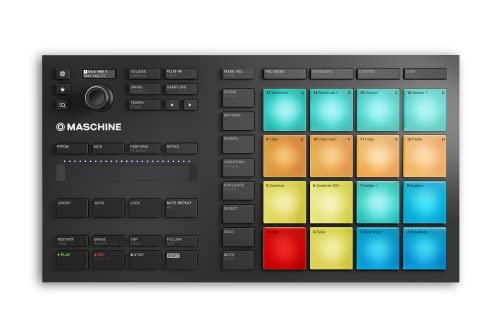
- Compact, music production instrument that integrates powerful software with tactile, responsive hardware
- Four ways to input sound using the 16 pads – drum in pad mode, play melodies in Keyboard mode, create chord progressions in Chord mode, and program in a classic step-sequencer style from Step mode
It is important to note that the Native Instruments Maschine Mikro Mk3 is not a traditional DJ controller; it is a production and performance tool. While the Hercules is designed for mixing existing tracks, the Maschine is designed for creating beats and melodies from scratch using 16 ultra-responsive pads. We included it here because many people who are interested in DJing are also interested in music production. If your goal is to “live-perform” your own drum patterns and samples rather than transition between songs, this is the better tool for you. However, for traditional DJing, the Hercules DJControl Inpulse 200 DJ Controller with Sound Card remains the superior choice for learning the ropes of the mix.
The Final Verdict: Is the Hercules DJControl Inpulse 200 Right For You?
After our deep dive into the Hercules DJControl Inpulse 200 DJ Controller with Sound Card, our conclusion is clear: this is the single best value-for-money entry point into the world of DJing currently available. Its greatest strength lies in its ability to teach. While other controllers simply provide the buttons, Hercules provides the guidance. The light-guided beatmatching system is a stroke of genius that effectively removes the most frustrating part of the learning process, allowing new DJs to focus on the fun of track selection and creative mixing. While the buttons are a bit stiff and it lacks the “pro” connectivity of more expensive units, these are fair trade-offs for a device that costs less than a few nights out at a club.
If you are a student looking for a new hobby, a parent buying a gift for a music-loving teenager, or even a veteran musician curious about the digital decks, this is the controller for you. It is portable, educational, and, most importantly, incredibly fun to use. We highly recommend taking that first step toward your DJing dreams. You can purchase the Hercules DJControl Inpulse 200 here and start your journey into the mix today. Don’t let the complexity of professional gear hold you back; with this controller, the party starts the moment you plug it in.
Last update on 2026-09-20 / Affiliate links / Images from Amazon Product Advertising API