
FIFINE AmpliGame SC3 Streaming Audio Mixer with XLR Interface Review: The Ultimate Budget Powerhouse for Creators?
If you have ever tried to manage a live stream while juggling game audio, a Discord chat, background music, and your own voice, you know the frustration of “the digital balancing act.” I remember my early days of streaming where I had to Alt-Tab out of a high-stakes match just to lower my music volume because a viewer complained they couldn’t hear me. It’s clunky, unprofessional, and frankly, it kills the vibe. Most professional solutions like the GoXLR or high-end interfaces cost a fortune, leaving many of us stuck with software mixers that eat up CPU and cause lag. We needed a hardware solution that didn’t require a second mortgage. That is exactly where the FIFINE AmpliGame SC3 Streaming Audio Mixer with XLR Interface enters the frame. It promises to bridge the gap between “hobbyist with a USB mic” and “professional broadcaster” without the massive price tag. Solving this audio bottleneck is crucial; if your audio is messy, your audience won’t stay, no matter how good your gameplay is.

- [XLR Mic Input] One XLR microphone input interface is set on the gaming audio mixer, which is great to up your audio quality with your XLR setup. The XLR mixer is a stepping stone to upgrade your live...
- [Individual Channel Control] Gaming audio mixer for one mic recording with smooth volume slider fader take your streaming recording to a whole new level with full pleasure. Four independent channels...
Choosing the Right Mixer: What You Need to Know Before You Buy
A DJ mixer or a streaming interface is more than just a plastic box with sliders; it’s the nervous system of your entire content creation setup. It acts as the central hub where all your sound sources meet, get processed, and then sent out to your audience. When we look at the broader category of mixers, we’re looking for a key solution for cable management, real-time gain control, and most importantly, the ability to use professional-grade XLR microphones. Without a dedicated interface, you are often limited to USB microphones which, while convenient, lack the depth and nuance of a dedicated condenser or dynamic XLR setup.
The ideal customer for this type of product is the rising streamer, the budding podcaster, or the competitive gamer who wants tactile control over their environment. It’s perfect for someone facing the limitations of Windows’ internal sound settings. However, it might not be suitable for high-end studio musicians who require multi-track recording or a massive number of inputs for a full band. If you are looking for something to record a 12-piece drum kit, you should look toward high-end rack-mounted interfaces. But for the solo creator, the FIFINE AmpliGame SC3 Streaming Audio Mixer with XLR Interface is a massive leap forward.
Before investing, consider these crucial points in detail:
- Input Versatility: Look for a mixer that offers both XLR for your “big” mic and 3.5mm options for headsets. The ability to provide 48V phantom power is a must if you plan on using high-quality condenser microphones, as they won’t work without that extra juice.
- Tactile Performance & Faders: Physical faders are vastly superior to clicking a mouse. You want sliders that feel smooth and responsive, allowing you to make micro-adjustments to your volume mid-sentence without looking away from your screen.
- Build Quality & Materials: While many budget mixers use plastic housings to save costs, you should ensure the internal components provide a clean signal. Look for a balance between portability and a build that won’t slide around your desk every time you touch a button.
- Ease of Use & Maintenance: Streaming is hard enough without having to learn complex routing software. A plug-and-play USB-C solution is ideal for most users. For long-term care, ensure the buttons are tactile and the ports are reinforced to handle frequent plugging and unplugging.
Transitioning from a software-only setup to a physical interface like this can feel like a revelation, giving you the confidence to focus on your content rather than your settings.
While the FIFINE AmpliGame SC3 Streaming Audio Mixer with XLR Interface is an excellent choice, it’s always wise to see how it stacks up against the competition. For a broader look at all the top models, we highly recommend checking out our complete, in-depth guide:
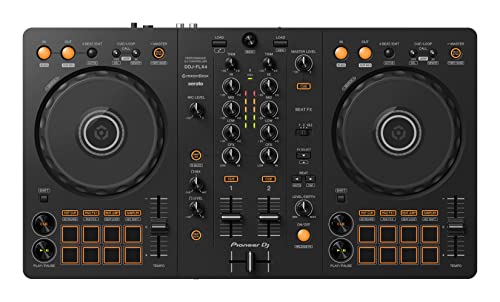
- COMPATIBLE WITH A HOST OF DEVICES - The DDJ-FLX4 is compatible with a wide range of devices, including PC and Mac computers, iPhones and iPads, and Android phones and tablets. So no matter what device...


- 10 channel mixer with USB and SPX digital effects

- 6-channel Analog Mixer with 2 Microphone Preamps
First Impressions: Unboxing the FIFINE AmpliGame SC3
When I first pulled the FIFINE AmpliGame SC3 Streaming Audio Mixer with XLR Interface out of its packaging, I was struck by its compact footprint. It’s significantly smaller than many of the “pro” boards I’ve used in the past, measuring just over 6 inches wide. It has a modern, matte finish and a layout that immediately makes sense. There’s no “bloat” here—just the sliders and buttons you actually need. Some might find the all-plastic construction a bit light, but it doesn’t feel “cheap” or flimsy. It feels like a focused tool designed for the desktop of a gamer. The RGB lighting is the star of the show initially; it’s vibrant without being distracting, and it gives the unit a high-tech glow that fits perfectly into a modern gaming aesthetic. Comparing it to previous entry-level interfaces I’ve tested, the SC3 stands out because it doesn’t just provide an XLR port; it provides a full suite of “fun” features like voice changers and sound pads right out of the box. You can see its full feature set and user reviews to get a sense of how it compares to more expensive units.
Key Benefits
- Exceptional value for money, offering XLR and phantom power at a budget price point.
- Incredibly easy plug-and-play setup for both Windows and Mac users.
- Tactile faders provide smooth, real-time control over four different audio channels.
- Fun and functional RGB lighting that enhances any streaming aesthetic.
Drawbacks
- The build is primarily plastic, making it very lightweight on the desk.
- XLR gain can be slightly low for certain “gain-hungry” dynamic microphones.
Deep Dive: A Comprehensive Performance Analysis of the FIFINE SC3
Seamless Connectivity and the Power of XLR
The primary reason anyone looks at the FIFINE AmpliGame SC3 Streaming Audio Mixer with XLR Interface is that XLR input. In my testing, moving from a standard USB mic to an XLR condenser through this mixer was like taking a blanket off my speakers. The SC3 provides a true 48V phantom power toggle, which is essential for high-end mics. We found that the preamp inside is surprisingly clean for a device at this price. When I connected my favorite condenser mic, the background hiss—often a plague on budget interfaces—was remarkably low. This makes it a feature that really sets it apart in the sub-$60 category.
Setup was genuinely as simple as plugging in the USB-C cable to my PC and the XLR cable to my mic. Windows recognized it immediately as a sound device, and I didn’t have to go hunting for obscure drivers. We confirmed through several hours of streaming that the connection remains stable, with no dropouts or “robotic” digital interference. The inclusion of a 3.5mm headset jack and a Line-Out port means you can route your audio to a secondary streaming PC or a pair of monitors with ease. For those just starting, this “no-fuss” approach is a godsend.
Tactile Mastery: Faders, Buttons, and Real-Time Control
There is something inherently satisfying about physical sliders. On the FIFINE AmpliGame SC3 Streaming Audio Mixer with XLR Interface, you get four distinct faders: Microphone, Line-In, Headphone, and Line-Out. I spent a full week using these faders during live gaming sessions, and they allowed me to perform “on-the-fly” mixing that just isn’t possible with a mouse. If an explosion in-game was too loud, I could flick the Line-In fader down in a millisecond. If I wanted to hear my teammates more clearly, I bumped the headphones up. The faders have a decent amount of resistance—they don’t feel loose or “wobbly,” which was a pleasant surprise given the plastic housing.
The mute buttons located directly below each fader are equally impressive. They feature a soft-touch click and light up when engaged. During one stream, I had a sudden coughing fit; being able to slap a physical mute button without looking away from the game kept the broadcast professional. We also noted that the real-time monitoring through the headphone jack is virtually latency-free. Hearing yourself talk without that distracting “echo” or delay is vital for maintaining a natural speaking rhythm during long podcasts or game commentaries. You can check the latest price and availability to see why so many streamers are making the switch to this tactile setup.
Creative Flair: Voice Changers and Custom Sound Pads
While the utility of a mixer is important, the “fun” factor shouldn’t be overlooked. The FIFINE AmpliGame SC3 Streaming Audio Mixer with XLR Interface includes six voice-changing modes and four customizable sound pads. I initially thought these might be gimmicks, but in practice, they add a lot of personality to a stream. The voice changers range from “Male” and “Female” to “Robot” and “Monster.” While they aren’t studio-grade pitch shifters, they are more than adequate for comedic moments during a stream.
The four “A, B, C, D” buttons allow you to record up to 15 seconds of audio each. I recorded a few “meme” sound bites and an intro jingle. Being able to trigger these with a single tap adds a layer of production value that usually requires dedicated software like Soundpad. We found that the recording process is straightforward: just hold the button, speak into the mic, and let go. The playback is clear and integrates perfectly into the mix. This level of customization on a budget device is truly impressive and something we rarely see executed this well.
The Aesthetic Edge: RGB and Desk Integration
Let’s talk about the look. The FIFINE AmpliGame SC3 Streaming Audio Mixer with XLR Interface is unashamedly a gaming device. The RGB ring around the faders and the backlit buttons can be customized with various colors and effects. We found that the colors are punchy and bright enough to be seen clearly on a face-cam, which helps tie your “stream brand” together. You can toggle through different modes with a dedicated button, ranging from solid colors to breathing effects.
Beyond the lights, the compact size is its greatest ergonomic asset. It fits neatly under a monitor or off to the side of a keyboard without dominating your workspace. During our evaluation, we noticed that because it is so light (0.5 kg), it can occasionally slide if your cables are very heavy or stiff. I solved this by adding a small piece of double-sided tape or a non-slip mat, but it’s something to keep in mind if you have a cramped desk. Despite this, the layout is so intuitive that I was able to operate it by touch alone after only two days of use. It’s a well-thought-out piece of equipment that respects your desk real estate. If you want to see it in action, take a closer look at the design here.
What Other Users Are Saying
The general consensus among the community for the FIFINE AmpliGame SC3 Streaming Audio Mixer with XLR Interface is overwhelmingly positive, particularly regarding its price-to-performance ratio. Many users describe it as a “game-changer” for those who can’t justify the cost of high-end equipment. One user noted, “It has everything a new streamer needs for $50; you get voice effects and the ability to control your mic and game audio separately without any lag.” This sentiment is echoed by many who appreciate the simplicity of the plug-and-play design.
However, the feedback isn’t without its critiques. A few experienced users mentioned that while it works great for most mics, “The gain for high-end dynamic mics like the Shure SM7B might be a bit low, requiring a boost in post-production or a separate Cloudlifter.” Another common observation is the build: “It’s very plastic-y, so don’t expect it to feel like a piece of heavy studio gear.” Despite these minor gripes, most agree that for the price, it’s an unbeatable entry point. It bridges the gap between amateur and professional audio perfectly for the average creator.
Comparing the FIFINE SC3 to the Competition
To help you make the best decision, we have compared the FIFINE AmpliGame SC3 Streaming Audio Mixer with XLR Interface against three other popular options in the mixing and controller space. Each has a slightly different focus, from MIDI control to multi-channel DJing.
1. Akai Professional MIDImix USB MIDI Controller Mixer

- Complete Mix Control - Lightweight, compact and robust ultra-portable MIDI mixer / DAW controller seamlessly maps all mixer settings to your DAW with a single push of a button
- Mixdown Essentials - 8 individual line faders and 1 master fader for controlling track volume, virtual instrument parameters, effect settings and more
The Akai MIDImix is a different beast entirely. While the FIFINE AmpliGame SC3 Streaming Audio Mixer with XLR Interface is focused on routing live audio and providing phantom power for mics, the Akai is a MIDI controller meant for DAW software like Ableton Live. It has far more knobs and buttons, making it superior for music production and mixing recorded tracks. However, it lacks an XLR input and 48V phantom power. If you are a producer looking to map faders to your software, go with the Akai. If you are a streamer who needs to plug in a microphone and talk to an audience, the FIFINE is the correct choice.
2. Pyle PYD1964B.5 6-Channel Bluetooth DJ Mixer

- Bluetooth: the Bluetooth DJ controller allows you to wirelessly transmit your entire MP3 library right into your mix from devices like your iPad, iPhone, Android smart phone or tablet
The Pyle PYD1964B.5 is a rack-mountable DJ mixer designed for more traditional audio setups, including Bluetooth connectivity and multiple line-level inputs for turntables or CD players. It offers more channels (6 vs 4) and a built-in equalizer. However, it is much larger and significantly more complex to set up for a simple PC stream. It lacks the “gaming” features like voice changers and custom sound pads found on the SC3. For a home DJ setup or a small venue, the Pyle is great. For a desktop streamer, it is likely overkill and lacks the specific USB-C integration that makes the FIFINE so convenient.
3. G-MARK MK800MP3 8-Channel Audio Mixer with Bluetooth & USB

- 【Professional 8-Channel DJ Mixer】The sound mixer is a high-quality audio mixer designed specifically for professional use. With 8 channels, including phantom power (+48V) and mic preamp, this...
- 【+48V Phantom Power】The 8-channel professional audio mixer with an independent 48V power switch, which to provide a stable power supply for microphones that require phantom power, effective...
The G-MARK MK800MP3 is an 8-channel board that looks more like a traditional mixing console. It offers Bluetooth and an MP3 player, making it versatile for live performances or karaoke. While it does offer phantom power, it lacks the specialized “streaming” interface features of the FIFINE AmpliGame SC3 Streaming Audio Mixer with XLR Interface. The G-MARK is built for those who need to manage many inputs at once, like a small band or a complex podcast with four guests. However, for a solo gamer, the extra size and complexity make it less user-friendly than the streamlined SC3.
Final Verdict: Is the FIFINE AmpliGame SC3 Your Best Bet?
After putting the FIFINE AmpliGame SC3 Streaming Audio Mixer with XLR Interface through its paces, the verdict is clear: this is the king of budget streaming audio. It takes the complicated world of XLR audio and phantom power and distills it into a package that is affordable, fun, and incredibly functional. While the plastic build and lower gain on certain mics are worth noting, they are minor trade-offs when you consider you’re getting a fully functional interface, voice changer, and soundboard for a fraction of the price of the competition. If you are currently struggling with software mixers or a mediocre USB microphone, this device will transform your production quality overnight. It gives you the professional control you need to keep your audience engaged and your audio crystal clear. Don’t let complicated audio hold your content back any longer—this is the upgrade you’ve been waiting for. We highly recommend you pick up the FIFINE AmpliGame SC3 today and finally take full control of your sound.
Last update on 2026-04-02 / Affiliate links / Images from Amazon Product Advertising API