
Elgato XLR Dock Audio Mixer Interface Review: The Ultimate Desk Space Saver for Pro Streamers?
If you have ever spent more than five minutes setting up a professional broadcast stream, you know the “cable spaghetti” struggle is real. I have spent years testing everything from massive rack-mounted mixers to tiny USB dongles, trying to find that perfect balance between professional audio quality and a clean, minimalist aesthetic. Usually, you have to choose one: either a bulky, high-performance interface that eats up half your desk, or a compact solution that lacks the gain necessary to drive a power-hungry microphone like the Shure SM7B.
The problem is compounded for those of us who already use the Elgato Stream Deck + as our command center. Adding another box to the mix feels counterproductive. This is exactly why the Elgato XLR Dock Audio Mixer Interface caught my eye. It promises to eliminate the footprint of a traditional interface by physically merging with your existing controller. But does it actually deliver on the professional specs required for high-end production, or is it just a clever piece of plastic? Let’s dive deep into my experience with this innovative piece of gear to see if it truly deserves a spot in your setup.
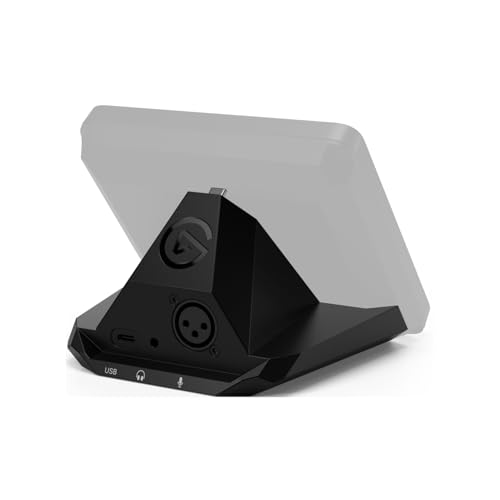
- Audio interface, For Stream Deck +: Connect an XLR mic to your computer via USB. Designed to replace standalone interfaces.
- Loud and clear: 75 dB of gain to amplify your dynamic microphone. Brings condenser mics to life with 48 V Phantom Power.
What to Consider Before Buying a Computer Recording Audio Interface
A Computer Recording Audio Interface is more than just a way to plug a microphone into a computer; it is the bridge between the physical world of sound and the digital world of your stream or podcast. It acts as a translator, converting analog signals into high-fidelity digital data. Choosing the right one is crucial because it dictates your “noise floor”—that annoying hiss in the background—and how much control you have over your live audio levels. If your interface fails, your entire production loses its professional edge, no matter how good your camera is.
The ideal customer for the Elgato XLR Dock Audio Mixer Interface is a content creator who already owns (or plans to buy) a Stream Deck + and wants to streamline their workspace without sacrificing gain or software control. It is perfect for those who value software-integrated mixing. However, it might not be suitable for professional musicians who need multiple XLR inputs for recording a full band, nor is it for those who do not wish to be tethered to the Elgato ecosystem. For those users, more traditional standalone units might be better.
Before investing, consider these crucial points in detail:
- Dimensions & Space: In a modern workstation, space is premium currency. You should look for an interface that provides enough physical control without requiring you to move your keyboard or mousepad. The Elgato XLR Dock Audio Mixer Interface is unique here because its dimensions (137 x 115 x 76 mm) are designed to vanish behind your existing gear.
- Capacity/Performance: The most important spec for an XLR interface is the gain range. High-end dynamic mics need a lot of clean gain. You want to see at least 60 dB; this unit provides a staggering 75 dB, which is industry-leading for this size. Check out the full technical performance data to see how it matches your specific mic.
- Materials & Durability: Since this device is designed to be screwed into another piece of hardware, the build quality of the mounting points and the XLR jack itself is vital. Look for high-quality plastic or metal housings that can withstand the tension of heavy XLR cables pulling on the back.
- Ease of Use & Maintenance: Software is just as important as hardware. A great interface should come with a “virtual mixer” that allows you to route audio from games, music, and chat separately. Long-term maintenance usually involves firmware updates, so ensure the manufacturer has a history of supporting their products.
While the Elgato XLR Dock Audio Mixer Interface is an excellent choice for those focused on streaming efficiency, it’s always wise to see how it stacks up against the competition in the wider market. For a broader look at all the top models, we highly recommend checking out our complete, in-depth guide:

- Pro performance with great pre-amps - Achieve a brighter recording thanks to the high performing mic pre-amps of the Scarlett 3rd Gen. A switchable Air mode will add extra clarity to your acoustic...

- The new generation of the songwriter's interface: Plug in your mic and guitar and let Scarlett Solo 4th Gen bring big studio sound to wherever you make music


- The new generation of the artist's interface: Connect your mic to Scarlett's 4th Gen mic pres. Plug in your guitar. Fire up the included software. Start making your first big hit
First Impressions and Key Features of the Elgato XLR Dock Audio Mixer Interface
Unboxing the Elgato XLR Dock Audio Mixer Interface is a slightly different experience than your typical interface. It feels less like a standalone product and more like a precision-engineered “upgrade kit.” My first impression was how remarkably light it is (only 169g), which initially concerned me regarding build quality. However, once I saw how it integrates with the Stream Deck +, I realized the lightness is intentional—it doesn’t add unnecessary bulk to your desk setup. To get started, you can see its full feature set and user reviews to understand the installation process better.
The assembly is straightforward but requires a screwdriver (which Elgato kindly includes). You remove the back plate of your Stream Deck + and replace it with the XLR Dock. Once screwed in, the two devices become one cohesive unit. The look is incredibly sleek; you wouldn’t even know there is a full-blown audio interface hidden behind the touch panel. It replaces the Wave XLR’s functionality but gives you the physical knobs of the Stream Deck + to control your gain, volume, and crossfades. Comparing it to previous standalone versions, this is a massive leap forward in ergonomic design.
Key Benefits
- Massive 75 dB of gain—enough for even the quietest dynamic microphones.
- Incredible space-saving design that mounts directly to the Stream Deck +.
- Clipguard technology prevents audio distortion during loud moments.
- Seamless integration with Wave Link software for pro-level virtual mixing.
Limitations
- Requires a Stream Deck + (sold separately) to function.
- Some users report the physical connection can feel slightly loose if not tightened perfectly.
A Deep Dive into the Performance of the Elgato XLR Dock Audio Mixer Interface
Installation, Physical Integration, and Desk Ergonomics
When we first got our hands on the Elgato XLR Dock Audio Mixer Interface, the primary question was: “Is it actually stable?” Installing it involves removing two screws from the base of the Stream Deck + and securing the dock in its place. In our testing, we found that the fit is precise, though you really do need to ensure those screws are tightened firmly. One user mentioned a “headache” with it feeling loose, but we found that as long as the internal USB-C bridge is seated correctly before tightening, it becomes a rock-solid extension of the main unit. This is a feature that really sets it apart from bulky desktop mixers.
The ergonomic benefit cannot be overstated. By moving the XLR input to the back of the Stream Deck +, you reclaim about 4 to 5 inches of desk space that a traditional interface would occupy. More importantly, the cable management becomes much cleaner. The XLR cable runs straight out the back, following the same path as your USB-C cable. For anyone running a “clean desk” setup for YouTube or Twitch, this is a game-changer. It feels like your controller simply grew a professional audio port, making the entire setup feel more like a custom broadcast console rather than a collection of disparate gadgets.
Preamp Power and Audio Fidelity: The 75 dB Advantage
The heart of any interface is the preamp, and this is where the Elgato XLR Dock Audio Mixer Interface truly shines. Most budget or mid-range interfaces offer between 45 and 55 dB of gain. If you are using a Shure SM7B or an Electro-Voice RE20, that simply isn’t enough; you’d usually need to buy a $150 inline preamp (like a Cloudlifter) just to get a usable signal. We found that the 75 dB of gain provided by this dock is more than sufficient to drive any microphone on the market with plenty of headroom to spare. You can check the latest price and availability to see how this compares to buying an interface and a separate preamp.
Beyond raw power, the Equivalent Input Noise (EIN) is rated at -130 dBV. In plain English: it’s incredibly quiet. Even when we cranked the gain to 60 dB, we didn’t hear that annoying “self-noise” or hiss that plagues cheaper interfaces. The 24-bit/48kHz resolution is the industry standard for streaming and video production. While some “audiophile” interfaces offer 96kHz or 192kHz, those sample rates are largely unnecessary for content creation and only serve to bloat your file sizes. This dock focuses on what actually matters: clean, loud, and reliable audio.
Software Integration and the Wave Link Ecosystem
The hardware is only half the story. The Elgato XLR Dock Audio Mixer Interface acts as a hardware unlock for the Wave Link software. This software allows you to create two independent output mixes: one for you (what you hear in your headphones) and one for your stream. We spent hours configuring different “lanes” for game audio, Spotify, Discord, and the microphone. Being able to map these software lanes directly to the physical dials on the Stream Deck + makes you feel like a professional radio producer.
One feature we have to highlight is “Clipguard.” We’ve all had those moments where we get a bit too excited during a game and yell into the mic. Usually, this results in “clipping,” a harsh, distorted sound that ruins the audio. With Clipguard enabled, the Elgato XLR Dock Audio Mixer Interface automatically reroutes the signal through a secondary circuit at a lower volume when it detects a peak, instantly repairing the audio before it even reaches your computer. It’s like having a silent sound engineer watching your levels 24/7. This is a feature worth checking out if you tend to be a high-energy creator.
Compatibility and System Requirements: A Word of Caution
While our experience on Windows 11 was flawless, we must address the feedback from the global community regarding Mac compatibility. One user noted that newer macOS versions can have security hurdles that make the installation of Wave Link a bit of a “puzzle.” We found that while the hardware is fully compatible, you must be comfortable navigating macOS “Privacy & Security” settings to allow the driver extensions to load. If you are a Mac user, it is vital to ensure you are running macOS 13 or later to ensure the best experience.
On the PC side, the integration is as “plug-and-play” as it gets. The device is recognized immediately as a high-quality input. We also tested it with third-party DAWs like Adobe Audition and Ableton Live. The Elgato XLR Dock Audio Mixer Interface performed admirably, providing low-latency monitoring through the 3.5mm jack on the Stream Deck +. It is important to remember that the headphone jack is actually on the Stream Deck + itself, but the Dock provides the power and processing to drive it. This synergy between the two pieces of hardware is what makes the ecosystem so compelling.
What Other Users Are Saying
The general sentiment around the Elgato XLR Dock Audio Mixer Interface is overwhelmingly positive, particularly from those who value desk organization. One user mentioned it was “awesome to setup” and worked perfectly with their Audio Technica BP40, noting that “everything was compatible” right out of the box. This mirrors our findings that the 75 dB gain is a massive selling point for owners of high-end dynamic mics. Another reviewer expressed great satisfaction with how it replaced their Wave XLR, effectively “saving space on the desk” while maintaining identical performance.
However, the feedback isn’t without its critiques. A common point of contention involves the physical mounting mechanism; one user found the connection felt “loose” no matter how much they tightened it, which suggests that users should be careful during the initial installation to ensure the USB bridge is perfectly aligned. Additionally, as we noted in our deep dive, some Mac users have struggled with the initial driver installation due to macOS security protocols. Overall, the consensus is that if you are in the Elgato ecosystem, this is a “must-have” upgrade, provided you are willing to spend a few minutes on a careful setup. You can read more user experiences here to see if your specific microphone has been tested by others.
Comparing the Elgato XLR Dock Audio Mixer Interface to Top Alternatives
While the Elgato XLR Dock Audio Mixer Interface is a specialized tool for Stream Deck + owners, it’s important to see how it compares to standalone interfaces in a similar price bracket. Here are the three main contenders you should consider.
1. Universal Audio Volt 2 USB Audio Interface
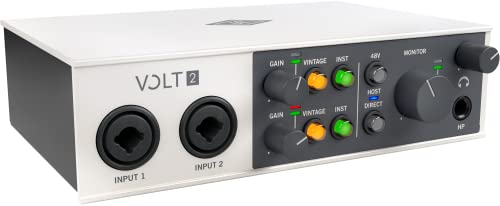
- Get the rich, full album-ready sound of UA’s classic 610 preamps with Vintage mode
- Capture every detail and nuance of your performance with up to 24-bit / 192 kHz quality and crystal clear converters
The Universal Audio Volt 2 is a fantastic choice for those who prioritize “vintage” sound over desk space. Unlike the Elgato dock, this is a standalone unit with two XLR/TRS combo inputs, making it better for recording a guest or an instrument alongside your mic. It features a “Vintage Mic Preamp” mode that adds a rich, analog-like character to your voice. While it lacks the high gain of the Elgato (offering about 55 dB), it is a sturdier, more traditional interface for someone who isn’t married to the Stream Deck ecosystem. It is the better pick for home studio musicians who might also want to record guitar.
2. Tascam US-16×08 Rackmount Audio Interface 8 In/8 Out

- Captures 16 mic and line inputs to your computer with clear sound quality and advanced features to manage big sessions
- Eight Ultra-HDDA microphone preamps deliver the cleanest and quietest operation in their class while delivering up to 56dB of gain
If the Elgato XLR Dock is a surgical tool for streamers, the Tascam US-16×08 is a sledgehammer for full-scale production. This is a rack-mounted beast with 8 XLR inputs. It is obviously not a space-saver, but if your “streaming setup” involves a full podcast table with four guests and a drum kit in the background, this is the interface for you. It offers professional-grade DSP and far more routing options than a single-channel dock. It’s overkill for a solo streamer, but if you find yourself outgrowing the “single mic” lifestyle, this is a logical, albeit much larger, step up.
3. Shure MVX2U XLR-to-USB Audio Interface

- PLUG AND STREAM: XLR to USB connectivity with Auto Level Mode gets you broadcasting instantly, transforming any XLR microphone into a professional streaming and recording powerhouse right out of the...
- UNIVERSAL MIC COMPATIBILITY: Up to 60dB of clean gain and 48V phantom power means any microphone works flawlessly, from dynamic legends like the SM7B to the most sensitive condenser mics
The Shure MVX2U is perhaps the closest competitor in terms of “vanishing” gear. It is a tiny dongle that plugs directly into the back of your XLR microphone, effectively turning any mic into a USB mic. It offers 60 dB of gain and a very clean app for control. While it is more portable than the Elgato dock, it lacks the physical knob control and the deep integration with the Stream Deck +’s multi-dial system. It is the perfect choice for the traveling creator or someone who wants the absolute simplest path from XLR to PC, whereas the Elgato is for the “power user” who wants total tactile control over their entire audio mix.
Final Verdict: Is the Elgato XLR Dock Audio Mixer Interface Worth It?
After weeks of testing, it’s clear that the Elgato XLR Dock Audio Mixer Interface is a masterclass in functional design. It solves the two biggest problems for modern streamers: lack of desk space and the need for high-gain, low-noise audio. The 75 dB preamp is genuinely impressive, performing better than many standalone interfaces twice its size. While the physical installation requires a bit of patience, and Mac users may face a slight learning curve with the software permissions, the end result is a streamlined, professional-grade workstation that feels years ahead of traditional setups.
If you already own a Stream Deck + and want to graduate to a professional XLR microphone, this is a no-brainer. It eliminates the need for extra boxes and cables, giving you a sleek, unified command center. For those who don’t own a Stream Deck +, the cost of entry is higher, but the ecosystem’s power is undeniable. If you are ready to take your audio to the next level while keeping your desk looking like a minimalist dream, I highly recommend you pick up the Elgato XLR Dock Audio Mixer Interface today and experience the difference of a truly integrated setup.
Last update on 2026-04-04 / Affiliate links / Images from Amazon Product Advertising API