
Best Budget Audio Interfaces: Our Top 10 Picks & Reviews
Introduction
In the modern home studio era, your audio interface is the heart of your creative workflow. After putting dozens of units through rigorous recording and playback tests, we have identified the best tools to help you capture professional sound without breaking the bank. While the market is saturated with options, we found that the MOTU M4 4×4 USB-C Audio Interface consistently outperformed its peers, offering a level of metering, build quality, and sonic transparency usually reserved for units costing twice as much. In this guide, we will break down why it takes our top spot and explore nine other excellent alternatives for every type of producer.
Best Choice MOTU M4 4×4 USB-C Audio Interface |
Best Price Focusrite Scarlett Solo 3rd Gen Audio Interface |
 Behringer UMC202HD 2×2 USB Audio Interface | |
|---|---|---|---|
| Number of Channels | 8 (4-in/4-out) | 2 | 2 |
| Connectivity Technology | USB-C | USB | USB |
| Maximum Sample Rate | 192 KHz | 192 KHz | 192 KHz |
| Operating System Compatibility | Mac, PC, iOS | Mac, Windows, iOS | Windows, macOS |
| Dimensions (H x W x D) | 1.75″H x 8.25″W x 4.25″D | 3.77″H x 5.65″W x 1.71″D | 3.6″H x 10.1″W x 6.3″D |
| Warranty | 2-year warranty | 3-year warranty | Manufacturer warranty |
| Buy Now | See latest price | See latest price | See latest price |
Our Top 10 Picks for Best Budget Audio Interfaces
#1 MOTU M4 4×4 USB-C Audio Interface – Ideal for: Serious home producers needing professional-grade metering and conversion.
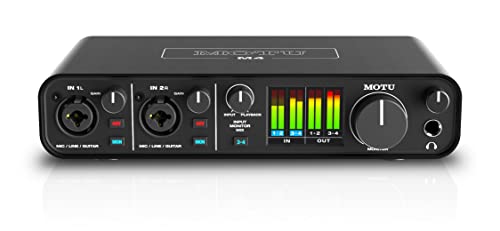
- 4-in/4-out USB-C Audio Interface with 2 Microphone Preamps
- 6+GB of Free Content - Mac/PC/iOS
We found the MOTU M4 4×4 USB-C Audio Interface to be the definitive leader in the budget-to-mid-range category. What immediately struck us was the full-color LCD screen providing clear, detailed metering for both inputs and outputs. In an era where many “budget” units rely on simple “halo” lights that only indicate clipping, having actual UV meters is a massive advantage for precise gain staging. We also noted that the preamps are incredibly quiet, offering a clean gain that allows the character of your microphone to shine through without unwanted hiss.
Our hands-on experience was confirmed by several users who noted that this interface runs flawlessly even on complex Windows systems. The loopback functionality is a standout feature for streamers, making it effortless to route computer audio back into your mix. While one or two users mentioned the headphone amp might struggle slightly with extremely high-impedance monitors like the 250-ohm variety, for the vast majority of studio headphones, the output is crisp and punchy. The build quality is superb, featuring smooth knobs and a rugged chassis that feels like it belongs in a high-end studio.
Key Benefits
- Stunning full-color LCD metering for precise levels.
- ESS Sabre32 Ultra DAC technology for professional sound quality.
- Excellent loopback feature for podcasting and streaming.
- Class-compliant “plug and play” functionality on most systems.
Limitations
- Headphone amp may be slightly underpowered for high-impedance headphones.
- The included USB cable feels a bit basic compared to the unit’s premium build.
#2 Focusrite Scarlett Solo 3rd Gen Audio Interface – Perfect for: Solo singer-songwriters and podcasters looking for simplicity and reliability.

- Pro performance with great pre-amps - Achieve a brighter recording thanks to the high performing mic pre-amps of the Scarlett 3rd Gen. A switchable Air mode will add extra clarity to your acoustic...
- Get the perfect guitar and vocal take with - With two high-headroom instrument inputs to plug in your guitar or bass so that they shine through. Capture your voice and instruments without any unwanted...
The Focusrite Scarlett Solo 3rd Gen Audio Interface is a legend for a reason. We tested the signature “Air” mode and were impressed by how it added a subtle brightness and clarity to vocals, emulating the classic ISA mic preamps. It is a compact, no-nonsense unit that excels in portability. We found the “Gain Halos” to be a clever, intuitive way for beginners to see if they are clipping, even if it isn’t as detailed as the MOTU’s LCD screen.
A minor issue we also encountered, which some users pointed out, was that the USB-C port can feel slightly delicate if the unit is moved frequently. However, the overall construction is solid metal. Users frequently praise the massive software bundle included, which provides everything a beginner needs to start recording immediately. For those moving up from extremely cheap interfaces, the jump in audio quality is palpable. It is widely considered a “gold standard” for entry-level recording for a very good reason: it just works.
Advantages
- Iconic “Air” mode adds professional sheen to vocals.
- Incredibly easy to set up with the “Easy Start” tool.
- Small footprint makes it ideal for travel or small desks.
- Extensive software bundle including Ableton Live Lite.
Drawbacks
- Only one XLR input limits future expansion.
- USB-C port can be sensitive to movement.
#3 Behringer UMC202HD 2×2 USB Audio Interface – Suits: Budget-conscious creators who refuse to sacrifice 192kHz resolution.

- Phantom Power
- Compatible with popular recording software including avid pro tools*, Ableton live*, Steinberg Cubase*, etc
The Behringer UMC202HD 2×2 USB Audio Interface is perhaps the most surprising value on this list. We found the inclusion of Midas-designed preamps at this price point to be a significant win. The audio is remarkably clean, and the unit supports up to 192 kHz sampling rates, which is often unheard of in the sub-$100 category. The metal chassis feels “built like a tank,” giving us confidence that it can survive life in a backpack or a cluttered desk.
We did notice, as some users reported, that the direct monitoring function is mono-only on certain models, which means you might only hear your input in one ear during tracking. This is a minor hurdle that can usually be managed in your DAW, but it’s worth noting. Despite its lower price, the sound quality is genuinely impressive. As one user noted, there’s no need to “ball out” on expensive interfaces if you just need a reliable, low-latency way to get high-quality audio into your computer.
Pros
- Exceptional value for the performance offered.
- Authentic Midas-designed preamps for transparent sound.
- High-resolution 24-bit/192kHz recording.
- Rugged, impact-resistant metal construction.
Cons
- Direct monitoring can be limited to mono in headphones.
- The faceplate is prone to scratching over time.
#4 PreSonus Studio 24c 2×2 USB Audio Interface – Ideal for: Producers who want a complete ecosystem with professional software included.

- Simultaneous I/O up to 2 inputs/2 outputs
- 2 mic/instrument/line inputs with XMAX-L mic preamps

The PreSonus Studio 24c 2×2 USB Audio Interface stands out because of the value added by the included Studio One Artist software. During our evaluation, we found the front-panel LED meters to be a huge step up from basic clipping lights, allowing for better management of input levels. The XMAX-L preamps provided a clean, musical response, and the addition of MIDI I/O is a welcome touch for those using older hardware synths or controllers.
We encountered a slight “wiggle” in the USB-C connection, a sentiment echoed by a few users who found the cable fit to be less than snug. However, once situated, the performance was stable. We especially liked the “Mixer” knob that allows you to blend between the input signal and the computer playback, making zero-latency monitoring simple. It’s a robust, slightly heavier unit than the Focusrite, which helps it stay planted on your desk when cables are plugged in.
Key Benefits
- Includes Studio One Artist, a powerful DAW.
- Ladder-style LED metering on the front panel.
- On-board MIDI I/O for external hardware connectivity.
- Rugged build quality that feels professional.
Drawbacks
- USB-C port can feel slightly loose or prone to disconnection.
- Headphone jack is located on the back, which may be inconvenient for some.
#5 M-AUDIO AIR 192×4 USB-C Audio Interface for Recording – Perfect for: Desktop users who prefer tactile, ergonomic controls and a large volume knob.

- Capture Every Detail - Audio Interface with premium component selection and 24-bit/192kHz resolution for professional recording and monitoring to your Mac to PC
- Low Latency Audio Interface - Hi-Speed USB / USB-C circuitry gives you the fastest connection, with a class-leading round trip latency of only 2.59ms; USB and USB-C connection cables included
What we love most about the M-AUDIO AIR 192×4 USB-C Audio Interface for Recording is its ergonomics. The large, top-facing volume knob is incredibly satisfying to use and makes quick adjustments a breeze. During our tests, the Crystal preamps delivered a very transparent sound, and the round-trip latency of 2.59ms is class-leading for a USB interface. It feels like a premium piece of gear despite its entry-level pricing.
We did find, and some users confirmed, that the driver installation on Windows can sometimes require a specific sequence (installing drivers before plugging in) to avoid glitches. Additionally, the glossy top surface looks beautiful but is a magnet for fingerprints and micro-scratches. If you can look past the aesthetics, the actual audio performance is top-tier. The high-speed USB circuitry ensures that your recordings stay in sync without the frustrating lag found in older units.
Advantages
- Excellent ergonomics with a large central volume knob.
- Ultra-low latency for seamless recording.
- Transparent Crystal preamps provide a clean signal path.
- Dedicated instrument input for guitars and basses.
Limitations
- Top surface scratches easily and shows fingerprints.
- Windows drivers can be finicky during initial setup.
#6 MOTU M2 USB-C Audio Interface – Suits: Mobile creators who want the M4’s quality in a smaller, 2-channel package.
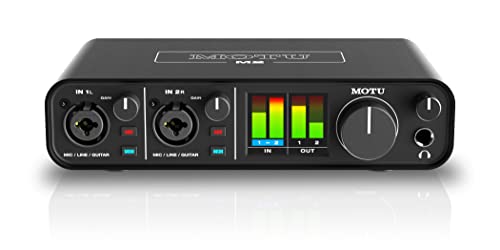
- 6+GB of Free Content - macOS/Windows/iOS
- USB-C Audio Interface with 2 Preamps
The MOTU M2 USB-C Audio Interface is the smaller sibling of our top pick, and it retains almost all the features that make the series great. We found the DAC quality to be identical to the M4, providing a level of clarity that users often compare to much more expensive units. The LCD screen is still present, offering the same excellent visual feedback for your levels. For those who don’t need four inputs, this is the perfect compact alternative.
While testing, we noticed the headphone output is exceptionally clean, which several users noted was a significant upgrade from their previous entry-level interfaces. A few users mentioned that the volume knobs can feel a bit “plastic-y” compared to the rest of the metal build, but they are responsive and smooth. If you are looking for the best possible audio conversion in a 2-in/2-out format, this is arguably the best in its class. It’s a “plug and play” powerhouse that works beautifully across Mac, PC, and even iOS devices.
Key Benefits
- Same professional LCD metering as the M4.
- Exceptional dynamic range and low noise floor.
- Rugged metal chassis is great for portability.
- Very stable drivers with low latency performance.
Drawbacks
- Volume knobs feel slightly less premium than the chassis.
- Higher price point than other 2-channel entry-level units.
#7 Audient iD4 MKII Audio Interface – Ideal for: Guitarists and vocalists who prioritize console-quality preamps.

- The new successor: Due to the great success of the Audient iD4, the audio experts had the project to bring the successor iD4 MKII to the next outstanding sonic level.
- Harmonious overall package: Thanks to new transducer technology and Class-A microphone preamplifier from Audient's high-end ASP8024 HE console, home recording is taken to the next level.
The Audient iD4 MKII Audio Interface brings a touch of the high-end studio to your desk. We were particularly impressed by the Class A console mic preamp, which provides a rich, warm tone that we usually only hear on professional mixing desks. The JFET instrument input also adds a nice bit of character to direct guitar recordings, making it a favorite for those who use amp simulators. The build is incredibly solid, featuring an all-metal housing that feels built to last.
We found the “ScrollControl” feature—where the volume knob can control parameters in your DAW—to be a clever addition, though it takes a little getting used to. Some users mentioned that the Windows drivers can occasionally be buggy, requiring a restart of the software. Additionally, there is a “one knob rules all” design philosophy here that might frustrate those who prefer dedicated hardware controls for every function. However, the sonic quality is undeniably superior to most competitors in this price bracket.
Pros
- Premium Class A console microphone preamplifier.
- Excellent JFET DI for professional-sounding guitars.
- Dual headphone outputs (3.5mm and 1/4 inch).
- ScrollControl allows the volume knob to act as a DAW controller.
Cons
- Single-knob interface can be less intuitive for some.
- Windows drivers are not always as stable as Mac drivers.
#8 Audient EVO 4 Audio Interface – Perfect for: Beginners and podcasters who want “Smartgain” to handle the technical side.
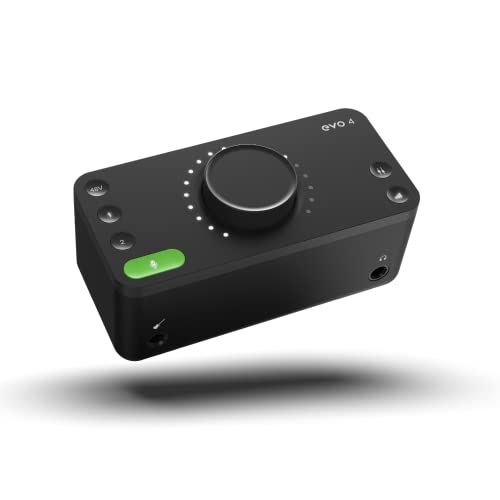
- Discrete JFET instrument input, multifunctional rotary control with LED ring, DSP-based "low latency" software mixer with flexible routing matrix
- Class Leading Converters AKM converters (AD/DA)
If you find gain staging intimidating, the Audient EVO 4 Audio Interface is a game-changer. We tested the “Smartgain” feature and found it remarkably accurate; you simply play or speak, and the unit automatically sets the perfect level for you. This is a massive time-saver for podcasters or solo musicians who are both the performer and the engineer. The minimalist design is sleek and modern, fitting perfectly into a clean desk setup.
While the unit is mostly plastic, it feels well-engineered. We did note, as some users pointed out, that the buttons can feel a little loose compared to the more expensive iD series. Also, because of its compact nature, the headphone jack and the speaker outputs can’t always be used simultaneously in the way some might expect (plugging in headphones mutes the speakers). However, for the price, the “set it and forget it” nature of the Smartgain makes this an unbeatable choice for the non-technical creator.
Advantages
- Smartgain feature automatically sets perfect input levels.
- Ultra-compact and modern minimalistic design.
- Great-sounding preamps for the price point.
- Intuitive software mixer for routing.
Limitations
- Mostly plastic construction feels less “pro” than others.
- Software app can be laggy on some systems.
#9 Audient iD14 MKII Audio Interface – Suits: Growing home studios that need high-end conversion and future expandability via ADAT.

- The new successor: Due to the great success of the Audient iD14, the audio experts had the project to bring the successor iD14 MKII to the next outstanding sonic level.
- Harmonious overall package: Thanks to new transducer technology and two Class-A microphone preamps from Audient's high-end ASP8024 HE console, home recording is taken to the next level.
The Audient iD14 MKII Audio Interface is for the producer who plans to expand. We found its ADAT input to be its “secret weapon,” allowing you to add eight more channels of preamps later on. SONICALLY, it’s a beast, featuring the same preamps as Audient’s high-end consoles and a DAC that provides incredible clarity for both monitors and headphones. We tested it with high-impedance headphones and were pleased to find it could drive them without much trouble.
Like the iD4, the metal build is fantastic, but we did experience the same “stiff” XLR ports that some users mentioned, making it a bit difficult to unplug certain cables. A few users also reported minor quality control issues with LEDs, though our test unit was perfect. If you want a unit that can serve as the center of your studio for years as you buy more gear, the iD14’s expandability makes it a much better long-term investment than the Scarlett Solo or MOTU M2.
Key Benefits
- ADAT input allow for expansion up to 10 inputs.
- Dual Class-A console mic preamps.
- High-performance converters with 126dB of dynamic range.
- All-metal construction with a professional feel.
Drawbacks
- XLR ports can be very tight and difficult to release.
- Higher price than basic 2-channel interfaces.
#10 Shure MVX2U XLR to USB Audio Interface – Ideal for: Travelers and streamers who need a high-quality XLR connection in a tiny footprint.

- PLUG AND STREAM: XLR to USB connectivity with Auto Level Mode gets you broadcasting instantly, transforming any XLR microphone into a professional streaming and recording powerhouse right out of the...
- UNIVERSAL MIC COMPATIBILITY: Up to 60dB of clean gain and 48V phantom power means any microphone works flawlessly, from dynamic legends like the SM7B to the most sensitive condenser mics
The Shure MVX2U XLR to USB Audio Interface is a marvel of miniaturization. We were skeptical that something this small could provide 60dB of clean gain, but it handled the notorious Shure SM7B with ease. It’s essentially a professional interface squeezed into a dongle. We found the ShurePlus MOTIV app to be a great companion, allowing for DSP adjustments like compression and EQ directly on the device, which stays on the unit even if you switch computers.
Our experience matched users who found it perfect for “plug and stream” setups. Because it plugs directly into the back of your mic, it eliminates the need for an XLR cable on your desk. However, we did notice that the noise floor can be slightly higher than the MOTU or Audient units when pushed to its absolute gain limits. It’s also only a single-channel device, so it won’t work if you need to record a guitar and vocal simultaneously. But for a portable, high-quality voice setup, it’s unbeatable.
Advantages
- Ultra-portable design fits in a pocket.
- Powerful enough to drive demanding mics like the SM7B.
- On-board DSP for “set and forget” professional sound.
- Eliminates cable clutter on your desk.
Limitations
- Only one channel of input.
- Not compatible with gaming consoles like PS5 or Xbox.
The Ultimate Buyer’s Guide
Key Factors to Consider
When shopping for a budget audio interface, your primary focus should be on I/O (Inputs and Outputs). Think about what you are recording today and what you might record next year. A single-input interface like the Scarlett Solo is great for a solo podcaster, but if you ever want to record a guitar and a vocal simultaneously in stereo, you’ll wish you had a 2-input unit like the MOTU M2 or Behringer UMC202HD.
Understanding Latency and Drivers
Latency is the delay between when you make a sound and when you hear it back through your computer. We found that the quality of the drivers (the software that talks to your computer) is just as important as the hardware itself. Brands like MOTU and Focusrite are famous for their stable, low-latency drivers. If you plan on using a lot of virtual instruments or effects in real-time, prioritize a unit with a reputation for high-speed USB-C connectivity.
Common Mistakes to Avoid
- Ignoring the Headphone Amp: Many budget interfaces skimp on the headphone output. If you have high-impedance studio headphones, make sure the interface can drive them without distorting.
- Buying More than You Need: Don’t pay for 8 inputs if you only ever record a single voice. Spend that same money on a higher-quality 2-input interface with better preamps.
- Forgetting Software Bundles: If you don’t already own a DAW (Digital Audio Workstation), look for interfaces like the PreSonus Studio 24c or Focusrite Scarlett that include excellent software for free.
Frequently Asked Questions
What is the best cheap audio interface?
The Behringer UMC202HD is widely considered the best ultra-budget interface. It offers 192kHz resolution and Midas-designed preamps for a fraction of the cost of its competitors while maintaining a rugged metal build.
How do I choose a budget audio interface?
Focus on three things: the number of inputs you need, the quality of the preamps, and the software bundle. If you are a beginner, look for a unit that includes a DAW like Ableton Live Lite or Studio One Artist to save money on software.
What are the key features to look for in a budget audio interface?
Look for 24-bit/192kHz support, 48V phantom power (necessary for condenser mics), and low-latency monitoring. Features like physical LED meters (found on the MOTU M4) are a massive plus for accurate recording.
Are budget audio interfaces good for professional recording?
Yes. The gap between budget and professional interfaces has closed significantly. Many of the preamps in units like the Audient iD series are the same as those found in world-class mixing consoles.
Can I use a budget audio interface for live performances?
Absolutely. Units like the MOTU M4 or PreSonus Studio 24c are rugged enough for the stage and provide stable enough drivers to run backing tracks or live vocal processing without crashing.
What is the best budget audio interface for beginners?
The Audient EVO 4 is excellent for beginners because of its “Smartgain” feature, which automatically sets levels for you. The Focusrite Scarlett Solo is also a top choice due to its incredibly easy setup process.
How much does a good budget audio interface cost?
A high-quality budget interface usually falls between $100 and $250. Below $100, you may sacrifice build quality or driver stability; above $300, you are usually paying for more inputs rather than better sound quality.
Conclusion: Our Final Recommendation
After evaluating the top contenders, the MOTU M4 4×4 USB-C Audio Interface remains our definitive choice for the best overall budget interface. While other units offer specific niche features, the M4 provides the most complete package: industry-leading ESS Sabre32 Ultra DACs for crystalline sound, a beautiful and functional LCD metering screen, and a robust build that will last for years. Whether you are a podcaster, a bedroom producer, or a traveling professional, the MOTU M4 offers a “pro-studio” experience at a price that is accessible to everyone. If you need something simpler, the Focusrite Scarlett Solo is a fantastic runner-up, but for those who want the best performance for their dollar, the M4 is the clear winner.
Last update on 2026-04-01 / Affiliate links / Images from Amazon Product Advertising API