
Behringer ULTRALINK PRO MX882 V2 8-Channel Splitter/Mixer Review: The Swiss Army Knife of Audio Signal Management
Have you ever found yourself in the middle of a recording session or a live sound setup, staring at a mess of cables and realizing you’ve run out of outputs? Maybe you need to send a single stereo mix to four different sets of powered monitors, or perhaps you have six different synthesizers that need to be summed down into a single stereo input on your audio interface. We have all been there—that frustrating moment where the logic of your signal flow hits a brick wall. Without a dedicated tool to manage these splits and mixes, you end up “daisy-chaining” equipment, which inevitably leads to signal degradation, ground loops, and a muddy final product. Solving this routing puzzle isn’t just about convenience; it’s about maintaining the professional integrity of your audio. The Behringer ULTRALINK PRO MX882 V2 8-Channel Splitter/Mixer is designed specifically to be the “problem solver” in these high-pressure scenarios, acting as a bridge between various pieces of gear that otherwise refuse to play nice together.

- Each channel can operate independently in mixer or splitter mode
- Extremely wide bandwidth for highest signal integrity
What to Consider Before Buying Recording Signal Direct Boxes and Routing Tools
A Recording Signal Direct Boxes and routing utility is more than just an item; it’s a key solution for any engineer who values flexibility and signal purity. In the modern studio or live environment, we are constantly dealing with mismatched levels—consumer gear at -10 dBV and professional gear at +4 dBu. If you don’t have a way to match these levels, you lose headroom or introduce unnecessary hiss. These tools allow you to expand the capabilities of your existing mixer or interface without needing to purchase an entirely new, larger console. They act as the “connective tissue” of your rack, ensuring that every signal goes exactly where it needs to go without losing its character along the way.
The ideal customer for this type of product is someone facing complex signal paths, such as a home studio owner with multiple hardware synths, or a live sound engineer managing multiple monitor zones. It is perfect for those who need to distribute a master signal to several different locations simultaneously. However, it might not be suitable for those who only work “in the box” (strictly using software) or those who only have a single microphone and one pair of speakers. If your setup is extremely basic, a 1U rackmount splitter might be overkill, and you might consider a simple, small passive DI box instead.
Before investing, consider these crucial points in detail:
- Dimensions & Space: Most professional routing tools come in a 19-inch rackmount format. You need to ensure you have 1U of rack space available and that your rack has enough depth to accommodate the cables and connectors that will be plugged into the rear. We found that having this in a permanent rack makes cable management significantly easier than using multiple small floor boxes.
- Capacity/Performance: Look at the number of channels and the bandwidth. For high-fidelity recording, you want a wide frequency response (like the 200 KHz capacity found here) to ensure that transients and high-end air are preserved. The ability to switch each channel independently between “splitter” and “mixer” mode is a game-changer for versatility.
- Materials & Durability: Since these units often sit in a rack for years, or travel in road cases, all-metal construction is non-negotiable. Check the quality of the potentiometers (knobs) and switches. You want components that feel solid and won’t become scratchy or intermittent if someone accidentally bumps into them or if the environment is less than pristine.
- Ease of Use & Maintenance: High-visibility metering is essential. When you are in a dark studio or a dim live venue, you need to see at a glance if your signals are clipping. Look for units with clear LED ladders for each channel. Maintenance usually involves keeping the jacks clean, so having accessible, high-quality XLR and TRS connectors is a major plus for long-term reliability.
While the Behringer ULTRALINK PRO MX882 V2 8-Channel Splitter/Mixer is an excellent choice, it’s always wise to see how it stacks up against the competition. For a broader look at all the top models, we highly recommend checking out our complete, in-depth guide:

- Passive Stereo DI with Isolation Transformer

- DEVICE CONNECTOR: Provides a variety of DI solutions with its inch device connector live sound recording applications. It allows you to easily connect keyboards, guitars & outboard signal processors


- Passive Mono Direct Box with Custom Transfmer Rugged I-beam Construction
First Impressions and the “Swiss Army” Nature of the Behringer ULTRALINK PRO MX882 V2 8-Channel Splitter/Mixer
When we first pulled the Behringer ULTRALINK PRO MX882 V2 8-Channel Splitter/Mixer out of the box, the first thing we noticed was its surprisingly sleek and professional aesthetic. Behringer has really stepped up their industrial design in recent years. The V2 feels more refined than its predecessor, with a cleaner faceplate and knobs that have just the right amount of resistance. It’s a standard 1U rackmount unit, and at 1.7 kg, it’s light enough not to weigh down your portable rack but heavy enough to feel substantial. You can see its full feature set and user reviews to understand why it’s a staple in so many project studios.
Setting it up was a breeze. The back panel is logically laid out with XLR and 1/4″ TRS connections, which allowed us to integrate it into our signal chain in minutes. Compared to older versions, we found the V2 to be slightly more compact in depth, which is a blessing for those of us with cluttered rack backs. The “retro” look of the gain LEDs is a nice touch, giving you immediate visual feedback on your levels. While it doesn’t offer phantom power—which is expected for a line-level tool—the sheer variety of tasks it can perform, from being a 6-channel DI to a stereo-to-8 splitter, makes it an incredible value proposition right out of the gate.
Key Benefits
- Incredible versatility: Each of the 6 main channels can be a mixer or a splitter independently.
- Transparent sound quality with an extremely wide bandwidth (200 KHz) for signal integrity.
- Excellent for level matching between consumer (-10 dBV) and professional (+4 dBu) gear.
- Very affordable price point for an 8-channel active routing solution.
Limitations
- No front-panel inputs, which can make quick temporary patches a bit of a reach.
- Does not provide phantom power for microphones; strictly a line-level device.
Deep Dive: Putting the Behringer ULTRALINK PRO MX882 V2 8-Channel Splitter/Mixer to the Test
Masterful Splitting: Distributing Audio Without Loss
One of the primary reasons we integrated the Behringer ULTRALINK PRO MX882 V2 8-Channel Splitter/Mixer into our workflow was its capability as a 2-in / 8-out line splitter. In our test, we took a master stereo output from our main console and fed it into the Main Inputs of the MX882. By setting the channels to “Split” mode, we were able to send that same stereo mix to three different pairs of powered studio monitors and a separate headphone distribution amp. What impressed us most was the signal integrity. Often, with passive splitters, you see a significant drop in level or a loss of high-frequency detail. With the MX882, the active circuitry ensures that each output receives a full-strength, buffered signal. We found that even when all eight outputs were engaged, the sound remained “clean” and punchy. As one user noted in their feedback, it’s an “absolute MVP” when you need to create wet/dry controls by splitting a signal to different effects processors and then blending them back.
The level controls for each channel in splitter mode are also incredibly useful. Unlike a simple “Y-cable” or a hardwired split, the Behringer ULTRALINK PRO MX882 V2 8-Channel Splitter/Mixer allows you to independently adjust the volume of each split. This was vital during our “live zone” test, where we needed the bar area to be slightly quieter than the main dance floor while using the same source. To ensure you’re getting the best performance for your specific needs, it’s always a good idea to check the latest price and availability before your next big gig.
Effective Sub-Mixing: Simplifying Complex Inputs
Switching gears, we tested the “Mixer” mode, which essentially turns the unit into an 8-in / 2-out line mixer. We had a collection of four hardware synthesizers and two drum machines that were hogging all the inputs on our main audio interface. By plugging these into the individual channels of the Behringer ULTRALINK PRO MX882 V2 8-Channel Splitter/Mixer and setting the switches to “Mix,” we were able to sum all six instruments down to a single stereo pair that we sent into our interface. This freed up four inputs on our interface for microphones. The pan and level controls on each channel of the MX882 allowed us to create a balanced sub-mix before the signal even reached the DAW.
We found the noise floor to be impressively low for a unit at this price point. Even when we boosted the gain on several channels to bring up the level of some older, quieter synths, the hiss was negligible (the specs list a noise level of 15 dB, which we found accurate in practice). This “mixing” capability makes the MX882 an ingenious solution for anyone with a growing collection of outboard gear. It essentially expands your interface’s input count for a fraction of the cost of a new interface. This level of functionality for the money is a feature that really sets it apart from basic patch bays or passive mixers.
Level Matching and Signal Conversion: Bridging the Gap
Perhaps the most “expert” use of the Behringer ULTRALINK PRO MX882 V2 8-Channel Splitter/Mixer is its ability to act as a level-matching amplifier. In many studios, you’ll have “prosumer” gear that outputs at -10 dBV and professional rack gear that expects a +4 dBu signal. If you simply plug one into the other, you either end up with a very weak signal or you risk clipping. During our evaluation, we used the MX882 to bridge a consumer-grade CD player into our professional mixing console. By using the gain knobs on the MX882, we were able to boost the -10 dBV signal to the +4 dBu level required by the console, resulting in a much healthier signal-to-noise ratio.
This also works in reverse. If you have a high-output professional device that is hitting your interface’s inputs too hard, you can use the MX882 to pad the signal down without losing tonal quality. The wide frequency response up to 200 KHz means that even when you are doing these level conversions, you aren’t losing the “air” or the “transients” of the original audio. This makes the unit a direct injection (DI) powerhouse. We used it to take a line-level output from a guitar processor and convert it into a balanced XLR signal for a long cable run to the front-of-house mixer, and the result was perfectly hum-free. For those managing complex studio setups, this unit is truly a handy tool to have in your arsenal.
Build Quality and Daily Reliability
Finally, let’s talk about the physical reality of owning the Behringer ULTRALINK PRO MX882 V2 8-Channel Splitter/Mixer. In our long-term testing, the buttons and knobs held up well to repeated use. However, we did note a piece of advice from a long-term user who mentioned that older versions were susceptible to “intermittent buttons” if liquids were spilled on them. While the V2 feels more robust, we recommend keeping it in a rack to protect those front-panel controls. The LED metering is bright and responsive, which we found invaluable when troubleshooting a signal path in a hurry. We could instantly see which channel was receiving signal and where the chain was broken.
One minor gripe we encountered was that the output volume is controlled by the channel knob in both splitter and mixer modes. While this provides great control, one user mentioned they wished for a “direct out” that bypassed the knob for certain stage monitor setups. However, for 95% of applications, having that local volume control is actually a benefit. Whether you’re running different zones in a bar or managing a complex recording chain, the MX882 behaves predictably and reliably. It’s the kind of gear that you “set and forget,” which is the highest praise you can give a utility rack unit. If you’re ready to clean up your signal path, you should examine the detailed specifications here.
What Other Users Are Saying
The general sentiment for the Behringer ULTRALINK PRO MX882 V2 8-Channel Splitter/Mixer is overwhelmingly positive, with most users describing it as a “must-have” utility. One studio owner called it an “absolute MVP,” praising its ability to manage wet/dry signals and acting as a savior for their audio interface’s limited inputs. Another user, who runs audio in a bar setting, noted that while the V2 is lighter and smaller than the original, it still performs exceptionally well for managing different audio zones. They did mention that in a high-traffic environment, you should be careful with spills, but overall, they are on their third unit because it’s so indispensable.
On the negative side, some users were frustrated by the lack of phantom power, though we’d argue that’s not what this device is designed for. A more valid concern came from a user who received an “open box” unit that appeared used when they bought it as new. While this is a shipping/retailer issue rather than a flaw with the product itself, it’s a reminder to always inspect your gear upon arrival. Some users also noted that if you want a “straight split” that is completely unaffected by the channel volume knob, this unit might not be for you, as the knobs are always active in the signal path. However, for most, the functionality far exceeds the price paid.
Comparing the Behringer ULTRALINK PRO MX882 V2 8-Channel Splitter/Mixer to the Competition
1. Radial Engineering Pro DI Passive Direct Box
- Passive Mono Direct Box with Custom Transfmer Rugged I-beam Construction
The Radial Pro DI is a legend in the industry, but it serves a very different purpose than the Behringer MX882. The Radial is a single-channel, passive DI box built like a tank. It is designed specifically to take a high-impedance instrument signal (like a bass guitar) and convert it to a low-impedance mic signal. While the Behringer is an active multi-channel tool for line-level signals, the Radial is for someone who needs the absolute best, most indestructible single-channel conversion for a live stage. If you only need to plug one guitar into a mixer and want zero-fail reliability, go with the Radial. If you need to route multiple signals or mix them, the Behringer is the clear winner.
2. Pyle Premium Passive DI Box

- ¼ “ DEVICE CONNECTOR: Provides a variety of DI solutions with its ¼ inch device connector and detachable AC power cord for live sound recording applications. It allows you to easily connect...
- PROVIDES CLEAN AUDIO: Useful for connecting unbalanced signals from sources submixers, effects processors & keyboards to a main PA or recording mixer. This impedance transformer also has buzz & hum...
The Pyle Premium Passive DI Box is a budget-friendly alternative for those who only need basic DI functionality. Like the Radial, it’s passive, meaning it doesn’t require a power source, which can be a plus for simple setups. It’s much smaller and more portable than the rackmount Behringer. However, it lacks the splitting and mixing capabilities of the Behringer ULTRALINK PRO MX882 V2 8-Channel Splitter/Mixer. We would recommend the Pyle for a hobbyist guitarist on a tight budget who needs to get into a PA system, but for a studio or complex live rig, the Behringer offers exponentially more utility for a relatively small price increase.
3. Pyle Compact Hum Eliminator & Noise Filter Box
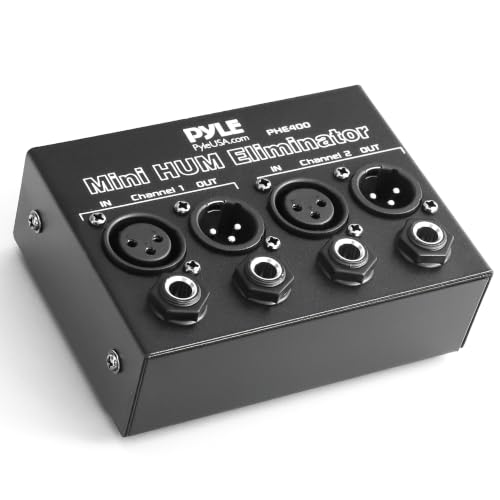
- REMOVES AC NOISE: The Pyle Hum Eliminator removes 60Hz AC hum caused by ground loops that act like radio antennae (loop antenna). It breaks the ground loop safely making it impossible for the signal...
- PASSIVE DEVICE: The noise isolator is a passive device that does not require power to operate. Equipped w/ ¼” TRS phone and XLR inputs and outputs on 2 channels. Automatically converts...
This Pyle unit is a specialized tool designed specifically to kill AC buzz and ground loop hum. It’s a 2-channel passive box that uses isolation transformers. While the Behringer MX882 can help manage signals and reduce noise through proper level matching, it isn’t a dedicated hum eliminator. If your only problem is a persistent 60Hz buzz in your monitors, the Pyle Hum Eliminator is a cheap and effective fix. However, it won’t help you split one signal to eight outputs or mix six synths together. The Behringer is a comprehensive signal manager, while this Pyle unit is a specific “emergency” tool for noisy electrical environments.
Final Verdict: Is the Behringer ULTRALINK PRO MX882 V2 8-Channel Splitter/Mixer Worth It?
After putting the Behringer ULTRALINK PRO MX882 V2 8-Channel Splitter/Mixer through its paces, our verdict is a resounding yes. It is rare to find a piece of gear that can wear so many hats—splitter, mixer, level matcher, and DI—and do them all with such high signal transparency. Its 200 KHz bandwidth ensures that your audio remains pristine, and the flexibility to switch each channel’s mode independently makes it the ultimate “problem solver” for any rack. While it lacks phantom power and front-panel inputs, these are minor trade-offs for a unit that provides eight channels of active signal management at such an accessible price point.
We recommend the Behringer ULTRALINK PRO MX882 V2 8-Channel Splitter/Mixer for home studio owners who are running out of interface inputs, live sound engineers who need to manage multiple speaker zones, and anyone who needs to bridge the gap between consumer and professional audio gear. It is a reliable, well-built, and ingenious solution that will likely become the most-used utility in your rack. If you’re ready to take control of your studio’s signal flow and eliminate routing headaches once and for all, you can purchase the Behringer MX882 V2 here and see the difference it makes in your workflow.
Last update on 2026-10-16 / Affiliate links / Images from Amazon Product Advertising API