
Audient EVO 4 Audio Interface Review: A Real-World Look at the Smartest Little Box for Modern Creators
I clearly remember the frustration of my first recording session. I had a decent microphone, a laptop, and enough enthusiasm to fuel a small city. However, every take was ruined by either a distracting hiss in the background or sudden digital clipping that sounded like a bag of chips being crushed in my ears. The problem wasn’t my performance; it was my entry-level interface. Navigating gain stages and trying to find that “sweet spot” where the signal is loud enough but not distorted is a rite of passage for every creator, but it doesn’t have to be a painful one. This is exactly where the Audient EVO 4 Audio Interface enters the conversation. Whether you are a podcaster trying to sound professional or a musician looking to capture clean DI guitar tracks, failing to solve the gain-staging and conversion puzzle results in amateur-sounding content that no amount of post-production can truly fix.
For those of us who aren’t trained audio engineers, the technical barrier of entry into recording can be daunting. I spent months searching for a tool that would simplify the process without sacrificing the professional audio fidelity Audient is known for. When I first held the Audient EVO 4 Audio Interface, I wanted to see if its minimalist design could actually deliver on its promise of making recording “effortless.” If you’re tired of guessing where your levels should be, you might want to see its full feature set and user reviews to understand how it addresses these common pain points.
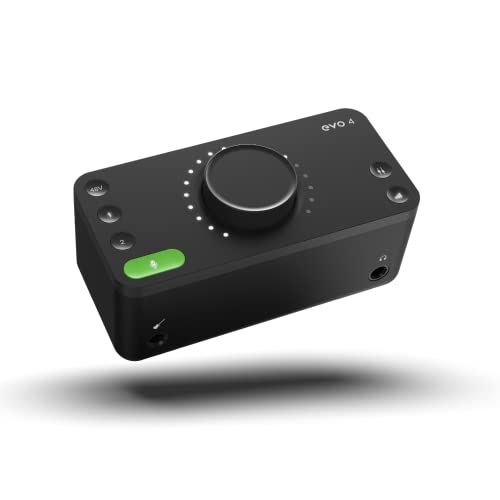
- Discrete JFET instrument input, multifunctional rotary control with LED ring, DSP-based "low latency" software mixer with flexible routing matrix
- Class Leading Converters AKM converters (AD/DA)
What to Consider Before Buying a Computer Recording Audio Interface
A Computer Recording Audio Interface is more than just an item; it’s a key solution for anyone looking to bridge the gap between the analog world (your voice or instrument) and the digital world of your computer. Without a dedicated interface, you are relying on your computer’s built-in sound card, which is generally designed for video calls and basic playback, not for high-fidelity audio production. A dedicated interface provides the necessary preamps to boost microphone signals, converters to turn that electrical signal into data, and the low-latency monitoring required to hear yourself in real-time without a distracting delay.
The ideal customer for this type of product is someone facing the challenges of home recording, such as a podcaster, a singer-songwriter, or a streamer who needs reliable, high-quality audio in a compact form factor. It is perfect for those who value efficiency and portability. However, it might not be suitable for those who need to record a full drum kit or a multi-piece band simultaneously, as a two-channel interface like the Audient EVO 4 Audio Interface is limited by its input count. In those cases, a larger rack-mounted interface with eight or more preamps would be a more appropriate investment.
Before investing, consider these crucial points in detail:
- Dimensions & Space: If you have a small desk or travel frequently, a compact interface is vital. You want something that provides a stable footprint without cluttering your workspace, yet remains heavy enough that your XLR cables won’t pull it off the desk.
- Capacity & Performance: Look at the gain range and the quality of the AD/DA converters. High-performance converters ensure that the nuances of your performance are captured accurately, while a healthy gain range (like the 58dB found in the EVO series) allows you to use gain-hungry microphones without excessive noise.
- Materials & Durability: While many professional units use metal chassis, high-quality polymers can offer a lightweight and durable alternative for mobile setups. Consider if the build quality matches your environment—whether it’s staying on a mahogany desk or being tossed into a gig bag every weekend.
- Ease of Use & Maintenance: Software integration is often overlooked but critical. An interface that requires hours of driver troubleshooting is a workflow killer. Look for “plug-and-play” compatibility and intuitive control software that enhances rather than complicates your process.
Selecting the right interface is a balance between technical specs and practical workflow. While the Audient EVO 4 Audio Interface is an excellent choice, it’s always wise to see how it stacks up against the competition. For a broader look at all the top models, we highly recommend checking out our complete, in-depth guide:

- Pro performance with great pre-amps - Achieve a brighter recording thanks to the high performing mic pre-amps of the Scarlett 3rd Gen. A switchable Air mode will add extra clarity to your acoustic...
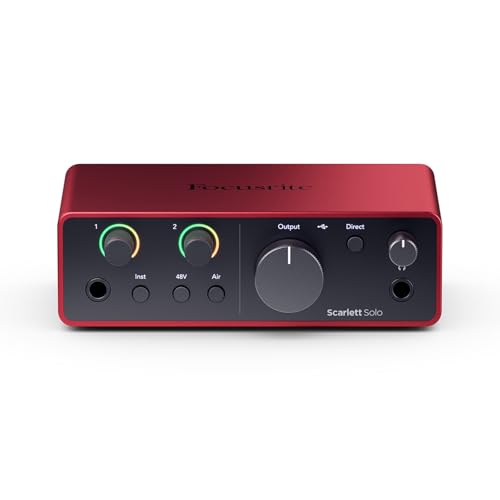
- The new generation of the songwriter's interface: Plug in your mic and guitar and let Scarlett Solo 4th Gen bring big studio sound to wherever you make music

- The new generation of the artist's interface: Connect your mic to Scarlett's 4th Gen mic pres. Plug in your guitar. Fire up the included software. Start making your first big hit
First Impressions: The Minimalist Marvel
Unboxing the Audient EVO 4 Audio Interface is a unique experience compared to the traditional “knobs-and-switches” look of most gear. The first thing I noticed was the single, large multifunctional rotary control on the top, surrounded by a ring of glowing LEDs. It feels modern, almost like a piece of high-end consumer electronics rather than a piece of “pro audio” kit. The matte black finish is sleek, though it is primarily constructed of plastic. While some might prefer the heavy-duty metal of a Focusrite or a Motu, I found the EVO 4 to feel surprisingly solid and dense for its size. It’s a design that screams “form meets function.”
Initial setup was remarkably fast. I connected the USB-C cable, and my Mac recognized it instantly. On Windows, the driver installation was straightforward, providing a low-latency experience that is essential for recording. The “Smart Touchpoints” allow you to toggle between volume control for your monitors, headphones, and individual input gains using the same central knob. It’s an elegant solution to the problem of “knob clutter” on small devices. If you are a fan of minimalist aesthetics, you should check the latest price and availability for this sleek unit.
What We Like
- Smartgain feature automatically sets perfect recording levels in seconds.
- Professional-grade AKM converters provide exceptional audio clarity for the price.
- JFET instrument input adds a pleasing, tube-like warmth to guitars and basses.
- Loopback functionality makes it a powerhouse for streamers and remote podcasters.
What We Didn’t Like
- The plastic chassis may feel less premium to users used to metal interfaces.
- The software app can occasionally be laggy on certain Windows configurations.
Putting the Audient EVO 4 Audio Interface to the Test
To truly understand why the Audient EVO 4 Audio Interface has gained such a following, we spent several weeks using it as our primary interface for voiceovers, acoustic guitar tracking, and general streaming. We wanted to see if the “Smart” features were just marketing fluff or actual tools that improve the recording experience.
Set It and Forget It: The Magic of Smartgain
In our testing, the standout feature of the Audient EVO 4 Audio Interface was undoubtedly the Smartgain. As someone who has spent years manually tweaking gain knobs while watching a meter, the ability to let the interface do the heavy lifting was a revelation. To use it, you simply press the green button, select the channels you want to set, and perform. Within about ten seconds, the interface analyzes your peaks and sets the gain at an optimal level—typically leaving about -6dB to -10dB of headroom. We found this to be incredibly accurate, even when switching between a soft-spoken podcast guest and a louder vocalist.
One user noted that as a beginner, this feature was “nearly idiot-proof,” and we have to agree. It removes the fear of peaking and ruining a great take. We even tried to “trick” it by starting quiet and then getting very loud, but the algorithm handles dynamic shifts quite well. For creators who are also the talent, this means you can focus on your performance rather than looking over your shoulder at your computer screen to check levels. This is a feature that really sets it apart from almost every other interface in this price bracket.
Preamps and Conversion: Pure Audio Excellence
While features are great, an interface is only as good as its sound. The Audient EVO 4 Audio Interface uses the same preamp design philosophy found in Audient’s high-end consoles, offering a clean, transparent, and detailed sound. With 58dB of gain, it had enough juice to power a Shure SM7B—a notoriously “quiet” microphone—without the immediate need for an external booster like a Cloudlifter, though you’ll be pushing the preamps toward their upper limit. The noise floor is impressively low, ensuring that your recordings remain “clean and clear,” as one podcasting user reported after switching to the EVO 4.
The conversion is handled by high-quality AKM chips, supporting sample rates up to 96kHz. In our side-by-side comparisons with other budget interfaces, the EVO 4 exhibited a wider soundstage and better transient response on acoustic instruments. The JFET DI input on the front is another highlight; it’s designed to mimic the input stage of a classic tube amplifier. When we plugged in a Fender Stratocaster, the DI signal felt “alive” and responded well to amp modeling software, providing a richer harmonic content than the standard “flat” DI inputs found on most competitors.
Loopback and Software Integration
For modern content creators, the ability to record computer audio alongside a microphone is essential. The Audient EVO 4 Audio Interface includes a robust Loopback feature that is managed via a software mixer. We used this to record Skype interviews and gameplay audio directly into our DAW without any complex routing or external cables. The “low latency” software mixer is surprisingly powerful, allowing you to create custom monitor mixes so you can hear exactly what you need while recording. We found the routing matrix to be flexible enough for advanced users, yet simple enough for those just starting out.
However, it’s worth noting that we did encounter some minor lag with the EVO app on an older Windows laptop. While it didn’t affect the audio performance or the recording itself, the visual response of the meters in the app was sometimes a half-second behind the actual sound. This seems to be a software-specific issue that may vary depending on your system’s resources. Despite this, the physical interface remains responsive, and the “Smart Touchpoints” ensure you can control most functions without even opening the software. If you’re a streamer, the loopback capability alone makes it worth considering to enhance your production value.
Portability and Practicality in the Field
Because the Audient EVO 4 Audio Interface is bus-powered via USB, it’s a perfect companion for a laptop. We took it on a trip and recorded in a hotel room, and its small footprint was a massive advantage. It fits in the palm of your hand and weighs very little. We did see some concerns from users about a “rattling noise” inside the box or a “loose green button,” but our test unit was silent and felt well-assembled. While it is plastic, it is a high-density polymer that doesn’t feel brittle. We would recommend using a small padded pouch if you plan on throwing it in a backpack, just to protect the large central knob from being knocked around.
One quirk we discovered—which was also mentioned by other users—is that plugging into the front instrument port automatically disables the first XLR input on the back. Similarly, plugging in headphones mutes the speaker outputs. While this makes sense for a “solo” workflow to prevent feedback, it’s something to keep in mind if you were hoping for more complex routing. For the vast majority of home studio users, this automatic switching is actually a helpful feature that simplifies the workflow. You can read more about the technical specs to see if this I/O configuration fits your specific recording needs.
What Other Users Are Saying
The general sentiment surrounding the Audient EVO 4 Audio Interface is overwhelmingly positive, especially regarding its ease of use. Many users who describe themselves as “non-technical” have praised how quickly they were able to get professional results. One user mentioned that the EVO 4 “completely changed and elevated the way our podcast sounds,” highlighting the clarity of the preamps. Another user who paired it with a Shure MV7X noted that the “preamp noise is very minimal,” which is a common praise for the Audient circuitry.
However, it’s not without its critics. A few users have expressed disappointment with the plastic build, with one stating they returned it because it felt “a little flimsy” compared to their expectations. There are also reports of the Smartgain feature behaving unexpectedly for some, with one user claiming it “changes the microphone gain without my input,” though this may be related to specific software settings or “Auto-Gain” features within third-party apps like Zoom or Discord. Despite these outliers, the majority of the community views the EVO 4 as a “cute minimalistic interface” that punches well above its weight class in terms of audio quality. Using the Audient EVO 4 Audio Interface means joining a community that values smart design over traditional bulk.
Comparing the Audient EVO 4 Audio Interface to its Top Alternatives
While the EVO 4 is a fantastic tool, the budget interface market is crowded. Here is how it stacks up against three other popular options.
1. M-AUDIO AIR 192×4 USB-C Audio Interface for Recording

- Capture Every Detail - Audio Interface with premium component selection and 24-bit/192kHz resolution for professional recording and monitoring to your Mac to PC
- Low Latency Audio Interface - Hi-Speed USB / USB-C circuitry gives you the fastest connection, with a class-leading round trip latency of only 2.59ms; USB and USB-C connection cables included
The M-Audio AIR 192×4 is a strong competitor for those who prefer a more traditional layout. It features a large, central volume knob similar to the EVO, but it sticks to physical gain knobs for each input. Its “Crystal Preamps” are very transparent, and the unit feels a bit more “pro” due to its metal top plate. However, it lacks the Smartgain feature and the sophisticated loopback routing found in the Audient EVO 4 Audio Interface. If you prefer tactile, physical control over every parameter and don’t mind a slightly larger footprint, the M-Audio is a solid alternative for home musicians.
2. Rode AI-1 USB Audio Interface


The Rode AI-1 is the epitome of simplicity. It is a single-channel interface, meaning you can only plug in one microphone or instrument at a time. Its build quality is exceptional, featuring a rugged aluminum chassis that feels like it could survive a drop. The headphone amp on the AI-1 is surprisingly powerful, which is great for users with high-impedance headphones. However, compared to the Audient EVO 4 Audio Interface, it is less versatile. You lose the second input, the Smartgain, and the loopback functionality. It’s an excellent choice for a solo voiceover artist who wants a “tank” on their desk, but the EVO 4 offers much more utility for a similar price.
3. Shure MVX2U XLR to USB Audio Interface

- PLUG AND STREAM: XLR to USB connectivity with Auto Level Mode gets you broadcasting instantly, transforming any XLR microphone into a professional streaming and recording powerhouse right out of the...
- UNIVERSAL MIC COMPATIBILITY: Up to 60dB of clean gain and 48V phantom power means any microphone works flawlessly, from dynamic legends like the SM7B to the most sensitive condenser mics
The Shure MVX2U is a completely different beast. It is a “signal adapter” style interface that plugs directly into the back of an XLR microphone. It is incredibly portable and comes with the ShurePlus MOTIV desktop app, which offers DSP features like compression and EQ. While it is perfect for someone who wants to turn their XLR mic into a USB mic without any desk clutter, it lacks the dedicated instrument input and the stereo monitor outputs found on the Audient EVO 4 Audio Interface. If you are a mobile podcaster, the Shure is great, but for a home studio setup, the EVO 4 is a much more complete solution.
Final Verdict: Is the Audient EVO 4 Audio Interface the Right Choice for You?
After weeks of testing and comparing, our conclusion is that the Audient EVO 4 Audio Interface is one of the most innovative entry-level interfaces on the market today. It manages to pack professional-sounding preamps and class-leading conversion into a box that is genuinely easy to use. The Smartgain feature is a game-changer for solo creators, and the loopback functionality makes it a top-tier choice for streamers and podcasters. While the plastic build and the occasional software lag are minor drawbacks, they are easily outweighed by the sheer quality of the audio and the elegance of the workflow.
If you are looking for an interface that removes the technical barriers to recording and lets you focus on your creativity, we highly recommend this unit. It bridges the gap between simplicity and professional performance better than almost anything else in its price range. Whether you are recording your first podcast episode or your tenth studio album, this little box will not let you down. To see if this is the missing piece for your studio, check the current pricing and secure yours today.
Last update on 2026-03-31 / Affiliate links / Images from Amazon Product Advertising API