
AlphaTheta SLAB MIDI Controller with 16 Velocity Pads Review: The Ultimate Tactile Powerhouse for Serato Studio?
As a music producer and DJ who has spent countless late nights staring at a screen, I know the frustration of “clicking” a beat into existence. The transition from hearing a melody in your head to actually producing it often feels like it’s being filtered through a clunky interface. We’ve all been there: trying to find the right sample, struggling to map a MIDI controller that wasn’t built for our software, and losing that creative spark in the process. For those of us using Serato Studio, the need for a dedicated, tactile interface hasn’t just been a “want”—it’s been a necessity. Without physical pads and dials, your workflow remains stagnant, and your drums lack that human “swing” that only physical interaction can provide. This is exactly where the AlphaTheta SLAB MIDI Controller with 16 Velocity Pads enters the frame, promising to bridge the gap between software potential and physical performance.

- Made for Serato Studio: The first MIDI pad controller developed specifically for instinctive beat-making in Serato Studio
- Unlock the Full Version: Includes Serato Studio full version so you can start producing right out of the box

What to Consider Before Buying a Dedicated DJ or Production Controller
A DJ controller or production surface is more than just an item; it’s a key solution for bridging the gap between digital precision and human expression. When you step into the world of tactile control, you are looking for something that removes the barriers between your ideas and your speakers. The right hardware should feel like an extension of your hands, allowing you to manipulate audio in real-time without ever glancing at your laptop. It’s about muscle memory, the “feel” of a velocity-sensitive pad, and the reliability of a dial that doesn’t skip a beat when you’re deep in the creative flow.
The ideal customer for this type of product is someone facing a bottleneck in their creative speed—perhaps a DJ looking to transition into production or a beat-maker who finds traditional keyboards too restrictive. It’s perfect for the “bedroom producer” who needs a compact footprint but doesn’t want to sacrifice professional-grade features. However, it might not be suitable for those who strictly play vinyl or those who require a full-sized 88-key weighted piano feel for their compositions. If you are looking for a traditional 4-channel club mixer, you might consider different hardware altogether.
Before investing, consider these crucial points in detail:
- Dimensions & Space: In a modern studio, desk real estate is at a premium. You want a controller that is substantial enough to feel “pro” but compact enough to fit into a backpack or alongside a laptop. Measuring just under 12 inches wide, the AlphaTheta SLAB MIDI Controller with 16 Velocity Pads is designed to fit into tight booths and crowded desks without compromise.
- Capacity/Performance: Look for high-resolution pads and responsive dials. The “Performance” aspect refers to how many functions you can trigger at once. With 16 pads and a multi-function dial, the capacity for complex beat-making is significantly higher than on entry-level models.
- Materials & Durability: Since this is a “hands-on” instrument, the build quality is paramount. You need pads that can withstand thousands of strikes and a chassis that won’t flex during an intense set. AlphaTheta has a reputation for using high-grade plastics and reinforced internals that hold up to the rigors of travel.
- Ease of Use & Maintenance: A plug-and-play experience is vital. You don’t want to spend three hours installing drivers. USB-powered devices that “unlock” software features automatically are the gold standard for modern workflows, ensuring you spend more time making music and less time troubleshooting.
Choosing the right controller is a deeply personal decision that depends on your specific software of choice and your physical style of play.
While the AlphaTheta SLAB MIDI Controller with 16 Velocity Pads is an excellent choice, it’s always wise to see how it stacks up against the competition. For a broader look at all the top models, we highly recommend checking out our complete, in-depth guide:

- The All-Rounder to Learn On: A simple, user-friendly layout inherited from pro Pioneer DJ gear makes it easy to start and grow

- Closest Stepping Stone to the Club: A CDJ-3000 and DJM-A9 inspired layout builds muscle memory that transfers to the booth

- Flagship Performance Controller: Built for serious hobbyists, mobile DJs, and pros who want a future-proofed open-format tool
First Impressions: The AlphaTheta SLAB Experience
Unboxing the AlphaTheta SLAB MIDI Controller with 16 Velocity Pads feels like receiving a precision-engineered tool. It is remarkably sleek, with a matte finish that resists fingerprints and a weight that feels “planted” rather than hollow. One of the first things I noticed was the inclusion of both a straight and an L-shaped USB cable—a small but incredibly thoughtful touch for anyone trying to manage cable clutter in a tight DJ booth. You can see its full feature set and user reviews to understand just how much value is packed into this small frame.
The layout is intuitive, especially for those familiar with the Serato ecosystem. The pads are the centerpiece, but the “Multi-Function Dial” and the “Touch Strip” immediately suggest that this isn’t just a simple drum machine. It’s a comprehensive command center. Compared to older MIDI controllers I’ve used, the SLAB feels significantly more modern, eschewing bulky faders for more streamlined, touch-sensitive controls that feel right at home in 2024. Before you even plug it in, you can tell this was built for the modern era of “stems” and real-time sampling.
Key Benefits We Loved
- Seamlessly unlocks the full version of Serato Studio for instant professional production.
- Highly responsive 16 velocity-sensitive pads with polyphonic aftertouch for expressive performance.
- Innovative Multi-Function Dial that significantly speeds up library browsing and audio scrubbing.
- Ultra-portable, USB-powered design that fits perfectly in a standard laptop bag.
Drawbacks to Consider
- Designed specifically for Serato Studio; mapping to other DAWs requires more effort.
- The touch strip may take a slight learning curve for those used to physical pitch wheels.
Deep Dive: Performance and Real-World Testing of the AlphaTheta SLAB
After spending several weeks integrated with this unit, it’s clear that the AlphaTheta SLAB MIDI Controller with 16 Velocity Pads is designed to be the heart of a Serato-centric workflow. Let’s break down the core features that define this experience.
The Performance Pads: Nuance and Power
The 16 velocity-sensitive pads are, without a doubt, the star of the show. In my testing, I found the “Aftertouch” capability to be a game-changer. Most compact controllers have pads that are either “on” or “off,” but the SLAB allows for incredible nuance. When I was working on a synth lead in Serato Studio, I could press harder or softer on the pads to modulate the sound in real-time, adding a layer of expression that usually requires a much larger keyboard. We found that the pads have just the right amount of “bounce”—not too mushy, not too rigid—making them ideal for fast finger-drumming. Whether you are using the Step Sequencer mode or the Trigger mode, the multicolor LEDs provide instant visual feedback that keeps you from having to look at your screen. You can check the latest price and availability to see how this tactile response stacks up against your current setup.
Workflow Efficiency: The Multi-Function Dial & Focus Control
One of the biggest time-wasters in music production is searching through libraries and clicking through plugin parameters. The Multi-Function Dial on the AlphaTheta SLAB MIDI Controller with 16 Velocity Pads effectively kills this problem. I used the dial to scrub through audio samples and perform slice edits with a level of precision that a mouse simply can’t match. The “automatic plugin parameter mapping” feature is particularly impressive. When I opened a filter plugin, the dial immediately became the frequency knob. This allowed me to keep my hands on the hardware and my ears on the music. This level of streamlining your studio sessions is what separates a hobbyist tool from a professional instrument.
Serato Integration and the Stems Revolution
The way this controller handles Serato Stems is nothing short of magical. For those who haven’t used it, Stems allows you to split a full track into vocals, drums, bass, and melody in real-time. The SLAB has a dedicated Stems sample deck that allows you to extract these elements and place them into a 16-slot sample deck instantly. I found myself taking a vocal from an old soul record and instantly chopping it across the pads while the drums from a different track played in sync. The hardware-unlock feature is a massive bonus here; simply plugging in the controller gives you the full power of Serato Studio without paying for a separate subscription. This is a feature that really sets it apart in a market full of “lite” software bundles.
Compact Design and Portability
For the producer on the move, the physical footprint is a dream. It is smaller than an A4 sheet of paper. During a recent trip, I was able to slip the SLAB and my laptop into a single bag and work on a beat during a flight. It is entirely USB-powered, meaning no bulky power bricks to carry around. Despite its small size, the touch strip performance allows for filter sweeps and pitch bends that feel substantial. I particularly liked using the touch strip for controlling “swing” in real-time—it gave my tracks a more organic, human feel that rigid quantizing often destroys. This makes it a perfect addition to a mobile setup or a crowded DJ booth.
What Other Users Are Saying
The general consensus among those who have integrated the AlphaTheta SLAB MIDI Controller with 16 Velocity Pads into their workflow is overwhelmingly positive, specifically regarding speed. One user noted that it “sped up my workflow” significantly, which aligns perfectly with my findings regarding the multi-function dial. Another enthusiast simply called it a “beautiful piece of music production machinery,” highlighting the aesthetic and build quality that AlphaTheta is known for. Many users who primarily work with the Serato Sample VST inside other DAWs like FL Studio have reported that it works “EXCELLENT” in that capacity, showing that it’s more versatile than just a Serato Studio tool.
However, no product is without its critics. A few users mentioned that they had difficulty reaching customer support, and one user reported trouble getting the pads to trigger sound initially. In my experience, most “no sound” issues are related to software routing within the DAW rather than hardware failure, but it is worth noting that for a professional-grade device, buyers expect top-tier support. Despite these isolated incidents, the majority of users agree that this machine makes the production process more enjoyable and efficient. As one user put it, “I love it, makes Serato Studio even better to use.”
Comparing the Top Alternatives
If you are still deciding if the SLAB is the right fit, it’s worth looking at how it compares to these popular models in the same ecosystem.
1. Pioneer DJ DDJ-FLX4 2-Channel DJ Controller
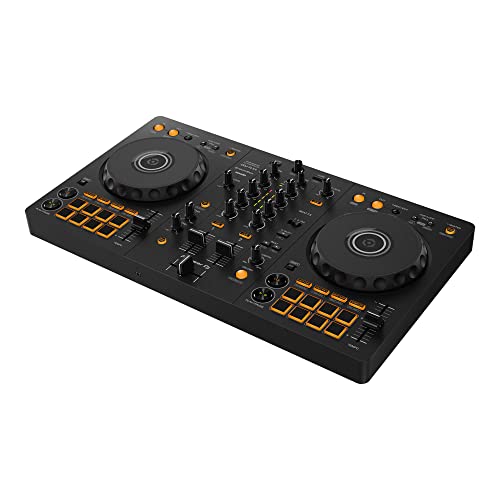
- Compatible with DJ software rekordbox and Serato
- Compatible with multiple devices that allow you to enjoy DJ from a variety of devices (beginning 2023)
The Pioneer DJ DDJ-FLX4 is a more traditional DJ controller compared to the SLAB. While the SLAB is a production-focused MIDI powerhouse, the FLX4 is designed for those who want to mix tracks, use jog wheels, and perform standard transitions. It is a fantastic entry-level unit that works with both Rekordbox and Serato. If your primary goal is to DJ at parties rather than build beats from scratch, the FLX4 is the better choice. However, it lacks the advanced aftertouch pads and the deep production integration that makes the SLAB so special for creators.
2. Pioneer DJ DDJ-FLX4 2-Deck DJ Controller
- The All-Rounder to Learn On: A simple, user-friendly layout inherited from pro Pioneer DJ gear makes it easy to start and grow
- No Beatmatching Skills Needed: Smart Fader auto-adjusts volume, bass, and BPM so you can blend genres by moving one fader
This version of the FLX4 offers the same core functionality but is often bundled differently. Like its sibling, it is the industry standard for beginners wanting a professional “club-style” layout. When compared to the AlphaTheta SLAB MIDI Controller with 16 Velocity Pads, you’ll notice the FLX4 is much larger and focuses on the “A/B deck” mixing philosophy. The SLAB is far more portable and offers much deeper control over sampling and sequencing. Choose this if you need a “deck and mixer” setup for live performance.
3. Pioneer DJ DDJ-REV1 2-Deck DJ Controller

- Learn to Scratch the Right Way: An open, battle-style layout mirrors a classic turntable and battle mixer setup
- Start for Free: Unlocks Serato DJ Lite so you can plug in and begin performing straight away
The DDJ-REV1 is tailored specifically for the “battle-style” DJ. Its layout mimics two turntables turned sideways with a mixer in the middle, making it a dream for scratch artists. While it is excellent for Serato DJ Pro, it doesn’t offer the same production-centric features as the SLAB. The pads on the REV1 are smaller and located in the mixer section, whereas the SLAB puts those high-quality pads front and center. For beat-makers and finger-drummers, the SLAB remains the superior tactile instrument.
Final Verdict: Is the AlphaTheta SLAB Right for You?
After putting the AlphaTheta SLAB MIDI Controller with 16 Velocity Pads through its paces, I can confidently say it is one of the most efficient tools for the modern producer. Its main strengths lie in its deep integration with Serato Studio and the incredible feel of its velocity-sensitive pads. While it might be a bit specialized for those who don’t use the Serato ecosystem, its portability and the fact that it unlocks professional software make it an incredible value. It transforms the often-tedious process of sampling and sequencing into an expressive, tactile joy. You can grab the AlphaTheta SLAB here to see how it can revolutionize your own creative process.
If you are ready to stop clicking and start playing, this is the hardware that will get you there. It’s solid, smart, and designed for the future of music production. Whether you’re chopping stems or laying down intricate drum patterns, the SLAB provides the foundation you need to elevate your sound. Don’t let your creativity be limited by your mouse—invest in your production future and add this powerhouse to your setup today.
Last update on 2026-09-20 / Affiliate links / Images from Amazon Product Advertising API