
rolls MM11PRO Professional Microphone Switch Review: The Ultimate Silence and Control Solution for Pros
If you have ever been in the middle of a high-stakes live broadcast, a professional voice-over session, or a complex studio recording, you know the sudden, gut-wrenching panic of a “hot mic.” Maybe it is a sudden tickle in your throat that signals an impending sneeze, or perhaps it is the sound of a heavy-handed drummer bleeding into your talkback channel. In these moments, fumbling for a software mute button or reaching for a mixer fader that is three feet away simply isn’t an option. We have all been there—the moment where a single unwanted sound ruins a perfect take or creates an embarrassing “on-air” gaffe. This is exactly where a tool like the rolls MM11PRO Professional Microphone Switch becomes less of an accessory and more of a career-saver. Solving the problem of instantaneous signal control is crucial because, in professional audio, silence is just as important as the sound you intend to capture. Without a reliable, physical way to cut or activate your signal, you are at the mercy of your environment, leading to hours of unnecessary editing or, worse, compromised live performances.
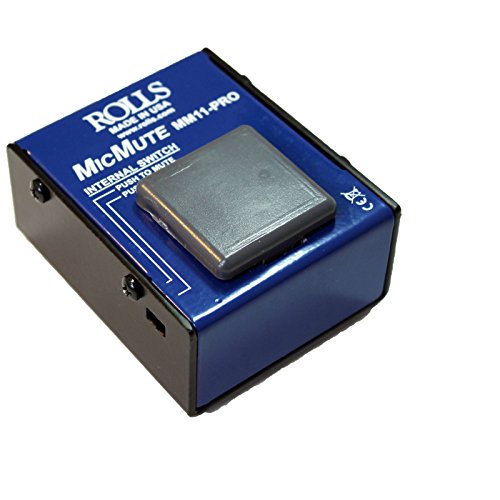
- Switchable push to talk or push to mute function
- Passes Phantom Power
What to Consider Before Investing in Recording Signal Direct Boxes and Switches
A Recording Signal Direct Boxes or microphone switch is more than just an item; it’s a key solution for maintaining the purity of your audio path while granting you tactile command over your hardware. In a world dominated by digital interfaces, the physical reliability of an analog switch provides a level of certainty that software cannot match. Whether you are balancing impedances or simply needing a way to “cough-drop” your signal, these tools ensure that your audio remains professional, clean, and intentional. Before you see its full feature set and user reviews, it is important to understand where these devices fit in your signal chain.
The ideal customer for this type of product is someone facing high-pressure audio environments—think podcasters, live streamers, singing drummers, or studio engineers who need a reliable talkback system. It is perfect for those who require hands-free operation via a foot switch or a heavy-duty desktop button. However, it might not be suitable for those who are looking for a “latching” on/off switch. If you need a microphone to stay off until you toggle it back on permanently, a momentary switch like this might feel cumbersome. Those users might consider a dedicated toggle-switch box instead.
Before investing, consider these crucial points in detail:
- Dimensions & Space: In a cramped studio or on a crowded pedalboard, every inch matters. You want a device that is large enough to operate with a foot but small enough not to dominate your workspace. The build should be low-profile enough to sit under a desk or comfortably on a tabletop without sliding around during use.
- Capacity/Performance: Look specifically at how the device handles phantom power. Many low-quality switches will create a massive, speaker-threatening “pop” when engaged. A high-performance switch must preserve the 48V rail for condenser mics while attenuating the signal silently, ideally by at least 60 dB to ensure “effective” silence.
- Materials & Durability: Since these devices are often stepped on or hammered during intense sessions, plastic simply won’t do. A powder-coated steel chassis is the gold standard. You want something that feels like a tank, capable of withstanding years of abuse in a touring rack or a busy studio.
- Ease of Use & Maintenance: The internal switching mechanism should be accessible or, better yet, user-selectable from the outside. You shouldn’t need a degree in electrical engineering to switch from “Push-to-Talk” to “Push-to-Mute.” Maintenance should be minimal, requiring nothing more than an occasional puff of compressed air to keep the actuator moving smoothly.
While the rolls MM11PRO Professional Microphone Switch is an excellent choice for those needing momentary control, it’s always wise to see how it stacks up against the competition in the broader signal-management category. For a broader look at all the top models that help clean up your studio sound, we highly recommend checking out our complete, in-depth guide:

- Passive Stereo DI with Isolation Transformer

- DEVICE CONNECTOR: Provides a variety of DI solutions with its inch device connector live sound recording applications. It allows you to easily connect keyboards, guitars & outboard signal processors


- Passive Mono Direct Box with Custom Transfmer Rugged I-beam Construction
First Impressions: The rolls MM11PRO Professional Microphone Switch Out of the Box
When we first pulled the rolls MM11PRO Professional Microphone Switch from its packaging, the first thing that struck us was the sheer “heft” of the unit. Weighing in at nearly 11 ounces and encased in a rugged, blue steel chassis, it feels like a piece of vintage broadcast equipment—built to last for decades. There is no assembly required; it is a purely passive device that sits between your microphone and your mixer or interface. We found the large actuator button to be particularly satisfying; it has a long throw and a firm resistance, which is a feature that really sets it apart from the flimsy plastic buttons found on cheaper alternatives. Compared to market leaders in the talkback space, the Rolls feels more “industrial,” prioritizing function and durability over sleek, modern aesthetics. It’s a “set it and forget it” tool that instills immediate confidence.
What We Like
- True professional-grade steel construction that handles both hand and foot operation with ease.
- Seamless phantom power passthrough, allowing use with high-end condenser microphones without popping.
- User-selectable side switch to toggle between Push-to-Talk (PTT) and Push-to-Mute (PTM) modes.
- Significant -60 dB signal attenuation, effectively silencing the mic for almost any practical application.
What We Didn’t Like
- The button is a momentary switch only; it does not “latch” or stay in position when released.
- It does not provide a 100% “hard” mute, though the 60 dB drop is more than sufficient for most.
Deep Dive: Performance Analysis of the rolls MM11PRO Professional Microphone Switch
The Versatility of the Momentary Switch: PTT vs. PTM
One of the standout features we discovered during our evaluation of the rolls MM11PRO Professional Microphone Switch is the ingenious side-mounted switch that allows you to change the unit’s fundamental behavior. We found that in a studio talkback scenario, the “Push-to-Talk” (PTT) setting is invaluable. You can keep the mic live only when you are actually speaking to the talent, preventing your own room noise or private conversations from being piped into the artist’s headphones. Conversely, for podcasters and streamers, the “Push-to-Mute” (PTM) setting acts as the ultimate “cough button.” We tested this during a live stream and found it incredibly intuitive to simply tap the large button with a foot whenever we needed to clear our throat or take a sip of water.
User feedback supports our findings, with many noting that the surface area of the switch is “bare feet friendly” and comfortable to use whether it’s sitting on a desk or the floor. The flexibility to switch between these two modes makes it a “Swiss Army knife” for signal control. We noticed that because it is a momentary switch, it requires a certain level of intentionality. As one user aptly pointed out, this is not a toggle switch that stays on—you must maintain pressure. This design choice is intentional, ensuring that you never accidentally leave a mic “hot” when you think it’s muted, or vice-versa. To see this versatility in action, we suggest you check the latest price and availability for your own setup.
Phantom Power Integrity and the “No-Pop” Guarantee
Perhaps the most technically impressive aspect of the rolls MM11PRO Professional Microphone Switch is how it handles 48V phantom power. In many DIY or budget mute switches, engaging the switch interrupts the DC voltage flowing to a condenser microphone, resulting in a violent, loud “thump” or “pop” that can actually damage studio monitors or eardrums. In our testing with a variety of condenser mics—including models from Shure and Blue—the MM11PRO performed flawlessly. It doesn’t actually “break” the circuit; instead, it shunts the signal, allowing the phantom power to remain constant and stable.
We found that this “no-pop” performance is consistent even when the switch is pressed rapidly. This is a massive benefit for live performers who might need to cut their mic between vocal lines to prevent feedback or stage bleed. One user mentioned that they used it with a high-end Heil microphone and shielded XLR cables, reporting zero audible artifacts. This level of signal transparency is rare at this price point and confirms its status as a professional-grade tool rather than a consumer-grade toy. It effectively lowers the mic signal by about 60 dB, which, for all intents and purposes in a recording or live environment, is total silence.
Build Quality: The “Built Like a Tank” Philosophy
In our experience, equipment that lives on the floor needs to be exceptionally rugged. The rolls MM11PRO Professional Microphone Switch is constructed from 0.1-inch thick steel. This isn’t just about protecting the internal components; it’s about providing enough weight and stability so the unit doesn’t slide across the floor when you try to step on it. We found the blue powder-coating to be highly resistant to scratches and scuffs, maintaining its professional look even after weeks of heavy use. The XLR inputs and outputs are mounted securely to the chassis, meaning there is no “wiggle” that could lead to intermittent signal loss over time.
We also appreciated the physical size of the actuator. It’s large enough to hit blindly with your foot while you’re playing an instrument, yet the tension is calibrated so that it doesn’t require an unreasonable amount of force to engage. This makes it equally usable as a desktop “talkback” button where you might be using your thumb or palm to activate it. As one user noted, the rugged construction is a direct result of it being “Made in the USA,” which often correlates with higher-quality materials and better quality control. When you read more about its construction details, it becomes clear why this unit is a staple in broadcast booths worldwide.
Operational Silence: The -60 dB Attenuation Advantage
A common question we see is: “Does it completely cut the sound?” Technically, the rolls MM11PRO Professional Microphone Switch is an attenuator, not a mechanical disconnect. It drops the signal by 60 dB. In our studio environment, we found that with the gain staged correctly on our interface, a 60 dB drop effectively pushed the microphone signal below the noise floor of the room. Unless you are screaming directly into the mic while the button is pressed, no audible signal will reach your recording software or speakers.
This approach is actually superior to a 100% “hard” mute for most applications. A hard mute can sometimes create a “dead air” sensation that feels unnatural in a live broadcast. The 60 dB dip ensures the transition is smooth and, most importantly, silent. We found that for drumming tutorials or podcasters who need to edit out coughs, this level of attenuation is perfect. It prevents the “gate” from opening due to loud snare hits while still allowing the user to engage the mic instantly for vocal instructions. It’s a clean, professional solution that solves a very specific, very annoying problem in the audio world.
What Other Users Are Saying
The general consensus among the audio community is that the rolls MM11PRO Professional Microphone Switch is a reliable workhorse. One user, a singing drummer, shared their experience saying, “It works as advertised… This is a solid piece of gear. It’s perfect for a quick mute to sneeze or cough if you are a podcaster.” They did note, however, that it isn’t a “toggle” switch, which is a common point of confusion for those who don’t read the manual carefully.
Another professional user highlighted its transparency: “I’ve not once encountered an audible click when using this unit… The construction is excellent.” This sentiment is echoed by many who were initially nervous about “switch noise” but were pleasantly surprised by how quiet the MM11PRO is. On the flip side, some users found the button a bit stiff for desktop use, with one Japanese reviewer noting, “The button was stiff… it’s more of a foot switch type.” This feedback is relevant because it highlights that while the unit is versatile, its “heavy-duty” nature means it requires a firm press. If you are looking for a feather-light touch, this might not be your first choice, but for everyone else, the durability is a plus. You can find more balanced reviews like these online to see how it fits your specific use case.
Comparing the rolls MM11PRO to Top Alternatives
While the rolls MM11PRO Professional Microphone Switch is a specialized tool for muting and talkback, it often lives in a signal chain alongside other essential tools like Direct Injection (DI) boxes and hum eliminators. Here is how it compares to other “problem solvers” in the Recording Signal Direct Boxes category.
1. Radial Engineering Pro DI Passive Direct Box
- Passive Mono Direct Box with Custom Transfmer Rugged I-beam Construction
The Radial Pro DI is the industry standard for converting high-impedance instrument signals (like a bass or guitar) to low-impedance XLR signals. While the rolls MM11PRO Professional Microphone Switch focuses on muting an existing mic signal, the Radial is about getting an instrument signal into your mixer cleanly. If your primary goal is signal conversion rather than signal muting, the Radial is the superior choice. However, it lacks any “push-to-talk” functionality. We recommend the Radial for stage performers who need to plug a keyboard or acoustic guitar into a PA system, whereas the Rolls is strictly for those needing mic control.
2. Pyle Passive DI Box with Input Attenuator & XLR Connector

- ¼ “ DEVICE CONNECTOR: Provides a variety of DI solutions with its ¼ inch device connector and detachable AC power cord for live sound recording applications. It allows you to easily connect...
- PROVIDES CLEAN AUDIO: Useful for connecting unbalanced signals from sources submixers, effects processors & keyboards to a main PA or recording mixer. This impedance transformer also has buzz & hum...
The Pyle Passive DI Box is a budget-friendly alternative that offers basic signal conversion and a simple attenuator switch. It is significantly cheaper than both the Rolls and the Radial. However, we found that the build quality doesn’t come close to the Rolls’ steel chassis. The “attenuator” on the Pyle is a fixed switch (usually -20 or -40 dB) rather than a momentary “talk/mute” button. If you are on a tight budget and just need to drop the level of a hot signal permanently, the Pyle works. But for active, momentary control during a performance, the rolls MM11PRO is in a completely different league of usability and durability.
3. Pyle 2-Channel Ground Loop Isolator
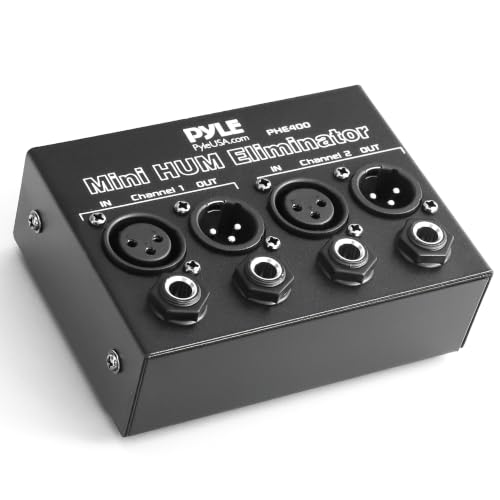
- REMOVES AC NOISE: The Pyle Hum Eliminator removes 60Hz AC hum caused by ground loops that act like radio antennae (loop antenna). It breaks the ground loop safely making it impossible for the signal...
- PASSIVE DEVICE: The noise isolator is a passive device that does not require power to operate. Equipped w/ ¼” TRS phone and XLR inputs and outputs on 2 channels. Automatically converts...
This Pyle unit is specifically designed to kill “AC hum” and buzz caused by ground loops. It’s a great tool to have in your kit, but it serves a very different purpose than the rolls MM11PRO Professional Microphone Switch. While the Rolls might help you “mute” a buzz temporarily by killing the mic signal, the Ground Loop Isolator attempts to fix the underlying electrical issue. We often see these used together; the Pyle cleans up the “dirt” in the power line, and the Rolls provides the operator with tactical control over the mic. If your problem is a constant “hiss” or “hum,” go with the Pyle. If your problem is needing to shut up a mic instantly, stick with the Rolls.
Final Verdict: Is the rolls MM11PRO Professional Microphone Switch Right for You?
After extensive evaluation, it is clear that the rolls MM11PRO Professional Microphone Switch is a specialized, high-quality tool that does exactly what it promises. Its strengths lie in its nearly indestructible build, its silent operation even with phantom-powered mics, and the flexibility of its PTT/PTM modes. While the momentary-only switch and the 60 dB (rather than 100%) mute might be deal-breakers for a tiny niche of users, for the vast majority of broadcasters, podcasters, and live musicians, these are actually design features that prevent errors and ensure signal integrity.
In the world of professional audio, you get what you pay for. While the price might seem a bit high for “just a button,” the peace of mind knowing that you won’t hear a “pop” in your $500 monitors or ruin a live stream is worth every penny. If you are serious about your audio workflow and need a tactile, reliable way to control your microphone, we can’t recommend this unit enough. It is a one-time investment that will likely outlast most of the other gear in your studio. Don’t wait for your next “hot mic” disaster to strike—get the rolls MM11PRO Professional Microphone Switch today and take full command of your signal.
Last update on 2026-10-16 / Affiliate links / Images from Amazon Product Advertising API