
Avid Pro Tools Dock Review: The Ultimate Tactile Upgrade for Professional Mixers
For years, I found myself trapped in the “one-click-at-a-time” cycle. If you have ever spent six hours straight nudging automation breakpoints with a mouse or trying to adjust two plugin parameters simultaneously with a cursor that can only be in one place at once, you know the frustration. The physical disconnect between our creative ears and our digital workspace is a major hurdle in modern audio production. We search for solutions like the Avid Pro Tools Dock because we crave that old-school console feel—the ability to close our eyes and actually touch the sound. Without a tactile interface, mixing feels less like an art form and more like data entry. This lack of physical engagement not only slows down your workflow but can actually lead to “visual mixing,” where you make decisions based on what a waveform looks like rather than how it sounds. Breaking free from the mouse isn’t just about speed; it is about reclaiming the soul of your production process.
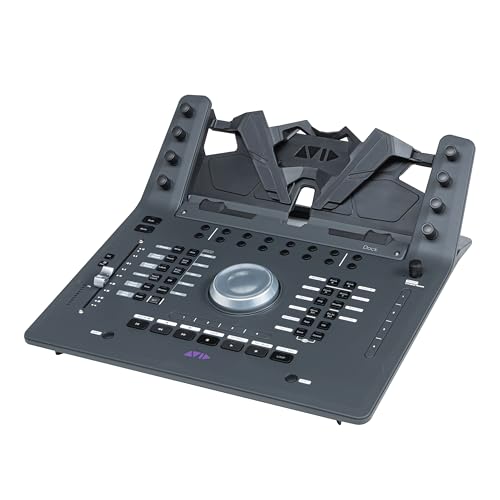
- With the combination of touchscreen, fader, knob, and switch control, you gain incomparable navigation speed and tactile precision to create better sounding mixes faster
- Work with multiple software tools in parallel instead of porting projects. Get extensive audio, video, and monitoring software integration and control from the surface. Take control of DAWs and video...
Choosing the Right DAW Controller: A Comprehensive Buyer’s Guide
A Digital Audio Workstation (DAW) controller is more than just a peripheral; it is the central nervous system of your studio. It bridges the gap between your software’s limitless potential and your human need for physical feedback. By offloading complex navigation, automation, and transport tasks to a dedicated hardware surface, you free up your brain to focus on the nuances of the music. Whether you are a solo composer or a post-production engineer, a high-quality controller solves the problem of “menu diving” and puts the most critical functions of your DAW right at your fingertips.
The ideal customer for this type of product is a professional or semi-professional engineer who spends hours inside a DAW and needs to maximize efficiency. It is perfect for those who find themselves frustrated by the limitations of a keyboard and mouse, particularly when it comes to complex automation or navigating large session files. However, it might not be suitable for casual hobbyists or those with extremely limited desk space who only record a single track at a time. If you primarily work with loops and don’t engage in deep mixing, a simpler MIDI keyboard with a few faders might suffice.
Before investing, consider these crucial points in detail:
- Dimensions & Space: Your studio real estate is precious. Before buying, measure your desk to ensure the unit fits comfortably alongside your keyboard and monitors. Consider whether you need a portable solution or a permanent fixture that anchors your workspace. A controller that is too large can create ergonomic issues, while one that is too small might feel cramped during intense sessions.
- Capacity & Protocol: Not all controllers speak the same language. Look for devices that use high-speed protocols like EUCON rather than standard MIDI or HUI. EUCON allows for much higher resolution and deeper integration with software, meaning your faders will be more responsive and your screen feedback will be instantaneous.
- Materials & Durability: Since this is a device you will be touching thousands of times a day, build quality is paramount. Look for touch-sensitive motorized faders and sturdy encoders. While many modern controllers use high-grade plastics to keep weight down, the internal components—especially the fader motors and buttons—should feel robust and capable of withstanding years of constant use.
- Ease of Use & Maintenance: A controller should simplify your life, not complicate it. Check how easy it is to map custom functions and whether the software interface is intuitive. Long-term maintenance usually involves keeping the fader tracks clean from dust, so a design that doesn’t have deep, open crevices is always a plus for longevity.
Once you understand these core requirements, you can better appreciate how a specialized tool can transform your daily grind into a streamlined creative session. To see how this unit fits into the wider market, you can see its full feature set and user reviews to gauge its real-world performance.
While the Avid Pro Tools Dock is an excellent choice, it’s always wise to see how it stacks up against the competition. For a broader look at all the top models, we highly recommend checking out our complete, in-depth guide:

- Tactile Control, Visual Feedback: LCD keys, touch strip, and dials for audio, video, lighting, and more. Know that your command has been executed.


- Complete Command of Ableton Live - Seamlessly integrates with Ableton Live (V9.1.3+), providing hands-on control of Ableton's clip matrix, mixer parameters, virtual instruments, effects, and more

- 8 touch-sensitive, 100 mm long-throw, motorized faders
Unboxing the Avid Pro Tools Dock: First Impressions and Design
When I first pulled the Avid Pro Tools Dock out of its packaging, the first thing that struck me was its purposeful silhouette. It doesn’t look like a toy; it looks like a piece of an S6 console that was precision-cut for a home studio. At roughly 20 inches wide, it occupies a significant but manageable footprint on the desk. The matte black finish is professional, and the layout is immediately familiar to anyone who has spent time on high-end Avid surfaces. The “dock” aspect is literal—there is a dedicated slot designed to hold an iPad, which serves as the visual heart of the unit when running the Pro Tools | Control app.
The assembly is straightforward: connect the power, plug in the Ethernet cable (essential for that high-speed EUCON connection), and slide your tablet into place. I was impressed by the inclusion of a USB charging port on the back, specifically designed to keep your tablet powered during marathon sessions. Compared to older Artist Series units, the Avid Pro Tools Dock feels significantly more substantial. The jog wheel has a satisfying weight to it, and the single motorized fader moves with a whisper-quiet precision that justifies its professional pedigree. Before even diving into the software, it is clear that you can check the latest price and availability and find that the build quality aligns with Avid’s high standards for studio gear.
Key Benefits
- Incredibly deep EUCON integration for lag-free, high-resolution control.
- Versatile touch-screen workflows when paired with the free iPad app.
- Physical Jog Wheel and Weighted Fader provide elite tactile precision.
- Customizable Soft Keys allow for complex macro sequences to save hours of time.
Drawbacks
- Requires an iPad to unlock its full potential and visual feedback.
- The learning curve for custom programming can be steep for beginners.
Deep Dive: Putting the Avid Pro Tools Dock to the Test
The Power of EUCON: More Than Just a Controller
The “secret sauce” of the Avid Pro Tools Dock is the EUCON protocol. Unlike standard MIDI-based controllers that can feel sluggish or limited in their “handshake” with your DAW, EUCON is a high-speed Ethernet protocol that allows the hardware to truly become one with the software. In my testing, the most impressive feature was the “Attention” functionality. Whenever I clicked a track in Pro Tools with my mouse, the Avid Pro Tools Dock immediately snapped to that track. The fader jumped to the correct position, and the knobs mapped themselves to the track’s plugins instantly.
We found that this isn’t just limited to Pro Tools, either. Because it is EUCON-aware, it automatically switches focus to whatever application you are using. I jumped between Pro Tools for mixing and Logic Pro for MIDI composition, and the Avid Pro Tools Dock followed me without needing a single manual reconfiguration. This “intelligence” is what separates professional tools from entry-level gear. You can a feature that really sets it apart is the way it handles multi-DAW environments, making it a central hub for your entire creative suite rather than a one-trick pony.
The Fader and Jog Wheel: Tactile Precision
If you are buying this unit, you are likely doing it for the fader and the wheel. The single long-throw motorized fader on the Avid Pro Tools Dock is touch-sensitive, meaning as soon as your finger makes contact, it takes control of the automation. This is vital for writing smooth, musical volume rides. In my experience, the motor is remarkably quiet—I could record vocals in the same room without the “whirring” of the fader being picked up by a sensitive condenser mic. This level of refinement is something users frequently praise, noting that it feels like working on a high-end console rather than a plastic peripheral.
The jog wheel is equally impressive. It’s weighted and features a smooth rotation that makes “scrubbing” through audio feel organic. Whether you are performing precision edits in a post-production session or just navigating a 200-track song, the wheel provides a level of control a mouse simply can’t match. It features dedicated buttons for Zoom, Transport, and even a “Shutle” mode. Using the wheel to fly through the timeline while the fader handles the levels creates a “two-handed” workflow that easily doubled my editing speed within the first week of use.
Customization and Macros: The Workflow Accelerator
While the knobs and faders are the stars, the “Soft Keys” are the unsung heroes of the Avid Pro Tools Dock. There are two banks of these buttons, plus eight touch-strip buttons that can be assigned to almost any command in your DAW. I spent an afternoon setting up macros for common tasks: one button to “Commit Track,” another to “Toggle Click,” and a complex macro that opens my favorite EQ and Compressor on any selected track simultaneously. This level of customization is a game-changer. By reducing the number of times I have to reach for a keyboard or navigate a nested menu, I found I could stay in the “creative zone” much longer.
One user review mentioned using the 8 touch strip buttons to assign up to 16 functions when using the Shift modifier, and I can confirm this is an absolute necessity for power users. This is where the Avid Pro Tools Dock truly pays for itself in time saved. If you are a professional, time is money, and being able to trigger a complex chain of commands with a single physical button press is invaluable. It transforms the unit from a simple mixer into a command center for your entire production workflow. To see how these buttons look and feel in action, you can see more detailed images and layout specs online.
The Tablet Integration: Visual Intelligence
The Avid Pro Tools Dock is designed to be paired with an iPad running the Pro Tools | Control app. While the unit functions without it, you would be doing yourself a disservice by not using a tablet. The app provides high-resolution metering, a “Channel View” that shows all your plugin parameters at once, and a massive grid of additional soft keys. In my testing, the integration was flawless. When I touched one of the physical knobs on the Dock, the corresponding parameter on the iPad screen highlighted instantly. This visual-tactile loop is incredibly satisfying.
We found that having the iPad docked at an ergonomic angle right in front of the user makes for a much more natural posture than constantly looking up at a main monitor. It turns the Dock into a mini-S6 console. The inclusion of a USB port on the back to keep the tablet charged is a thoughtful touch that shows Avid understands the needs of real-world engineers who pull 12-hour days. For those looking to build a high-end workstation, this tablet integration is a key reason to consider this specific model over more traditional, screen-less controllers.
What Other Users Are Saying: Real-World Feedback
The consensus among the professional community is overwhelmingly positive, especially for those moving from larger setups to a more compact home environment. One veteran engineer noted that they use a 64-fader S6 in their main studio but bought the Avid Pro Tools Dock for home use, stating they “absolutely love it” because it replicates the feeling of a real console without the massive footprint. This sentiment is common; the Dock bridges the gap between high-end professional hardware and home studio accessibility.
However, users do point out a few things to keep in mind. Some have mentioned that while the build quality is solid, the chassis is primarily plastic, which might feel less “premium” than all-metal vintage gear. Setup is another point of discussion; while EUCON is powerful, it can occasionally be finicky with network settings during the initial install. As one user noted, it works perfectly “once it’s setup right,” but you should be prepared for a small amount of troubleshooting if your network configuration is non-standard. Overall, the ability to create custom macros and the smoothness of the fader are the most cited reasons for the high ratings this unit receives across the industry.
Comparing the Alternatives: Finding Your Perfect Match
While the Avid Pro Tools Dock is a powerhouse, it isn’t the only way to gain control over your DAW. Depending on your specific needs—whether you’re a streamer, a keyboardist, or an Ableton Live devotee—one of these alternatives might suit you better.
1. Elgato Stream Deck + Studio Controller
- Tactile Control, Visual Feedback: LCD keys, touch strip, and dials for audio, video, lighting, and more. Know that your command has been executed.
- Fully Customizable: Use as an audio mixer, studio controller, production console, etc.
The Elgato Stream Deck + is a very different beast. While the Avid Pro Tools Dock is a dedicated mixing surface, the Stream Deck + is a versatile macro-driven console with LCD keys and infinite rotary dials. It is much smaller and significantly more affordable. It doesn’t have a motorized fader or a weighted jog wheel, making it less ideal for precision mixing. However, for content creators or streamers who need to trigger sounds, change scenes, and adjust volume on the fly with visual icons, it is an incredible tool. If your “mixing” is mostly just balancing a mic against game audio, this is a fantastic, space-saving choice.
2. Novation Launchkey 61 MK4 MIDI Keyboard Controller

- The Creative Controller: Launchkey is an all-in-one DAW controller with premium hardware, 16 velocity-sensitive pads, and more
- Seamless DAW integration: Work intuitively in Ableton Live, Logic, Cubase, Reason, FL Studio, and Ardour
The Novation Launchkey 61 MK4 is primarily a performance tool. If you are a songwriter who needs keys to play melodies and pads to finger-drum, this is the better investment. It offers deep integration with DAWs like Ableton Live and Logic Pro, including faders and knobs for basic mixing tasks. However, it lacks the motorized automation and high-speed EUCON protocol of the Avid Pro Tools Dock. The Launchkey is for the creator who starts with a blank MIDI track; the Dock is for the engineer who wants to finish the record with professional polish. You can compare its feature set directly to see which workflow fits your style.
3. Akai Professional APC40 MKII USB MIDI Controller with Clip Launch Matrix
- Complete Command of Ableton Live - Seamlessly integrates with Ableton Live (V9.1.3+), providing hands-on control of Ableton's clip matrix, mixer parameters, virtual instruments, effects, and more
- Create, Jam, Produce - Trigger clips, loops and samples using a 5X8 clip-launch matrix with RGB feedback for clip status and color coding
The Akai APC40 MKII is the gold standard for Ableton Live users. Its 5×8 clip launch matrix is designed for non-linear composition and live performance. While it has faders and knobs, they are not motorized, which makes it less effective for high-precision automation rides compared to the Avid Pro Tools Dock. The APC40 is about “playing” the DAW like an instrument, whereas the Dock is about “sculpting” the audio with surgical precision. If you live in Ableton’s Session View, the Akai is your best bet; if you live in the Pro Tools Edit window, the Dock is the clear winner.
The Final Verdict: Is the Avid Pro Tools Dock Worth It?
After putting the Avid Pro Tools Dock through its paces, I can confidently say it is one of the most transformative pieces of gear you can add to a Pro Tools-centric studio. Its ability to condense the power of a massive console into a desktop-friendly format is unmatched. The combination of the weighted jog wheel, the whisper-quiet motorized fader, and the high-resolution EUCON feedback creates a mixing experience that is both faster and more enjoyable. While it does require an iPad to reach its full potential and the price point reflects its professional status, the time saved through custom macros and tactile efficiency makes it a sound investment for any serious engineer.
In conclusion, if you are tired of mixing with a mouse and want a controller that feels as professional as the software you use, this is the solution. It brings a level of precision and “vibe” to your studio that entry-level MIDI controllers simply cannot replicate. To take your workflow to the next level and stop letting your hardware hold you back, we highly recommend you click here to secure your Avid Pro Tools Dock today and experience the difference of true tactile control.
Last update on 2026-10-16 / Affiliate links / Images from Amazon Product Advertising API