
PreSonus FaderPort 16 DAW Controller Review: The Tactile Revolution Your Studio Needs
If you have ever spent six hours straight staring at a computer monitor, meticulously clicking and dragging a virtual fader with a mouse, you know the specific kind of fatigue I am talking about. It is more than just eye strain; it is a fundamental disconnect between your musical intuition and your digital tools. Mixing is an art of feel, and the mouse is a surgical instrument—not a musical one. For years, I found myself frustrated by the inability to adjust a vocal level while simultaneously riding the reverb send or tweaking a drum bus. We often search for a solution like the PreSonus FaderPort 16 DAW Controller because we realize that our creativity is being throttled by our hardware. Without a tactile interface, your workflow remains segmented, slow, and frankly, less fun. The complexity of modern productions demands a more fluid approach, and that is exactly where a high-end control surface enters the picture.
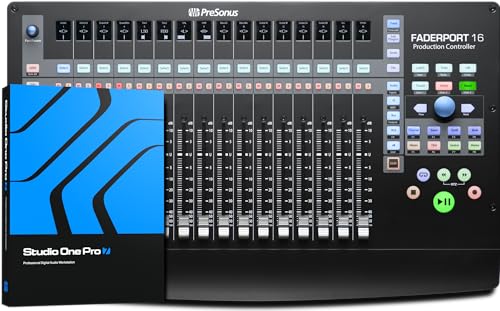
- Mix with precision via 16 100 mm touch-sensitive motorized faders and 89 buttons covering 104 different functions, all in a compact chassis that easily sits on any desk.
- Features 16 high-definition Scribble Strip displays so you can identify channels at a glance.
What to Consider Before Investing in a Digital Audio Workstation Controller
A Digital Audio Workstation Controller is more than just an item; it is a key solution for bridging the gap between human performance and digital precision. These devices are designed to give you physical access to the functions buried deep within your DAW’s menus. By moving the mixing process from your screen to your fingertips, you unlock a level of nuance that is simply impossible with a trackpad. Whether you are automating a sweeping filter or balancing a 60-track orchestral arrangement, the physical response of a fader provides immediate feedback that your brain processes much faster than visual data on a screen.
The ideal customer for this type of product is a studio professional, serious home recorder, or content creator who is facing “workflow bottlenecks” and wants to spend less time looking at a monitor and more time listening. It is perfect for those who need to manage large channel counts efficiently. However, it might not be suitable for those who work exclusively “in the box” with very simple arrangements (4-8 tracks) or those with extremely limited desk space who might prefer a single-fader solution. If you find yourself constantly “banking” through tracks just to find your master fader, you are the prime candidate for a 16-channel expansion.
Before investing, consider these crucial points in detail:
- Dimensions & Space: Unlike smaller units, a 16-channel controller requires significant real estate. You need to measure your desk to ensure you have roughly 20 inches of width available without blocking your keyboard or monitors. A cramped workspace can lead to ergonomic issues, so consider if your current layout can support a medium-sized chassis like the PreSonus FaderPort 16 DAW Controller.
- Capacity/Performance: Look for the resolution of the motorized faders. In our experience, 100mm travel is the industry standard for precision. You also want to ensure the unit supports the specific protocols of your DAW (HUI, MCU, or Native) to avoid “dead” buttons that do nothing in your specific software.
- Materials & Durability: Since you will be resting your hands on this device for hours, the build quality is paramount. A stainless steel or heavy-duty metal chassis is far superior to plastic, as it provides the weight necessary to keep the unit from sliding during aggressive fader movements. Touch-sensitive faders are also a must, as they allow the motor to disengage the moment you touch it.
- Ease of Use & Maintenance: Consider the visibility of the “scribble strips.” If you cannot clearly see the track names from a standard sitting position, the controller becomes a hindrance rather than a help. Maintenance is also key; motorized faders can attract dust over time, so a unit that is easy to wipe down and protect with a deck saver is a wise choice.
Choosing the right controller is a long-term investment in your studio’s efficiency. While the PreSonus FaderPort 16 DAW Controller is an excellent choice, it’s always wise to see how it stacks up against the competition. For a broader look at all the top models, we highly recommend checking out our complete, in-depth guide:

- Tactile Control, Visual Feedback: LCD keys, touch strip, and dials for audio, video, lighting, and more. Know that your command has been executed.


- Complete Command of Ableton Live - Seamlessly integrates with Ableton Live (V9.1.3+), providing hands-on control of Ableton's clip matrix, mixer parameters, virtual instruments, effects, and more

- 8 touch-sensitive, 100 mm long-throw, motorized faders
First Impressions: Unboxing the PreSonus FaderPort 16 DAW Controller
When we first pulled the PreSonus FaderPort 16 DAW Controller out of its box, the first thing that struck us was the density. At 8 pounds and featuring a stainless steel top plate, it feels like a piece of high-end rack gear rather than a consumer peripheral. The aesthetic is sleek and professional, with a low profile that sits comfortably on a desk without requiring a massive riser. While it is certainly larger than its 8-channel siblings, it manages to fit 16 faders into a footprint that is surprisingly compact, measuring just under 20 inches wide. You can explore its comprehensive features for yourself and see how the layout is designed for maximum efficiency.
The buttons have a firm, rubberized feel—they don’t “click” loudly but offer a satisfying tactile “thump” when pressed. The 16 high-definition scribble strips were immediately noticeable, though we did find that their viewing angle is somewhat shallow (more on that later). Compared to previous generations of controllers that relied on external power bricks and complicated MIDI cabling, the single USB 2.0 connection on the PreSonus FaderPort 16 DAW Controller makes for a refreshingly simple setup. It looks and feels like a centerpiece, a tool designed for someone who is ready to invest in a tool that truly streamlines your mix.
Key Benefits
- 16 touch-sensitive, 100mm motorized faders provide incredible mixing resolution.
- Deep “Native” integration with Studio One makes it feel like an extension of the software.
- The Session Navigator provides lightning-fast access to scrolling, zooming, and markers.
- Extremely compact footprint for a 16-channel surface, saving precious desk space.
Limitations
- The monochromatic LCD scribble strips can be difficult to read at certain angles.
- Setup in third-party DAWs (like Cubase or Logic) can be slightly more cumbersome than in Studio One.
The Deep Dive: Putting the PreSonus FaderPort 16 DAW Controller to the Test
The Power of 16: Why More Faders Matter
We spent several weeks using the PreSonus FaderPort 16 DAW Controller in various production environments, and the most immediate impact was the reduction in “banking.” On an 8-fader controller, if you are mixing a standard drum kit, you are already out of faders before you even get to the bass or guitars. With 16 faders, we found we could keep our entire drum bus, bass, and main vocal right in front of us at all times. This “two-bank” approach is a game changer for staying in the creative flow. The motorized faders are remarkably quiet—you won’t hear that annoying “chatter” that some cheaper controllers exhibit when following complex automation. To truly understand the impact, you should see why professional studios rely on this hardware for their day-to-day operations.
The touch sensitivity is incredibly responsive. In our testing, the faders reacted instantly to the slightest touch, allowing for smooth automation “write” passes without any jarring jumps. We also loved the “Alternative” modes, which allow you to flip the faders to control plugin parameters or bus sends. This turns the PreSonus FaderPort 16 DAW Controller from a simple volume mixer into a comprehensive sound-shaping tool. When you are riding the threshold of a compressor with a physical 100mm fader, you tend to make more musical decisions than when squinting at a tiny knob on a screen.
Mastering the Session Navigator
The standout feature of the PreSonus FaderPort 16 DAW Controller, aside from the faders themselves, is the Session Navigator. This is a dedicated section with a large rotary encoder and eight buttons that act as the “brain” of your session. We found ourselves using the “Zoom” and “Scroll” functions constantly. Instead of reaching for the mouse to find a specific part of the bridge, we simply tapped the “Marker” button and spun the wheel. It’s incredibly intuitive. The ability to use the wheel for “Master” fader control or “Section” navigation makes moving through a 100-track project feel effortless.
We also put the “Link” feature to the test. This allows the rotary encoder to control whatever parameter your mouse is currently hovering over. It sounds simple, but in practice, it is a revelation. You can hover over a frequency knob in an EQ plugin and use the physical wheel to sweep for resonances. This hybrid approach—using the mouse for selection and the PreSonus FaderPort 16 DAW Controller for manipulation—strikes a perfect balance. Before you commit, check the current price and full technical specs to see if this fits your current hardware setup.
Compatibility and DAW Integration
While the PreSonus FaderPort 16 DAW Controller is built by PreSonus, its compatibility with other software is surprisingly robust. We tested it with Logic Pro X, Cubase 13, and Pro Tools. In Logic and Pro Tools, it uses the HUI or MCU (Mackie Control Universal) protocols. While you lose some of the deep “Native” features found in Studio One (like the ability to control specific PreSonus plugins with mapped buttons), the core functionality—faders, transport, pans, and mutes—works flawlessly. One user we spoke with mentioned that setting it up in Cubase required a bit of a learning curve, but once they followed a few online tutorials, it became “brilliant” and indispensable. We found this assessment to be accurate; it is a power user’s tool that rewards a little bit of initial setup time.
In Studio One, however, the integration is nothing short of magical. It is essentially “plug and play.” The scribble strips automatically show your track names and colors, and the buttons are pre-mapped to the most logical functions. The included software bundle, featuring over $1000 worth of plugins and Studio One Artist, makes this an incredible value proposition for anyone looking to build a studio from scratch. It is a piece of gear that truly justifies its footprint through pure utility.
Build Quality, Aesthetics, and the Scribble Strip Debate
We need to address the “elephant in the room”: the scribble strips. These are monochromatic LCDs, and as some users have noted, they can be a bit dim if you are sitting at a low angle. In our studio, we found that by tilting the unit slightly or sitting in a standard upright mixing position, they were perfectly legible. However, it is something to be aware of if your studio lighting is very bright or if you prefer to mix from a reclined position. Despite this, the resolution of the text is sharp, and they provide essential information like track numbers, names, and pan positions.
The rest of the build is tank-like. The stainless steel chassis doesn’t just look good; it provides a professional weight that keeps the unit anchored. We’ve seen many plastic controllers develop “creaks” over time, but the PreSonus FaderPort 16 DAW Controller feels like it could survive a decade of heavy use. The buttons have a high-quality “soft-touch” feel that doesn’t wear down, and the faders themselves are smooth and consistent across all 16 channels. When you are deep in a mix, you want to feel like you are working on a high-end console, and this unit delivers that sensation better than almost anything else in its price bracket.
What Other Users Are Saying
The general sentiment among users is overwhelmingly positive, especially regarding the workflow improvements. One studio veteran noted that despite owning high-end consoles in the past, the PreSonus FaderPort 16 DAW Controller has become their go-to for daily editing and mixing because of its reliability and speed. Many users highlighted that while it is designed for Studio One, they have had great success using it with Logic and Pro Tools, with one user specifically stating it “works perfectly with Pro Tools and is very easy to use.”
However, it wouldn’t be a fair review without mentioning the critiques. A few users expressed frustration with the screen contrast, with one mentioning they wish for an “MK2 version with OLED screens.” Another user found the setup process in Cubase to be “cumbersome” initially, though they eventually found it to be a “freaking brilliant” addition to their studio once configured. These reviews confirm our findings: it is a stellar piece of hardware that requires a small amount of patience during setup if you aren’t using the PreSonus ecosystem. You can read more user insights and availability details to see how it might fit your specific DAW workflow.
How the PreSonus FaderPort 16 DAW Controller Compares to Alternatives
1. Novation Launchkey 61 MK4 MIDI Keyboard Controller

- The Creative Controller: Launchkey is an all-in-one DAW controller with premium hardware, 16 velocity-sensitive pads, and more
- Seamless DAW integration: Work intuitively in Ableton Live, Logic, Cubase, Reason, FL Studio, and Ardour
The Novation Launchkey 61 MK4 is a completely different animal than the PreSonus FaderPort 16 DAW Controller. While it does offer some DAW integration and a few faders, its primary focus is on performance and composition. This is the ideal tool for the producer who needs keys, pads, and arpeggiators to write music. However, for serious mixing, its 8 short-throw, non-motorized faders cannot compete with the 16 touch-sensitive motorized faders of the PreSonus. If your goal is “playing” your DAW like an instrument, get the Novation. If your goal is professional-level mixing and automation, stick with the FaderPort.
2. Elgato Stream Deck + Audio Mixer & Production Console
The Elgato Stream Deck + is a fantastic tool for content creators and streamers who need macro control and quick audio adjustments via dials. It’s incredibly customizable and the LCD keys are beautiful. However, it lacks the tactile 100mm faders that are essential for traditional music mixing. It is a “secondary” controller—perfect for triggering shortcuts or adjusting a microphone volume on the fly—but it isn’t a replacement for a full control surface. We often see professionals using a Stream Deck alongside a PreSonus FaderPort 16 DAW Controller to handle the non-fader tasks of their studio.
3. Akai Professional APC40 MKII USB MIDI Controller with Clip Launch Matrix
- Complete Command of Ableton Live - Seamlessly integrates with Ableton Live (V9.1.3+), providing hands-on control of Ableton's clip matrix, mixer parameters, virtual instruments, effects, and more
- Create, Jam, Produce - Trigger clips, loops and samples using a 5X8 clip-launch matrix with RGB feedback for clip status and color coding
The Akai APC40 MKII is the gold standard for Ableton Live users who need to launch clips and perform live sets. Its 5×8 matrix and dedicated knobs are tailor-made for the “Session View” in Ableton. While it does have faders, they are not motorized. This is a critical distinction. Without motorized faders, when you switch banks, the physical position of the fader will not match the software, leading to “jumps” in volume. The PreSonus FaderPort 16 DAW Controller is a far superior choice for traditional linear mixing and automation, whereas the Akai is the king of live electronic performance.
Final Verdict: Is the PreSonus FaderPort 16 DAW Controller Right for You?
After weeks of testing, it is clear that the PreSonus FaderPort 16 DAW Controller is one of the most powerful and space-efficient control surfaces on the market today. It solves the primary problem of modern digital mixing: the lack of tactile feedback. By providing 16 high-quality faders and a brilliantly designed Session Navigator, it allows you to keep your eyes on your speakers and your hands on your mix. While the screen contrast and third-party setup could be slightly improved, these are minor hurdles in what is otherwise a world-class studio tool. We recommend it unreservedly for Studio One users, and highly recommend it for any Logic, Cubase, or Pro Tools user who is tired of the mouse-and-keyboard grind.
If you are ready to reclaim your workflow and add a professional, tactile edge to your productions, there is no better time to upgrade your studio desk. The precision and speed you gain will pay for itself in saved time and better-sounding mixes. Stop clicking and start mixing—get the PreSonus FaderPort 16 DAW Controller for your studio today and experience the difference that 16 motorized faders can make.
Last update on 2026-10-16 / Affiliate links / Images from Amazon Product Advertising API