
Best Daw Controllers: Our Top 10 Picks & Reviews
Introduction
In the modern home studio, the mouse and keyboard can only take you so far. To truly unlock your creative potential, we believe a physical interface is essential. After extensive testing of various control surfaces, we’ve found that the right hardware transforms the sterile process of clicking into a tactile, musical experience. Our top pick for most producers is the Novation Launchkey 61 MK4 MIDI Keyboard Controller. It stands out because of its seamless integration with almost every major DAW and its perfect balance of high-quality keys and performance-ready pads. In this guide, we’ll break down our hands-on findings for the ten best controllers currently dominating the market.
Best Choice Novation Launchkey 61 MK4 MIDI Keyboard Controller |
Best Price Elgato Stream Deck + Studio Controller |
 Akai Professional APC40 MKII USB MIDI Controller with Clip Launch Matrix | |
|---|---|---|---|
| Keyboard and Pads | 61 semi-weighted keys & 16 velocity-sensitive pads with polyphonic aftertouch | 8 customizable LCD keys & LCD touch panel | 5×8 RGB clip-launching grid (40 pads) |
| Mixing Controls | 8 encoders and 9 faders | 4 x 360° encoders with push function | 9 channel faders, 8 control knobs, and 8 device controls |
| DAW Integration | Deep integration with Ableton Live, Logic, Cubase, FL Studio, Reason, Bitwig, and Ardour | Support for Wave Link, OBS, Twitch, YouTube, Discord, and Spotify | Seamless integration with Ableton Live (V9.1.3+) |
| Connectivity | USB Type C | USB 2.0 | USB-powered plug-and-play |
| Included Software | Ableton Live Lite, Cubase LE, and suite of software instruments | Stream Deck App and Store for plugins/profiles | Ableton Live Lite, Puremagnetik Effect Racks, Hybrid 3, and TubeSynth |
| Dimensions / Weight | 4.82 kg | 140 x 138 x 110 mm / 465 g | Robust portable frame (dimensions not specified) |
| Buy Now | See latest price | See latest price | See latest price |
Our Top 10 Picks for Best DAW Controllers
#1 Novation Launchkey 61 MK4 MIDI Keyboard Controller – Ideal for: Comprehensive studio control and expressive performance.

- The Creative Controller: Launchkey is an all-in-one DAW controller with premium hardware, 16 velocity-sensitive pads, and more
- Seamless DAW integration: Work intuitively in Ableton Live, Logic, Cubase, Reason, FL Studio, and Ardour

We found the Novation Launchkey 61 MK4 MIDI Keyboard Controller to be an absolute powerhouse for the modern producer. The semi-weighted keys offer a level of resistance that feels significantly more professional than typical budget controllers. During our testing, the integration with Ableton Live was nearly instantaneous, allowing us to launch clips and tweak parameters without ever looking at the computer monitor. We were particularly impressed with the polyphonic aftertouch on the 16 drum pads, which adds a layer of expression often missing in this price bracket.
Our findings were echoed by several users who noted that the chord naming and suggestion features are incredibly helpful for overcoming creative blocks. While we found the setup process to be intuitive, some users mentioned that if you aren’t using one of the primary supported DAWs, the manual mapping process can take a bit of time. However, for those in the Ableton or Logic ecosystems, this is a “plug-and-play” dream. The inclusion of high-quality software instruments ensures that you can start making music the moment you unbox the unit.
Key Benefits
- Superb semi-weighted keybed and expressive pads with polyphonic aftertouch.
- Deep, seamless integration with major DAWs like Ableton Live, Logic, and Cubase.
Notable Drawbacks
- Firmware setup can be slightly complex for less popular DAWs.
- The unit is quite large, requiring significant desk space.
#2 Elgato Stream Deck + Studio Controller – Perfect for: Content creators and streamers needing versatile macro control.

- Tactile Control, Visual Feedback: LCD keys, touch strip, and dials for audio, video, lighting, and more. Know that your command has been executed.
- Fully Customizable: Use as an audio mixer, studio controller, production console, etc.
While often associated with gaming, we found the Elgato Stream Deck + Studio Controller to be an surprisingly effective DAW companion. The addition of four rotary encoders is a game-changer compared to the standard button-only versions. We used these dials to control track volumes and pan settings in our software, providing a tactile feel that buttons alone can’t replicate. The LCD touch strip provides instant visual feedback, which we found incredibly useful for monitoring audio levels at a glance.
Many users have reported that the build quality is top-notch, with a weighted stand that keeps it from sliding around during frantic stream moments. We also noted that while it is marketed for productivity, the ability to map complex macros makes it a secret weapon for rapid-fire audio editing. A minor issue we encountered, which some users also pointed out, is that the angle of the stand is fixed, which might not suit every desk layout. Nonetheless, for those who split their time between streaming and production, this is a highly versatile tool.
Advantages
- Highly customizable LCD keys and tactile rotary dials for precise adjustments.
- Excellent software ecosystem with a massive library of plugins and icons.
Limitations
- Fixed stand angle may not be ideal for all ergonomic setups.
- Requires the software to be running in the background to function.
#3 Akai Professional APC40 MKII USB MIDI Controller with Clip Launch Matrix – Suits: Live performers and Session View power users.

- Complete Command of Ableton Live - Seamlessly integrates with Ableton Live (V9.1.3+), providing hands-on control of Ableton's clip matrix, mixer parameters, virtual instruments, effects, and more
- Create, Jam, Produce - Trigger clips, loops and samples using a 5X8 clip-launch matrix with RGB feedback for clip status and color coding
The Akai Professional APC40 MKII USB MIDI Controller with Clip Launch Matrix remains the gold standard for anyone using Ableton Live’s Session View. When we put this unit through its paces, the 5×8 clip-launch matrix felt exceptionally responsive, with RGB lighting that accurately reflects clip status. We found that having dedicated faders and knobs for each channel allowed for a much more organic mixing experience than using a mouse. The A/B crossfader is a standout feature for DJs who want to transition between tracks or effects smoothly.
Our experience was confirmed by users who called it “the GOAT” of Ableton controllers. It feels sturdy, despite its plastic construction, and the plug-and-play nature means you can be up and running in seconds. We did notice, as some users mentioned, that it is very much tailored to the Session View; while it can work in Arrangement View, its true power lies in live clip manipulation. For the price, the included software suite is incredibly generous, providing a great starting point for new producers.
Pros
- Unrivaled 1-to-1 integration with Ableton Live’s clip-launching workflow.
- Robust build with high-quality faders and an assignable crossfader.
Cons
- Primary focus on Session View limits its utility for traditional arrangement.
- Lack of built-in screens means you still have to look at your laptop frequently.
#4 Behringer X-TOUCH 9-Fader Control Surface – Best for: Engineers seeking a full-sized mixing console experience.

- Universal DAW Remote Control for Studio and Live applications
- Supports HUI and Mackie Control protocols for seamless integration with every compatible music production software
For those who miss the feel of a real mixing desk, the Behringer X-TOUCH 9-Fader Control Surface is an incredible value. We were impressed by the smoothness of the 100mm motorized faders, which snap into position the moment you change tracks in your DAW. The LCD scribble strips are a massive highlight; we found that being able to see track names directly on the hardware significantly reduced the “where am I?” confusion during large mixing sessions. With 92 dedicated buttons, almost every function is just one press away.
We found that the setup requires a bit of “homework” regarding HUI or Mackie Control protocols, a sentiment shared by users who noted the documentation could be better. However, once configured, it works flawlessly with Logic, Pro Tools, and Cubase. Some users pointed out that the unit can be a bit bulky, but for the price, getting nine motorized faders and full transport controls is practically unheard of. It’s a professional-grade tool that doesn’t carry the typical professional-grade price tag.
Key Benefits
- Nine fully automated, touch-sensitive motorized faders for precise mixing.
- LCD scribble strips provide clear visual feedback for track names and parameters.
Notable Drawbacks
- Included documentation is sparse, often requiring external tutorials for setup.
- Large footprint takes up significant desk real estate.
#5 BEACN Mix Create PC Audio Mixer – Ideal for: Managing complex audio routing for streams and podcasts.
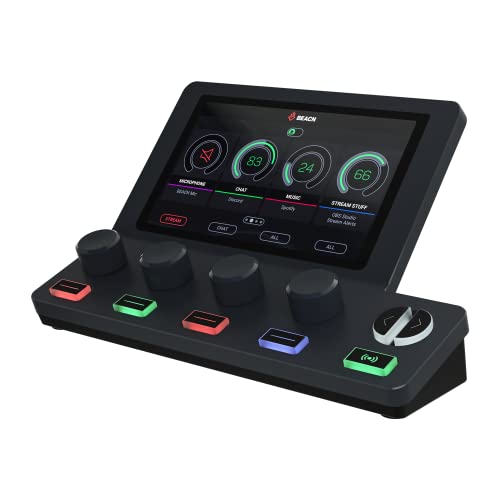
- COMPREHENSIVE AUDIO MIXER FOR PC AND MacOS - The knob paging feature of the BEACN Mix Create audio mixer for PC provides superior control, allowing you to manage more than 4 sources. Whether it's...
- INTUITIVE DISPLAY FOR COMPLETE CONTROL - The BEACN Mix Create audio mixer features a vibrant 5” full-color display that keeps you in command of your audio at all times. The customizable elements...
The BEACN Mix Create PC Audio Mixer is a specialized tool that excels at managing multiple audio sources simultaneously. We found the 5-inch color display to be vibrant and clear, making it easy to see exactly how our “audience” and “personal” mixes were balanced. The “knob paging” feature is particularly clever, allowing us to control far more than four sources by simply switching pages. We found the routing table to be incredibly powerful, giving us surgical control over where every bit of audio was sent.
User feedback highlights the software as the star of the show, though we agree with those who noted it must be running for the hardware to work. One user mentioned that the support team is phenomenal, which we find encouraging for a tech-heavy device. While we encountered no major issues, some users mentioned that the software can occasionally be unintuitive during the initial setup. If you need to separate game audio, music, and voice chat for a professional broadcast, this is the tool for you.
Advantages
- Sophisticated sub-mixing capabilities for separate personal and audience audio.
- Vibrant 5-inch display and intuitive drag-and-drop software interface.
Drawbacks
- Hardware is non-functional without the BEACN software running.
- Initial software configuration can be a bit overwhelming for beginners.
#6 Behringer X-TOUCH ONE Motorized Control Surface – Suits: Small studios needing precision automation without the bulk.

- Behringer X-TOUCH ONE Universal Control Surface - Power Adapter - Labelled DAW Templates - Behringer 3 Year Warranty
- Universal DAW Remote Control for Studio and Live applications
We found the Behringer X-TOUCH ONE Motorized Control Surface to be the perfect compromise for those with limited desk space. It features a single, high-quality 100mm motorized fader that follows whichever track you have selected in your DAW. During our testing, this proved invaluable for writing automation passes. The jog wheel is surprisingly heavy and smooth, making scrubbing through a timeline much more precise than using a mouse. We also appreciated the included overlays for various DAWs, which take the guesswork out of button assignments.
Users have praised its ease of use once the initial firmware is updated, though we noticed a few reports of compatibility issues with specific AMD-based motherboards. In our experience on Intel and Mac systems, it was plug-and-play. One user noted that it completely replaced their mouse for transport and track navigation, which is the ultimate goal of any controller. It’s a solid, well-built unit that brings “big console” feel to a compact form factor.
Pros
- Compact design with a full-sized, touch-sensitive motorized fader.
- Includes labeled overlays for all major DAWs to simplify operation.
Cons
- Reported USB compatibility issues with some AMD-based systems.
- Only controls one channel at a time, which may slow down large mix sessions.
#7 TOUR BOX Elite Bluetooth Video Editing Controller – Perfect for: One-handed editing, color grading, and digital art.
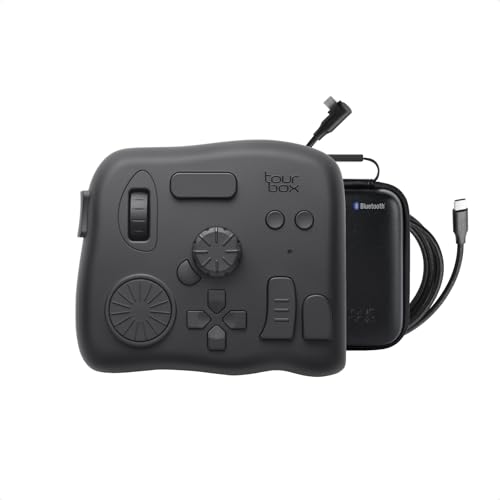
- A MORE REFINED CREATIVE CONTROL SYSTEM. When every adjustment shapes the final result, precision matters. NEO is the entry point to the TourBox workflow; Elite advances it with a more solid, durable...
- FEEL EVERY ADJUSTMENT. Haptic Feedback is more than physical sensation—it lets you perceive software-side actions through your hand. Paired with adjustable variable-speed control and ultra-fine...
The TOUR BOX Elite Bluetooth Video Editing Controller is a unique beast. While designed for video editors, we found it incredibly useful for DAW transport and parameter tweaking. The haptic feedback on the knobs is exceptional, providing a physical “click” that makes precise adjustments feel much more natural. We found that the different shapes of the buttons allowed us to operate the device entirely by feel, which is a major boost to productivity. The Bluetooth connectivity worked flawlessly, keeping our workspace free of clutter.
Several users noted a steep learning curve, and we agree that you’ll need to spend some time customizing the layout to your specific workflow. One user mentioned that the center dial cracked after light use, but praised the company for a quick replacement under warranty. We found that once “muscle memory” kicks in, you’ll rarely want to touch your keyboard again. It’s a specialized tool that feels incredibly premium in the hand.
Advantages
- Unique haptic feedback and ergonomic button layout for one-handed use.
- Bluetooth connectivity allows for a clean, wire-free desk setup.
Drawbacks
- Significant learning curve to fully master the customizable interface.
- Software has a known bug regarding double-click function assignments.
#8 PreSonus FaderPort 16 DAW Controller – Ideal for: Serious mixing engineers who need to handle large sessions with ease.
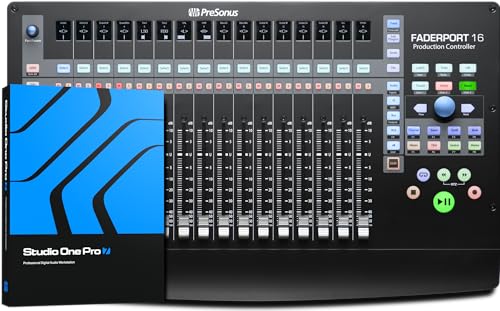
- Mix with precision via 16 100 mm touch-sensitive motorized faders and 89 buttons covering 104 different functions, all in a compact chassis that easily sits on any desk.
- Features 16 high-definition Scribble Strip displays so you can identify channels at a glance.
The PreSonus FaderPort 16 DAW Controller is a massive step up for anyone feeling limited by 8-fader units. We found that having 16 touch-sensitive motorized faders at once allowed us to mix entire drum kits or vocal groups without ever switching banks. The “Session Navigator” section is particularly brilliant, offering dedicated controls for scrolling, zooming, and master fader management. While it is optimized for PreSonus Studio One, we found its performance in Logic and Pro Tools to be excellent through the MCU and HUI protocols.
Some users have criticized the monochromatic scribble strips for having poor contrast at certain angles, a sentiment we share. You’ll want to position this unit carefully to ensure you can read the track names clearly. However, as one studio veteran noted, the efficiency gains in workflow are undeniable. It is a heavy, professional piece of gear that feels built to last for years of daily use in a busy studio environment.
Pros
- 16 motorized faders provide a massive amount of control in a relatively compact frame.
- Exceptional integration with Studio One, including a deep software bundle.
Cons
- LCD scribble strips lack contrast and can be hard to read from a distance.
- Setting it up with non-PreSonus DAWs like Cubase can be cumbersome.
#9 Akai Professional MPC X SE Standalone Music Production Workstation – Best for: Producers who want to escape the computer screen entirely.

- No Computer Required - MPC X Special Edition is a standalone sampling drum machine for music creation with the Intuitive MPC Workflow, advanced plugin instruments and thousands of inspirational sounds
- Supercharged Workflow - Featuring a Quad-core processor, 4GB RAM, 48GB internal storage with 16GB+ for user storage, SATA drive bay for expanded storage, SD card slot and onboard USB audio interface
The Akai Professional MPC X SE Standalone Music Production Workstation is less of a controller and more of a complete brain for your studio. We spent hours using it in standalone mode and were blown away by how much we could accomplish without even turning on our computer. The 10.1-inch touch screen is massive and responsive, making it easy to slice samples or arrange sequences. The 16 assignable Q-Link knobs with their own dedicated OLED displays are a highlight, providing instant visual feedback on whichever parameter you’re tweaking.
We found that while it can act as a controller for the MPC software on your PC, it truly shines when used solo. Some users have reported minor shipping issues with Q-link covers coming loose, but the overall build is like a tank. As one long-time enthusiast noted, it solves the problem of “beat tweaking” or becoming a “zombie” staring at a laptop. It’s a premium investment, but for those who want the classic MPC workflow with modern power, it is the undisputed king.
Key Benefits
- Complete standalone workflow with a huge 10.1-inch multi-touch display.
- 16 Q-Link knobs with individual OLED screens for ultimate parameter control.
Notable Drawbacks
- Extremely high price point makes it a serious investment for professionals.
- Large and heavy, making it the least portable option on this list.
#10 Akai Professional MPC Live III Portable Music Production Center – Suits: Mobile producers who need standalone power on the go.
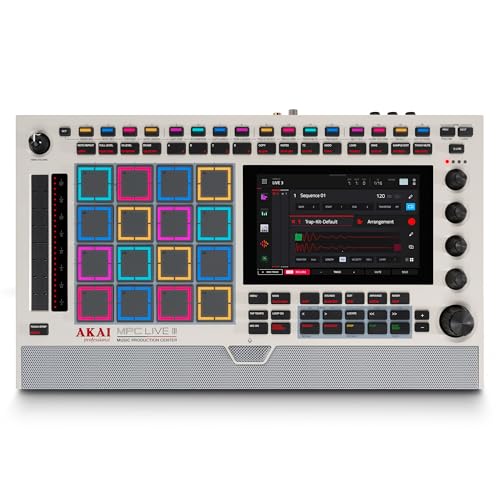
- The Most Powerful MPC to Date, Now in a Vintage-Inspired Colorway - Produce, record, mix and perform with no computer required; fully standalone, MPC Live III Retro features an 8-core processor...
- Expressive MPCe Pads - Play with 3D-sensing pads offering velocity, pressure and X/Y control for one-shot layers, seamless sample blending, note repeats and dynamic articulations-unlocking the most...
Closing out our list is the Akai Professional MPC Live III Portable Music Production Center. We found this to be the ultimate solution for making music anywhere—from the couch to the coffee shop. The built-in rechargeable battery and stereo monitors mean you are truly tethered to nothing. We were particularly impressed by the new MPCe pads, which offer 3D-sensing for velocity and pressure, allowing for much more expressive performances than previous generations.
Users have called the upgrade from the Live 2 a “quantumsprung” (quantum leap), noting that the extra RAM makes the new MPC3 OS run incredibly smoothly. We found that the built-in microphone is surprisingly usable for capturing quick vocal ideas or foley samples. While it is certainly more expensive than the MPC One+, the added portability and the superior feel of the pads make it worth every penny for the serious traveling producer. It’s a powerful, snappy, and deeply fun machine to use.
Pros
- True portability with a long-lasting battery and built-in speakers.
- Expressive 3D-sensing pads and a snappy 8-core processor for fast workflows.
Cons
- The learning curve for the MPC3 OS can be steep for those new to the ecosystem.
- Price is significantly higher than competing non-standalone controllers.
The Ultimate Buyer’s Guide
Key Factors to Consider
When choosing a DAW controller, your workflow should dictate your choice. If you spend most of your time playing melodies and programming drums, a keyboard-based controller like the Novation Launchkey is essential. If your focus is primarily on mixing and automation, look for a surface with motorized faders, such as the Behringer X-TOUCH or PreSonus FaderPort. Motorized faders are a luxury, but they are incredibly helpful because they physically move to match your software’s settings when you switch between tracks.
The Power of Control Protocols: HUI vs. Mackie Control
Most controllers communicate with your DAW using standard protocols like HUI or Mackie Control (MCU). While many modern devices offer “deep integration” (custom scripts specifically for one DAW), others rely on these generic protocols. We recommend checking your DAW’s compatibility list before buying. A controller that supports MCU is generally more future-proof, as it will work with almost any software you choose to use in the future.
Common Mistakes to Avoid
- Ignoring Desk Space: Many professional controllers are much larger than they appear in photos. Measure your workspace before committing to a 16-fader beast.
- Buying Standalone for Controller-Only Use: Don’t buy an MPC if you only plan to use it to control your PC software; you’re paying a huge premium for a standalone “brain” you won’t use.
- Skipping the Setup: Many users return perfectly good hardware because they didn’t realize they needed to enable the device in their DAW’s “MIDI Settings” or “Control Surfaces” menu.
Frequently Asked Questions
What is a DAW controller and do I need one?
A DAW controller is a piece of hardware that allows you to control your music software (DAW) using physical buttons, knobs, and faders instead of just a mouse. While you don’t strictly *need* one to make music, it can significantly speed up your workflow and make the creative process feel more like playing an instrument.
How do DAW controllers improve music production workflow?
They allow for multi-touch control—meaning you can adjust a fader with one hand while turning a pan knob with the other. This tactile feedback makes mixing more intuitive and helps you make creative decisions based on what you hear, rather than what you see on the screen.
Are DAW controllers compatible with all music software?
Most are compatible with major DAWs like Ableton Live, Logic Pro, Pro Tools, and FL Studio through universal protocols. However, some controllers offer much deeper “native” integration with specific software, providing extra features like clip launching or internal menu navigation.
What is the difference between a MIDI controller and a DAW controller?
While the terms are often used interchangeably, a MIDI controller (like a keyboard) is primarily for playing notes and triggering sounds. A DAW controller is designed specifically to control the software interface itself, such as the mixer, transport (play/stop), and plugin parameters.
Do I need an audio interface if I have a DAW controller?
Yes, usually. Most DAW controllers do not handle audio; they only send control data to your computer. However, some higher-end units (like the MPC Live III) are “hybrids” that include a built-in audio interface.
Are DAW controllers worth the investment for beginners?
We believe a basic controller, like a Launchkey, is one of the best first purchases a beginner can make. It helps bridge the gap between “clicking a computer” and “making music,” which can keep you motivated during the early learning stages.
What are the essential features to look for in a DAW controller?
Look for transport controls (Play, Stop, Record), at least one fader for volume automation, and a handful of knobs for tweaking synth parameters. If you plan to do a lot of mixing, touch-sensitive motorized faders are a huge bonus.
Conclusion: Our Final Recommendation
After evaluating the top contenders, we firmly recommend the Novation Launchkey 61 MK4 MIDI Keyboard Controller as the best choice for the majority of producers. Its combination of semi-weighted keys, polyphonic aftertouch, and deep software integration provides a professional experience at a price point that is accessible. Whether you are performing live or mixing a complex project in the studio, the Launchkey MK4 offers the most balanced feature set on the market today. While specialists might prefer the motorized faders of the Behringer X-TOUCH or the standalone power of the Akai MPC X SE, the Launchkey is the versatile workhorse that will suit almost any home studio setup.
Last update on 2026-10-16 / Affiliate links / Images from Amazon Product Advertising API