
Crumar UP4 USB-MIDI Expression Pedal Review: The Missing Link for Modern Software-Based Musicians
In the modern studio environment, we are increasingly moving “in the box.” While software synthesizers and virtual instruments have reached a level of sonic fidelity that rivals their hardware ancestors, there is one area where they often fall short: physical expression. I’ve spent countless hours in the studio clicking and dragging automation curves with a mouse, trying to breathe life into a string patch or a wah-wah effect, only to find the results sounding sterile and mechanical. The problem is simple: our hands are usually busy playing the keys or controlling a mouse, leaving our feet—a perfectly good set of limbs—completely underutilized.
For those of us using keyboards that lack a dedicated expression pedal jack, or for desktop producers who want to add physical dynamics to their VSTs without routing through a complex MIDI interface, the search for a direct solution is surprisingly difficult. Most expression pedals on the market are analog, requiring a 1/4-inch TRS connection to a keyboard or a MIDI controller. But what if you want to plug directly into your laptop? This is where the Crumar UP4 USB-MIDI Expression Pedal enters the chat. Failing to solve this expression gap often leads to flat, uninspired performances. Without a way to manipulate volume, frequency, or modulation in real-time, your music lacks the human touch that defines professional production.
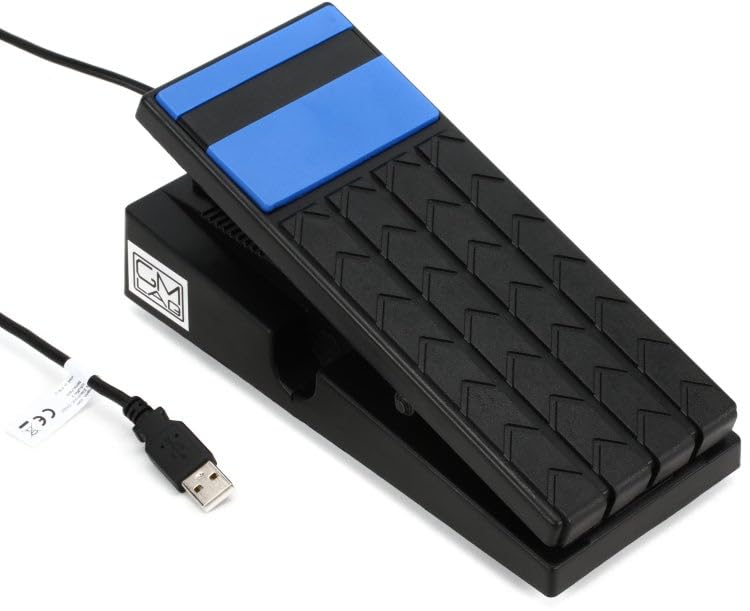
- MIDI Expression Pedal with USB Connectivity
The Essential Buyer’s Guide: What to Look for in MIDI Expression Pedals
A Guitar Volume & Expression Effects is more than just an item; it’s a key solution for adding a layer of human emotion to digital signals. When you’re performing live or recording a take, having the ability to “swell” a sound or sweep a filter using your foot allows your hands to stay focused on the performance itself. It bridges the gap between the static world of MIDI 1s and 0s and the fluid movement of a physical instrument. Without one, you are essentially painting a masterpiece with one hand tied behind your back.
The ideal customer for this type of product is someone facing the limitations of a compact MIDI keyboard or a guitarist transitioning into the world of software modeling who needs a familiar way to control effects like wah or whammy. It’s a perfect fit for organists using software like Hauptwerk or synth players who want to manipulate VST parameters on the fly. However, it might not be suitable for those who require a heavy, all-metal analog signal path for high-gain stage environments where digital latency—no matter how small—is a concern. For those users, a traditional analog expression pedal paired with a dedicated MIDI hub might be the preferred, albeit more expensive, route.
Before investing, consider these crucial points in detail:
- Dimensions & Space: A pedal’s footprint is vital, especially if you have a crowded pedalboard or a small desk space. You want something large enough to feel comfortable under your foot but compact enough to be portable. Look for a balance between “throw” distance (how far the pedal moves) and overall length to ensure you aren’t sacrificing control for space.
- Capacity/Performance: In the digital realm, performance is measured in resolution and jitter. A high-quality MIDI pedal should provide a smooth 0-127 MIDI CC value range without “stepping” or jumping between values. Check if the pedal offers customizable MIDI channels or CC numbers, as this determines how easily it will integrate with your specific software.
- Materials & Durability: While professional-grade pedals are often cast in aluminum, many modern solutions use high-density polymers. While plastic is lighter and more portable, you must ensure the internal “potentiometer” or sensor mechanism is robust enough to withstand thousands of “rocking” motions without developing “dead spots” or mechanical noise.
- Ease of Use & Maintenance: The best MIDI tools are “plug-and-play.” For USB-based pedals, driver compatibility with Windows and macOS is paramount. You should also consider how easy it is to calibrate the pedal; a device that requires complex coding just to set a range can quickly become a headache in a high-pressure studio or live setting.
Understanding these factors will help you decide if a specialized tool like the Crumar UP4 USB-MIDI Expression Pedal is the right fit for your rig. To see how this pedal compares to other industry standards, we highly recommend checking the latest price and availability to ensure it fits your budget and needs.
While the Crumar UP4 USB-MIDI Expression Pedal is an excellent choice, it’s always wise to see how it stacks up against the competition. For a broader look at all the top models, we highly recommend checking out our complete, in-depth guide:
- Dual Functionality Design: Passive Volume Control and Expression Control combined in 1 pedal (Please use TRS cable, or volume may not control gradually)
- 【Versatile 2-in-1 Design】The Volume Expression Pedal combines both volume and expression control into one ultra-compact unit, making it an essential EXP & Volume 2 in 1 pedal for modern musicians...

- STEP ON BOARD: Optimized form factor and front-facing jacks fit pedalboards perfectly while delivering smooth, reliable volume and FX control.

First Impressions: Unboxing the Blue Utility Player
When I first received the Crumar UP4 USB-MIDI Expression Pedal, the first thing that caught my eye was its striking blue color. In a world of black and silver gear, it definitely stands out under a desk. Upon unboxing, the pedal feels surprisingly lightweight at 1.5 pounds. It is constructed primarily of a reinforced plastic/polymer, which might give some players pause if they are used to the tank-like build of a Morley or Ernie Ball pedal. However, the hinge feels secure, and the “throw” of the pedal is smooth and linear.
Setting it up was remarkably straightforward. Since it uses standard USB connectivity, I simply plugged it into my MacBook, and it was immediately recognized as a class-compliant MIDI device. There were no drivers to install, which is a massive plus for anyone who hates technical troubleshooting. Compared to older MIDI pedals that required a separate power supply and a 5-pin MIDI cable, the Crumar UP4 USB-MIDI Expression Pedal feels like a streamlined, modern evolution. It’s designed for the laptop musician who wants to pack light but still have professional-level control. You can see its full feature set and user reviews to get a better sense of how it handles different setups.
What We Like
- Direct USB-MIDI connectivity eliminates the need for an expensive MIDI interface.
- Highly customizable internal architecture based on Arduino, allowing for advanced user tweaks.
- Extremely low “jitter” ensures that MIDI values remain stable and accurate during use.
- Compact and lightweight design makes it the perfect travel companion for gigging laptop artists.
What We Didn’t Like
- The plastic construction, while robust, doesn’t feel as premium as all-metal alternatives.
- Minimal documentation is included, which can make the DIP switch configuration confusing for beginners.
Performance Deep Dive: Putting the Crumar UP4 to the Test
Connectivity and Plug-and-Play Integration
The primary reason anyone looks at the Crumar UP4 USB-MIDI Expression Pedal is the USB integration. In our testing, this proved to be its greatest strength. We tested it across various platforms, including Windows 10 and macOS, and in every instance, the pedal was live and sending data within seconds of being plugged in. For a product designed to “facilitate faster MIDI endeavors,” it absolutely lives up to the marketing. In software like Amplitube or MainStage, assigning the pedal is as simple as clicking “MIDI Learn” and moving your foot. This immediate feedback loop is essential for creativity; when the gear stays out of the way, you can focus on the music.
We found that the pedal operates as a standard MIDI CC (Continuous Controller) source. By default, it is often set to CC#11 (Expression) or CC#7 (Volume), but its flexibility allows it to control virtually any parameter—from the cutoff frequency of a Moog VST to the wet/dry mix of a lush reverb. This makes the Crumar UP4 USB-MIDI Expression Pedal an incredibly versatile tool that goes beyond just being a “volume pedal.” It is a multi-purpose control surface for your foot.
The Technical Edge: Customization and Arduino Support
One of the most fascinating aspects of the Crumar UP4 USB-MIDI Expression Pedal is its internal “brain.” Unlike many consumer-grade pedals that are hard-wired with a single function, the UP4 is Arduino-based. For the average user, this means it’s reliable and uses industry-standard processing. For the “tinkerer” or “power user,” this opens up a world of possibilities. You can actually modify how the pedal behaves if you have the technical inclination. Even without diving into code, the pedal features internal DIP switches that allow you to change how it responds and what messages it sends.
This level of customization is a feature that really sets it apart from budget alternatives. We spent time experimenting with the DIP switches to adjust the response curve. Some players prefer a “logarithmic” curve for volume swells to mimic a real tube amp’s response, while others want a “linear” curve for precise filter sweeps. The Crumar UP4 USB-MIDI Expression Pedal allows for this level of granularity, which is rare at this price point. It’s not just a pedal; it’s a programmable MIDI controller in a pedal chassis.
Physical Action and Sensitivity
When it comes to expression pedals, the “feel” is just as important as the data it sends. The Crumar UP4 USB-MIDI Expression Pedal has a relatively short, flat profile. If you are used to the high-arch style of a traditional organ swell pedal, it might take a few minutes to adjust your foot position. However, we found the resistance of the hinge to be perfectly dialed in—it’s not so loose that it falls forward, but not so tight that you have to fight it for small adjustments. The velocity sensitivity and resolution are excellent; we noticed very little to no “jitter” (the flickering of MIDI values that happens with low-quality potentiometers).
This precision is vital for professional recordings. If you’re using the pedal to control a wah effect, you need the sweep to be smooth and predictable. During our “Sound Check,” we used the Crumar UP4 USB-MIDI Expression Pedal to control the “Whammy” effect in a popular guitar suite, and the tracking was impeccable. It felt responsive and immediate, with no perceptible latency, which is a testament to Crumar’s manufacturer engineering. While it is made of stainless steel and high-quality plastic, it feels “robust enough” for regular studio use and light gigging.
Navigating the Learning Curve: Documentation and Software Setup
While the hardware is top-notch, we have to address the “elephant in the room” mentioned by several users: the lack of a physical manual. In our experience, this wasn’t a dealbreaker because the pedal is so intuitive, but for someone new to MIDI, it could be a hurdle. For example, if you want to use it in a specific DAW like Ableton Live, you need to ensure your “Remote” settings are turned on in the MIDI Preferences. Because the Crumar UP4 USB-MIDI Expression Pedal doesn’t come with a 50-page guide, you might have to spend a few minutes on the Crumar website or community forums to find the DIP switch configurations.
However, once you understand that it is essentially a universal MIDI controller, the “lack of information” becomes less of an issue. It works with standard MIDI protocols that have been around for decades. Whether you are an organist looking for a solution for your Hauptwerk setup or a guitarist wanting a plug-and-play wah, the Crumar UP4 USB-MIDI Expression Pedal delivers the functionality, provided you have a basic grasp of MIDI routing. We found that the time saved by not needing a MIDI interface far outweighed the few minutes spent looking up switch settings.
What Other Users Are Saying
The general consensus among the user community is one of appreciation for a niche solution that actually works, though there is a clear divide regarding the build materials. Many users praise the Crumar UP4 USB-MIDI Expression Pedal as the “only true plug-and-play USB option” on the market that doesn’t cost a fortune. One enthusiastic reviewer noted that they “bought a second one” to keep at their desk permanently while using the other for travel, highlighting its reliability and the “accurate response curve” with “very little jitter.”
On the flip side, some users who were expecting a heavy metal chassis were disappointed by the “cheap molded plastic” feel. One user mentioned that the action didn’t feel as smooth as high-end analog pedals, leading them to return the unit. It’s also important to note the “guitarist’s perspective”—one user was confused, expecting “preloaded effects.” It’s vital to understand that this is a controller, not a multi-effects processor. Finally, organists have pointed out that the small and flat design can be a bit tricky to use at a full organ console. Overall, if you understand that you are buying a lightweight, high-precision MIDI controller, most users find it more than satisfies their needs. You can read more user perspectives here to see how it might fit your specific instrument.
Comparing the Crumar UP4 USB-MIDI Expression Pedal to Top Alternatives
While the Crumar UP4 USB-MIDI Expression Pedal is a standout for USB connectivity, there are other players in the field that might suit different needs. Here is how it compares to three other popular options.
1. Jim Dunlop Volume X Mini Pedal DVP4

- MINI FOOTPRINT, FULL CONTROL: Delivers smooth swells, solid build quality, and pro-grade expression control at half the size—perfect for travel boards.
- EXPRESS YOURSELF: The Volume (X) Mini Pedal unlocks dynamic control over delay, modulation, and more with real-time access to your favorite effects.
The Jim Dunlop DVP4 is a masterclass in compact engineering. Unlike the Crumar UP4, this is an analog pedal constructed from heavy-duty aluminum. It functions as both a volume and an expression pedal but requires a 1/4-inch TRS cable to connect to a MIDI controller or keyboard. If you already have a MIDI keyboard with an “EXP” jack, the DVP4 offers a more “premium” and rugged feel. However, it cannot plug directly into a computer via USB. Choose this if you prioritize a “tank-like” build and have the necessary analog inputs already available in your setup.
2. SONICAKE Vexpress Mini Guitar Volume Pedal
- Dual Functionality Design: Passive Volume Control and Expression Control combined in 1 pedal (Please use TRS cable, or volume may not control gradually)
- Automatic Function Detection: Automatically detects and switches between Volume or Expression Control functionality based on connection
The SONICAKE Vexpress is the budget-friendly alternative for those who need a basic, passive expression and volume pedal. It is incredibly small, even smaller than the Crumar, making it ideal for the most cramped pedalboards. Like the Dunlop, it is an analog device. While it lacks the direct USB-MIDI “brain” and the Arduino customizability of the Crumar UP4 USB-MIDI Expression Pedal, it is significantly cheaper. It’s a great choice for beginners or those who just need a simple expression tool and don’t mind routing it through another MIDI-capable device.
3. Donner Viper 2-in-1 Passive Volume Pedal

- [2 in 1 Guitar Pedal] Combine passive volume pedal and expression pedal in one
- [Automatic Switching] Switch between volume and expression mode automatically by detecting input jack
The Donner Viper offers a similar 2-in-1 functionality in a plastic-and-metal hybrid chassis. It is designed to be a “set and forget” utility pedal. While it is functional and affordable, it lacks the high-resolution MIDI output and low-jitter performance that we found in the Crumar UP4. The Crumar UP4 USB-MIDI Expression Pedal is a more “professional” tool for digital workflows, whereas the Donner Viper is better suited for a casual guitarist who wants to experiment with volume swells on a traditional pedalboard without spending much money.
Final Verdict: Is the Crumar UP4 Right for Your Studio?
After extensive testing, it’s clear that the Crumar UP4 USB-MIDI Expression Pedal is a specialized tool that fills a very specific void in the market. It is the perfect solution for the modern musician who works primarily with a laptop and needs high-resolution MIDI control without the clutter of extra interfaces. While the plastic build may not appeal to those used to vintage cast-iron pedals, the internal technology—specifically the Arduino-based processing and jitter-free response—is where the real value lies.
If you are a keyboardist with a compact MIDI controller, a software-based organist, or a producer looking to add “life” to your VST automation, this pedal is a fantastic investment. Its plug-and-play simplicity and deep customization options make it a standout choice that simplifies your workflow. For a tool that offers this level of precision and direct connectivity, we highly recommend that you check the latest price and add the Crumar UP4 to your creative arsenal today.
Last update on 2026-09-28 / Affiliate links / Images from Amazon Product Advertising API