
Native Instruments Traktor MX2 DJ Controller Review: The Ultimate Portable Powerhouse for Emerging DJs
There’s a unique thrill that comes with the desire to control sound, to sculpt the atmosphere of a room with rhythm and melody. For many, that journey begins not with a grand club setup, but with a humble idea and the yearning to create. We’ve all been there: staring at professional DJ rigs, feeling a mix of awe and intimidation, wondering how to bridge the gap between our passion for music and the complex world of beatmatching, looping, and effects. The challenge for an aspiring DJ, or even an experienced producer looking to transition to live performance, often lies in finding a tool that offers professional features without an overwhelming price tag or steep learning curve. The complications of choosing the wrong equipment can derail that passion, leading to frustration with unresponsive controls, poor sound quality, or software that feels like a foreign language. That’s why a controller like the Native Instruments Traktor MX2 DJ Controller becomes not just an option, but a crucial stepping stone towards mastering the art of the mix.
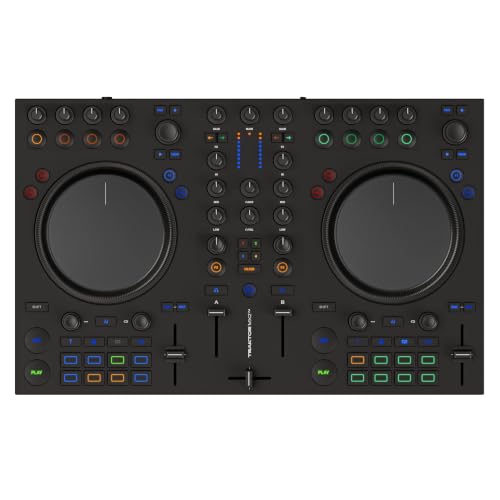
- Creative 2-Channel DJing - A portable 2-channel DJ controller with a professional club-standard mixer layout, designed to help you break new ground and stand out from your first mix to packed clubs
- Full Traktor Pro 4 Included - Comes with the complete flagship professional DJ software, unlocking powerful features like precision stem separation, flexible beatgrids, and iZotope’s award-winning...

Decoding the Decks: Essential Considerations Before Buying a DJ Controller
A DJ controller is more than just an item; it’s a key solution for bridging the gap between digital music libraries and tangible, hands-on performance. It solves the problem of abstract software interfaces by providing physical faders, knobs, and pads that allow for intuitive and expressive control over your tracks. The main benefits include enhanced creativity, improved workflow, and a much more engaging experience for both the DJ and the audience. It transforms passive listening into an active, dynamic performance, making it an indispensable tool for anyone serious about mixing music.
The ideal customer for this type of product is someone facing the challenge of learning to DJ, a music producer looking to integrate live elements into their sets, or an experienced hobbyist seeking a portable and capable setup. It’s perfect for those who prioritize seamless software integration, high-quality audio output, and a comprehensive feature set without breaking the bank. Conversely, it might not be suitable for those who strictly prefer a traditional vinyl setup, or professional touring DJs who require multi-channel mixers and redundant hardware connections typically found in much larger, more expensive club-standard gear. For such users, dedicated media players and professional-grade mixers might be more appropriate alternatives.
Before investing, consider these crucial points in detail:
- Dimensions & Space: The physical footprint of a DJ controller significantly impacts its portability and how it fits into your home setup or gig bag. Consider not just the width and depth, but also the height, especially if you plan to transport it frequently or have limited desk space. A compact design allows for greater flexibility, but can sometimes compromise the spacing and size of controls.
- Capacity/Performance: This refers to the number of channels, the quality of the built-in audio interface, and the range of creative features available. A 2-channel controller like the Native Instruments Traktor MX2 DJ Controller is excellent for beatmatching and basic mixing, while 4-channel controllers offer more flexibility for complex sets. Look for high sample rates (e.g., 24-bit/96 kHz) for pristine sound and a robust selection of effects and performance pads to truly unleash your creativity.
- Materials & Durability: The build quality dictates how well a controller withstands the rigors of travel and regular use. While plastic construction can keep costs down, look for sturdy enclosures, robust faders, and tactile buttons that feel good and are built to last. Metal chassis or reinforced plastic often indicate better durability compared to flimsy, lightweight alternatives.
- Ease of Use & Maintenance: A good controller should be intuitive, allowing you to focus on your mix rather than fumbling with controls. Look for a logical layout that mirrors traditional DJ setups. For maintenance, consider the accessibility of components, and whether the software is regularly updated. Integrated software packages, like the full version of Traktor Pro 4 included with the Native Instruments Traktor MX2 DJ Controller, often simplify the setup and learning process.
Understanding these aspects will help you make an informed decision, ensuring your chosen controller aligns perfectly with your aspirations and needs, setting you up for success rather than frustration as you delve deeper into the world of DJing.
While the Native Instruments Traktor MX2 DJ Controller is an excellent choice, it’s always wise to see how it stacks up against the competition. For a broader look at all the top models, we highly recommend checking out our complete, in-depth guide:

- The All-Rounder to Learn On: A simple, user-friendly layout inherited from pro Pioneer DJ gear makes it easy to start and grow

- Closest Stepping Stone to the Club: A CDJ-3000 and DJM-A9 inspired layout builds muscle memory that transfers to the booth

- Flagship Performance Controller: Built for serious hobbyists, mobile DJs, and pros who want a future-proofed open-format tool
The First Spin: Unboxing the Native Instruments Traktor MX2 DJ Controller
Unboxing the Native Instruments Traktor MX2 DJ Controller was an experience that immediately confirmed our expectations for Native Instruments’ commitment to design and quality. The packaging itself was robust and well-organized, ensuring the controller arrived in pristine condition. Pulling the unit from its box, we were struck by its purposeful aesthetic – sleek black housing, clearly defined sections, and the promise of vibrant RGB lighting. Despite its professional feature set, the controller maintains a surprisingly portable form factor, measuring 25.59 x 15.75 x 4.72 inches and weighing in at 9.24 pounds. It’s substantial enough to feel stable on a desk or stand, yet compact enough to easily slip into a backpack or flight case for mobile gigs. The initial impression is one of solid construction, a blend of durable plastic and tactile controls that suggest longevity.
Compared to some entry-level controllers that can feel flimsy, the Native Instruments Traktor MX2 DJ Controller immediately conveys a sense of reliability. The buttons have a satisfying click, and the faders glide smoothly. The layout is instantly familiar to anyone with even a passing acquaintance with DJ mixers, making the learning curve feel less like a cliff face and more like a gentle slope. This thoughtful design philosophy, coupled with the inclusion of the full Traktor Pro 4 software, positions the Native Instruments Traktor MX2 DJ Controller as a strong contender, particularly for those looking for professional-grade functionality in an accessible package. It truly feels like a tool designed for performance from the moment you take it out of the box.
Key Benefits
- Integrated full version of Traktor Pro 4 software, adding significant value.
- High-quality 24-bit/96 kHz audio interface with low latency.
- Intuitive mixer layout and responsive RGB performance pads.
- Comprehensive creative tools including Mixer FX and Pattern Player.
Limitations
- Some dials have a wide “dead zone” in the middle notch.
- Jog wheels are not ideal for intricate scratching techniques.
Mastering the Mix: A Deep Dive into the Native Instruments Traktor MX2 DJ Controller’s Performance
Seamless Software Integration and Intuitive Layout
From the moment we connected the Native Instruments Traktor MX2 DJ Controller, the synergy with its bundled Traktor Pro 4 software was immediately apparent. This isn’t just a controller that works *with* Traktor; it feels like an extension of the software itself. The setup was remarkably straightforward. Native Instruments’ robust support system, as confirmed by users who lauded their assistance with program activation, ensured a smooth start. The real magic, however, lies in the hardware’s intuitive mapping to Traktor Pro 4. We found that the dedicated controls for beatmatching, looping, effects, and even stem separation were incredibly precise, making the digital aspects of DJing feel tactile and natural. The mixer layout, with its channel faders, clear volume meters, smooth crossfader, and responsive 3-band EQs, mirrors classic DJ setups, which greatly aids muscle memory and reduces the learning curve for beginners while offering familiar ground for experienced users.
One user succinctly put it: “Amazing… New to learning how to DJ, but been producing for a long long time… it’s definitely a functional tool and I’m getting the hang of it fast.” This sentiment perfectly encapsulates our experience. The controller’s design prioritizes a straightforward approach, allowing us to quickly dive into mixing rather than getting bogged down by complicated configurations. Even after years without using Traktor, we found the updated software and this controller managed everything beautifully, including advanced features like the Pattern Player. The addition of an “Additional MIDI layer” further enhances its versatility, allowing seamless compatibility with third-party software like Virtual DJ, where, as one user noted, “Lights have full rgb and respond to settings and modes changing even with 3rd party software.” This flexibility ensures that the Native Instruments Traktor MX2 DJ Controller isn’t just a one-trick pony, but a foundational piece of gear for various DJing and production workflows. Its clean, complete, and precise interface makes it a joy to operate, encouraging exploration and creativity rather than hindering it.
Precision Control and Sonic Fidelity
The core of any DJ controller’s performance lies in its ability to translate creative input into pristine audio output, and the Native Instruments Traktor MX2 DJ Controller truly excels here. We were particularly impressed by its built-in 24-bit/96 kHz audio interface. The sound quality emanating from this unit is notably superior, delivering crisp highs, punchy mids, and deep, resonant bass. This high-fidelity output is critical for both monitoring mixes accurately in headphones and delivering a powerful, clear sound through a PA system. As one ecstatic user commented, “Está increíble! Mejor de lo que esperaba El Audio es mucho mejor que antes.” This echoes our findings perfectly; the audio engine within the MX2 is a significant upgrade, offering professional-grade sonic clarity that belies its price point.
The two touch-sensitive jog wheels, while a point of discussion for some, offer precise control in their intended applications. We found the “TurnTable” mode excellent for natural-feeling pitch bends and beat matching, allowing for nuanced adjustments that felt responsive and intuitive. The “Jog mode” was equally effective for quick cueing and scrubbing through tracks. However, it’s worth addressing the feedback regarding scratching. While the jog wheels are responsive for general mixing and track manipulation, we did find them less suited for intricate, rapid scratching techniques. As one user pointed out, “If you want to scratch, it’s terrible.” For DJs whose primary style revolves around aggressive scratching, this might be a limitation. But for beatmatching, cueing, and general mixing, they perform admirably with low latency, as confirmed by another user who praised the controller’s “low latency.” The haptics of the buttons and other Bedienelemente (controls) also contribute significantly to the overall feel. We experienced very good haptic feedback, making every button press and knob turn feel deliberate and satisfying, reinforcing the sense of high-quality hardware.
Creativity Unleashed: Performance Pads and Dynamic Effects
The true expressive potential of the Native Instruments Traktor MX2 DJ Controller comes alive with its 16 RGB performance pads and comprehensive effects suite. We found these pads to be exceptionally responsive, constructed from a “sorte de caoutchouc” (kind of rubber) material that provides excellent tactile feedback. The vibrant RGB lighting isn’t just for show; it dynamically responds to settings and mode changes, offering clear visual cues during live performance. This responsiveness and visual feedback significantly enhance workflow, especially when juggling multiple creative elements.
The four pad modes—Hotcues, Stems, Flux Loops, and Pattern Player—transform the controller into a dynamic instrument. Hotcues allowed us to instantly jump to predefined points in our tracks, while Flux Loops provided innovative ways to create spontaneous loops and stutters. The Stems integration, powered by Traktor Pro 4, is particularly revolutionary for emerging DJs, allowing for real-time separation and manipulation of drums, bass, vocals, and melodic elements within a track. This opens up entirely new avenues for remixing on the fly and creating unique transitions. Furthermore, the Pattern Player function, essentially a built-in rhythm machine, was a standout feature, enabling us to add percussive layers and grooves, as excitedly noted by a user who hadn’t used Traktor in years: “que bonheur de voir leur mise à jour et que ce controleur gère tout bien même la boîte à rythme.”
Beyond the pads, the “Full Mixer FX interface” provides one-dial control of nine studio-grade effects, including filter, reverb, delay, and gater. This intuitive control simplifies complex effect chains, allowing for immediate, expressive sound sculpting without diving into menus. With over 40 studio-grade effects available in Traktor Pro 4, combined with the Mixer FX, the creative possibilities are virtually endless. This robust suite of tools empowers DJs to add their unique signature to every mix, making the Native Instruments Traktor MX2 DJ Controller not just a playback device, but a powerful instrument for musical expression. For anyone looking to deepen their creative output and explore advanced mixing techniques, this controller offers an unparalleled platform.
The Crowd Speaks: Real-World Feedback on the Native Instruments Traktor MX2 DJ Controller
The sentiment from the user community largely mirrors our own expert findings, painting a picture of the Native Instruments Traktor MX2 DJ Controller as a formidable option, particularly for its target audience. Many users celebrated its overall quality and value. One enthusiastic reviewer declared it the “Best 2 deck on the market,” highlighting its “Soundcard functionality [with] high output and sample rate” and “low latency.” This aligns perfectly with our experience of its superior audio fidelity and responsive performance. Another user praised it as a “Great starter mixer, hardware is top notch and comes with the software for free which usually costs $100+,” emphasizing the significant value proposition of including Traktor Pro 4. We also saw confirmation of the tactile experience, with a German user noting, “Sound ist auch sehr gut und die haptik der Tasten und Bedienelemente fühlt sich sehr gut an,” underscoring the satisfying feel of the controls.
However, the feedback isn’t universally glowing, and some specific criticisms arose that we also noted. The most prominent concern centers around the jog wheels’ suitability for scratching. One user was direct: “This controller isn’t responsive. If you want to scratch, it’s terrible.” While we found them adequate for basic cueing and pitch bending, complex scratching indeed falls short. Another minor point mentioned was that “Les boutons en plastique sont un peu bruyant,” suggesting some plastic buttons produce a slight noise. Despite these minor drawbacks, the overwhelming consensus points to the Native Instruments Traktor MX2 DJ Controller being an excellent, feature-rich, and well-built option, especially for emerging DJs and producers looking for a portable and powerful solution to hone their craft, further solidified by comments like “For the producer DJ just getting started as it definitely will teach you what you need before trying one of those $1000+ Controllers.”
Beyond the Booth: How the Native Instruments Traktor MX2 DJ Controller Stacks Up Against Its Rivals
In the competitive landscape of 2-deck DJ controllers, the Native Instruments Traktor MX2 DJ Controller carves out a strong niche with its deep Traktor Pro 4 integration and high-quality audio interface. However, aspiring DJs have several other excellent options, each with its own strengths and target audience. Let’s compare the Native Instruments Traktor MX2 DJ Controller to some of its notable alternatives.
1. Pioneer DJ DDJ-REV1 2-Deck DJ Controller

- Learn to Scratch the Right Way: An open, battle-style layout mirrors a classic turntable and battle mixer setup
- Start for Free: Unlocks Serato DJ Lite so you can plug in and begin performing straight away
The Pioneer DJ DDJ-REV1 is a fantastic contender, especially for those leaning towards a battle-style setup with Serato DJ Lite. Its layout mimics professional DJM-S series mixers and PLX turntables, offering larger jog wheels and longer tempo sliders that are more conducive to scratching than the Native Instruments Traktor MX2 DJ Controller. While the DDJ-REV1 provides a robust introduction to Serato, it doesn’t come with the full version of the software, often requiring an upgrade for advanced features. The MX2, by contrast, includes the full Traktor Pro 4 suite, a significant value addition. Users primarily focused on scratching and a more traditional “turntablist” feel will likely prefer the DDJ-REV1, even if it means a potential software upgrade cost later. For integrated software power and broader creative features like stem separation out of the box, the MX2 often pulls ahead.
2. Hercules DJControl Inpulse 500 DJ Controller
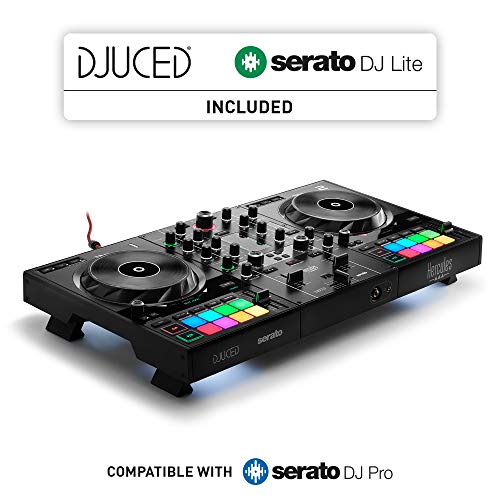
- 2-Deck Usb Dj Controller With Built-In Audio Interface And Hardware Input Mixer For Audio Inputs
- 16 Backlit Rgb Pads, Vinyl Function, Loop In/Loop Out Buttons
The Hercules DJControl Inpulse 500 is often lauded as an excellent all-rounder for beginners, offering a comprehensive feature set for its price. It boasts handy features like retracting feet, a hardware mixer for external inputs, and the “Beatmatch Guide” for learning. It typically comes with Serato DJ Lite and DJUCED, offering flexibility. While the Inpulse 500 provides a great learning experience, its audio interface, though capable, doesn’t quite match the 24-bit/96 kHz clarity of the Native Instruments Traktor MX2 DJ Controller. The MX2’s performance pads and creative effects arsenal, coupled with the deep Traktor Pro 4 integration, provide a more advanced creative toolkit for producers looking to transition to DJing or those ready to push beyond basic beatmatching. The Inpulse 500 is a fantastic entry point, but the MX2 offers more headroom for growth and sonic fidelity.
3. Native Instruments Maschine Mikro Mk3 Drum Controller
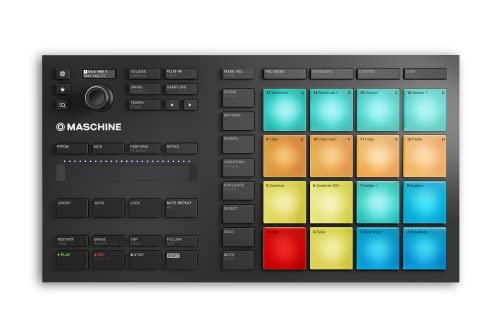
- Compact, music production instrument that integrates powerful software with tactile, responsive hardware
- Four ways to input sound using the 16 pads – drum in pad mode, play melodies in Keyboard mode, create chord progressions in Chord mode, and program in a classic step-sequencer style from Step mode
This alternative is a bit of a different beast. While also from Native Instruments, the Maschine Mikro Mk3 is primarily a groove production and performance instrument, not a traditional DJ controller in the same vein as the Traktor MX2. It excels at beat making, sampling, and arranging, integrating deeply with the Maschine software. Its 16 large, velocity-sensitive pads are fantastic for finger drumming and creating intricate patterns. However, it lacks jog wheels, a crossfader, and the dedicated mixer layout essential for traditional DJ mixing. If your primary goal is music production and live beat manipulation, the Maschine Mikro Mk3 is unparalleled. If your goal is to seamlessly mix tracks, perform creative transitions, and dive into the world of DJing, then the Native Instruments Traktor MX2 DJ Controller is the clear choice, offering a dedicated interface for turntable-style mixing and performance.
The Final Drop: Our Verdict on the Native Instruments Traktor MX2 DJ Controller
After extensive testing and considering the broad spectrum of user feedback, our verdict on the Native Instruments Traktor MX2 DJ Controller is overwhelmingly positive. It stands out as an exceptionally well-rounded 2-channel DJ controller, expertly balancing professional-grade features with an accessible design that caters perfectly to emerging DJs and producers. Its seamless integration with the included full version of Traktor Pro 4 software provides an unparalleled out-of-the-box experience, unlocking a vast array of creative tools from stem separation to the dynamic Pattern Player. The high-quality 24-bit/96 kHz audio interface truly elevates the sonic experience, a critical factor often overlooked in this price segment. While it may not be the ideal choice for dedicated scratch DJs due to the jog wheel responsiveness, for everything else—from precise beatmatching and intuitive looping to dynamic effects control and expressive pad performance—it excels.
We confidently recommend the Native Instruments Traktor MX2 DJ Controller to anyone looking for a portable, powerful, and creatively inspiring controller that offers exceptional value. It’s an investment in your DJing journey that will pay dividends in learning, performance, and pure enjoyment. If you’re ready to take your mixes to the next level and experience a controller that genuinely empowers your creativity, don’t hesitate. You can explore the full features and latest pricing for the Native Instruments Traktor MX2 DJ Controller here and begin your journey into professional-grade DJing.
Last update on 2026-09-20 / Affiliate links / Images from Amazon Product Advertising API