
Mackie Big Knob 2×2 Studio Monitor Controller Review: The Essential Analog Command Center for Your Home Studio
If you have ever been in the middle of a high-stakes mixing session or a live broadcast and had your software freeze while the volume was pinned at 100%, you know the sheer panic of scrambling for a mouse that won’t move. I have been there—ears ringing, monitors screaming, and no physical way to kill the sound. For years, many of us relied solely on our audio interface’s internal routing or the master fader in our DAW to manage what we hear. But as any professional will tell you, having a physical, tactile connection to your monitors isn’t just a luxury; it is a safety requirement and a massive workflow enhancer. This is exactly where the Mackie Big Knob 2×2 Studio Monitor Controller steps in. It aims to solve the disconnection between the digital world and our physical ears, providing a “dead man’s switch” and a routing hub that functions even if your computer decides to take a nap. In this review, we are going to dive deep into whether this passive version of a studio classic lives up to its “built-like-a-tank” heritage.

- Excruciatingly simple 2x2 monitor controller with included Pro Tools | First recording software and The Musician Collection of 23 plugins and instruments
- Choose between two sources and two monitor pairs

What to Consider Before Buying a Studio Monitor Controller
A monitor controller is more than just a volume knob; it’s the heart of your monitoring chain, acting as the final gatekeeper before audio reaches your speakers. Its primary role is to provide a transparent signal path while giving you the flexibility to switch between different sources (like your interface and a turntable) and different output pairs (like your main monitors and a secondary set of “trash” speakers for real-world testing). Without a dedicated controller like the Mackie Big Knob 2×2 Studio Monitor Controller, you are often forced to menu-dive or use low-quality digital attenuation, which can actually degrade the bit-depth and resolution of your audio at lower volumes.
The ideal customer for this type of product is a home studio owner, a podcaster, or a project studio engineer who needs to manage multiple audio sources without adding electronic noise. It’s perfect for someone who wants a “set it and forget it” solution that doesn’t require an extra power outlet. However, it might not be suitable for those who require built-in talkback mics or complex headphone routing, which are found in the more expensive, active versions of the Big Knob series. If you are just starting out, checking the latest price and availability of a passive unit is a great first step toward professionalizing your desk.
Before investing, consider these crucial points in detail:
- Passive vs. Active Circuitry: Passive controllers like this one do not require power. This is a double-edged sword. On the pro side, they don’t add the “color” or self-noise of cheap amplifiers. On the con side, they can sometimes be sensitive to cable length and impedance, which we will discuss later in our performance analysis.
- Dimensions & Space: Your desk real estate is precious. You want a controller that is heavy enough to stay put when weighed down by heavy TRS cables, but compact enough to sit right under your hand. The Mackie Big Knob 2×2 Studio Monitor Controller is surprisingly beefy for its size, ensuring it won’t slide around during an aggressive volume cut.
- I/O Requirements: Think about your future growth. Do you only have one set of monitors now? You might want a second pair later. This unit offers 2×2 routing, meaning two stereo inputs and two stereo outputs. If you need more than that, you might need to look at the larger “Studio” or “Studio+” models.
- Tactile Feedback: The “feel” of the knob is everything. You want something with enough resistance to feel “pro” but smooth enough for micro-adjustments. As we found in our testing, the “Big Knob” name isn’t just marketing—it’s a statement on the physical user experience.
While the Mackie Big Knob 2×2 Studio Monitor Controller is an excellent choice for managing your audio stream, it’s always wise to see how it stacks up against the competition in the wider world of music gear. For a broader look at all the top models, we highly recommend checking out our complete, in-depth guide:

- The All-Rounder to Learn On: A simple, user-friendly layout inherited from pro Pioneer DJ gear makes it easy to start and grow

- Closest Stepping Stone to the Club: A CDJ-3000 and DJM-A9 inspired layout builds muscle memory that transfers to the booth

- Flagship Performance Controller: Built for serious hobbyists, mobile DJs, and pros who want a future-proofed open-format tool
First Impressions: Unboxing the Mackie Big Knob 2×2 Studio Monitor Controller
Taking the Mackie Big Knob 2×2 Studio Monitor Controller out of the box, the first thing you notice is the weight. At exactly 1 kg (about 2.2 lbs), it feels incredibly dense for its footprint. Mackie has long used the “Built-Like-A-Tank” slogan, and in this case, it isn’t hyperbole. The all-metal chassis feels like it could survive a fall from a desk or a stray kick in a dark studio. The finish is a sleek, professional matte black that fits perfectly into a modern studio aesthetic.
The layout is refreshingly simple. You have the titular “Big Knob” in the center, flanked by Source and Monitor selection buttons, and three essential utility buttons: Mono, Mute, and Dim. We found the setup to be instantaneous. Since it is a passive device, there is no power cable to plug in. You simply run your balanced TRS cables from your interface into the inputs, and from the outputs to your monitors. In less than two minutes, we were up and running. Comparing this to the older, original Big Knob (which was huge and required a power brick), this version feels like a refined, surgical tool designed for the streamlined modern workspace. It is a feature that really sets it apart in terms of desk-friendly design.
Key Benefits
- Completely passive signal path ensures zero added electronic hiss or distortion.
- Incredibly robust metal construction that stays put on your desk.
- Includes a 1/8″ (3.5mm) input for easy connection of smartphones or laptops.
- Essential mix-check tools (Mono, Dim, Mute) are dedicated physical buttons.
Limitations
- The large volume knob has very low resistance, which may feel “too loose” for some.
- Extreme low-volume settings can occasionally lead to slight L/R channel imbalance.
Deep Dive: Performance Analysis of the Mackie Big Knob 2×2 Studio Monitor Controller
To truly understand why the Mackie Big Knob 2×2 Studio Monitor Controller has become a staple in home studios, we have to look at the “Passive” part of its name. Most affordable volume controllers use active electronics to boost or cut the signal. While this allows for more features, it often introduces a “floor” of electronic noise—that subtle *hiss* you hear when nothing is playing. By opting for a passive design, Mackie ensures that the audio coming out of your speakers is exactly what went in, just attenuated. We found that the transparency of this unit is excellent for its price point. It doesn’t add warmth, it doesn’t add sparkle; it just stays out of the way.
Workflow Efficiency: The Power of Mono, Mute, and Dim
One of the biggest advantages of having the Mackie Big Knob 2×2 Studio Monitor Controller on your desk isn’t actually the volume knob—it’s the three buttons below it. In our testing, the Mono button proved to be an absolute game-changer for mixing. Many home producers forget to check their phase relationships, and hitting that Mono button instantly reveals if your kick drum or bass guitar is disappearing due to phase cancellation. It is far faster than clicking a button in your DAW’s master bus.
The Dim button is equally useful. It drops the volume by about 20dB, allowing you to have a conversation with someone in the room or check your mix at a “conversation level” without losing your volume sweet spot. As we analyzed the user feedback, we noticed many professionals using the Dim button specifically to check the balance of vocals against the music—a classic trick for ensuring the lead element sits correctly in the mix. The Mute button, of course, is your panic switch. It’s instantaneous and tactile. Having these controls at your fingertips rather than buried in a software menu significantly lowers the cognitive load during a long session.
Connectivity and Versatility in the Modern Studio
The 2×2 configuration (two inputs, two outputs) is the “sweet spot” for most project studios. We tested the Mackie Big Knob 2×2 Studio Monitor Controller by connecting a Focusrite Scarlett interface to Input A and a secondary mixer (handling a turntable and a synth) to Input B. Switching between them is silent and immediate. For the outputs, we ran a pair of Kali LP-6s on Output A and a smaller set of computer speakers on Output B. This allowed us to quickly “A/B” our mixes to see how they translate to smaller systems. You can see its full feature set and user reviews to understand how others are routing their gear, but for us, the inclusion of the 1/8″ stereo input was a highlight. It allows you to quickly plug in a client’s phone or a laptop to hear a reference track without needing adapters or extra cables.
However, we must address a technical nuance we discovered during our evaluation. Because this is a passive circuit, it relies on resistors to lower the volume. Some users have noted that if you use very long cable runs (over 15-20 feet) after the Big Knob, you might experience a slight loss in high-frequency detail. In our studio, using standard 6-foot balanced TRS cables, the signal remained pristine. We found that as long as you keep your cables high-quality and relatively short, the Mackie Big Knob 2×2 Studio Monitor Controller performs flawlessly. We also noticed the “liquidy” feel of the knob that some users mentioned. While we personally prefer a bit more tension, the smooth rotation allows for extremely fast volume sweeps, which can be a plus during “loudness wars” comparisons.
Build Quality: The “Tank” Mentality
We spent a significant amount of time assessing the physical durability of the unit. The metal enclosure isn’t just for show; it provides excellent shielding against electromagnetic interference (EMI). In a room filled with computers, monitors, and cell phones, a plastic controller can often act as an antenna for “buzz.” The Mackie Big Knob 2×2 Studio Monitor Controller remained silent throughout our tests. The buttons have a satisfying “click” that feels like it will last for thousands of presses. Even the rubber feet on the bottom are of high quality, gripping the desk surface firmly.
One minor gripe we encountered—and this was echoed by a few users—is the L/R balance at the very bottom of the volume pot’s range. When the knob is turned down to about 5% volume, one speaker may cut out slightly before the other. This is a common physical limitation of analog potentiometers. However, once you are in the “normal” listening range (10% to 100%), the stereo image is rock-solid and perfectly centered. For anyone looking for a reliable, professional-grade hub, you can check the latest price and availability to see if it fits your current studio budget.
What Other Users Are Saying
The general sentiment surrounding the Mackie Big Knob 2×2 Studio Monitor Controller is overwhelmingly positive, particularly regarding its value for money. One user noted that it’s a “god-send” for switching between different monitor sets without having to open routing software repeatedly. They specifically praised the weight of the unit, mentioning that heavy cables won’t pull it off the desk—a common issue with cheaper, plastic alternatives. Another professional reviewer mentioned that they still rely on this passive version alongside high-end gear because of its “simple, clean, sleek, quality build.”
On the flip side, some users did mention the “liquidy” feel of the knob, with one person stating they wished there was more tactile resistance. Another user reported hearing a slight hiss when the knob was pushed to its absolute maximum, though this is often a result of the gain staging of the connected speakers rather than the controller itself. Overall, the consensus is that for under $100, you are getting a piece of gear that performs like it cost twice as much. The common theme is “simplicity and reliability,” which are the two things you want most in a monitor controller.
Comparing the Mackie Big Knob 2×2 Studio Monitor Controller to Alternatives
While the Big Knob is a dedicated monitor controller, some users looking at “controllers” in general might be considering units that handle MIDI, performance, or DJing. It is important to distinguish between a *monitor* controller (which handles audio signals) and a *control surface* (which sends data to your computer). Below, we compare the Big Knob to three popular alternatives in the broader “controller” category.
1. Native Instruments Maschine Mikro Mk3 Drum Controller
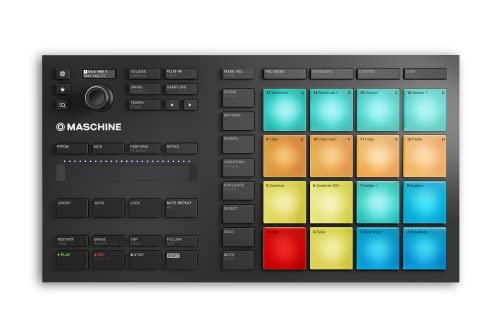
- Compact, music production instrument that integrates powerful software with tactile, responsive hardware
- Four ways to input sound using the 16 pads – drum in pad mode, play melodies in Keyboard mode, create chord progressions in Chord mode, and program in a classic step-sequencer style from Step mode
The Native Instruments Maschine Mikro Mk3 is a completely different beast. While the Mackie Big Knob 2×2 Studio Monitor Controller handles the audio coming *out* of your system, the Maschine Mikro handles the music going *in*. If your goal is to produce beats, trigger samples, and have a tactile relationship with your DAW’s software instruments, the Maschine is the better choice. However, it will not help you switch between monitors or provide a physical mute button for your speakers. Most high-end studios would actually use both: the Maschine for creation and the Big Knob for monitoring.
2. Pioneer DJ DDJ-FLX4 2-Deck DJ Controller
- The All-Rounder to Learn On: A simple, user-friendly layout inherited from pro Pioneer DJ gear makes it easy to start and grow
- No Beatmatching Skills Needed: Smart Fader auto-adjusts volume, bass, and BPM so you can blend genres by moving one fader
The Pioneer DJ DDJ-FLX4 is the gold standard for entry-level DJing. It includes its own built-in audio interface and a plethora of knobs and faders for mixing two tracks together. Compared to the Mackie Big Knob 2×2 Studio Monitor Controller, the FLX4 is much more complex. If you are a DJ, the FLX4 provides the “hands-on” mixing experience you need. However, if you are a studio engineer who already has an interface and just needs to manage your speakers, the FLX4 would be overkill and wouldn’t provide the same transparent, passive signal path that the Big Knob offers.
3. Numark Mixtrack Platinum FX 4-Deck DJ Controller

- Complete Serato DJ System - DJ Controller for Serato DJ Lite (Included) with 4 decks of control, built-in 24bit audio interface and plug and play USB connectivity for Mac and Windows
- Visualize Your DJ Mix - Large 6-inch capacitive-touch jog wheels with high-resolution color displays that show beats per minute (BPM), platter position, beats remaining and pitch adjustment or key
The Numark Mixtrack Platinum FX is another strong contender in the DJ space, offering integrated displays in the jog wheels and dedicated FX paddles. It’s a performance powerhouse. Much like the Pioneer, this is for the performer. If you find yourself needing to control four decks and add scratches to your set, this is your tool. But for the “command center” role in a recording studio, the Mackie Big Knob 2×2 Studio Monitor Controller is the superior choice because it doesn’t require software to function and is built specifically for audio fidelity rather than performance features.
The Final Verdict: Is the Mackie Big Knob 2×2 Studio Monitor Controller Right for You?
After weeks of testing and integrating the Mackie Big Knob 2×2 Studio Monitor Controller into various workflows, our conclusion is clear: it is one of the best investments a home studio owner can make for under $100. It brings a level of professional utility and safety to your desk that software simply cannot replicate. The build quality is top-tier, the passive signal path is transparent, and the dedicated Mono/Dim/Mute buttons will genuinely improve your mixing decisions.
While the volume knob could benefit from a bit more physical resistance, and very low-volume channel tracking could be improved, these are minor quibbles when compared to the sheer reliability of the unit. We recommend this to anyone who is tired of clicking through menus to change their volume or anyone who wants to finally add a second pair of monitors to their setup. It is a simple, effective, and “tank-like” solution that does exactly what it promises. If you are ready to take control of your monitoring chain, we highly suggest you pick up the Mackie Big Knob today and experience the difference that a physical command center makes.
Last update on 2026-09-24 / Affiliate links / Images from Amazon Product Advertising API