
Hercules DJControl Inpulse 200 MK2 DJ Controller for Learning Review: The Ultimate Gateway to Mastering the Mix?
We have all been there: standing in front of a computer screen, staring at complex DJ software, and trying to transition between two songs using nothing but a laptop trackpad and a keyboard. It is a frustrating, uninspired way to learn an art form that is fundamentally tactile. For many aspiring DJs, the barrier to entry isn’t a lack of rhythm or musical taste; it’s the intimidating price and complexity of professional gear. Without a physical interface, you lose the “feel” of the music, and without guidance, you’re just guessing where the beats align. This is exactly where a dedicated tool like the Hercules DJControl Inpulse 200 MK2 DJ Controller for Learning steps in. Solving this initial hurdle is crucial because many beginners give up before they even understand the basics of beatmatching. If you don’t start with the right hardware, you risk developing bad habits or, worse, losing interest in a potentially life-changing hobby.
When we first got our hands on the Hercules DJControl Inpulse 200 MK2 DJ Controller for Learning, we wanted to see if it truly bridged that gap between “bedroom enthusiast” and “confident performer.” This isn’t just about having knobs and sliders; it’s about having a system that actively teaches you the mechanics of the craft. To help you decide if this is the right investment for your musical future, see its full feature set and user reviews to understand the scope of what this compact powerhouse can do.

- Built-in audio: Master (speakers) and monitoring (headphones) outputs
What to Consider Before Buying a DJ Controller
A DJ controller is more than just an item; it’s a key solution for translating your musical vision into a seamless auditory experience. In the modern era, these devices act as the bridge between your digital music library and the speakers. They provide the physical touchpoints—the faders, the EQ knobs, and the jog wheels—that allow you to manipulate sound in real-time. Whether you are looking to play at a friend’s house party or just want to record mixes for your own enjoyment, the right controller makes the difference between a clunky transition and a professional-sounding set. It solves the problem of “menu diving” on a computer, allowing you to keep your eyes on the crowd (or your workspace) rather than a laptop screen.
The ideal customer for this type of product is someone facing the daunting “blank page” of a new hobby, particularly students, younger users, or adults who want a low-risk way to explore DJing. It is also a fantastic secondary unit for professionals who need a portable “backpack rig” for preparing sets on the go. However, it might not be suitable for those who require 4-channel mixing, XLR balanced outputs for large club sound systems, or high-end motorized platters. If you are already performing at large festivals, you likely need a more advanced “stand-alone” system.
Before investing, consider these crucial points in detail:
- Dimensions & Space: Consider where you will be practicing. A compact controller is vital if you have a small desk or if you plan to travel. Look for a unit that fits easily into a standard backpack without requiring a specialized, expensive flight case.
- Capacity/Performance: Check the number of channels and the software compatibility. For a beginner, two channels are perfect, but ensure the hardware supports modern features like “Stems” (separating vocals and instruments), which is becoming a standard in creative mixing.
- Materials & Durability: While most entry-level controllers are made of plastic to keep costs down, the quality of that plastic matters. You want knobs that don’t feel “wobbly” and faders that have a smooth, consistent resistance to allow for precise volume adjustments.
- Ease of Use & Maintenance: Look for “plug and play” functionality. You shouldn’t need an engineering degree to set it up. Furthermore, consider the power source; USB-powered units are much more convenient than those requiring a bulky external power brick.
Choosing the right hardware is the first step toward success. While the Hercules DJControl Inpulse 200 MK2 DJ Controller for Learning is an excellent choice, it’s always wise to see how it stacks up against the competition. For a broader look at all the top models, we highly recommend checking out our complete, in-depth guide:

- The All-Rounder to Learn On: A simple, user-friendly layout inherited from pro Pioneer DJ gear makes it easy to start and grow


- Closest Stepping Stone to the Club: A CDJ-3000 and DJM-A9 inspired layout builds muscle memory that transfers to the booth

- Flagship Performance Controller: Built for serious hobbyists, mobile DJs, and pros who want a future-proofed open-format tool
First Impressions and Key Features of the Hercules DJControl Inpulse 200 MK2
Unboxing the Hercules DJControl Inpulse 200 MK2 DJ Controller for Learning, the first thing we noticed was its incredibly small footprint. It is light—weighing just under three pounds—yet it doesn’t feel like a toy. The MK2 version brings several refinements over its predecessor, most notably the improved jog wheels which feel significantly more responsive for scratching and the addition of dedicated Stems control. In the box, you get the unit itself (with a hard-wired USB cable), a quick start guide, and access to both DJUCED and Serato DJ Lite software. This dual-software compatibility is a major selling point; usually, you are locked into one ecosystem, but here you can try both to see which workflow suits you best.
The initial look is sleek, with a matte black finish and brightly backlit pads. One thing that immediately sets it apart from competitors like Pioneer or Traktor is the “Beatmatch Guide” button. When activated, red light guides appear next to the tempo sliders and jog wheels, telling you exactly which way to move them to sync your tracks. For anyone who has struggled to understand the concept of “phasing,” this is a game-changer. Before you dive into the technicalities, check the latest price and availability to see why this is currently one of the most recommended starter units on the market.
Key Benefits
- Built-in Light Guides: The revolutionary “Beatmatch Guide” helps you learn to mix by ear with visual cues.
- Stems Integration: Dedicated pad modes to separate vocals from instruments in real-time.
- Dual Software Support: Works seamlessly with both Serato DJ Lite and Hercules’ own DJUCED software.
- Ultra-Portable: Lightweight and compact enough to fit in a carry-on or backpack for travel.
Limitations
- Hard-wired USB Cable: If the cable breaks, you can’t simply swap it for a new one without a repair.
- Limited Pads: Only 4 physical pads per deck, requiring “Mode” switching to access all 8 functions.
A Deep Dive into the Hercules DJControl Inpulse 200 MK2 Performance
The Learning Experience: Beatmatch Guide and DJ Academy
We spent several hours testing the core educational features, and we can confidently say that Hercules has mastered the “learning” aspect of this controller. The Beatmatch Guide is not just a gimmick; it is a functional teaching tool. In our testing, we intentionally chose tracks with slightly different BPMs and turned off the “Sync” button (the button that automatically matches speeds). The red arrows next to the pitch fader told us to slide up or down, and the lights under the jog wheel indicated whether the track was ahead or behind the beat. Within minutes, we were manually beatmatching—a skill that usually takes weeks to grasp.
Supporting this hardware feature is the DJ Academy. Integrated directly into the DJUCED software, these video tutorials are top-notch. They aren’t just dry technical manuals; they are engaging lessons that walk you through the fundamentals of phrasing, EQing, and using effects. We found that following the tutorials while using the Hercules DJControl Inpulse 200 MK2 DJ Controller for Learning creates a feedback loop that accelerates learning. One user in our community mentioned they had been DJing for two months and found it “perfect for beginners,” emphasizing the importance of those tutorial videos. We agree; the synergy between the hardware lights and the software lessons is the strongest feature of this unit.
Creative Versatility: Stems and Pad Modes
One of the biggest upgrades in the MK2 version is the focus on “Stems.” For the uninitiated, Stems allow you to press a button and instantly remove the drums or the vocals from a track. We tested this using Serato DJ Lite, and the Hercules DJControl Inpulse 200 MK2 DJ Controller for Learning handled it beautifully. By using the pads, we could “mash up” a vocal from a pop song over a house beat with zero preparation. This level of creative freedom used to be reserved for $1,000 controllers, so seeing it implemented so effectively here is impressive.
The 8 pads (4 per deck) are multi-functional, covering Hot Cues, Stems, FX, and Sampler modes. While we would have preferred 8 physical pads per deck, the “Pad Mode” button is easy to toggle. We found the pads to be responsive, with a satisfying “click” that confirms the action. Whether you are triggering a siren sound effect or jumping to a specific chorus, the latency is negligible. If you want to see how these pads look in action, a feature that really sets it apart is the way the pads illuminate to show which mode is currently active.
Build Quality and Portability: The “Backpack” Test
As an expert reviewer, I have seen many controllers that look great but feel like they will break after three weeks. The Hercules DJControl Inpulse 200 MK2 DJ Controller for Learning is surprisingly sturdy for its price point. We took it on a short trip, tossing it into a standard laptop bag alongside a 15-inch MacBook. It survived the commute perfectly. The jog wheels have been improved in the MK2 version; they have a bit more “heft” to them, making them feel less like spinning plastic and more like a tool. They aren’t motorized, but they offer enough resistance for basic scratching and “nudge” movements during a mix.
We did encounter one polarizing design choice: the hard-wired USB cable. From a beginner’s perspective, this is great because you can’t lose the cable. From a professional’s perspective, it’s a potential point of failure. If you accidentally snag the cord and it frays, the whole unit is out of commission. However, as one 9-year veteran DJ noted in their feedback, for a “cheap unit you can chuck in a backpack,” it’s a small trade-off for the overall functionality. The built-in audio interface is another “pro” feature—you can plug your headphones directly into the front and your speakers into the back (RCA), meaning you don’t need any extra sound cards to get started. For those worried about setup, this controller is incredibly easy to get up and running on both Windows and Mac.
The Intelligent Music Assistant (IMA) and Software Integration
Finally, let’s talk about the “Intelligent Music Assistant.” This is a feature unique to the Hercules ecosystem (specifically DJUCED). When you are stuck and don’t know what song to play next, you can hit the IMA button. It analyzes your current track’s energy and BPM and suggests songs from your library—or from streaming services like Beatport or TIDAL—that will fit perfectly. We found this to be an excellent way to discover “happy accidents” in our music collection.
The “ENERGY” knob is another clever touch. It changes the color of the ring around the browser knob from blue (chill) to red (high energy), helping you visually gauge the vibe of your library. While Serato DJ Lite is the industry standard and great for those who want to eventually move to professional Pioneer gear, we actually found DJUCED to be more feature-rich for the absolute beginner. It includes the full “Academy” and doesn’t feel like a “stripped down” version of a pro software. To see how the IMA can help you build your first set, explore the full software capabilities here.
What Other Users Are Saying
The general sentiment for the Hercules DJControl Inpulse 200 MK2 DJ Controller for Learning is overwhelmingly positive, particularly among its target demographic. Beginners often praise its ease of use, with one user stating, “I love this thing! It’s perfect for beginners… Just be sure to watch tutorial videos.” This highlights that while the hardware is intuitive, the real value lies in the educational ecosystem Hercules has built. Even seasoned pros find a use for it, with one 9-year DJ veteran calling it “legit” for its portability, though they did express minor annoyance at the “older USB standard” and the “hard-wired” cable.
On the critical side, a few users have experienced durability issues with the USB connection over long-term use. One reviewer noted that their cable “doesn’t pick up the controller anymore” after a few months of light use. While this seems to be a rare occurrence, it underscores the importance of treating the hard-wired cable with care. Another user mentioned that the buttons are “just okay for the price,” suggesting that if you are extremely serious and have a larger budget, you might eventually want to upgrade to something like the FLX4. However, for most, the consensus is that it offers “more bang for your buck” than almost anything else in its price bracket. This feedback is relevant because it confirms that while the unit is high-performing, it is still an entry-level device meant for learning and light travel.
If you’re ready to start your journey and want a tool that grows with you, this is a solid place to start.
Comparing the Hercules DJControl Inpulse 200 MK2 to Its Top Alternatives
1. Pioneer DJ DDJ-REV1 2-Deck DJ Controller

- Learn to Scratch the Right Way: An open, battle-style layout mirrors a classic turntable and battle mixer setup
- Start for Free: Unlocks Serato DJ Lite so you can plug in and begin performing straight away
The Pioneer DJ DDJ-REV1 is designed with a “battle-style” layout, mimicking the setup of two turntables turned sideways with a mixer in the middle. This is a very different philosophy compared to the Hercules DJControl Inpulse 200 MK2 DJ Controller for Learning. While the Hercules focuses on traditional club layouts and educational light guides, the REV1 is aimed at those who want to learn scratching and open-format DJing. It has larger jog wheels than the Hercules, which is a plus for scratch enthusiasts, but it lacks the built-in “Beatmatch Guide” lights. If your goal is to become a scratch master, the REV1 is the better pick, but for pure learning and portability, the Hercules still holds the edge.
2. Roland DJ-202 2-Channel Compact DJ Controller
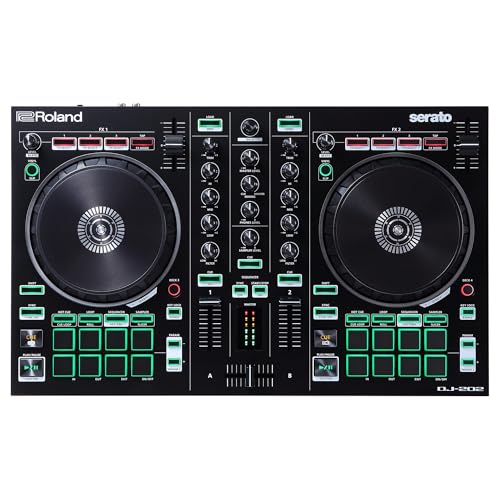
- Lay down the beat with genre-defining built-in drum kits from Roland's legendary TR-808, TR-909 and TR-606, realized with advanced ACB (Analog Circuit Behavior) technology
- Feel every move with large, low-latency platters, made to scratch
The Roland DJ-202 is a unique beast because it includes a built-in drum machine with legendary Roland sounds (TR-808, TR-909). This makes it a fantastic tool for DJs who want to “remix” on the fly by adding their own percussion. However, it is slightly larger and more complex than the Hercules DJControl Inpulse 200 MK2 DJ Controller for Learning. The Roland is also more expensive and doesn’t offer the same level of integrated video tutorials or light guides. We would recommend the Roland DJ-202 for someone who has a background in music production or drumming, whereas the Hercules remains the superior choice for an absolute novice who needs a guided experience.
3. Pioneer DJ DDJ-FLX4 2-Deck DJ Controller
The Pioneer DJ DDJ-FLX4 is widely considered the “gold standard” for entry-level controllers, and for good reason. It works with Rekordbox and Serato, has a professional “club-standard” layout, and features “Smart CFX” for easy transitions. However, it is nearly double the price of the Hercules DJControl Inpulse 200 MK2 DJ Controller for Learning. While the FLX4 is a better long-term investment for someone 100% committed to a professional career, the Hercules is much more accessible. The Hercules also includes the specific Beatmatch Guide lights that the Pioneer lacks. If budget is no object, get the FLX4, but if you want the best “teacher” for the lowest price, the Hercules is the winner.
Final Verdict: Is the Hercules DJControl Inpulse 200 MK2 the Right Choice for You?
After extensive testing and comparing it with the current market leaders, we can conclude that the Hercules DJControl Inpulse 200 MK2 DJ Controller for Learning is the undisputed king of the “entry-level” category. It doesn’t just give you the buttons to DJ; it actually teaches you how to use them. The combination of the Beatmatch Guide, the DJ Academy tutorials, and the addition of modern features like Stems makes it an unbeatable value. While the hard-wired cable and the 4-pad layout are minor drawbacks, they are easily forgiven given the price point and the portability of the unit. Whether you are a parent buying for a child, a student on a budget, or a pro looking for a backup, this controller delivers where it counts.
If you have been waiting for a sign to start your DJing journey, this is it. The Hercules DJControl Inpulse 200 MK2 DJ Controller for Learning removes the frustration and replaces it with a fun, guided, and highly creative experience. Don’t let your music stay trapped in your headphones—it’s time to share it with the world. We highly recommend you grab the Hercules DJControl Inpulse 200 MK2 today and start your first mix tonight!
Last update on 2026-09-20 / Affiliate links / Images from Amazon Product Advertising API