
Yamaha DM3-D 22-Channel Digital Mixing Console with Dante Review: The Tiny Giant of Professional Audio
If you have ever spent hours lugging a massive 32-channel console up a narrow flight of stairs for a small corporate gig or struggled to fit a professional-grade interface onto a cluttered home studio desk, you know the physical toll of high-end audio. For years, the industry forced us to choose: either settle for a compact “prosumer” mixer that lacked the routing and sample rate of the big boys, or break your back carrying a full-sized desk. When we first heard about the Yamaha DM3-D 22-Channel Digital Mixing Console with Dante, we were skeptical. How could something weighing less than 20 pounds offer the same 96kHz fidelity as flagship consoles? We needed a solution that could handle a sophisticated live stream on Tuesday and act as a precision DAW controller on Wednesday. Solving this “portability vs. power” paradox is crucial for the modern independent engineer, as failing to provide high-resolution audio or flexible networking can lead to lost clients and subpar productions. In this review, we dive deep into why this ultracompact powerhouse might just be the most important piece of gear you buy this year.
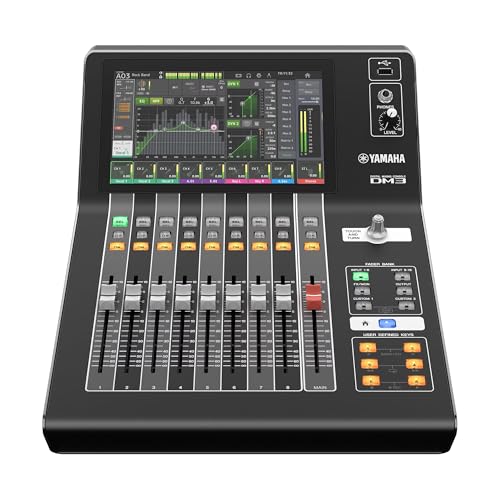
- Renowned Yamaha sound quality with 96kHz sample rate
- 22 Channels (16 Mono / 1 ST / 2 ST FX RTNs), 6 Mono or 3 ST Mixes / 2 Matrixes / 1 ST Bus
What to Consider Before Buying a Digital Mixer or Unpowered Recording Mixer
A digital console like the Yamaha DM3-D 22-Channel Digital Mixing Console with Dante is more than just an item; it’s a key solution for bridging the gap between live sound reinforcement and studio-grade recording. In the past, “unpowered mixers” were often simple analog boards with limited routing. Today, the category has evolved into sophisticated digital hubs that manage everything from microphone preamplification to complex network-based audio distribution. When you invest in a unit of this caliber, you are essentially buying the brain of your entire audio ecosystem, ensuring that every signal—whether from a vocalist’s mic or a software synth—is processed with the highest possible integrity.
The ideal customer for this type of product is the professional “hybrid” worker: someone who manages live events, high-end podcasts, or church services, but also needs a reliable recording interface for their home studio. It is perfect for those who require Dante networking to integrate with existing infrastructure. However, it might not be suitable for those who are strictly looking for a “plug-and-play” analog experience without a learning curve, or hobbyists on a very tight budget who don’t need 96kHz resolution or network audio. For those users, a simpler analog USB mixer might suffice, though they would sacrifice the immense processing power found here.
Before investing, consider these crucial points in detail:
- Dimensions & Space: Even in a professional setting, real estate is at a premium. You want a console that provides enough physical faders to be useful but has a footprint small enough to fit in a standard backpack or a crowded broadcast booth. Look for designs that maximize the screen-to-chassis ratio to ensure you aren’t sacrificing visibility for size.
- Capacity/Performance: In the digital realm, capacity isn’t just about the number of physical inputs. You must look at the “channel count” vs. “physical inputs,” the sample rate (96kHz is the current professional gold standard), and the number of internal buses and matrixes available for complex monitor mixes and streaming feeds.
- Materials & Durability: Since a compact mixer is often moved frequently, the build quality must be rugged. All-metal chassis construction is preferred over plastic. The faders should feel smooth yet resistant to dust, and the touchscreen needs to be responsive enough for high-pressure live environments where sweaty fingers are common.
- Ease of Use & Maintenance: A digital mixer is only as good as its software. Consider how intuitive the user interface is—specifically if it offers a “single-knob” philosophy for quick adjustments. Also, check the manufacturer’s history with firmware updates, as these updates often unlock new features or fix compatibility issues with modern DAWs.
Choosing the right console requires balancing these technical needs with your specific workflow. While the Yamaha DM3-D 22-Channel Digital Mixing Console with Dante is an excellent choice, it’s always wise to see how it stacks up against the competition. For a broader look at all the top models, we highly recommend checking out our complete, in-depth guide:

- Works out of the box with mics, instruments, phones, and computers

- Premium ultra-low noise, high headroom analog mixer

- 5-channel compact mixer with proven high-headroom, low-noise performance
First Impressions and the Revolutionary Design of the Yamaha DM3-D
When we first pulled the Yamaha DM3-D 22-Channel Digital Mixing Console with Dante out of its box, the primary sensation was one of disbelief. At just 19.9 pounds, it feels significantly lighter than its capabilities suggest. The aesthetic is clean and professional, sporting the classic Yamaha industrial design that suggests durability without unnecessary flair. The 9-inch touchscreen dominates the top right of the unit, and it is strikingly bright and sharp—essential for those outdoor gigs where glare can be a dealbreaker. We found that the layout is incredibly logical; even if you are coming from an older analog background, the transition feels natural.
Compared to previous compact units in the MG or even the TF series, the DM3-D feels like a significant leap forward in build quality. The faders have a professional “throw” to them, and the “Touch & Turn” knob—a staple of higher-end Yamaha desks like the CL5—is present here, providing a tactile bridge between the digital screen and physical control. To truly appreciate the engineering involved, you should see its full feature set and user reviews, which confirm that this isn’t just a toy, but a miniaturized flagship. The inclusion of Dante out of the box is the “killer feature” here, immediately placing it in a different league than standard USB-only mixers.
What We Like
- Stunning 96kHz sound quality that rivals consoles triple its price.
- Native Dante 16×16 connectivity for seamless professional networking.
- Ultra-compact and lightweight frame, perfect for mobile engineers.
- Highly intuitive 9-inch touchscreen and “Touch & Turn” workflow.
What We Didn’t Like
- Initial firmware setup can be technical for beginners.
- DAW control integration (specifically with Logic) requires a bit of menu diving.
A Deep Dive into the Yamaha DM3-D 22-Channel Digital Mixing Console with Dante’s Performance
Audio Fidelity: The 96kHz Advantage
In our testing, the most immediate standout feature of the Yamaha DM3-D 22-Channel Digital Mixing Console with Dante was the sheer transparency of its preamps. Yamaha has utilized their professional-grade preamplification circuitry here, offering 16 mono channels of pristine audio. We put these preamps to the test with a variety of high-end condenser microphones and found the noise floor to be virtually non-existent. Because the console operates at a 96kHz sample rate, the “air” and high-frequency detail in vocal recordings are noticeably superior to the standard 48kHz found in most compact mixers. This isn’t just marketing fluff; we found that when mixing multi-tracked drums, the phase coherence and transient response were remarkably sharp.
During a live recording session, we utilized the 16 professional Yamaha pre-amps (12 XLR and 4 Combo Jacks) to capture a full jazz quartet. The result was a recording that required very little “fixing” in the mix. The headroom is generous, allowing for those unexpected peaks during a dynamic performance without the harsh clipping associated with cheaper digital converters. If you are someone who values sonic purity, you should check the latest price and availability to see how this fits into your studio upgrade path. The ability to maintain this level of fidelity in a unit that fits on a side table is, quite frankly, a game-changer for independent producers.
Workflow and Interface: The Touch & Turn Philosophy
Operating a digital mixer can often feel like navigating a spreadsheet, but Yamaha has avoided this pitfall with the Yamaha DM3-D 22-Channel Digital Mixing Console with Dante. We found the 9-inch touchscreen to be the heart of the experience. It is highly responsive, with no noticeable lag when switching between EQ curves, dynamics processors, or fader banks. The “Touch & Turn” knob is perhaps our favorite physical feature. By simply touching a parameter on the screen—say, the frequency of a mid-band EQ—the physical knob immediately takes control of that parameter. This hybrid workflow allows for the precision of physical hardware with the visual feedback of a modern tablet.
We spent several hours configuring custom fader layers and found the process to be remarkably straightforward. For live sound, being able to quickly jump between the 6 mono or 3 stereo mixes is vital. We also tested the “Quick Pro Presets,” which are developed in collaboration with major microphone manufacturers like Shure and Sennheiser. While we usually prefer to start from scratch, these presets are surprisingly accurate and provide a fantastic starting point for novice users or when you’re in a rush during a soundcheck. This level of intuitive design is a feature that really sets it apart from the cluttered menus of its competitors.
Connectivity and Dante Networking: The Future-Proof Hub
The “D” in DM3-D stands for Dante, and this is where the console truly earns its “Professional” badge. In our evaluation, we integrated the Yamaha DM3-D 22-Channel Digital Mixing Console with Dante into an existing Audinate Dante network. The 16×16 Dante interface allowed us to route audio to and from other rooms in the facility with a single Ethernet cable. This eliminates the need for massive analog snakes and significantly reduces the potential for electromagnetic interference. For those working in houses of worship or corporate AV, the ability to send a “broadcast mix” over the network while maintaining a “house mix” locally is invaluable.
Furthermore, the unit acts as an 18×18 USB audio interface. We connected it to a MacBook Pro and a PC, and it was recognized instantly as a core audio device. Using the Yamaha DM3-D 22-Channel Digital Mixing Console with Dante as a DAW controller is equally impressive. While some users have noted that the initial firmware update can be a bit tricky, once updated, the console integrates beautifully with Cubase and other major DAWs. For anyone looking to modernize their signal chain, this console offers an incredible value proposition for network audio.
Versatility: From Live Gigs to Home Studio DAW Control
The true beauty of the Yamaha DM3-D 22-Channel Digital Mixing Console with Dante lies in its dual personality. On Saturday night, we used it to mix a small outdoor concert, utilizing its 8 analog XLR outputs for mains and monitors. The built-in effects—including high-quality reverbs and delays—sounded lush and expensive. On Monday morning, we moved it into the studio to use as the primary interface for a voiceover session. The transition between these two very different environments was seamless. The unit even supports DAW remote control, allowing you to use the physical faders to ride levels in your software.
We found the inclusion of 2 matrixes and a stereo bus provided more than enough routing for complex streaming setups. You can easily create a dedicated mix for your Zoom or OBS stream that is entirely separate from what you’re hearing in your studio monitors. One user review mentioned using this for small streaming jobs and noted how easy it was to bridge the gap between their larger Yamaha consoles (like the CL series) and this portable unit. We agree; the software ecosystem is consistent across the Yamaha line, making this an excellent “B-rig” for pro touring engineers. To see how others are using this in their hybrid setups, we recommend you read more user testimonials here.
What Other Users Are Saying
The general sentiment among users is overwhelmingly positive, with many praising the Yamaha DM3-D 22-Channel Digital Mixing Console with Dante for its “beyond amazing” build and sound quality. One professional who uses larger Yamaha consoles like the DM7 at work noted that they bought this specifically for their home studio and streaming tasks, highlighting its versatility. Another user described it as being “worth every penny” and incredibly easy to learn, which echoes our own findings regarding the intuitive interface.
However, no product is without its critics. A few users mentioned that the firmware update process out of the box was frustrating and required several hours to get the DAW integration working correctly. One user specifically warned that they found the software “almost impossible to work with” until the firmware was properly sorted. We found this to be a valid concern; like most high-end digital gear, there is an initial “IT phase” where you must ensure your network and software versions are aligned. Despite this, the majority of professionals feel that the 96kHz sound and Dante capabilities far outweigh the initial setup hurdles. For those who want the best sound in the smallest package, this unit remains the top choice in its category.
Comparing the Yamaha DM3-D to Top Alternatives
1. TC Helicon GoXLR MINI Broadcast Mixer with Audio Interface

- “Go live” desktop rig for online broadcasters gives you instant control over your audio
- Flexible and intuitive USB-based mixing for all of your audio - simple, easy-to-use controls get you up and running quickly
The TC Helicon GoXLR MINI is a vastly different beast, designed almost exclusively for streamers and gamers. While it offers excellent Midas preamps and a very intuitive interface for controlling desktop audio levels, it lacks the 96kHz resolution and the massive 22-channel capacity of the Yamaha. It is significantly more affordable, but it is a “prosumer” device. Someone who only needs to mix their microphone with game audio and music for a Twitch stream might prefer this for its simplicity and price. However, it cannot handle a live band or complex Dante networking.
2. Behringer XENYX 1204USB 12-Input Mixer with USB Interface
- Premium ultra-low noise, high headroom analog mixer
- Neo-classic "British" 3-band EQs for warm and musical sound. Maximum input level plus12 dBu @ plus10 dB gain Maximum input level 30 dBu
The Behringer XENYX 1204USB is a classic analog solution for those on a budget. It provides 12 inputs and basic USB recording capabilities. While it features the famous “British EQ” and decent preamps, it is purely analog in its workflow—no touchscreen, no motor faders, and certainly no Dante. We would recommend this to a beginner podcaster or a small venue that only needs to plug in a couple of mics and a laptop. It is a workhorse, but it lacks the professional fidelity and routing flexibility that make the DM3-D a professional standard.
3. Behringer XENYX X1204USB 12-Input Mixer with USB Audio Interface

- Premium ultra-low noise, high headroom analog mixer
- 4 state-of-the-art XENYX, phantom-powered Mic Preamps comparable to stand-alone boutique preamps
This model is the “big brother” to the previous Behringer, adding a 24-bit multi-FX processor to the mix. It is a solid choice for small live performances where you need a little reverb on the vocals without carrying an external rack. Again, compared to the Yamaha DM3-D 22-Channel Digital Mixing Console with Dante, the Behringer feels dated. It lacks the 96kHz sample rate and the deep DAW integration. It’s perfect for those who want a tactile, old-school analog feel for under $200, but it won’t satisfy a professional engineer looking for a future-proof digital hub.
The Final Verdict: Is the Yamaha DM3-D the Ultimate Compact Console?
After putting the Yamaha DM3-D 22-Channel Digital Mixing Console with Dante through its paces in both live and studio environments, we can confidently say it is in a class of its own. Its main strengths lie in its uncompromising sound quality and the inclusion of Dante networking in a frame that you can carry with one hand. While the initial firmware setup might be a bit of a hurdle for those who aren’t tech-savvy, the payoff is a professional-grade console that can handle almost any audio task you throw at it. We recommend this console to any engineer who needs to maintain a high standard of audio across multiple locations or who wants to consolidate their studio and live rigs into one powerful unit.
In conclusion, if you are tired of compromising on features just because you need a small footprint, this is the solution you’ve been waiting for. It bridges the gap between portability and professional performance like no other mixer on the market today. Do not let its size fool you—this is a serious tool for serious audio work. To take your productions to the next level and experience 96kHz clarity for yourself, we highly suggest you grab the Yamaha DM3-D today and revolutionize your workflow.
Last update on 2026-09-15 / Affiliate links / Images from Amazon Product Advertising API