
Akai Professional MIDImix USB MIDI Controller Mixer Review: The Ultimate Portable Solution for Mobile Mixing?
For many of us in the home studio world, the transition from hardware-heavy setups to “in-the-box” production was a double-edged sword. On one hand, we gained access to an infinite library of plugins and sounds; on the other, we lost the physical connection to our music. I remember the frustration of trying to mix a complex track using nothing but a mouse and a laptop keyboard. Clicking and dragging individual faders one by one is not only tedious—it kills the creative flow. You can’t feel the “sweet spot” of an EQ or perform a smooth, multi-channel fade-out with a trackpad. This tactile void is exactly why I began searching for a compact, reliable control surface that wouldn’t break the bank or take up my entire desk.
The problem is that many MIDI controllers are either too bulky for a mobile setup or too expensive for someone just starting out. When you’re working in a cramped home office or producing on a plane, you need something that fits in a backpack but still offers enough “hands-on” control to make mixing feel like an art form again. Failure to find the right balance usually leads to “mouse fatigue” and a mix that sounds static and robotic. That is where the Akai Professional MIDImix USB MIDI Controller Mixer enters the conversation, promising a 1-to-1 mapping experience with Ableton Live and a layout that mimics a traditional mixer in a footprint no larger than a small tablet. To see if it lives up to the hype, you can check the latest price and availability of this portable powerhouse.
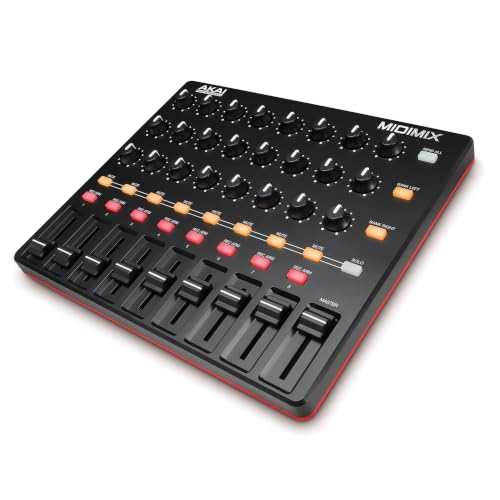
- Complete Mix Control - Lightweight, compact and robust ultra-portable MIDI mixer / DAW controller seamlessly maps all mixer settings to your DAW with a single push of a button
- Mixdown Essentials - 8 individual line faders and 1 master fader for controlling track volume, virtual instrument parameters, effect settings and more

What to Consider Before Buying a Compact MIDI Mixer
Choosing a MIDI mixer is a significantly different process than buying a standard audio mixer. Since the MIDI controller doesn’t process audio itself but rather sends data to your computer, your primary concerns should be integration, layout efficiency, and portability. A high-quality MIDI mixer is a key solution for producers who want to automate parameters in real-time, perform live sets with tactile control, or even photographers who want to map dials for editing software. It bridges the gap between the digital and physical worlds, allowing for more expressive and intuitive adjustments than any software interface could provide.
The ideal customer for the Akai Professional MIDImix USB MIDI Controller Mixer is the mobile producer, the live performer, or the budget-conscious bedroom musician who prioritizes portability and a high control-to-dollar ratio. It is perfect for those who use Ableton Live and want a “plug-and-play” experience. However, it might not be suitable for professional studio engineers who require motorized faders for precise recall or those with very large hands who might find the condensed layout cramped. If you are looking for high-end, heavy-duty gear with long-throw faders, you might consider larger, more expensive console-style controllers instead.
Before investing, consider these crucial points in detail:
- Dimensions & Space: In a mobile or home studio, every square inch counts. You want a device that provides a significant number of controls without dominating your workspace. Look for a slim profile that can sit comfortably alongside a laptop or a secondary MIDI keyboard without causing clutter.
- Capacity & Control Count: A great mixer should offer enough channels to manage a standard group of tracks. Having at least 8 channel faders plus a master fader is the industry standard for a reason—it allows you to mix in “banks” efficiently. The number of knobs per channel also dictates how much control you have over EQ, sends, and pans.
- Materials & Durability: Since portable gear is often tossed into backpacks, the build quality is paramount. While most budget controllers use plastic, the reinforcement and the feel of the faders are what matter. You want components that won’t snap off during transit but remain light enough for travel.
- Ease of Use & Software Integration: The best hardware is invisible; it should work immediately with your DAW (Digital Audio Workstation). Look for “class-compliant” devices that don’t require complex driver installations and offer pre-mapped templates for popular software like Ableton Live or FL Studio.
While the Akai Professional MIDImix USB MIDI Controller Mixer is an excellent choice for many, it’s always wise to see how it stacks up against the competition. For a broader look at all the top models, we highly recommend checking out our complete, in-depth guide:

- The All-Rounder to Learn On: A simple, user-friendly layout inherited from pro Pioneer DJ gear makes it easy to start and grow

- 10-Channel standalone mixer (no USB or effects)

- Flagship Performance Controller: Built for serious hobbyists, mobile DJs, and pros who want a future-proofed open-format tool
Unboxing and First Impressions: The Akai Professional MIDImix Experience
When the Akai Professional MIDImix USB MIDI Controller Mixer first arrived at our studio, the first thing that struck us was its weight. At just 1.54 pounds, it feels incredibly light, yet the chassis is surprisingly rigid. It doesn’t have that “hollow” plastic feel that plagues many budget controllers. The matte black finish gives it a professional look that fits right in with other high-end gear. Inside the box, you get the unit itself, a USB cable, and a software download card for Ableton Live Lite, which is a fantastic addition for those just starting their musical journey.
Upon plugging it into my Mac, I didn’t have to install a single driver. It was instantly recognized by my system. In Ableton Live, selecting it as a control surface was a two-click process, and immediately, the faders on the screen jumped to match the positions on the hardware. This level of “1 to 1” mapping is what Akai is famous for, and seeing it work so seamlessly in such a small device was impressive. It’s clear that Akai designed this with the traveling artist in mind. To get a better sense of how it looks in a real studio setup, you should see its full feature set and user reviews from other professionals.
Key Benefits
- Incredible density of controls: 24 knobs and 9 faders in a compact frame.
- Seamless integration with Ableton Live via 1 to 1 mapping.
- Ultra-portable and lightweight design, perfect for mobile setups.
- “SEND ALL” button allows for instant syncing of hardware and software values.
Limitations
- The knobs are quite small and low-profile, which may be tricky for those with larger fingers.
- Faders have a shorter throw compared to full-sized studio consoles.
A Deep Dive into the Performance of the Akai Professional MIDImix USB MIDI Controller Mixer
Layout Efficiency and Tactile Ergonomics
The primary reason anyone looks at the Akai Professional MIDImix USB MIDI Controller Mixer is the sheer number of physical controls it provides. We found that having three knobs per channel (24 knobs total) is a game-changer for mixing on the go. In a typical Ableton session, I map these to Low, Mid, and High EQ bands. Being able to sweep the filters on multiple tracks simultaneously is something a mouse simply cannot do. While some users have noted that the knobs are small, we found that their low-profile design is actually a benefit for portability. They are less likely to get snapped off when sliding the unit into a laptop sleeve.
The faders, while shorter than what you’d find on a $500 console, offer enough resistance to feel “pro.” They aren’t loose or “wiggly.” We evaluated the spacing and found that while it is tight, it’s intelligently laid out. For a device that measures only 9.37 inches wide, fitting 8 channel strips is a feat of engineering. One feature we particularly love is the “SEND ALL” button. This solves the age-old MIDI problem where your software fader is at 100% but your hardware is at 0%. One press of this button sends all physical positions to the DAW, ensuring your mix is exactly where you see it on the hardware.
Ableton Live Integration and Beyond
The Akai Professional MIDImix USB MIDI Controller Mixer is advertised as having 1 to 1 mapping with Ableton Live, and in our testing, this was 100% accurate. As soon as you load a project, the bank of 8 faders controls your first 8 tracks. The “Bank” buttons allow you to quickly shift over to tracks 9-16, 17-24, and so on. This makes it feel like you have a 32-channel mixer in your lap. The 16 buttons are pre-mapped for Mute, Solo, and Record Arm functionality, which speeds up the recording workflow significantly. If you’re a producer who likes to stay in the “flow state” without looking at a screen, this is a feature that really sets it apart from more generic MIDI controllers.
However, we didn’t stop at Ableton. We tested the MIDImix with Reaper and FL Studio as well. While it doesn’t have the “automatic” mapping of Ableton, it functions as a standard MIDI device perfectly. Using the MIDI Learn function in other DAWs was straightforward. We even saw reports of photographers using this for Lightroom editing, mapping the knobs to exposure, contrast, and saturation. This versatility makes the MIDImix more than just a music tool; it’s a general-purpose tactile interface for any software that accepts MIDI input.
Portability and Build Reliability
In our time evaluating the Akai Professional MIDImix USB MIDI Controller Mixer, we took it to various locations—coffee shops, park benches, and local studios. Its thin profile (just 1.18 inches high) means it fits in the same pocket as a standard laptop. The “recessed” design of the buttons and knobs that some users complain about is actually a deliberate design choice for durability. During transport, there are no protruding parts that catch on the fabric of a bag. We found that the metal-like top plate adds a layer of protection that many competitors in this price range lack.
Durability isn’t just about the shell; it’s about the connection. The USB port on the back is snug, and we didn’t experience any disconnects during vigorous live performance testing. For those who are worried about the “cheap” feel mentioned in some reviews, we found that for a device priced around $100, the build quality is actually above average. It’s a workhorse, not a museum piece. It’s designed to be used, moved, and integrated into a high-energy workflow. You can check the latest price to see how much value you’re actually getting per control knob.
Customization and Advanced Mapping
One aspect that often goes overlooked is the Akai Professional MIDImix Editor software. This allows you to go “under the hood” and change the MIDI CC values for every single knob and button. We found this essential for advanced users who want to create their own custom layouts. For example, if you prefer the knobs to control VST synth parameters instead of a mixer’s EQ, you can re-program the entire surface in minutes. This level of customization ensures the MIDImix grows with you as your studio setup evolves.
We also confirmed user feedback regarding the “small knobs” by testing it with different hand sizes. While users with very large hands might find it a bit fiddly, most will adapt within an hour of use. In fact, some users have opted to buy aftermarket “DJ-style” knobs to put on top of the existing posts for a more robust feel. The fact that the community has found ways to customize this unit so extensively speaks to its popularity and longevity in the market. To see more about how other users have customized their units, check out the user reviews.
What Other Users Are Saying
The general sentiment among users is one of high praise for the value and portability, with a few recurring critiques regarding the ergonomics of the knobs. One user noted, “This unfathomably value device has 24 rotary knobs… It took me a while to find a spot for this, but it works perfectly for controlling software synths.” This echoes our findings that the sheer density of controls is the MIDImix’s greatest strength. Another satisfied owner mentioned, “It connects instantly with my DAW… a great buy and a good addition to my studio,” highlighting the seamless plug-and-play nature of the device.
On the flip side, some users have expressed frustration with the knob height. As one reviewer put it, “The knobs are so damn short. Your hands will def feel the pain after a long session on this.” While we found the knobs manageable, it is a valid point for those planning 8-hour mixing sessions. Another user mentioned the build feeling “cheap” compared to $500 units, but they also conceded that “this thing is perfectly functional and a fair deal… you get a lot of controls per dollar spent.” It’s clear that as long as you understand you are buying a budget-friendly, portable tool and not a high-end studio console, you will be very happy with the purchase. It is definitely worth checking out if you need maximum control in minimum space.
Comparing the Akai Professional MIDImix to Top Alternatives
1. Native Instruments Traktor Kontrol S2 Mk3 DJ Controller
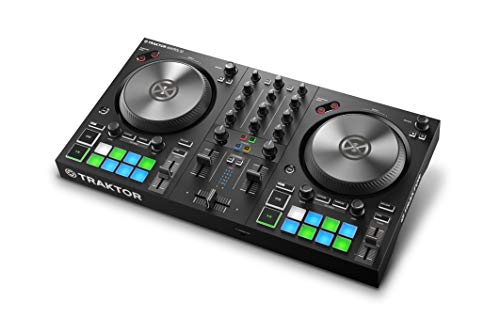
- Jog mode: Classic spin-to-nudge function, as well as scratch capability
- Beat grid adjust mode: Use the jog wheel to manually adjust beat grid in TRAKTOR
The Native Instruments Traktor Kontrol S2 Mk3 is a significantly different beast. While the MIDImix is a general-purpose MIDI mixer designed for DAW control and studio mixing, the S2 Mk3 is a dedicated DJ controller. It features jog wheels, integrated audio outputs, and is designed specifically for Traktor software. If your goal is to “mix” tracks in a live DJ setting with beatmatching and scratching, the S2 Mk3 is the better choice. However, if you are a music producer looking to control faders and EQs within Ableton or FL Studio, the S2 Mk3 is overkill and less efficient than the MIDImix, which offers more channel strips and knobs for a fraction of the price.
2. Pyle PMXU43BT.5 4-Channel Digital Audio Mixer

- USB/FLASH READER/MP3 COMPATIBILITY - Connect your external USB, computer PC, flash drive or Bluetooth device to mix & record. Use the built-in controls to play/pause, skip tracks and switch between...
- BLUETOOTH WIRELESS MUSIC STREAMING - Hassle and cable-free audio streaming ability directly to the console unit. Mix your iPad, iPhone, Android Smart Phone to your DJ session. This audio mixer makes...
The Pyle PMXU43BT.5 is an actual audio mixer, meaning it processes sound signals through its hardware. It features XLR inputs for microphones and Bluetooth connectivity for streaming. This is ideal for podcasters or small live setups where you need to plug in physical instruments. However, it is NOT a dedicated MIDI controller in the way the MIDImix is. While it has a USB interface for recording, you cannot map its knobs to control individual faders in Ableton Live. For the digital producer working strictly in-the-box, the Pyle lacks the tactile DAW integration that makes the Akai MIDImix so powerful.
3. Pyle PMXU128BT 12-Channel Bluetooth Audio Mixer

- RECORD AND CONNECT TO PC: This studio style mixer has a USB soundcard and audio interface to record and connect to MAC or PC. It has universal digital audio file compatibility, and can be used for...
- BLUETOOTH WIRELESS STREAMING: This twelve-channel DJ sound controller has Bluetooth for wireless streaming. Can be used as an input to mix signal with other input channels. It works with iPhone...
Similar to its smaller sibling, the Pyle PMXU128BT is a traditional analog-style mixer with 12 channels. It’s great for a band setup or a home studio that needs to route multiple microphones and instruments to a single output. It offers 48V phantom power and built-in FX. Again, the trade-off is the lack of MIDI control. It’s much larger than the MIDImix and cannot be used to automate software parameters via MIDI CC. If you need a hub for your hardware instruments, go with the Pyle. If you want to control your software mixer with your hands, the Akai Professional MIDImix remains the superior specialized tool.
Final Verdict: Is the Akai Professional MIDImix the Right Choice for You?
After putting the Akai Professional MIDImix USB MIDI Controller Mixer through its paces, our conclusion is clear: it is one of the best “bang-for-your-buck” controllers on the market today. Its strengths lie in its incredible portability, the sheer number of assignable controls, and its near-perfect integration with Ableton Live. While the knobs are low-profile and the faders have a shorter throw, these are compromises made to achieve a size that can fit into any backpack. For the mobile producer, the laptop performer, or the space-constrained home studio owner, these trade-offs are more than worth it.
If you are tired of mixing with a mouse and want to bring a tactile, hardware feel back to your digital workflow without spending hundreds of dollars, this is the solution you’ve been looking for. It’s robust enough for travel and flexible enough to control everything from EQs to photo editing sliders. We highly recommend this to anyone who values efficiency and portability above all else. Don’t let a lack of tactile control hold your music back any longer—click here to add the Akai Professional MIDImix to your setup today and experience the difference that a real mixer layout can make.
Last update on 2026-10-16 / Affiliate links / Images from Amazon Product Advertising API