
Mackie CR-XBT 3.5-Inch Bluetooth Studio Monitors Review: The Perfect Blend of Desktop Convenience and Professional Sound
If you have ever spent a late night editing a video, mixing a podcast, or even just getting lost in a high-fidelity soundtrack, you have likely encountered the “thin sound” problem. Most standard computer speakers or budget Bluetooth units focus on looking good rather than sounding accurate. They often artificially boost the bass to hide poor driver quality, or they lack the clarity needed to distinguish between a guitar’s mid-range and a vocalist’s breath. As someone who spends hours daily at a desk, I found that my creative work was suffering because I simply couldn’t hear what I was doing. Without an accurate representation of your audio, your final product—whether it is a YouTube video or a home-recorded song—will never translate well to other systems. Solving this requires moving beyond “consumer” audio and into the world of monitors. That is exactly where the Mackie CR-XBT 3.5-Inch Bluetooth Studio Monitors come into play, promising a professional-grade experience in a footprint that actually fits on a modern desk.
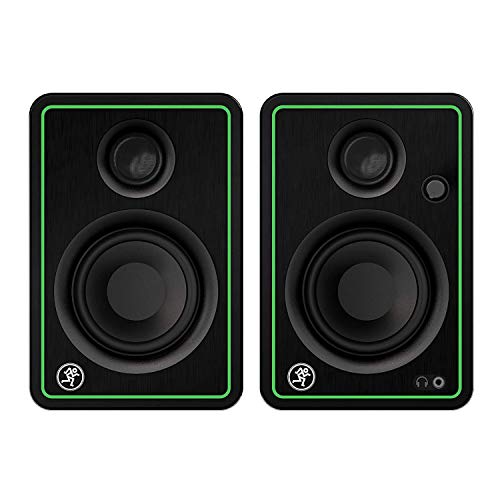
- Bluetooth (pair)
- Bluetooth Connectivity
What You Must Know Before Investing in Studio Audio Monitors
Investing in a set of studio audio monitors is more than just buying new speakers; it is a key solution for anyone looking to bridge the gap between casual listening and critical audio work. Unlike traditional speakers that are designed to “flatter” the music, a true monitor is designed to be “flat.” This means it aims to reproduce audio exactly as it was recorded, without adding extra bass or treble. This transparency is vital for creators who need to make informed decisions during the mixing or editing process. When you use the Mackie CR-XBT 3.5-Inch Bluetooth Studio Monitors, you are buying a tool that helps you hear the truth in your audio files, allowing for better EQ choices and a more professional end result.
The ideal customer for this type of product is someone facing space constraints but unwilling to sacrifice audio integrity—think bedroom producers, podcasters, office-bound gamers, and content creators. They are perfect for those who need versatility, allowing for a quick switch between professional wired monitoring and casual wireless streaming. However, they might not be suitable for those who require massive, earth-shaking low end for large-scale EDM production in a treated studio environment. If you are working in a massive room and need to feel the sub-bass in your chest, you might consider larger 5-inch or 8-inch alternatives that can move more air.
Before investing, consider these crucial points in detail:
- Dimensions & Space: Studio monitors come in various sizes, usually denoted by the woofer diameter. For a standard desk setup, 3.5-inch drivers like those in the Mackie CR-XBT 3.5-Inch Bluetooth Studio Monitors are often the “Goldilocks” size—large enough to provide full sound but small enough to leave room for your monitors and keyboard. Always measure your desk’s depth to ensure the rear-firing ports have a few inches of breathing room against the wall.
- Capacity/Performance: Look for the wattage and frequency response. A 50-watt system is generally more than enough for “near-field” listening (sitting 3 feet away). You want a frequency range that reaches high enough for clarity (20kHz) and low enough to hear kick drums and bass guitars clearly. Check out the latest price and availability to see how this model fits your budget.
- Materials & Durability: The cabinet material significantly affects the sound. While many cheap speakers use thin plastic, professional monitors often utilize wood or reinforced metal enclosures to reduce vibration and distortion. The Mackie CR-XBT 3.5-Inch Bluetooth Studio Monitors utilize a solid build that helps maintain sonic consistency even at higher volumes.
- Ease of Use & Maintenance: Connectivity is king in the modern home studio. Ensure the monitors have the inputs you need (RCA, TRS, or 1/8″) and consider if Bluetooth is necessary for your workflow. Front-facing controls for volume and power are a massive plus for daily ergonomics, saving you from reaching behind the speakers every time you want to adjust the level.
While the Mackie CR-XBT 3.5-Inch Bluetooth Studio Monitors is an excellent choice, it’s always wise to see how it stacks up against the competition. For a broader look at all the top models, we highly recommend checking out our complete, in-depth guide:
The Ultimate Guide to Choosing the Best Studio Monitors for Your Gaming and Creative Setup

- TRUSTED STUDIO-QUALITY SOUND: True studio sound for music production, gaming, movies, streaming, and everyday audio. Sold as a complete stereo pair.


- Hi-Res Audio Certified – Experience superior sound with Hi-Res Audio certification, delivering a flat response across 52Hz to 40kHz for precise and accurate monitoring, music creation, or everyday...

- Bring ADAM Audio sound quality to your desk with the fully active D3V monitoring system. Designed for songwriters, producers, and music lovers, the stylish monitors can be directly connected to...
Unboxing and Initial Impressions of the Mackie CR-XBT 3.5-Inch Bluetooth Studio Monitors
Pulling the Mackie CR-XBT 3.5-Inch Bluetooth Studio Monitors out of the box, the first thing I noticed was the build quality. Unlike the flimsy, lightweight speakers you often find at big-box electronics stores, these have a reassuring heft of 9.05 pounds. The design is undeniably sleek; the brushed metal grille and the signature Mackie green “running man” logo give them a professional, modern aesthetic that looks great next to a high-end laptop or a dual-monitor setup. They don’t look like toys; they look like specialized equipment.
The setup was remarkably straightforward. Mackie includes all the necessary cables—RCA to 1/8″ and a standard speaker wire to connect the active speaker to the passive one. I had them powered on and paired with my smartphone via Bluetooth in less than three minutes. The tactile feel of the front-facing volume knob is smooth, and the click when you power them on feels durable. Compared to previous versions of the CR series, the “X” redesign feels more polished and mature, fitting perfectly into the “prosumer” niche. You can see its full feature set and user reviews to get a sense of how they compare to other multimedia monitors in this price bracket.
Key Benefits
- Exceptional studio-quality sound with a neutral profile ideal for mixing.
- Seamless Bluetooth connectivity for wireless streaming from mobile devices.
- Convenient front-panel volume control and headphone output.
- Comprehensive input options (TRS, RCA, 1/8″) for total setup flexibility.
Limitations
- No onboard EQ controls (Bass/Treble) for room tuning.
- Fixed power cable makes it difficult to replace if damaged.
A Deep Dive into the Mackie CR-XBT 3.5-Inch Bluetooth Studio Monitors’s Performance
Sonic Accuracy and Audio Reproduction
When we first fired up the Mackie CR-XBT 3.5-Inch Bluetooth Studio Monitors, we focused on their primary claim: professional studio-quality sound. We found that the 3.5-inch woofer and 0.75-inch silk dome tweeter work in impressive harmony. The mids are surprisingly clear, which is a feature that really sets it apart in this size category. When listening to vocal-heavy tracks, the voices sat right in front of the mix, not buried under artificial bass. We noticed that the monitors present the music “as is”—if a recording is poor, you will hear it; if it is mastered well, it shines. This is exactly what a monitor should do.
In our tests involving acoustic guitar and piano, the high-frequency detail was crisp without being fatiguing. The bass, while not “room-shaking” given the 3.5-inch driver size, is punchy and accurate. As one user mentioned in their feedback, these speakers present the music without “adding too much bass or seemingly enhancing” it, which is the hallmark of a true reference monitor. For creators who need to hear the subtle nuances of their edits, this level of transparency is indispensable. If you want to experience this level of clarity yourself, you can check the latest price and availability for your own studio setup.
Bluetooth Integration and Connectivity Versatility
One of the biggest hurdles in a home studio is cable management. The inclusion of Bluetooth in the Mackie CR-XBT 3.5-Inch Bluetooth Studio Monitors is a game-changer for casual listening. We found the pairing process to be instantaneous. You simply hold the button on the front, find “CR3-XBT” on your device, and you’re connected. We tested the 10-meter range and found it held steady even through a standard office wall. This makes it incredibly easy to switch from working on a project at your desk to relaxing on a couch and streaming a playlist from your phone.
Beyond wireless, the rear panel is impressively flexible. Having both balanced 1/4″ TRS inputs and unbalanced RCA inputs allowed us to connect an audio interface and a secondary device simultaneously. This versatility is crucial for content creators who might be running a guitar through a recorder and then playing back tracks via Bluetooth, a scenario that one of the users highlighted as being “amazing” for their personal studio workflow. The ability to handle multiple input sources without constantly swapping cables is a massive boost to productivity.
Ergonomics and Daily Workflow Efficiency
Good monitors should disappear into your workflow, and the Mackie CR-XBT 3.5-Inch Bluetooth Studio Monitors do just that thanks to their smart design choices. The most important of these is the front-panel volume control. Most professional monitors hide the power and volume on the back, forcing you to reach around every time you want to turn things down. We found that having the knob right on the front, which also acts as the power switch, makes these incredibly user-friendly for daily desk use.
Additionally, the front-panel headphone out is a lifesaver for late-night sessions. When you plug in headphones, the speakers automatically mute, which is a small but critical detail for home users living with roommates or family. We also appreciated the “Position Switch” on the back, which lets you choose whether the active speaker (the one with the controls) is on your left or right side. This level of customization ensures that the volume knob is always within easy reach, regardless of your desk layout. This focus on the user’s physical interaction with the product is a feature that really sets it apart from more cumbersome, old-school monitors.
Suitability for Content Creation and Multimedia
We tested these monitors across several different media types: video editing, gaming, and casual Netflix watching. For video editing, the clear vocals were a standout. We were able to hear background hiss in our recordings that we previously missed with standard headphones. In gaming, the stereo imaging was excellent; we could clearly hear directional cues in atmospheric titles. While they are marketed as studio monitors, their “multimedia” branding is accurate because they excel in general entertainment too.
However, we must address the “hiss” mentioned by some users. In our evaluation, we found that like many active monitors in this price range, there is a very faint noise floor if the volume is cranked while no audio is playing. However, in a typical room with ambient noise (like a computer fan), it is virtually unnoticeable once the music starts. For the $100 price point, the trade-off between this minor noise floor and the exceptional clarity you get is well worth it. They are “super loud” for their size, as one reviewer noted, and they maintain their composure even when pushed toward their 50-watt limit.
What Other Users Are Saying
The general sentiment among users is overwhelmingly positive, especially regarding value for money. Many users have described the sound as “fan-freakin-tastic” for the $100 price point, noting that the clarity of vocals and instruments is a major step up from traditional computer speakers. One guitar player noted how perfect these are for a small personal studio, specifically praising the ability to use Bluetooth while playing through a recorder. This versatility seems to be a recurring theme in the feedback.
On the negative side, some users pointed out the lack of EQ adjustment (bass/treble knobs), which can be a drawback if your room has naturally booming acoustics. There were also mentions of an “audible hiss” that some sensitive listeners found annoying at low volumes. Additionally, one user was disappointed by the fixed power cable, expressing a preference for modular designs that are easier to repair. Overall, however, the consensus is that for the price, the Mackie CR-XBT 3.5-Inch Bluetooth Studio Monitors are “crazy good” and a “must-buy” for those looking for a budget-friendly entry into high-quality audio. You can read more user perspectives and see detailed ratings here.
Comparing the Mackie CR-XBT 3.5-Inch Bluetooth Studio Monitors to the Competition
1. KRK Rokit 5 G4 Powered Studio Monitor Pair
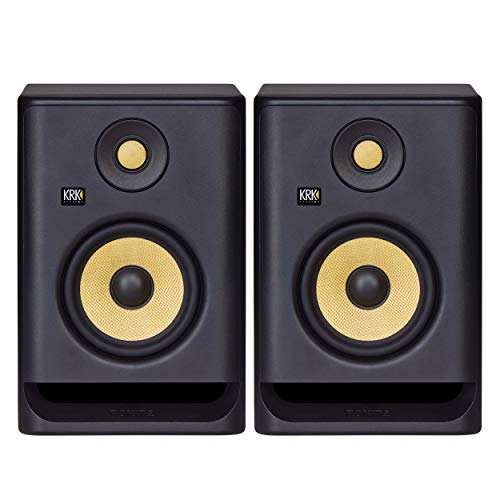
- The KRK ROKIT G4 line has been scientifically re-engineered from the ground up for the way modern artists work—in all genres and environments
- The ROKIT RP5 G4 is an incredibly versatile and sonically accurate bi-amp monitor takes music and sound creativity to a whole new industry-level
The KRK Rokit 5 G4 is a step up into a more professional category. With a larger 5-inch woofer and a front-firing port, it delivers significantly more bass and volume than the Mackie CR-XBT 3.5-Inch Bluetooth Studio Monitors. It also features a built-in DSP-driven EQ with an LCD screen on the back, allowing you to tune the speaker specifically to your room’s acoustics. This is the better choice for serious home producers who focus on bass-heavy genres like Hip-Hop or EDM and have the desk space to accommodate a much larger cabinet. However, it lacks the Bluetooth convenience and front-panel volume control that makes the Mackie so attractive for multimedia users.
2. Yamaha HS8 8-Inch Studio Monitor

- 8 inch cone woofer and 1 inch dome tweeter; Produce low distortion sound with a well-defined bottom end at any output level.Waterproof : No
- 38Hz to 30kHz frequency response; Power consumption: 60 watts
The Yamaha HS8 is an industry standard for “honest” monitoring. These are much larger, 8-inch speakers designed for dedicated studio rooms. While the Mackie CR-XBT 3.5-Inch Bluetooth Studio Monitors are built for desktop versatility, the HS8 is built for clinical accuracy. It offers a much wider frequency response and a flat profile that doesn’t hide any flaws in a mix. However, for a standard desk, the HS8 is likely too large and powerful, often requiring acoustic treatment to prevent the bass from overwhelming the room. If you are just starting out or working in a small bedroom, the HS8 might be overkill both in size and price.
3. JBL 305P MkII Powered Studio Monitors
- PACKAGE INCLUDES: (2) 305P MkII 5 2-Way Powered Studio Reference Monitor Monitoring Speaker
- CRYSTAL-CLEAR IMAGING: 305P MkII’s patented Image Control Waveguide delivers precise, immersive sound with a wide sweet spot, ideal for music production and podcasting.
The JBL 305P MkII is famous for its “Image Control Waveguide,” which provides a very wide “sweet spot”—meaning the sound remains accurate even if you move your head around while working. Like the KRK, these have a 5-inch woofer, offering a more robust low-end response than the 3.5-inch Mackie. They are fantastic for mixing and offer great detail. However, they are sold as individual units and lack the consumer-friendly features of the Mackie CR-XBT 3.5-Inch Bluetooth Studio Monitors, such as Bluetooth and a front-panel headphone jack. For a hybrid setup used for both work and play, the Mackie remains the more convenient “all-in-one” solution.
Final Verdict: Are the Mackie CR-XBT 3.5-Inch Bluetooth Studio Monitors Right for You?
After extensive testing and comparing the Mackie CR-XBT 3.5-Inch Bluetooth Studio Monitors to both user expectations and market rivals, our conclusion is clear: these are the best bang-for-your-buck multimedia monitors currently available for small setups. They masterfully bridge the gap between “cheap computer speakers” and “expensive professional monitors.” While they might lack the deep sub-bass of a 5-inch or 8-inch system, they more than make up for it with their vocal clarity, sleek design, and incredible ease of use. The front-panel volume knob and Bluetooth connectivity make them a joy to use on a daily basis, whether you are mixing a video or just listening to a new album.
If you are a student, a content creator, or someone who simply wants better sound at their desk without spending a fortune, these are a phenomenal investment. They provide the accuracy needed to improve your creative work while remaining fun enough for casual listening. Stop settling for muddy, indistinct audio that hampers your creativity. Upgrade your desktop experience today and get your pair of Mackie CR-XBT 3.5-Inch Bluetooth Studio Monitors here to finally hear your audio the way it was meant to be heard.
Last update on 2026-10-16 / Affiliate links / Images from Amazon Product Advertising API