
ddrum DDTi Electronic Drum Pad Review: The Ultimate Trigger-to-MIDI Solution for Modern Drummers
Every modern drummer eventually faces a frustrating crossroads. You love the organic feel, rebound, and stage presence of your acoustic drum kit, but the realities of late-night practicing, home studio recording, and the sheer power of modern drum VSTs (Virtual Studio Technology) make acoustic drums highly impractical. Microphoning a real kit requires an acoustic suite, thousands of dollars in high-end microphones, and an endless struggle against bleed and room reflections. The alternative is buying a high-end electronic kit, but many of us don’t want to play on tiny, lifeless rubber pads, nor do we want to spend several thousand dollars on a premium module packed with preset sounds we will never use.
We wanted to convert our acoustic shells into a silent, mesh-headed electronic powerhouse, routing our strikes directly into premium drum software. However, finding a reliable, low-latency interface to translate real-world drum strikes into flawless digital signals was a nightmare. Many traditional drum modules are bloated with expensive, outdated internal sounds, while basic trigger converters often suffer from terrible latency, dropped notes, and unbearable double-triggering. This is where the ddrum DDTi Electronic Drum Pad step-converter enters the picture, promising a streamlined, highly customizable, and affordable bridge between raw physical performance and digital audio perfection. In this comprehensive ddrum DDTi Electronic Drum Pad Review, we will put this interface through its paces to see if it truly delivers on its promise of low-latency drum conversion.
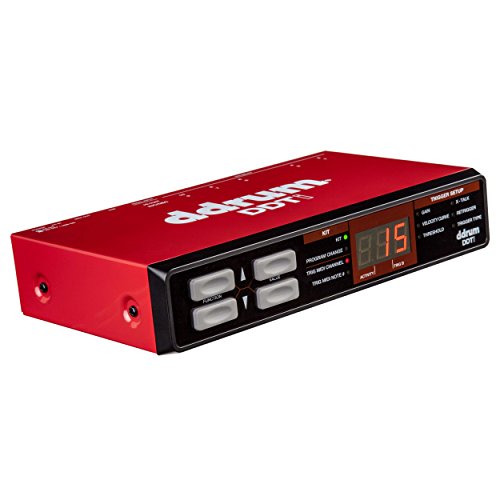
- A simple way to convert your drum pads or triggers into MIDI with 10 TRS trigger inputs to accommodate single- or dual-zone triggers
- Multiple hi-hat control options let you get the expression you need, and customizable trigger settings let you define the feel of your drums
What to Consider Before Buying Electronic Drum Accessories
Electronic Drum Accessories are more than just items; they are key solutions for drummers seeking to customize, expand, and perfect their playing experience. When you step into the world of hybrid or fully electronic drumming, you quickly realize that the out-of-the-box configuration of most standard kits rarely meets the specific creative needs of a professional player or recording engineer. Accessories like trigger interfaces, mounting brackets, and specialty footswitches allow you to bypass the technical limitations of standard hardware, giving you the freedom to build a custom kit that responds perfectly to your unique playing style, velocity, and workflow dynamics.
The ideal customer for this type of product is a tech-savvy drummer, a home studio producer, or a hybrid live performer who wants to trigger custom samples, play silently using mesh heads, or expand their existing electronic kit without buying an entirely new module. If you are already running drum software like EZdrummer, Superior Drummer, or Steven Slate Drums on your computer, this trigger interface is exactly what you need. However, it might not be suitable for those who want a simple, standalone plug-and-play e-drum kit that produces sound directly through headphones without being connected to a computer, hardware sampler, or external synthesizer. If you do not want to deal with MIDI routing, computer configurations, or virtual instruments, you might want to look into a traditional drum module with built-in sounds.
Before investing, consider these crucial points in detail:
- Dimensions & Space: Consider where the hardware will sit on your drum rack or stand. A compact, lightweight interface is ideal for crowded hybrid setups, but you must ensure you have a proper mounting solution, as some interfaces do not ship with dedicated mounting plates or clamps.
- Capacity/Performance: Look closely at the number of inputs and their zone compatibility. To trigger a full kit, you will need an interface that supports at least 10 inputs, preferably with dual-zone capabilities (allowing you to trigger different sounds from the drum head and the rim).
- Materials & Durability: Since this hardware will be subjected to the constant vibrations of a drum kit, a rugged metal chassis is highly superior to cheap plastic housings, protecting the internal circuitry from structural wear and tear over years of live gigs.
- Ease of Use & Maintenance: The interface must feature an intuitive physical layout and easy menu navigation. Setting up custom triggers requires deep menu diving to adjust thresholds, crosstalk, and velocity curves, meaning responsive buttons and a clear display screen are absolutely vital.
Ultimately, choosing the right accessories comes down to understanding your specific performance goals. If you want to take your electronic drumming to the next level, ensuring clean signal paths and robust amplification is also a critical part of the equation.
While the ddrum DDTi Electronic Drum Pad is an excellent choice, it’s always wise to see how it stacks up against the competition. For a broader look at how to monitor your electronic drum sounds with maximum clarity, we highly recommend checking out our complete, in-depth guide:

- 【Non-slip Rubber】Well-made non-slip rubber backing ensures stability for your entire setup while positioned on Hard surfaces. Well-made woven fibers, Back -Pure natural anti-slip latex dots...

- Made of high-quality 1680D PVC, this drumstick holder has high durability and waterproof, easy to maintain and clean, allowing quick access to change sticks or brushes during practice and performance.

- THE WORLD IS YOUR PRACTICE PAD - Your sticks are now transformed into portable practice sticks because the silicone drumstick tips are made from the same are made from the same material as many drum...
Unboxing the ddrum DDTi Electronic Drum Pad: First Impressions and Core Capabilities
When the ddrum DDTi Electronic Drum Pad arrived at our studio, the first thing that struck us was its incredibly robust, compact design. Weighing in at a mere 1.5 pounds and sporting a sleek, metallic blue and silver industrial chassis, it feels like a professional piece of rack gear rather than a plastic toy. The front panel is refreshingly minimalist, featuring a bright, red three-digit LED display, a selection of navigation buttons, and a master volume-style data dial. It feels exceptionally sturdy, ready to handle the rigors of travel and live stage use without breaking a sweat.
On the back of the unit, you are greeted by an impressive array of 10 TRS trigger inputs, plus dedicated inputs for a hi-hat control pedal and a program change footswitch. This level of connectivity is remarkable for a unit at this price point, making it easy to see its full feature set and user reviews before committing to a purchase. It functions completely driverless on both Mac and Windows systems, drawing its power directly from the USB port, which means you do not have to clutter your studio floor with another annoying wall-wart power supply. For those running classic hardware setups, the inclusion of a traditional 5-pin MIDI output is a phenomenal touch, allowing you to trigger vintage drum machines and hardware synthesizers directly.
Key Benefits of the DDTi
- Generous 10 TRS trigger inputs supporting single- and dual-zone pads.
- True plug-and-play USB connectivity with Mac and PC with zero driver installations.
- Highly customizable trigger parameters, including threshold, sensitivity, and crosstalk.
- Incredibly rugged, lightweight metal chassis that is highly portable.
Limitations to Keep in Mind
- No onboard audio sounds; it is purely a MIDI/USB controller interface.
- Does not include a mounting plate or stand clamp in the box.
Put to the Test: An In-Depth Look at the ddrum DDTi Electronic Drum Pad’s Performance
Uncomplicated Plug-and-Play Setup with Modern DAWs
In our studio evaluation, setting up the ddrum DDTi Electronic Drum Pad was an absolute breeze. We connected the interface directly to our MacBook Pro via the included USB cable, opened up Reaper, and loaded a virtual instrument track with Superior Drummer 3. The operating system immediately recognized the DDTi as a class-compliant MIDI controller without requiring any manually downloaded drivers. This plug-and-play simplicity is a massive lifesaver for studio workflows; this ease of connection is a feature that really sets it apart from older, clunkier modules that require complex driver configurations just to talk to your computer.
We routed physical drum triggers attached to our acoustic kit directly into the DDTi’s rear inputs. Instantly, our strikes were translated into MIDI notes with incredibly low latency. Because the unit is USB bus-powered, we didn’t experience any ground-loop noise issues that often occur when multiple mains-powered audio devices are connected to the same studio circuit. The MIDI communication remained rock-solid over hours of continuous tracking, with no dropped signals or sluggish performance. For hybrid drummers who want to integrate sample triggering into their live setups, the DDTi provides a highly stable, fuss-free connection that you can rely on night after night.
Advanced Trigger Tweaking and Double-Trigger Elimination
The true magic of the ddrum DDTi Electronic Drum Pad lies in its incredibly powerful, user-customizable trigger settings. When converting an acoustic kit to mesh heads, double-triggering (where a single physical strike registers as multiple notes in your software) is a common, highly annoying problem. During our testing, our mesh-head snare drum initially suffered from double-triggering due to head vibrations. By diving into the DDTi’s internal menus, we easily adjusted the “Retrigger” and “Threshold” settings to filter out those unwanted post-strike vibrations, ensuring that only our deliberate strikes registered in the virtual instrument.
Additionally, the “Crosstalk” (X-Talk) rejection settings worked beautifully. When hitting our high tom, the vibrations would occasionally trigger our mid tom pad. By dialing in the crosstalk values on the DDTi’s intuitive front-panel interface, we were able to isolate each pad completely, ensuring a clean, precise performance. If you are struggling with messy trigger signals on a hybrid drum kit, that is exactly why we suggest you invest in this reliable interface to resolve crosstalk issues once and for all. The front panel interface, although simple with its three-digit LED, is surprisingly fast to navigate once you spend a few minutes learning the button combinations.
Dynamic Sensitivity, Expressive Velocity Curves, and Hi-Hat Control
A major concern for any expressive drummer is whether an electronic interface can capture the subtle nuances of a real performance, such as ghost notes, rimshots, and heavy accents. The ddrum DDTi Electronic Drum Pad features a highly responsive, velocity-sensitive architecture that handles dynamics with incredible precision. It offers several selectable velocity curves, allowing you to tailor the output to match your specific playing dynamics. Whether you are a heavy-hitting rock drummer or a light-touch jazz fusion player, you can find a curve that maps your physical strikes to the corresponding MIDI velocities flawlessly, allowing you to get the most expressive e-drumming experience possible.
We tested the dual-zone capabilities by hooking up a dual-zone snare pad to Input 1. The DDTi separated the head hits and the rim clicks perfectly, transmitting two distinct MIDI notes over a single TRS cable. We also evaluated the hi-hat control input using a continuous hi-hat pedal. The interface supported multiple hi-hat control options, translating the pedal’s position from fully open, to half-open, closed, and tight foot splashes. This level of expressive detail is incredibly rare for trigger interfaces in this budget class, providing a surprisingly realistic hi-hat feel when paired with high-quality software libraries.
Physical Durability and the Mounting Conundrum
From a purely physical standpoint, the ddrum DDTi Electronic Drum Pad is built like a tank. The metal chassis feels completely road-ready, and the inputs on the back are tight and robust, holding 1/4-inch jack plugs firmly in place. However, the physical design does present one notable challenge: mounting. The unit does not ship with any mounting brackets, clamps, or rubber feet. It is designed to sit on a flat desktop surface, but for live gigging or crowded studio setups, you will need to mount it directly to your drum rack or a cymbal stand.
During our research and hands-on setup, we found that attempting to screw a standard cymbal rod or makeshift clamp directly into the chassis’s bottom casing can cause structural damage if not handled with care. To avoid breaking any internal threads, we strongly recommend purchasing a dedicated universal mounting plate that can be screwed safely into the pre-drilled holes on the bottom of the unit. Once properly mounted to a rack using a compatible bracket, the DDTi remains perfectly stable, unaffected by the heavy vibrations generated by enthusiastic drumming.
What Other Drummers Are Saying: Real-World Feedback
To ensure our assessment aligns with the broader drumming community, we analyzed feedback from dozens of real-world users who have integrated the ddrum DDTi Electronic Drum Pad into their personal setups. The overall sentiment is overwhelmingly positive, with users praising its affordability and its outstanding ability to breathe new life into older or DIY drum configurations.
Many users highlighted how beautifully the DDTi works when converting a standard acoustic kit using mesh heads and internal triggers. Drummers noted that it “fixed all double-trigger issues” thanks to its comprehensive threshold and retrigger settings, allowing them to route clean, fully responsive signals directly into virtual drum packages like EZdrummer and Superior Drummer. Several home studio musicians also pointed out that they prefer this interface over expensive drum modules because they “didn’t need built-in sounds in the module” since they rely entirely on software virtual instruments anyway.
However, some users did express frustration regarding the physical mounting setup. A few drummers experienced issues when trying to mount the unit using improvised hardware, warning that screwing custom rods directly into the bottom casing can break the internal nut casting if too much torque is applied. Additionally, a handful of advanced users noted that saving settings requires you to navigate back to the kit selection mode to ensure your changes are globally stored, which can be slightly confusing if you do not read the user manual thoroughly first. Despite these minor physical and software quirks, the consensus is clear: the DDTi is an absolute steal for anyone looking to build a high-performance DIY electronic kit on a budget.
How the ddrum DDTi Electronic Drum Pad Stacks Up Against Alternatives
While the ddrum DDTi Electronic Drum Pad is an exceptional choice, it is always wise to compare it with other drum accessories and utility options on the market to see how they can complement or alternative-structure your setup.
1. KORG PS3 Single Footswitch
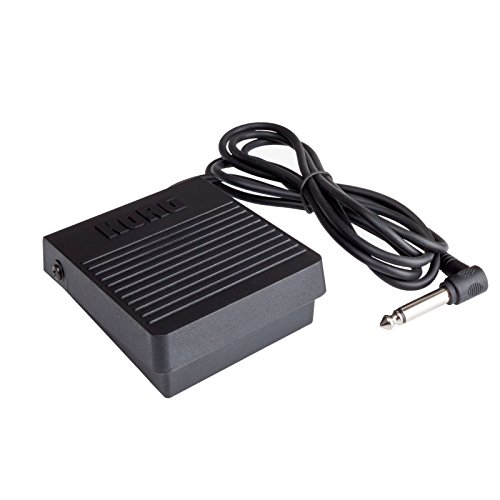
- Korg PS3 Single Momentary Footswitch
The KORG PS3 Single Footswitch is a compact, momentary footswitch designed for keyboard players and electronic percussionists. While the ddrum DDTi Electronic Drum Pad is a comprehensive 10-input trigger-to-MIDI interface, the Korg PS3 serves as an excellent auxiliary accessory. You can plug this momentary switch directly into the DDTi’s program change or foot control input. This allows you to quickly cycle through your custom drum kits, start/stop backtracks, or trigger specific sound effects with a tap of your foot during live performances. If you are a gigging drummer who needs hands-free control over your digital setup, adding the Korg PS3 to your DDTi interface is a highly practical, low-cost upgrade.
2. ROSS 2-12 Inch Drum Tension Rods
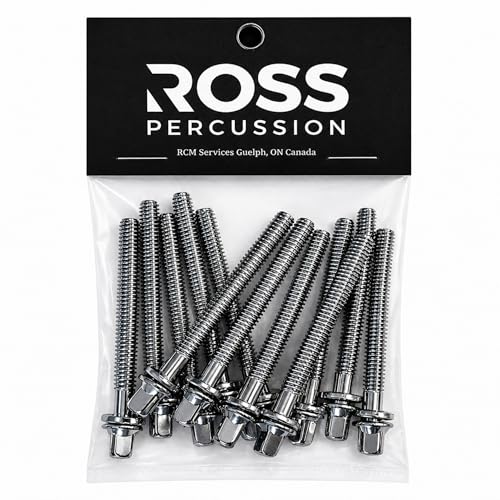
- CONSISTENT CONTROL – Designed to apply balanced pressure during tightening or loosening, supporting stable pitch adjustment on mounted playing surfaces.
- DEFINED LENGTH REFERENCE – Sized at 2” (52mm) measured from the bottom the collar to the threaded tip to support accurate hardware selection.
The ROSS 2-12 Inch Drum Tension Rods are high-quality, chrome-plated tension rods designed for acoustic drum maintenance. If you are using the ddrum DDTi Electronic Drum Pad as part of an acoustic-to-electronic conversion project, structural stability is absolutely paramount. When installing mesh heads on your acoustic shells, you will need consistent, reliable tension across the drum rims to ensure that your drum triggers register hits evenly. These ROSS tension rods are ideal for replacing old, worn-out hardware on your snare and toms, ensuring smooth tuning adjustments. They are a must-have maintenance accessory for any DIY hybrid drummer looking to achieve flawless trigger response.
3. Alesis Universal Percussion Mount
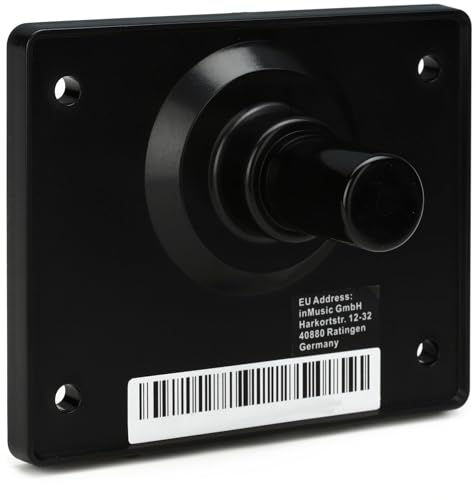
- The Ultimate Companion for Your Multipad -Mounting plate for Alesis electronic percussion instruments -the ultimate solution to take your electronic percussion module to your next live performance
- Rack-mounting Covered - Mounts to drum racks with a rack clamp (sold separately)

The Alesis Universal Percussion Mount is a heavy-duty metal mounting plate designed to attach electronic percussion pads and modules directly to standard drum hardware. As we noted during our review, the ddrum DDTi Electronic Drum Pad does not ship with any mounting brackets, making it difficult to position within a standard drum rack. The Alesis Universal Percussion Mount solves this problem perfectly. Its pre-drilled holes line up beautifully with many standard module chassis designs, allowing you to mount your DDTi interface safely to any multi-clamp or rack stand without risking damage to the casing. If you plan on gigging with your DDTi, this mounting plate is a mandatory purchase to keep your setup secure and professional.
The Final Verdict: Is the ddrum DDTi Electronic Drum Pad Worth Your Hard-Earned Cash?
After putting the ddrum DDTi Electronic Drum Pad through rigorous testing, we can confidently state that it is one of the most cost-effective, reliable, and powerful trigger-to-MIDI interfaces available on the market today. It strips away the unnecessary, costly fat of traditional drum modules—such as underwhelming built-in sounds and confusing onboard mixing boards—and focuses entirely on what matters most: lightning-fast, highly accurate trigger conversion. With 10 dual-zone compatible inputs, plug-and-play USB connectivity, and deep trigger customization menus, it provides everything you need to build a professional-grade hybrid or electronic drum kit.
While the lack of an included mounting bracket and the need for a computer or hardware module to produce sound are small hurdles, they do not detract from the immense value this unit provides. If you want to transform your acoustic kit into a silent, expressive MIDI powerhouse, or if you simply need to expand your existing electronic setup without breaking the bank, this interface is a phenomenal investment. If you are ready to elevate your virtual drumming experience, we highly recommend you grab your own ddrum DDTi interface online today and take control of your virtual drum library with professional precision.
Last update on 2026-10-04 / Affiliate links / Images from Amazon Product Advertising API