
BEACN Studio USB XLR Audio Interface for Creators Review: The Ultimate Dual-PC Powerhouse for Modern Streamers?
If you have ever attempted to set up a dual-PC streaming rig, you know the absolute madness that ensues the moment you try to route audio between two machines. For years, the “solution” involved a spaghetti-like mess of 3.5mm cables, ground loop isolators that muffled your high-end frequencies, and expensive mixers that occupied half your desk. We have been there—staring at a screen, listening to an annoying 60Hz hum in our headphones, wondering why professional-grade audio has to be so physically exhausting to manage. When the legendary GoXLR started to age out of the market, a vacuum was left for something that could handle complex routing without the bulk or the analog noise floor issues. This is exactly where the BEACN Studio USB XLR Audio Interface for Creators steps in, promising to solve the modern creator’s most annoying headaches with digital precision. We decided to put it to the test to see if it truly lives up to the hype of being the “easiest and cleanest solution” for the modern workspace.
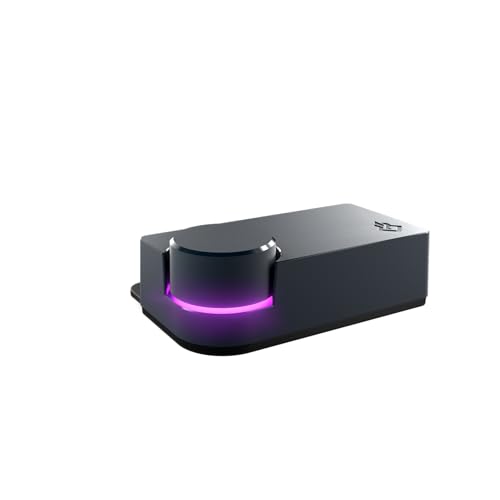
- Microphone Interface: premium XLR to USB-C connection
- On-board DSP including EQ, Compression, Expander/Gate, Noise Suppression, Low Frequency Enhancement and more
What to Consider Before Investing in Computer Recording Audio Interfaces
A Computer Recording Audio Interface is more than just an item; it’s a key solution for bridging the gap between professional analog hardware and the digital world of streaming and content creation. These devices take the raw electrical signal from a high-quality XLR microphone and convert it into data your computer can understand. But beyond simple conversion, they act as the central nervous system for your entire audio ecosystem, allowing you to balance game sound, music, alerts, and your voice in real-time. Without a dedicated interface, you are often stuck with low-quality onboard sound cards that introduce “hiss,” or USB microphones that lack the warmth and versatility of professional XLR counterparts.
The ideal customer for this type of product is a streamer, podcaster, or professional gamer who demands granular control over their audio and potentially operates across multiple devices, like a gaming PC and a streaming PC. It is for the person who is tired of software-only solutions that crash or introduce lag. However, it might not be suitable for those who only need a simple plug-and-play solution for occasional Zoom calls or those who are on a very tight budget and don’t own an XLR microphone. For those individuals, a basic USB mic or a simple single-input interface might suffice, but for anyone looking to “level up,” a dedicated interface is non-negotiable.
Before investing, consider these crucial points in detail:
- Dimensions & Space: Your desk real estate is precious, especially if you have multiple monitors and controllers. Look for an interface that offers a compact footprint without sacrificing the physical knobs or ports you need to access daily. A device that is too large can become a clutter magnet, while one that is too small might feel “cheap” or slide around when you plug in heavy XLR cables.
- Capacity & Performance: In the world of audio, performance is measured by sample rates, bit depth, and preamp noise levels. You want an interface that supports at least 48kHz (or 96kHz for future-proofing) and offers enough “clean gain” to power demanding microphones like the Shure SM7B without needing an external booster.
- Materials & Durability: Since this is a device you will be interacting with constantly, the build quality matters. Interfaces made with high-grade plastics or metal housings tend to last longer and provide better shielding against electromagnetic interference from your PC and monitors.
- Ease of Use & Maintenance: The hardware is only half the battle; the accompanying software must be intuitive. You should look for a product that doesn’t require a degree in sound engineering to set up, but also offers a “pro mode” for when you want to tweak your EQ or compression settings to perfection.
Choosing the right interface can be a daunting task given the sheer number of options available today. While the BEACN Studio USB XLR Audio Interface for Creators is an excellent choice, it’s always wise to see how it stacks up against the competition. For a broader look at all the top models, we highly recommend checking out our complete, in-depth guide:

- Pro performance with great pre-amps - Achieve a brighter recording thanks to the high performing mic pre-amps of the Scarlett 3rd Gen. A switchable Air mode will add extra clarity to your acoustic...


- The new generation of the songwriter's interface: Plug in your mic and guitar and let Scarlett Solo 4th Gen bring big studio sound to wherever you make music

- The new generation of the artist's interface: Connect your mic to Scarlett's 4th Gen mic pres. Plug in your guitar. Fire up the included software. Start making your first big hit
First Impressions: Unboxing the BEACN Studio USB XLR Audio Interface for Creators
Upon opening the box, the first thing we noticed about the BEACN Studio USB XLR Audio Interface for Creators was its incredibly sleek, minimalist design. It doesn’t scream “gamer” with obnoxious RGB; instead, it looks like a piece of high-end studio equipment that fits perfectly in a professional setup. The “Dark” finish is matte and sophisticated. We found the initial setup to be refreshingly straightforward, especially compared to the multi-hour ordeals we’ve had with older hardware mixers. It’s light—perhaps a bit lighter than we expected at just under 6.5 ounces—but it sits firmly on the desk once the cables are connected. Before you even plug it in, you can see its full feature set and user reviews to understand just how much technology is packed into this small frame. The inclusion of dual USB-C ports on the back immediately signaled that this was designed for the modern era of computing. While some might find the plastic casing a bit “light,” the actual performance and the feel of the software integration quickly overshadowed any concerns about the physical weight.
Key Benefits
- Seamless dual-PC and console integration via proprietary dual USB-C technology.
- On-board DSP that handles all mic processing (EQ, Comp, Gate) without taxing your CPU.
- Ultra-low-noise preamp with enough gain for the most demanding dynamic microphones.
- Incredibly powerful software routing that replaces complex physical cable setups.
Limitations
- The software app can be inconsistent and may require occasional restarts.
- The included USB-C cables can be finicky and may not fit all ports snugly.
Deep Dive: Why the BEACN Studio USB XLR Audio Interface for Creators is a Game Changer
Proprietary Dual USB Technology: The Death of Ground Loops
In our years of testing audio gear, the biggest hurdle for streamers has always been the dual-PC setup. Typically, you’d need an expensive mixer and a handful of specialized cables just to get game audio from one PC to the other without a buzzing sound. The BEACN Studio USB XLR Audio Interface for Creators solves this elegantly with its dual USB-C ports. During our evaluation, we were able to connect one cable to our gaming rig and the second to our streaming laptop. The device acts as a digital bridge, sending up to 8 channels of perfectly clean, digital audio between the two devices. We found that this completely eliminated the need for ground loop isolators, which often degrade audio quality. As one user mentioned, it truly is the “easiest and cleanest solution” for anyone facing the challenges of a multi-device setup. You can check the latest price and availability to see how this one feature alone justifies the investment for serious content creators.
On-Board DSP: Professional Sound Without the CPU Latency
One of the most impressive aspects of the BEACN Studio USB XLR Audio Interface for Creators is the built-in Digital Signal Processing (DSP). Most interfaces are “dumb”—they just pass the audio to your computer, where you then have to use heavy VST plugins or software like OBS to add EQ and compression. This adds latency and eats up your CPU cycles, which can cause frame drops in games. With the BEACN Studio, all that processing happens inside the interface itself. We spent hours tweaking the EQ, Expander/Gate, and Noise Suppression within the BEACN App. The Noise Suppression is particularly noteworthy; it managed to strip away the sound of our mechanical keyboard and a noisy air conditioner without making our voices sound like they were underwater. This built-in DSP mic chain ensures that your voice sounds studio-ready before it even hits your streaming software.
The Ultra-Low-Noise Preamp: Powering the Giants
If you own a microphone like the Shure SM7B or the Electro-Voice RE20, you know they are “gain hungry.” Most entry-level interfaces require you to crank the gain to 100%, which introduces a noticeable “hiss” or floor noise. We were pleasantly surprised by the preamp in the BEACN Studio USB XLR Audio Interface for Creators. It provided plenty of clean headroom, allowing us to capture a rich, full-bodied vocal performance without any audible electronic interference. The technical specs list a 3.5 Kiloohm impedance, which is perfectly matched for professional XLR mics. Whether you are whisper-quiet or shouting during an intense gaming session, the preamp stays transparent. This is a feature that really sets it apart from budget mixers that often struggle with high-end dynamic microphones.
The BEACN Ecosystem: Sophisticated Software Routing
The hardware is only half the story; the BEACN App is what ties everything together. It allows you to create “virtual” cables inside your Windows environment. For example, we could route our music to one channel, our game sound to another, and our Discord chat to a third—all while keeping them separate for our stream. This level of control is usually reserved for massive physical mixing consoles. While we did encounter a few “buggy” moments where the app needed a quick restart—a sentiment echoed by some users who found the software inconsistent—the sheer utility of the advanced routing capabilities is hard to beat. When the software is running smoothly, it provides a level of flexibility that makes you feel like a professional broadcast engineer. For creators moving away from older hardware like the GoXLR, this transition feels like moving into the future of digital audio management.
What Other Users Are Saying
The general sentiment among the community for the BEACN Studio USB XLR Audio Interface for Creators is overwhelmingly positive, especially regarding its problem-solving capabilities. Many users have highlighted that it is the most efficient way to manage a dual-PC or PS5 streaming setup. One creator noted, “I went from GoXLR to the BEACN Studio… and it was probably the best choice I’ve ever made.” This reflects our own experience that the device simplifies a formerly complex workflow. Users also frequently praise the background noise removal, confirming our findings that the DSP-based suppression is top-tier.
However, it wouldn’t be a balanced review without mentioning the frustrations some have faced. A recurring theme in the feedback is that the software can feel “buggy and inconsistent.” Some users reported that the app occasionally bugs out or that the physical USB-C cables provided in the box don’t feel like they seat perfectly in the ports. One user even mentioned that the device itself feels a bit “cheap” due to its light weight. Despite these criticisms, the consensus remains that when the app is functioning as intended, it is an unbeatable tool for the price. It’s clear why so many creators are making the switch despite the software’s early-stage growing pains.
Top Alternatives to the BEACN Studio USB XLR Audio Interface for Creators
While the BEACN Studio offers specialized features for streamers, it’s important to look at other industry staples to ensure you’re getting the best fit for your specific needs.
1. MAONO MaonoCaster 10-Channel Podcast Mixer with Bluetooth

- [Excellent Performance with Superior Preamp]: AME2 built-in quality preamps support phantom power for optimal performance of XLR microphones. The AME2 features 3-level mic gain adjustment, supporting...
- [Up to 11 Customized Sound Pads to Enhance Your Podcast Atmosphere]: AME2 10-channel podcast mixer allows for 11 customizable sound pads. 3 sound pads support recording of up to 60s of audio each and...
The MAONO MaonoCaster is a much more “hands-on” device compared to the BEACN Studio. It features physical sound pads for triggers and built-in Bluetooth, making it a fantastic choice for podcasters who want to bring in phone callers or play sound effects on the fly. However, it lacks the advanced dual-PC digital routing that makes the BEACN Studio so special. If you prefer physical buttons over software-based routing and need a more budget-friendly, all-in-one “studio in a box,” the MAONO is a solid contender, though its preamps aren’t quite as clean as the BEACN’s.
2. MOTU M2 USB-C Audio Interface
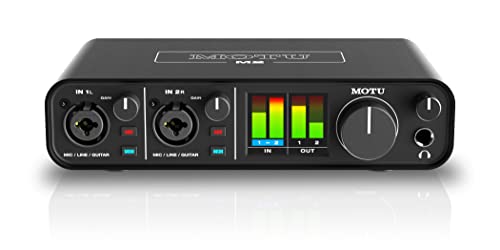
- 6+GB of Free Content - macOS/Windows/iOS
- USB-C Audio Interface with 2 Preamps
The MOTU M2 is widely considered the gold standard for pure audio quality in the entry-level professional bracket. It features a gorgeous full-color LCD screen for metering and some of the best ESS Sabre32 Ultra DAC technology in its class. Unlike the BEACN Studio, it doesn’t have built-in DSP for mic processing or specialized dual-PC routing software. The MOTU M2 is for the purist who wants the absolute best signal-to-noise ratio and plans to do all their audio processing in a DAW like Ableton or Logic Pro. It is built like a tank and offers legendary stability.
3. Audient iD14 MKII Audio Interface

- The new successor: Due to the great success of the Audient iD14, the audio experts had the project to bring the successor iD14 MKII to the next outstanding sonic level.
- Harmonious overall package: Thanks to new transducer technology and two Class-A microphone preamps from Audient's high-end ASP8024 HE console, home recording is taken to the next level.
The Audient iD14 MKII is another powerhouse focused on audio fidelity. It provides two Class-A console mic preamps, which offer a warm, analog-like character that the BEACN Studio can’t quite replicate. It’s an excellent choice for musicians and high-end podcasters who need more than one XLR input. However, for a streamer, the lack of dedicated “gaming” features like dual-USB connectivity or noise suppression DSP means you’ll have to rely on more external hardware or software. If your priority is the “musicality” of your voice above all else, the Audient is a masterclass in design.
The Final Verdict: Is the BEACN Studio Worth Your Money?
After weeks of testing the BEACN Studio USB XLR Audio Interface for Creators, our verdict is clear: it is a specialized, highly effective tool that solves the most specific and annoying problems modern streamers face. While its software still has some rough edges that require patience, the benefits of digital dual-PC routing, powerful on-board DSP, and a clean, high-gain preamp far outweigh the occasional app restart. It effectively kills the “cable clutter” and “ground loop hum” that have plagued creators for a decade. We recommend this interface to any streamer or podcaster who wants a clean desk and a professional sound without the headache of analog mixers. If you are ready to reclaim your desk space and elevate your broadcast quality, you should definitely grab the BEACN Studio here and experience the future of creator-focused audio gear.
Last update on 2026-10-16 / Affiliate links / Images from Amazon Product Advertising API