
BOMGE mini 2 Channel USB Audio Interface for Recording Review: The Ultimate Budget Solution or a Lesson in Compromise?
Every aspiring musician, podcaster, and content creator eventually hits a wall: the built-in microphone on a laptop or smartphone simply doesn’t cut it. Whether you are trying to capture the subtle resonance of an acoustic guitar or the commanding presence of a podcast host, you need a way to bridge the gap between your analog sound and your digital workstation. This is where the search for an affordable yet capable audio interface begins. Many of us start with a limited budget, looking for a device that offers professional features—like XLR inputs and phantom power—without the professional price tag. Failing to find a reliable entry-point can lead to frustrated recording sessions, poor audio quality that turns off listeners, and a steep learning curve that kills creativity. We’ve all been there, staring at expensive rack-mounted gear and wondering if there is a simpler, more accessible way to start. That is exactly why we decided to put the BOMGE mini 2 Channel USB Audio Interface for Recording through its paces to see if it truly serves the needs of the modern beginner.

- USB Audio Interface: Podcast, Record, Live Stream, This Portable Audio Interface Covers it All – USB sound card for Mac or PC delivers 48 kHz audio resolution for pristine recording every time.
- 2 in/2 out and connect more devices: The portable audio interface has 2 jacks: 2 combo XLR/MIC/LINE inputs with phantom power for recording guitar, vocals or line-in signals. 2 independent RCA stereo...
What to Consider Before Buying a Computer Recording Audio Interface
A Computer Recording Audio Interface is more than just an item; it’s a key solution for anyone looking to transform their computer into a full-fledged recording studio. These devices serve as the translator between the electrical signals of your instruments and the binary code of your computer. By using a dedicated interface, you solve issues related to “latency”—that annoying delay between playing a note and hearing it in your headphones—and “gain,” ensuring your signal is loud and clear without excessive hiss. The main benefit is the ability to use professional-grade microphones and instruments, giving your recordings a polished, studio-quality sheen that simply isn’t possible with standard computer sound cards.
The ideal customer for this type of product is a beginner producer, a hobbyist guitarist, or a streamer who needs a straightforward way to connect a high-quality microphone to their PC. It is perfect for those who prioritize portability and ease of use. However, it might not be suitable for professional studio engineers who require high-end A/D converters, multiple outputs for complex monitoring setups, or sample rates exceeding 48 kHz. If you are looking to record a full drum kit with eight microphones simultaneously, you should look toward multi-channel rack units instead. For everyone else, checking out the latest price and availability of this BOMGE unit is a great starting point.
Before investing, consider these crucial points in detail:
- Dimensions & Space: In a home studio, desk real estate is often at a premium. You want a device that is compact enough to fit next to your keyboard but heavy enough that the weight of your XLR cables doesn’t pull it off the desk. Portable interfaces are great for mobile recording, but they should still feel sturdy enough for daily use.
- Capacity & Performance: Look specifically at the number of inputs and the quality of the preamps. For most solo creators, two channels are the “sweet spot,” allowing you to record a vocal and an instrument at the same time. The presence of 48V phantom power is non-negotiable if you plan on using condenser microphones.
- Materials & Durability: While plastic housings are common in budget gear to keep costs down, metal chassis provide better shielding against electromagnetic interference and more durability. Pay attention to the knobs and switches; they should feel tactile and secure, not loose or “wobbly.”
- Ease of Use & Maintenance: For beginners, “plug and play” functionality is a massive advantage. Having to troubleshoot complex driver installations can be a major roadblock. Look for interfaces that are class-compliant with Mac and Windows, ensuring you can start recording as soon as you unbox the device.
While the BOMGE mini 2 Channel USB Audio Interface for Recording is an excellent choice for those on a strict budget, it’s always wise to see how it stacks up against the competition. For a broader look at all the top models, we highly recommend checking out our complete, in-depth guide:

- Pro performance with great pre-amps - Achieve a brighter recording thanks to the high performing mic pre-amps of the Scarlett 3rd Gen. A switchable Air mode will add extra clarity to your acoustic...


- The new generation of the songwriter's interface: Plug in your mic and guitar and let Scarlett Solo 4th Gen bring big studio sound to wherever you make music

- The new generation of the artist's interface: Connect your mic to Scarlett's 4th Gen mic pres. Plug in your guitar. Fire up the included software. Start making your first big hit
First Impressions: Unboxing the BOMGE mini 2 Channel USB Audio Interface for Recording
When we first unboxed the BOMGE mini 2 Channel USB Audio Interface for Recording, the first thing that struck us was its incredibly small footprint. It is remarkably lightweight—just 0.32 kilograms—which makes it an ideal companion for a traveling musician or a student. However, that lightness comes at a cost; the build is primarily plastic, which feels a bit “budget” compared to the heavy metal housings of brands like Focusrite or PreSonus. That said, it doesn’t feel fragile, just very utilitarian. To see the design up close, you can see its full feature set and user reviews to get a sense of how it fits into a modern desk setup.
The layout is intuitive. You have two combo jacks on the front, meaning they accept both XLR cables for mics and 1/4-inch cables for guitars or line-level signals. The top panel features gain controls, a 48V phantom power switch, and a master volume knob. There are no hidden menus or complicated software mixers here; what you see is what you get. For a beginner, this lack of complexity is a feature, not a bug. It aims to solve the problem of “analysis paralysis” by providing exactly what you need to get the sound into your DAW without any fuss.
What We Like
- Incredibly affordable price point for a dual-channel interface.
- True plug-and-play functionality—no drivers required for Mac or Windows.
- Supports 48V phantom power for professional condenser microphones.
- Ultra-portable and compact, fitting easily into a laptop bag.
What We Didn’t Like
- Noticeable noise floor (hiss) when gain is pushed past the 50% mark.
- Plastic construction feels less premium than competitors.
A Deep Dive into the Performance of the BOMGE mini 2 Channel USB Audio Interface for Recording
Seamless Connectivity and Setup
In our testing, the “plug and play” claim held up remarkably well. We connected the BOMGE mini 2 Channel USB Audio Interface for Recording to a Windows 10 machine and a MacBook Pro, and in both instances, the device was recognized immediately as a standard USB audio codec. This is a massive win for beginners who might be intimidated by installing ASIO drivers or navigating complex setup wizards. We opened Ableton Live and Garageband, and within seconds, we were able to select the BOMGE as our primary input and output device. This simplicity makes it a fantastic tool for those who want to focus on the music rather than the tech.
One detail we noticed, which was also echoed by other users, is the flexibility of the inputs. Because they are combo jacks, you can record a vocal microphone and a bass guitar simultaneously. For a songwriter, this is the most important workflow. We found that the 48 kHz resolution is perfectly adequate for podcasting and demo recording. While it’s not the 192 kHz found on high-end gear, the difference is negligible for social media content or YouTube streaming. If you are a student or a bedroom producer, you might find that you can check the latest price and availability and get started for a fraction of what a professional setup would cost.
Input Quality and the Reality of Preamps
When it comes to the actual sound quality, we have to be realistic about the price point. The preamps are functional and provide enough gain for standard dynamic microphones like the Shure SM58. However, our expert evaluation confirmed a common user complaint: the noise floor. When we turned the gain up past the 1/3 mark, we began to hear a consistent digital hiss. This is a common trait of budget-friendly interfaces, but it’s something to be aware of. If you are recording loud sources, like a cranked guitar amp or an energetic vocalist, this won’t be an issue. But for quiet spoken-word recordings, you might need to use a noise-reduction plugin in post-production.
We also tested the 48V phantom power with a standard condenser mic. It worked as advertised, providing the necessary juice to power the microphone’s internal circuitry. Interestingly, one user reported that using two condenser microphones simultaneously caused some noise issues, suggesting that the internal power supply might struggle under a heavy load. In our test with a single condenser, it was stable, but we recommend this interface primarily for single-mic setups or a mix of one mic and one instrument. To understand the technical limitations better, we suggest you read the detailed specs and user feedback before making a final decision.
Output Routing and Monitoring
The back of the BOMGE mini 2 Channel USB Audio Interface for Recording features RCA outputs rather than the balanced TRS outputs found on more expensive models. This means you’ll likely need an RCA-to-1/4-inch cable or an RCA-to-3.5mm adapter to connect to your studio monitors or computer speakers. While RCA is less common in professional settings, it is very common in consumer electronics and home DJ setups. The monitoring is direct, meaning you can hear your input without the delay caused by your computer’s processing. This is critical for staying in time while recording.
One minor drawback we found is the lack of a dedicated headphone jack on some versions of this mini unit, or rather, the reliance on the main output for monitoring. As one user pointed out, it would be much better if it included a dedicated 1/4-inch headphone output with its own volume control. However, for the price, the “Main Out” control does the job of managing your overall volume levels. It’s a simple, no-frills approach that works well if you are monitoring through a set of powered desktop speakers. This interface is truly designed for the “on-the-go” creator who values size over a plethora of output options.
Durability and Portability in the Real World
We spent a week carrying the BOMGE mini 2 Channel USB Audio Interface for Recording in a standard backpack to see how it would handle the rigors of travel. Despite its plastic housing, it held up well. The knobs are recessed enough that they don’t catch on fabric, and the USB port feels reasonably secure. We did notice, as one user mentioned, that the included USB cable can feel a bit flimsy, so we swapped it out for a higher-quality braided cable for our tests. If you are a bassist or drummer in a band and want to record rehearsals on your laptop, this is a feature that really sets it apart—you barely notice the weight in your bag.
The “mini” designation is no joke. It’s about the size of a large smartphone, just thicker. This makes it perfect for “stealth” recording or for creators who work in very cramped spaces, like a dorm room or a small home office. While it may not have the “heft” of a studio centerpiece, its utility in mobile scenarios is undeniable. For those who need a secondary interface for travel while keeping their expensive gear at home, this is a very compelling option. You can explore the portability features and see if it fits your specific workflow.
What Other Users Are Saying
The general consensus among users is that the BOMGE mini 2 Channel USB Audio Interface for Recording is a “get what you pay for” device that over-delivers for the price but shows its budget roots in the finer details. Many beginner producers have praised it for being the perfect entry point. One bassist noted that it’s “perfect for recording on the go,” though they admitted it needs a little FX post-processing to “get rid of the digital hum.” This aligns with our findings regarding the noise floor at higher gain settings.
On the more critical side, several users pointed out the build quality issues, with one person reporting a “partly broken” USB port out of the box. Another professional user noted that the “audible hissing” above 1/3 gain makes it difficult to use for professional-grade work compared to brands like PreSonus. However, for the hobbyist, a common sentiment is “Económico y buena calidad” (Economic and good quality), suggesting that for those who just need to get sound into a computer for a podcast or a rough demo, the BOMGE is a reliable, if simple, tool. It’s clearly a product that thrives in the hands of those who prioritize value and ease of use over technical perfection.
Top 3 Alternatives to the BOMGE mini 2 Channel USB Audio Interface for Recording
1. MAONO MaonoCaster 10-Channel Podcast Mixer with Bluetooth

- [Excellent Performance with Superior Preamp]: AME2 built-in quality preamps support phantom power for optimal performance of XLR microphones. The AME2 features 3-level mic gain adjustment, supporting...
- [Up to 11 Customized Sound Pads to Enhance Your Podcast Atmosphere]: AME2 10-channel podcast mixer allows for 11 customizable sound pads. 3 sound pads support recording of up to 60s of audio each and...
If you find the BOMGE a bit too simplistic, the MAONO MaonoCaster is a significant step up in terms of features, specifically for podcasters and streamers. While the BOMGE is a pure audio interface, the MaonoCaster acts as a full mixer with sound pads, Bluetooth connectivity, and built-in noise reduction. It is much larger and less portable, but it offers a “studio-in-a-box” experience. We recommend this for creators who want to do live sound effects or take phone calls during a live stream, something the BOMGE isn’t designed to handle. It’s a more complex but more versatile alternative for the digital content creator.
2. MOTU M2 USB-C Audio Interface
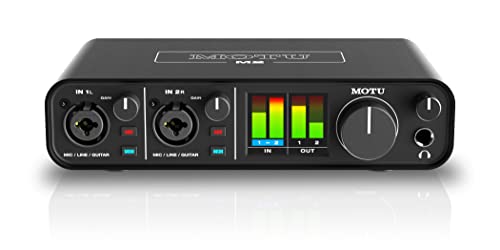
- 6+GB of Free Content - macOS/Windows/iOS
- USB-C Audio Interface with 2 Preamps
For those who have a bit more room in their budget and are worried about the noise floor of the BOMGE, the MOTU M2 is our top professional-grade alternative. The M2 features ESS Sabre32 Ultra DAC technology, which provides a level of audio clarity and dynamic range that the BOMGE simply cannot match. It also features a gorgeous full-color LCD screen for level metering, which is a massive upgrade over the BOMGE’s simple LED indicators. If you are serious about music production and want an interface that will last you for years as your skills grow, the MOTU M2 is the “gold standard” of compact interfaces.
3. Audient iD4 MKII Audio Interface

- The new successor: Due to the great success of the Audient iD4, the audio experts had the project to bring the successor iD4 MKII to the next outstanding sonic level.
- Harmonious overall package: Thanks to new transducer technology and Class-A microphone preamplifier from Audient's high-end ASP8024 HE console, home recording is taken to the next level.
The Audient iD4 MKII is designed specifically for guitarists and solo vocalists who want the best possible preamp quality in a small package. Unlike the BOMGE, which uses functional but noisy preamps, the Audient uses the same Class-A console mic preamp found in their high-end recording consoles. It only has one XLR input (compared to the BOMGE’s two), but the quality of that single input is vastly superior. It also features a dedicated JFET instrument input for guitars, which provides a much warmer, more musical tone. If quality is more important to you than having two mic inputs, the Audient is the way to go.
Final Verdict: Is the BOMGE mini 2 Channel USB Audio Interface for Recording Right for You?
After a thorough evaluation, our verdict is clear: the BOMGE mini 2 Channel USB Audio Interface for Recording is a fantastic “gateway” device. It successfully removes the technical and financial barriers that prevent many people from starting their audio journey. It’s small, incredibly easy to set up, and provides the essential phantom power needed for modern microphones. While it suffers from some plastic-build “cheapness” and a noise floor that might irritate professional engineers, these are acceptable trade-offs at this price point. We highly recommend this interface for students, beginner podcasters, and hobbyist musicians who need a secondary, portable device for capturing ideas on the fly.
If you are looking to record your first song, launch a podcast on a shoe-string budget, or simply need a way to connect your guitar to your laptop without a headache, this is a solid investment. It provides a simple, effective bridge into the world of digital audio. Don’t let expensive gear lists hold you back—start creating today. We suggest you check the current price and grab your BOMGE interface to begin your recording journey right now!
Last update on 2026-10-16 / Affiliate links / Images from Amazon Product Advertising API