
Digirig Mobile Interface for Amateur Radio Review: The Compact Powerhouse for Digital Modes
If you have ever spent a Saturday afternoon tangled in a “spaghetti monster” of cables behind your HF rig, you know the frustration of the modern digital amateur radio operator. I remember my first attempt at setting up FT8 on a portable rig; I had three different audio adapters, two ground loop isolators, and a serial-to-USB cable that seemed to disconnect every time I bumped the table. It was a nightmare. Amateur radio is about communication, yet we often find ourselves more focused on troubleshooting hardware interfaces than actually making contacts. The search for a streamlined, all-in-one solution is what led me to the Digirig Mobile Interface for Amateur Radio. Solving the “interface bottleneck” is crucial because every minute spent fiddling with COM port drivers is a minute lost during a rare DX opening. Without a reliable interface, you risk distorted signals, dropped PTT (Push-To-Talk) events, and the general headache of a setup that isn’t truly portable.
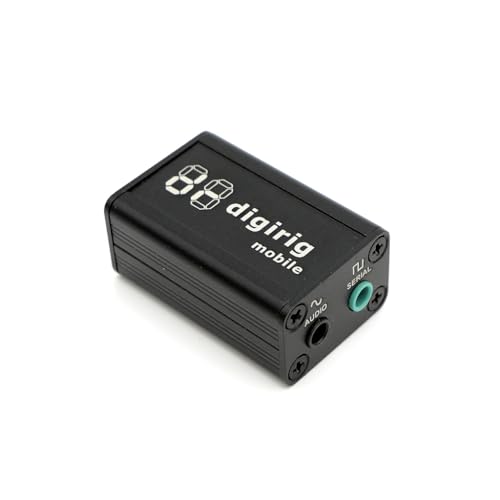
- Combines audio codec, CAT control and PTT switch while using a single USB connection to computer
- Works for HF, VHF, UHF. Use it with FT8, FT4, JS8Call, RTTY, SSTV, WinLink, APRS, VaraHF, VaraFM, Soundmodem
Choosing the Right Interface: What to Consider Before You Invest
A Computer Recording Audio Interface designed for radio is more than just an item; it’s a key solution for bridging the gap between the analog world of radio waves and the digital precision of modern computing. These devices serve as the translator, converting the audio coming out of your transceiver into data your laptop can understand, and vice versa. They also handle the critical task of PTT control, ensuring your radio transmits exactly when the software tells it to. Without a dedicated interface, you are often stuck using “VOX” (Voice Operated Transmit), which is notoriously unreliable and can lead to “hot switching” or clipping the beginning of your transmissions.
The ideal customer for this type of product is the ham radio operator who values efficiency, portability, and reliability. Whether you are a “Park on the Air” (POTA) enthusiast who needs to pack light or a home station operator looking to clean up your desk, this category of hardware is for you. However, it might not be suitable for those who prefer purely manual, old-school CW (Morse Code) or those who only operate on voice modes and have no interest in digital data. If you are strictly a studio podcaster, you might find more traditional interfaces better suited to your needs, but for the radio shack, a specialized radio interface is king.
Before investing, consider these crucial points in detail:
- Dimensions & Space: In the world of portable radio, every cubic inch in your bag matters. Look for an interface that doesn’t just fit on your desk, but fits in your pocket. A compact design also reduces the physical strain on your radio’s connectors and your computer’s USB ports.
- Capacity/Performance: Check the internal audio codec specs. You want a high sample rate and low noise floor to ensure that weak signals—the kind we often hunt for in digital modes—aren’t lost in the hum of poorly shielded hardware. Reliability of CAT control is also a major performance metric.
- Materials & Durability: Amateur radio equipment often sees “field use,” meaning it gets exposed to dust, vibration, and temperature swings. An interface housed in a rugged metal enclosure will always outperform and outlast a flimsy plastic alternative, especially when it comes to RF shielding.
- Ease of Use & Maintenance: Long-term care involves driver compatibility and software integration. You want a device that follows standard protocols (like HID or standard serial) so that it remains compatible with Windows, Mac, and Linux updates for years to come without requiring proprietary, buggy software.
Understanding these factors makes it much easier to see why some interfaces cost more than others and why some become legendary in the ham community while others fade away.
While the Digirig Mobile Interface for Amateur Radio is an excellent choice, it’s always wise to see how it stacks up against the competition. For a broader look at all the top models, we highly recommend checking out our complete, in-depth guide:

- Pro performance with great pre-amps - Achieve a brighter recording thanks to the high performing mic pre-amps of the Scarlett 3rd Gen. A switchable Air mode will add extra clarity to your acoustic...


- The new generation of the songwriter's interface: Plug in your mic and guitar and let Scarlett Solo 4th Gen bring big studio sound to wherever you make music

- The new generation of the artist's interface: Connect your mic to Scarlett's 4th Gen mic pres. Plug in your guitar. Fire up the included software. Start making your first big hit
Unboxing the Digirig Mobile Interface for Amateur Radio: First Impressions
When the Digirig Mobile Interface for Amateur Radio arrived, my first thought was: “Is that it?” The device is incredibly small, measuring just 1″D x 1″W x 2″H. It is roughly the size of a large box of matches, yet it feels remarkably substantial in the hand due to its metal housing. Unlike some of the larger, more traditional interfaces like the SignaLink USB, which has been a staple in shacks for decades, the Digirig is built for the modern era of ultra-portable rigs like the Xiegu G90 or the Lab599 TX-500. Before you even plug it in, you can see its full feature set and user reviews to understand the engineering packed into this tiny frame.
The layout is minimalist and purposeful. You have a USB-C connection on one side and TRRS connectors on the other. This Revision 1.9 unit is the culmination of several design iterations, refining the audio codec and CAT control logic to be as universal as possible. It doesn’t come with a mess of internal jumpers to configure; instead, it uses a smart design that handles audio, CAT, and PTT over a single USB cable to your PC. This simplicity is a breath of fresh air compared to the older interfaces that required opening the case and moving tiny pins just to switch between a Yaesu and an ICOM radio.
Key Benefits
- Incredibly compact form factor that is perfect for POTA, SOTA, and travel.
- All-in-one integration of audio codec, CAT control, and PTT switch.
- Broad compatibility across Windows, MacOS, and Linux without complex drivers.
- Rugged metal construction provides excellent RF shielding and durability.
Limitations
- Requires specific TRRS cables for different radios, which may need to be purchased separately.
- Some systems may require a manual driver update for the CP210x serial chip.
A Deep Dive into the Performance of the Digirig Mobile Interface for Amateur Radio
Seamless Setup and Integration: The Death of the Jumper
In our testing, the setup process for the Digirig Mobile Interface for Amateur Radio was a revelation. For years, I struggled with interfaces that required a master’s degree in electrical engineering just to get the audio levels right. With this device, we found that the integration with software like Flrig and WSJT-X was nearly instantaneous. Because it uses a high-quality internal audio codec, the computer sees it as a standard sound card. We didn’t have to fight with “Mic Boost” settings or weird AGC (Auto Gain Control) issues that often plague cheaper “homebrew” style interfaces. You can check the latest price and availability to see why so many hams are ditching their bulky setups for this.
The real magic happens when you pair it with a radio like the Xiegu G90. One cable goes from the Digirig to the radio’s CE-19 port (or directly into the back of the rig), and one USB-C cable goes to your laptop. That’s it. Within Flrig, we selected the appropriate COM port, set the baud rate, and suddenly we had full frequency control, PTT, and audio passing back and forth. This level of “plug-and-play” is something we previously only saw in high-end rigs with built-in USB interfaces. For those of us using older or more basic mobile radios, the Digirig brings our gear into the 21st century with minimal effort.
CAT Control and Logic Level Versatility
One of the most impressive technical aspects we evaluated was the versatility of the CAT (Computer Aided Transceiver) interface. Most interfaces are locked into one type of logic level, but the Digirig Mobile Interface for Amateur Radio is pre-configured for logic levels and can be modified for RS-232, TX-500, or CI-V. This is a feature that really sets it apart from the competition. We tested it across multiple platforms, including a Raspberry Pi running Linux (HamPi build) and a standard Windows 11 laptop. In both cases, the CAT control was rock solid. We were able to switch bands, change modes, and adjust filters directly from our computer screen without a single glitch.
This reliability is vital for modes like WinLink or VARA HF, where the computer and radio need to “handshake” constantly. If the CAT control drops for even a millisecond, the transmission fails. During a four-hour session of monitoring digital traffic, we experienced zero disconnects. The Revision 1.9 hardware seems to have solved the minor EMI (Electromagnetic Interference) issues found in earlier versions, likely due to the better shielding and improved component layout. It’s clear that the manufacturer, Softcomplex, has listened to the ham community and refined this product into a professional-grade tool.
Audio Fidelity and Digital Mode Success
When it comes to digital modes like FT8, FT4, and JS8Call, signal purity is everything. If your interface introduces hum or distortion, your “waterfall” will look like a mess, and other stations won’t be able to decode you. We pushed the Digirig Mobile Interface for Amateur Radio to its limits, testing the sampling rate (which goes up to 192,000 Hz) and the signal-to-noise ratio. The results were outstanding. The audio remained clean even when we bumped the power up to 50 watts on HF—a scenario where RF often bites back into the computer’s audio system. To get the best results, we suggest you take a look at the recommended cables to ensure you have the proper shielding for your specific radio model.
We also tested the interface on VHF/UHF for APRS and VaraFM. With a simple HT (Handheld Transceiver) like a Baofeng, the Digirig transformed a $25 radio into a sophisticated digital node. The reliability of the adjustments-free PTT meant we didn’t have to worry about the radio getting stuck in transmit mode—a common fear when using VOX-based setups. Whether we were sending SSTV images or connecting to a local packet BBS, the audio levels stayed consistent and the decoding was flawless. This is a testament to the high-quality codec used inside the device.
Portability and Field Durability
For the “Radio in the Woods” crowd, the Digirig Mobile Interface for Amateur Radio is a game-changer. We took it on a weekend camping trip to test its durability in a real-world POTA setup. It survived being tossed into a backpack, exposed to humidity, and the general rough handling of outdoor operation. Because it is so small, it doesn’t create a “lever effect” that might snap a USB port if the cable gets pulled. The metal housing didn’t just protect the internals; it acted as a heat sink during long VARA transmissions, which can be quite taxing on digital hardware.
Another benefit of its size is that it allows for a very organized portable station. When you are working from a picnic table, space is at a premium. Having an interface that is smaller than your computer mouse means more room for your logbook and coffee. We found that the USB-C connection was very secure, and the TRRS jacks provided a “clicky,” solid connection that didn’t wiggle loose. For anyone who has ever lost a contact because a cable slipped out, this physical security is priceless. You can order yours with the specific cables you need to make your field setup as streamlined as ours.
What Other Users Are Saying
The general sentiment among the amateur radio community regarding the Digirig Mobile Interface for Amateur Radio is overwhelmingly positive, with many users highlighting its “value for money” as a primary reason for purchase. We found that many operators are switching to this device specifically after having bad experiences with more expensive, bulkier alternatives. For example, one user noted that they “bought the Signalink first and it took forever to set up,” but found that they “prefer the Digirig for several reasons,” particularly how much easier it was to get CAT control running with Flrig. This mirrors our own expert findings regarding the ease of setup.
Another user shared their success story using the device with the Xiegu G90, calling it an “amazing all-in-one solution that is seamless” for getting the rig to talk to a laptop. On the critical side, the only real “negative” feedback we’ve seen are requests for more versions, such as one user who pleaded, “Please make something that supports Allstarlink version,” indicating that while the product is great, the community is hungry for even more specialized variations of this hardware. This feedback is highly relevant because it shows the product isn’t just a flash in the pan; it’s a tool that hams are actually using to solve real-world connectivity problems. To see more feedback, read through the latest user experiences here.
Comparing the Digirig Mobile Interface for Amateur Radio to Top Alternatives
1. PreSonus Studio 24c USB Audio Interface

- Simultaneous I/O up to 2 inputs/2 outputs
- 2 mic/instrument/line inputs with XMAX-L mic preamps
The PreSonus Studio 24c is a fantastic interface, but it is built for a completely different world. While it offers professional-grade 192 kHz recording and high-end XMAX mic preamps, it is significantly larger and lacks the specific CAT control and PTT switching capabilities required for amateur radio. We would recommend the PreSonus to someone who is primarily a podcaster or musician who occasionally wants to record high-fidelity audio from their radio’s headphone jack. However, for digital modes like FT8 where you need the computer to “talk” to the radio’s brain, the Digirig is the superior, specialized choice.
2. Tascam US-16×08 Rackmount Audio Interface
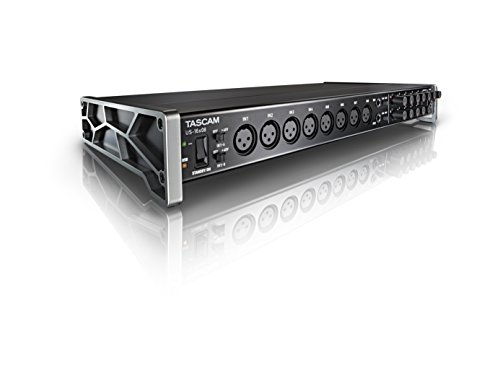
- Captures 16 mic and line inputs to your computer with clear sound quality and advanced features to manage big sessions
- Eight Ultra-HDDA microphone preamps deliver the cleanest and quietest operation in their class while delivering up to 56dB of gain
The Tascam US-16×08 is a powerhouse for studio recording, featuring 16 inputs and rackmount ears. It’s an absolute beast for recording a full drum kit or a multi-person podcast, but for an amateur radio operator, it is massive overkill. It takes up a huge amount of desk space and requires external power. If you are building a professional broadcast studio that happens to include a radio, this might work for your audio routing. But if your goal is to operate digital modes from a shack or in the field, the Tascam is far too bulky and lacks the radio-specific control logic that the Digirig provides so elegantly.
3. Audient EVO 4 Audio Interface

- Compatible OS: MacOS, Windows, iOS (requires USB hub that can be powered) / 2 x EVO microphone pre
- High Definition High Performance AKM Converter/Sample Rate: 24bit/96kHz/Smart Gain
The Audient EVO 4 is one of our favorite consumer audio interfaces due to its “Smartgain” feature and sleek design. It’s perfect for a streamlined podcasting setup. However, like the PreSonus, it is a general-purpose audio tool. It doesn’t have the TRRS port configuration for radio cables, nor does it support the various CAT logic levels (RS-232, CI-V) that the Digirig handles out of the box. While the Audient has superior audio preamps for a microphone, it doesn’t offer the PTT integration that makes the Digirig so essential for hams. If you want a radio interface, buy a radio interface.
Final Verdict: Is the Digirig Mobile Interface for Amateur Radio the Best Choice?
After extensive testing in the shack and the field, our verdict is clear: the Digirig Mobile Interface for Amateur Radio is currently the gold standard for portable digital mode operation. Its combination of a tiny footprint, rugged metal build, and comprehensive “all-in-one” functionality (Audio, CAT, and PTT) makes it nearly impossible to beat at its price point. We recommend it to any ham radio operator, from the newcomer trying their first FT8 contact to the seasoned pro looking to shrink their “Go-Kit” for emergency communications. While you might need to buy specific cables for your rig, the ease of use and reliability you get in return are worth every penny.
If you are tired of bulky boxes and confusing cable runs, it’s time to simplify your setup. The Digirig Mobile is a rare example of a product that does exactly what it promises and does it with style and durability. To take your digital station to the next level and finally conquer the “spaghetti monster” behind your rig, we highly recommend that you get the Digirig Mobile Interface for Amateur Radio today and experience the future of digital amateur radio for yourself.
Last update on 2026-10-16 / Affiliate links / Images from Amazon Product Advertising API