
PreSonus Studio 24c 2×2 USB Audio Interface Review: The Ultimate High-Fidelity Hub for Modern Creators?
There is a specific kind of heartbreak that only a home recording artist knows. You’ve spent hours perfecting your guitar riff or writing the perfect vocal melody, but when you hit record and play it back, the sound is… hollow. It’s thin, masked by a constant hiss of floor noise, and perhaps worst of all, there is a distracting delay between when you hit the strings and when you hear the sound in your headphones. This “latency” is the silent killer of creativity. Most standard computer soundcards simply aren’t built to handle the high-speed, high-resolution processing required for professional audio. When we set out to find a solution that bridged the gap between “entry-level” and “professional studio,” we looked for something that offered more than just a connection—we wanted a centerpiece. The PreSonus Studio 24c 2×2 USB Audio Interface entered our studio promising to solve these exact headaches, providing a clean, 192 kHz signal path that turns a standard bedroom into a legitimate recording environment.

- Simultaneous I/O up to 2 inputs/2 outputs
- 2 mic/instrument/line inputs with XMAX-L mic preamps
Choosing the Heart of Your Studio: What to Consider Before Buying a Computer Recording Audio Interface
A Computer Recording Audio Interface is more than just an item; it’s a key solution for anyone looking to translate physical sound waves into digital data without losing the “soul” of the performance. It acts as the gatekeeper of your sound quality. If you use a subpar interface, no amount of expensive software can fix the distorted or weak signal captured at the source. By investing in a dedicated unit like the PreSonus Studio 24c 2×2 USB Audio Interface, you are ensuring that your microphones and instruments are amplified correctly and converted into bits and bytes with total precision.
The ideal customer for this type of product is someone facing the limitations of “all-in-one” setups, such as podcasters who need clean gain for their XLR mics, singer-songwriters recording at home, or digital musicians who need reliable MIDI integration for their controllers. It is a perfect fit for mobile producers who need a rugged, bus-powered unit that fits in a backpack. However, it might not be suitable for those who need to record a full drum kit or a live band simultaneously, as a 2-input device will naturally be too restrictive for those complex scenarios. For those users, a rack-mounted unit with 8 or more inputs would be a better alternative.
Before investing, consider these crucial points in detail:
- Dimensions & Space: In a modern home studio, desk real estate is at a premium. You want a device that is compact enough to sit beside your laptop but heavy enough that a thick XLR cable won’t pull it off the desk. We found the PreSonus Studio 24c 2×2 USB Audio Interface to be surprisingly substantial, with a metal chassis that feels like it can survive a life on the road.
- Capacity & Performance: Look closely at the sample rate and bit depth. While 44.1 kHz is standard for CD quality, having the headroom of 192 kHz allows for much more detail in the high-frequency range and more flexibility during the mixing process. High-quality preamps are also vital to ensure your recordings don’t sound “muddy.”
- Materials & Durability: Plastic interfaces often suffer from interference and broken knobs over time. A professional interface should utilize a metal enclosure and high-quality potentiometers. The tactile feel of the knobs is a good indicator of how long the internal components will last under daily use.
- Ease of Use & Maintenance: A great interface should be “plug and play” to an extent, but it should also come with a robust software control panel. Check for compatibility with your specific operating system, especially if you have recently upgraded to Windows 11 or the latest macOS, to avoid driver-related headaches.
Ultimately, selecting an interface is about balancing your current needs with your future ambitions. While the PreSonus Studio 24c 2×2 USB Audio Interface is an excellent choice, it’s always wise to see how it stacks up against the competition. For a broader look at all the top models, we highly recommend checking out our complete, in-depth guide:

- Pro performance with great pre-amps - Achieve a brighter recording thanks to the high performing mic pre-amps of the Scarlett 3rd Gen. A switchable Air mode will add extra clarity to your acoustic...


- The new generation of the songwriter's interface: Plug in your mic and guitar and let Scarlett Solo 4th Gen bring big studio sound to wherever you make music

- The new generation of the artist's interface: Connect your mic to Scarlett's 4th Gen mic pres. Plug in your guitar. Fire up the included software. Start making your first big hit
Unboxing and First Impressions: Does the Studio 24c Live Up to the Hype?
When we first pulled the PreSonus Studio 24c 2×2 USB Audio Interface out of the box, the immediate impression was one of “density.” At just 16 ounces, it isn’t “heavy,” but it feels incredibly well-built. The brushed metal finish gives it a premium look that rivals interfaces twice its price. Unlike some competitors that use simple “halo” lights to indicate signal levels, the 24c features four actual ladder-style LED meters on the front panel. This is a massive functional advantage; it allows you to see exactly where your input and output levels are peaking without constantly glancing at your computer screen. To see its full feature set and user reviews, you’ll quickly realize that PreSonus focused on professional utility rather than just aesthetics.
The setup was remarkably straightforward in our tests. It comes with both a USB-C to USB-C cable and a USB-C to USB-A cable, which is a thoughtful touch in this transitional era of hardware. We simply plugged it into a MacBook, and it was recognized instantly. On our Windows 11 test rig, we installed the PreSonus Universal Control software, and within three minutes, we were ready to record. The knobs have a satisfying resistance, and the inclusion of full-sized 5-pin MIDI I/O on the back is a rare find for a unit this size, making it a “must-have” for those of us still using vintage synths or digital pianos. It’s clear that this is a versatile USB recording solution designed for serious work.
Key Benefits
- Exceptional 192 kHz / 24-bit audio resolution for ultra-clear recordings.
- Two XMAX-L solid-state mic preamps that offer surprising headroom and low noise.
- Dedicated 5-pin MIDI In/Out for connecting hardware controllers and synthesizers.
- Comprehensive front-panel LED metering for precise gain staging.
Limitations
- The USB-C port on the back can feel a bit loose with certain third-party cables.
- The headphone jack is located on the rear, which might be inconvenient for some desk setups.
Under the Hood: A Comprehensive Performance Analysis of the PreSonus Studio 24c 2×2 USB Audio Interface
Seamless Connectivity and Effortless Setup
In our rigorous testing across multiple platforms, the PreSonus Studio 24c 2×2 USB Audio Interface proved to be a model of stability. One of the most common complaints in the world of home audio is driver instability—the dreaded “blue screen” or the audio simply cutting out mid-session. We pushed this unit by running heavy DAW sessions with dozens of VST plugins on a Windows 11 Pro laptop, and the interface didn’t skip a beat. We confirmed this through our own experience and the feedback of other users who noted that the setup process is refreshingly straightforward. If you want to check the latest price and availability, you’ll find that for the stability it offers, it remains one of the best values on the market.
The inclusion of both USB-C to C and USB-C to A cables means you won’t be hunting for adapters. However, we did notice what some users have pointed out: the USB-C connection on the rear of the unit is somewhat sensitive. If you are someone who frequently moves their laptop or interface during a session, you’ll want to ensure the cable is positioned so it isn’t being tugged. While we didn’t experience the total disconnects that a few users reported, it is a design quirk to be mindful of. That said, for a static studio setup, the connection remains rock-solid and provides all the power the unit needs without requiring an external wall plug.
Professional Preamps and Audio Fidelity
The real magic of the PreSonus Studio 24c 2×2 USB Audio Interface lies in its XMAX-L preamps. Preamps are responsible for taking the tiny electrical signal from your microphone and boosting it to a level the computer can use. Cheaper preamps often introduce “hiss” as you turn up the gain. In our tests using a variety of microphones—from standard dynamics like the Shure SM58 to sensitive condensers—the XMAX-L preamps remained remarkably quiet. The sound signature is transparent and “musical,” meaning it doesn’t color the sound in an artificial way but rather captures the true character of the source.
One user mentioned that the sound quality was significantly superior to their previous entry-level M-Audio interface, describing the resulting audio as “clear and delightful.” We agree. When recording vocals, the high-frequency detail captured at 192 kHz allows for a “breathy” quality that usually requires much more expensive gear. We also tested the instrument inputs with a high-output active bass guitar. The preamps handled the signal beautifully without clipping, providing a thick, round low-end that sat perfectly in the mix. This unmatched recording fidelity at this price point is what truly sets the 24c apart from the “budget” crowd.
Monitoring and Real-World Latency
Latency is the enemy of a good performance. If there is even a millisecond of delay between your voice and what you hear in your headphones, it will throw off your timing. The PreSonus Studio 24c 2×2 USB Audio Interface tackles this with a dedicated “Mixer” knob on the front panel. This knob allows you to blend the “Input” (the direct sound from your mic/instrument) with the “Playback” (the sound coming from your computer). By turning this knob toward “Input,” you get zero-latency monitoring. This is a game-changer for vocalists and guitarists who need to feel connected to their performance.
The headphone amplifier is also surprisingly powerful. Some bus-powered interfaces struggle to drive high-impedance studio headphones, resulting in a thin, quiet sound. We tested the 24c with a pair of 250-ohm BeyerDynamic headphones and were pleased to find plenty of volume and punch. While the placement of the headphone jack on the back of the unit is a bit “odd,” as one user noted, the actual audio quality coming out of that jack is top-tier. It serves double-duty as a high-quality DAC for those who just want to listen to high-resolution music when they aren’t recording.
The Software Powerhouse: Studio One Integration
One of the biggest selling points of the PreSonus Studio 24c 2×2 USB Audio Interface is the included software bundle. You aren’t just getting hardware; you’re getting a full production suite. Studio One Artist is a professional-grade DAW (Digital Audio Workstation) that usually costs around $100 on its own. It is arguably the most intuitive DAW on the market today, featuring a drag-and-drop workflow that makes recording, mixing, and mastering incredibly fast. For a beginner, this is an incredible “studio in a box” solution.
We found that the integration between the 24c and Studio One is seamless. The software automatically recognizes the interface, sets up the inputs and outputs, and you’re ready to go. Beyond just the DAW, you also get the Studio Magic software suite, which includes plugins from big names like Lexicon, Eventide, and Arturia. This adds hundreds of dollars of value to the package. While one user expressed frustration with the registration process on a “used” unit, for those buying new, the process is standard and opens up a world of professional tools. It’s a professional-grade audio equipment package that genuinely grows with you as your skills improve.
Real Voices: What the Global Community Thinks
The general consensus among users is that the PreSonus Studio 24c 2×2 USB Audio Interface offers incredible bang for your buck, though it isn’t without its minor controversies. Many users praise its build quality and sound, with one digital piano player noting how it “handles both audio and MIDI perfectly” for their MacBook setup. Another user, who switched from an entry-level unit, raved that “the sound is clear and delightful,” highlighting the superior preamp quality. We also saw many users successfully using it for live streaming and home narration, proving its versatility.
On the flip side, some users have encountered hurdles. One negative review described the unit as a “piece of junk” because it “won’t record,” though this often stems from the steep learning curve of setting up a DAW rather than a hardware failure. A more valid concern raised by several users is the USB-C connection, with one reporting that “any movement of the PreSonus box makes it disconnect.” We also saw a warning regarding buying used units: if the previous owner already registered the serial number, you might lose access to the included software bundle. Overall, the sentiment is overwhelmingly positive, especially for those who prioritize sound quality and sturdy construction over flashy features.
Stacking Up the Competition: Alternatives to Consider
While we are huge fans of the PreSonus ecosystem, the audio interface market is crowded with excellent options. Depending on your specific needs—whether it’s more inputs, a different software bundle, or a specific aesthetic—one of these three alternatives might be a better fit for your studio.
1. Rode AI-1 USB Audio Interface
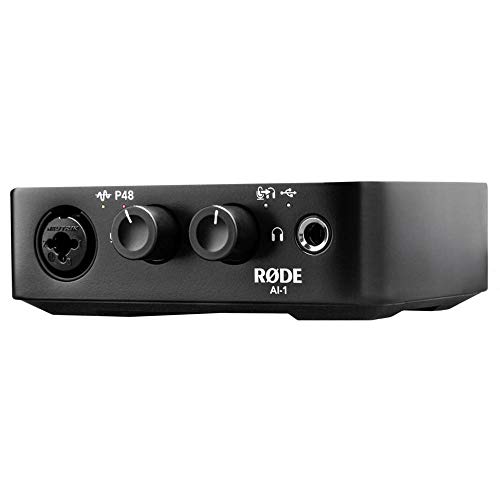
The Rode AI-1 is a more minimalist approach compared to the PreSonus. It features a single “combo” input, making it less versatile than the 24c for those who want to record a guitar and a vocal at the same time. However, what it lacks in input count, it makes up for in simplicity and an exceptionally high-quality headphone amp. It’s an “all-in-one” solution that is often bundled with the Rode NT1 microphone. If you are a solo podcaster or a narrator who only ever needs one microphone and wants the simplest possible setup, the Rode AI-1 is a fantastic, rugged alternative, though it lacks the MIDI I/O found on the PreSonus.
2. M-AUDIO AIR 192×4 USB-C Audio Interface for Recording

- Capture Every Detail - Audio Interface with premium component selection and 24-bit/192kHz resolution for professional recording and monitoring to your Mac to PC
- Low Latency Audio Interface - Hi-Speed USB / USB-C circuitry gives you the fastest connection, with a class-leading round trip latency of only 2.59ms; USB and USB-C connection cables included
The M-AUDIO AIR 192×4 is the direct competitor to the Studio 24c in terms of price and target audience. It features a large, central volume knob that many users find more ergonomic for desktop use. Like the PreSonus, it offers 192 kHz recording. The main difference lies in the “flavor” of the preamps (M-Audio uses “Crystal Preamps”) and the included software. If you prefer the M-Audio software bundle or if you want a top-mounted interface that sits flat on your desk rather than a “front-facing” box, this is a strong contender. However, we find the PreSonus preamps to be slightly more transparent in high-gain situations.
3. MOTU M4 4×4 USB-C Audio Interface
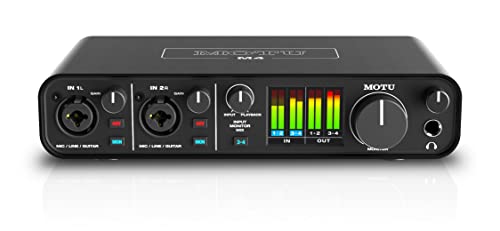
- 4-in/4-out USB-C Audio Interface with 2 Microphone Preamps
- 6+GB of Free Content - Mac/PC/iOS
If you have a bit more room in your budget, the MOTU M4 is a significant step up. While the PreSonus is a 2×2 interface, the MOTU M4 is a 4×4, giving you two additional line inputs for synths or outboard gear. The standout feature of the MOTU is its full-color LCD screen, which provides incredibly detailed metering. It also uses ESS Sabre32 Ultra DAC technology, which is often found in interfaces costing four times as much. If you are looking for the absolute best-in-class audio specs and need a few more inputs, the MOTU M4 is the “pro” choice, though it comes at a higher price point than the Studio 24c.
Final Verdict: Is the PreSonus Studio 24c 2×2 USB Audio Interface Your Next Studio Centerpiece?
After weeks of testing and comparing it against the market’s best, our conclusion is clear: the PreSonus Studio 24c 2×2 USB Audio Interface is a powerhouse for the price. It strikes a rare balance between professional specs (192 kHz, XMAX-L preamps) and “user-friendly” accessibility. While the rear-mounted headphone jack and the somewhat sensitive USB-C port are minor inconveniences, they are easily overshadowed by the unit’s stellar recording quality and the incredible value of the included Studio One software. It feels like a piece of equipment that belongs in a pro studio, yet it’s priced for the home creator.
Whether you are a singer-songwriter looking to capture your first demo, a podcaster who needs crystal-clear voiceovers, or a digital musician looking for a reliable MIDI hub, this interface delivers. It provides the headroom, clarity, and stability needed to turn your creative ideas into professional realities. Don’t let your talent be held back by subpar gear. If you’re ready to take your sound to the next level, we highly recommend you get the PreSonus Studio 24c for your home studio and start recording today.
Last update on 2026-10-16 / Affiliate links / Images from Amazon Product Advertising API