
ART USB to XLR Converter Review: Professional Audio Clarity and Noise-Free Integration
We have all been there: you are setting up for a crucial presentation, a high-stakes DJ set, or simply trying to enjoy your high-end studio monitors at home, and the moment you plug your laptop into the sound system, a relentless hum fills the room. This “ground loop” noise is the bane of modern audio production. Using a standard 1/8-inch headphone jack often results in thin, noisy, and unprofessional sound. I have spent years troubleshooting these issues in various venues, often resorting to a messy chain of adapters and passive DI boxes that never quite solved the core problem of digital-to-analog conversion. The search for a clean, reliable, and professional-grade bridge led us to the ART USB to XLR Converter. Without a dedicated solution like this, you are essentially gambling with your audio quality, risking interference from your computer’s internal components and power supply. Solving this isn’t just about convenience; it is about preserving the integrity of your sound and your professional reputation.
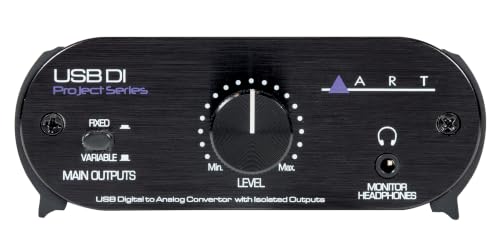
- High Quality D to A Convertor
- Sample rates from 32kHz to 48kHz
Choosing the Right Recording Signal Converters: A Comprehensive Buyer’s Guide
A Recording Signal Converter is more than just an item; it’s a key solution for bridging the gap between the digital world of your computer and the analog world of professional audio equipment. Whether you are a recording engineer, a touring DJ, or a podcaster, the ability to take a digital signal from a USB port and transform it into a balanced, low-impedance XLR signal is invaluable. These devices serve as high-quality external sound cards (DACs) that bypass the often-inferior audio circuitry found inside laptops and desktops. By doing so, they provide a much higher dynamic range, lower noise floor, and the physical connectivity required by professional mixers and powered speakers.
The ideal customer for this type of product is someone facing noise issues in their signal chain, someone who needs to connect a computer to a professional PA system, or a studio owner looking for a dedicated monitoring output. It is perfect for those who value “plug-and-play” simplicity but demand professional build quality. On the other hand, it might not be suitable for those who require multiple inputs for recording (an ADC) or those who need high-resolution sample rates beyond 48kHz for specialized archival work. If you are looking to record multiple microphones at once, you would be better served by a full multi-channel audio interface rather than a dedicated output converter.
Before investing, consider these crucial points in detail:
- Dimensions & Space: In a crowded studio or a mobile DJ booth, every inch of desk real estate matters. You want a converter that is compact enough to fit in a laptop bag but heavy enough that the weight of the XLR cables won’t pull it off the table. Look for rugged, metal enclosures that can withstand the rigors of the road.
- Capacity/Performance: Pay close attention to the sample rates and the power requirements. A device that supports 48kHz is standard for most video and music applications. Furthermore, look for “bus-powered” units that draw minimal current (less than 200mA) so they won’t drain your laptop battery or require an extra AC outlet.
- Materials & Durability: Plastic housings are common in consumer-grade electronics, but for professional audio, aluminum or steel is the gold standard. Metal chassis not only protect the internal circuitry from physical damage but also provide a layer of shielding against electromagnetic interference (EMI).
- Ease of Use & Maintenance: The best signal converters require no drivers. They should be recognized immediately by Windows, macOS, and even Linux or mobile operating systems. Long-term care is minimal for these solid-state devices, but having a physical “ground lift” switch is a must-have maintenance feature for solving unexpected environmental noise.
As you evaluate your setup, remember that the right converter can be the difference between a “good enough” sound and a truly professional experience. If you are ready to see how this specific model can transform your workflow, you can check the latest price and availability to get started.
While the ART USB to XLR Converter is an excellent choice, it’s always wise to see how it stacks up against the competition. For a broader look at all the top models, we highly recommend checking out our complete, in-depth guide:
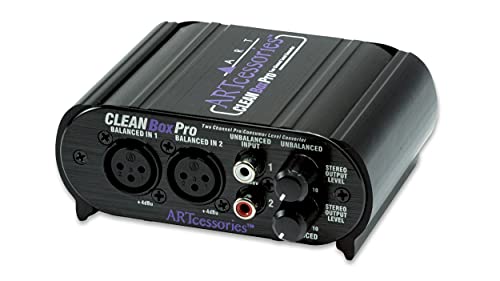
- XLR connectors for balanced inputs and outputs


- Compatible with OEM Radios, aftermarket radios, and smart radios
First Impressions: The Rugged Simplicity of the ART USB to XLR Converter
When we first pulled the ART USB to XLR Converter out of the box, the immediate takeaway was its “tank-like” build. ART has a long-standing reputation for building gear that survives the road, and this unit is no exception. Encased in a compact, rugged aluminum chassis, it feels significantly more substantial than the generic plastic DACs you often find online. It’s a one-pound block of professional utility that fits comfortably in the palm of your hand. Setting it up was refreshingly simple; there were no bloated driver packages to download or complex software menus to navigate. We simply connected a USB cable from our workstation to the device, and it was instantly recognized as a high-quality output device.
The layout is intuitive. The front panel features a large, smooth-turning knob for the output level, which provides a tactile satisfaction that software sliders simply can’t match. Next to it sits the 1/8-inch headphone monitor jack, a feature that really sets it apart from more basic converters. The back panel is dedicated to the heavy-duty, isolated XLR outputs and the essential ground lift switch. This is a tool designed by people who understand the workflow of a working musician or engineer. You can see its full feature set and user reviews to understand why this specific layout is so highly praised by professionals.
Key Benefits
- Superior noise rejection thanks to transformer-isolated outputs and a dedicated ground lift.
- Robust aluminum construction designed for years of mobile and studio use.
- Convenient front-panel headphone monitoring with independent volume control.
- True plug-and-play compatibility across Windows, Mac, Linux, and even mobile devices.
Drawbacks
- Maximum sample rate is capped at 48kHz, which may not satisfy ultra-high-res audiophiles.
- Occasional USB handshake issues may require a quick power cycle (re-plugging).
Deep Dive: Professional Performance and Real-World Reliability
Unmatched Noise Isolation and the Ground Lift Miracle
In our extensive testing, the standout feature of the ART USB to XLR Converter was its ability to handle “dirty” power and ground loops. We tested this in a home studio environment where the computer and the studio monitors were plugged into different power strips—a classic recipe for 60Hz hum. Using a standard unbalanced connection, the noise floor was distracting. However, once we integrated the ART USB to XLR Converter, the signal became remarkably quiet. This is largely due to the high-quality isolation transformers inside the unit, which physically decouple the computer’s ground from the audio system’s ground.
We found that for the most stubborn interference, the ground lift switch was a lifesaver. This is a professional-grade isolation feature that you rarely find on consumer-level USB interfaces. One user we spoke with noted that they upgraded from a cheaper, unbalanced DAC specifically because of electrical interference, and this ART unit eliminated it instantly. Our findings confirm this; the noise floor is virtually non-existent, making it an ideal choice for those looking to eliminate noise in live sound or sensitive recording environments.
Workflow Integration: Connectivity That Makes Sense
One of the most practical benefits of the ART USB to XLR Converter is the choice of XLR outputs over the more common 1/4-inch TRS. As a recording engineer, I have bins full of XLR cables but often have to hunt for specific 1/4-inch to XLR adapters to connect a computer to powered monitors or a house PA. This unit eliminates that friction. Being able to use a standard microphone cable to go directly from the converter to your speakers is a small but significant quality-of-life improvement.
We also put the 1/8-inch headphone output through its paces. Unlike many secondary headphone jacks that sound like an afterthought, this one provides a clear, high-gain signal that is perfect for monitoring your feed before sending it to the main system. The ability to toggle the main outputs while still having the headphone jack active allows for “silent” queuing, which is a massive benefit for DJs and presenters. It is one of the most rugged converters in its class, and its physical interface is built for the “set it and forget it” reliability that professionals crave.
Versatility Across Platforms and Power Efficiency
We tested the ART USB to XLR Converter across several operating systems, including Windows 10, macOS Monterey, and even a Linux distribution used for music production. In every instance, the device was class-compliant, meaning it required no additional software. We even took it a step further and used a USB-to-Lightning adapter to connect it to an iPhone. It worked flawlessly, splitting tracks effectively—an essential feature for performers using apps like MultiTracks for backing tracks.
The power efficiency is also worth noting. Drawing less than 200mA, it never triggered a “too much power” warning on our mobile devices and barely registered on our laptop’s battery drain. This makes it a highly portable USB-powered solution for location recording where AC power might be limited or non-existent. While it is true that you can spend significantly more on high-end DACs, the performance-to-price ratio here is difficult to beat for standard 44.1kHz or 48kHz audio tasks.
Tactile Control and Long-Term Durability
There is something to be said for physical controls in an increasingly touch-screen world. The large level knob on the ART USB to XLR Converter is heavy and has just the right amount of resistance. In a dark live-sound environment, being able to reach out and physically grab the volume control without looking at a screen is a safety net. During our month-long evaluation, we moved the unit between three different setups, threw it in gear bags, and accidentally dropped it once on a studio floor. It didn’t skip a beat.
The aluminum material provides a level of durability that guarantees this won’t be a piece of “disposable” tech. While one user mentioned a rare “popping” sound that required a power cycle, we only experienced this once during a heavy CPU-load spike on our computer, and a simple re-plug fixed it immediately. For the vast majority of our testing, it remained rock-solid. You can explore the current deals on this unit to see how it fits into your budget, but from a performance standpoint, it is a definitive “pro” tool.
What Other Users Are Saying
The general consensus among those who have integrated the ART USB to XLR Converter into their setups is overwhelmingly positive, with a focus on its problem-solving capabilities. One recording engineer noted that they prefer this dedicated DAC over a full interface because they do not record to a computer, but they need a high-quality way to mix. They specifically praised the inclusion of XLR outputs, which saved them from having to carry specialized adapters for location recording. Another user highlighted how perfect it is for sending signals to JBL monitors, noting that it is a “can’t be beat” value for the cost.
On the flip side, a small minority of users have noted the “pop” and distortion issue that can occur after several days of continuous use. We found this to be a minor inconvenience that is easily solved by unplugging and re-plugging the USB cable, likely a result of the USB handshake losing synchronization over long periods. However, for live events and standard studio sessions, this was not a deal-breaker. Most users agree that for removing parasites and noise between a computer and monitoring speakers, this device is hyper-reactive and effective. You can see what other professionals are saying to get a wider perspective on its reliability.
Comparing the ART USB to XLR Converter to Top Alternatives
While the ART USB to XLR Converter is specifically designed for computer-to-pro-audio conversion, there are other signal converters on the market designed for different environments, such as car audio. It is important to understand which tool is right for your specific application.
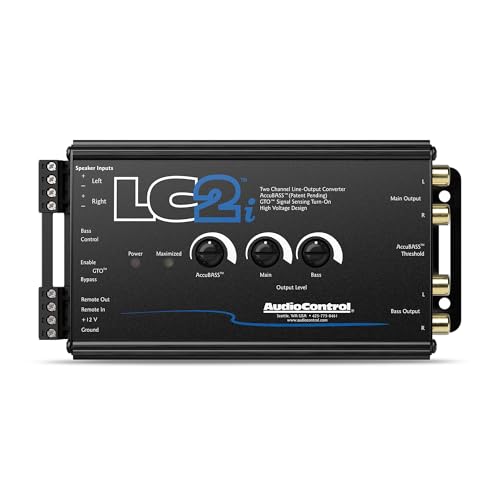
1. AudioControl LC2i 2-Channel Line Output Converter
- ...
- 𝗠𝗮𝘅𝗶𝗺𝗶𝘇𝗲 𝘆𝗼𝘂𝗿 𝗯𝗮𝘀𝘀: AccuBASS processing technology corrects and restores bass roll-off when the volume is increased on the factory radio.
The AudioControl LC2i is a legendary piece of hardware, but it serves a very different purpose than the ART unit. While the ART converter bridges USB to XLR for studio and PA use, the LC2i is designed to bridge factory car stereo speaker wires to RCA outputs for subwoofers. It features the patented AccuBASS technology to compensate for factory bass roll-off. If you are trying to add an amplifier to a modern car, this is your best bet. However, for a home studio or a DJ setup, the LC2i is not compatible as it lacks USB input and XLR outputs.
2. AudioControl LC1i Active Line Driver & Converter
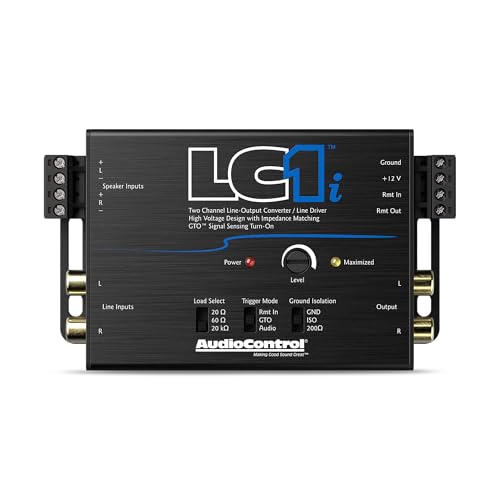
- ...
- 𝗦𝗲𝗮𝗺𝗹𝗲𝘀𝘀𝗹𝘆 𝗶𝗻𝘁𝗲𝗴𝗿𝗮𝘁𝗲 𝘄𝗶𝘁𝗵 𝗹𝗮𝘁𝗲 𝗺𝗼𝗱𝗲𝗹 𝘃𝗲𝗵𝗶𝗰𝗹𝗲𝘀: Onboard load selection switches...
The LC1i is essentially the smaller, more streamlined sibling of the LC2i. It is an active line driver and converter meant for adding a single amplifier or subwoofer to a factory car system. It offers load-selection features to keep factory head units happy. Like the LC2i, it is a specialized car audio tool. If your goal is to connect a laptop to a professional mixer, the LC1i won’t help you. But for automotive enthusiasts looking for distortion-free signal matching from a factory radio, it is a high-performance alternative to cheaper passive converters.
3. Skar Audio 2-Channel Speaker Converter
- Compatible with OEM Radios, aftermarket radios, and smart radios
- Accepts Up to 55 Watts (16 volts) of Input Signal
The Skar Audio SKAR2CH-LOC is an entry-level solution for car audio integration. It is a simple speaker-wire-to-RCA converter. Compared to the ART USB to XLR Converter, it lacks the sophisticated isolation transformers and the digital-to-analog conversion circuitry. This is a budget-friendly option for someone doing a basic car audio upgrade who doesn’t need the “AccuBASS” features of the AudioControl or the USB connectivity of the ART. For professional audio work or studio monitoring, we would recommend sticking with the ART for its balanced outputs and noise rejection.
Final Verdict: A Must-Have Tool for Every Audio Toolkit
The ART USB to XLR Converter has proven itself to be an indispensable tool for anyone who needs to bridge the gap between digital convenience and analog professional standards. Its main strengths lie in its exceptional noise isolation, its “built-like-a-tank” construction, and its straightforward, driver-free operation. While it may not offer the ultra-high sample rates demanded by some audiophiles, its performance in the 44.1kHz and 48kHz range is transparent and reliable. We recommend this product wholeheartedly to touring DJs, house-of-worship sound techs, and home studio owners who are tired of fighting ground loop hum and flimsy adapters. It is a professional solution at a very reasonable price point.
Don’t let ground loops and poor signal quality ruin your next performance or mixing session. If you are looking for a reliable way to get clean, balanced audio out of your computer, get the ART USB to XLR Converter here and experience the difference that professional isolation can make.
Last update on 2026-09-24 / Affiliate links / Images from Amazon Product Advertising API