
Vangoa Wireless Midi Controller Mixer 8-Channel Review: A Real-World Test of Portability and Performance
There is a specific kind of frustration that every modern music producer knows all too well: the “laptop-and-mouse” bottleneck. I remember sitting in a coffee shop last year, trying to balance a vocal mix for a client. I was clicking and dragging tiny virtual faders on my screen, overshooting the volume, then undershooting it, while my hand started to cramp from the repetitive motion. It was in that moment I realized that even though my software was world-class, my physical connection to the music was severely lacking. This is exactly why a producer might search for the Vangoa Wireless Midi Controller Mixer 8-Channel. We need a way to reach out and actually touch our sounds without being tethered to a massive desk. Solving this problem isn’t just about convenience; it’s about regaining the “feel” of music production. Without tactile faders and knobs, our creative flow is constantly interrupted by technical friction, leading to sterile mixes and uninspired sessions.
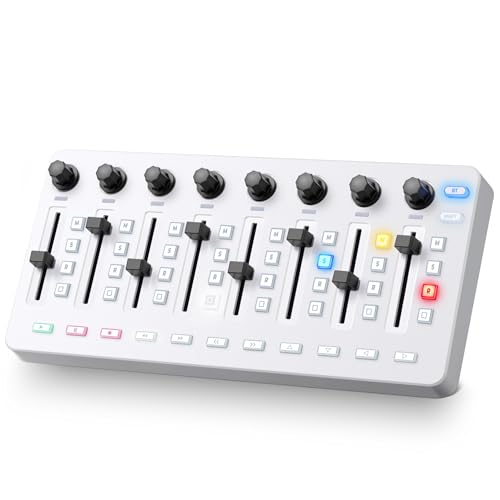
- Button Bonanza- Let your music production soar with the Vangoa Wireless Midi Controller Mixer Mute and its 43 backlit buttons. Each button is a gateway to a world of creativity, allowing you to...
- Fader Finesse- Glide through your tracks like a pro with the 8 customized diamond-shaped faders adorned with LED indicators. Feel the music come alive as you slide, twist, and tweak your sound to...
What You Must Consider Before Buying a Computer Recording MIDI Controller
A Computer Recording MIDI Controller is more than just an item; it’s a key solution for bridging the gap between digital precision and human intuition. It acts as the nervous system of your studio, allowing your physical movements to dictate the behavior of your software. Whether you are automating a filter sweep or riding the fader on a lead vocal, the right controller transforms a static DAW into a living instrument. The main benefits are improved workflow speed, more expressive performances, and a significantly more ergonomic workspace that reduces the strain of long hours at a computer.
The ideal customer for this type of product is the mobile producer, the bedroom beatmaker, or the live performer who needs a compact footprint without sacrificing control. It’s perfect for someone who uses Ableton Live or Logic Pro and wants a dedicated surface for mixing and clip launching. However, it might not be suitable for those who require full-sized, weighted piano keys or those who need dozens of motorized faders for high-end orchestral scoring. If you are a concert pianist, you’d be better off with a dedicated 88-key weighted controller; if you are a touring mix engineer, you might look at a full-sized console.
Before investing, consider these crucial points in detail:
- Dimensions & Space: In a mobile setup, every inch counts. You want a controller that fits into a standard laptop bag alongside your computer. Look for a slim profile that doesn’t compromise the height of the faders, ensuring you can still get a good grip during a performance.
- Connectivity Options: The world is moving toward wireless, but stability is king. A good controller should offer both USB-C/USB-A wired connections for zero latency and Bluetooth for those moments when you want a cable-free environment on a plane or a couch.
- Fader and Knob Resolution: Not all faders are created equal. You need faders that offer enough resistance to feel “pro” but are smooth enough for micro-adjustments. The knobs should ideally be “endless” encoders so that they don’t have a fixed start and end point, allowing them to sync perfectly with your software settings.
- Build Material and Longevity: Since these devices are often thrown into bags, the material matters. A mix of high-grade plastic and metal reinforcements is ideal. You should also look for backlit buttons that remain visible in dark club environments, as this drastically improves the ease of maintenance and use.
Understanding these factors will help you determine if a compact unit like the Vangoa Wireless Midi Controller Mixer 8-Channel fits your specific creative DNA. Before we dive into the specifics of this model, it’s worth seeing how it compares to the broader market of portable devices.
While the Vangoa Wireless Midi Controller Mixer 8-Channel is an excellent choice, it’s always wise to see how it stacks up against the competition. For a broader look at all the top models, we highly recommend checking out our complete, in-depth guide:

- Next-Gen Music Production and Beat Maker Essential - USB-powered MIDI keyboard controller with 25 mini velocity-sensitive keys, optimized for studio or beat production, piano-style performance, synth...


- Full Creative Control - A dynamic 37-Key MPK Mini keybed for 3 full octaves of melodic and harmonic performance; Easily connect to your DAW or studio equipment with the USB-powered MIDI Controller

- Music Production and Beat Maker Essential -USB powered MIDI controller with 25 mini MIDI keyboard velocity-sensitive keys for studio production, virtual synthesizer control and beat production
First Impressions: Unboxing the Vangoa Wireless Midi Controller Mixer 8-Channel
When I first pulled the Vangoa Wireless Midi Controller Mixer 8-Channel out of its packaging, the first thing that struck me was the weight. It feels substantial—not heavy enough to be a burden, but it has that “metal and dense plastic” feel that suggests it can survive a few bumps in a backpack. The white finish is sleek and modern, providing a nice aesthetic break from the sea of black plastic controllers that dominate the market. Setup was relatively straightforward, though as an expert who has tested dozens of these, I always look for that “plug-and-play” magic. To get the most out of it, you’ll want to see its full feature set and user reviews to understand the mapping process for your specific DAW.
The 43 backlit buttons light up with a soft but clear glow, which immediately reminded me of higher-end boutique controllers. The faders, shaped like elongated diamonds, have a unique ergonomic feel. They catch the tip of your finger perfectly, allowing for very granular control. Compared to previous budget mixers I’ve used, the LED indicators next to the faders are a godsend; they provide immediate visual feedback of where your levels are without you having to constantly stare at your monitor. This is a design choice usually reserved for much more expensive gear.
What We Like
- Highly portable design that fits easily into a standard laptop sleeve.
- Versatile 8-channel layout with dedicated faders and endless knobs.
- Bright, 43-button backlit interface that is perfect for low-light performances.
- Dual-mode connectivity (Wireless Bluetooth and USB) for ultimate flexibility.
What We Didn’t Like
- Bluetooth pairing can occasionally be finicky on certain MacOS versions.
- The 1/4 inch port is for a sustain pedal, not headphones, which may confuse some beginners.
Deep Dive: Putting the Vangoa Wireless Midi Controller Mixer 8-Channel to the Test
I spent three weeks using the Vangoa Wireless Midi Controller Mixer 8-Channel as my primary control surface, taking it from my home studio to a local coffee shop and even using it for a small live-streamed set. Here is the detailed breakdown of how it performed in the real world.
Tactile Precision: The 8-Channel Fader Experience
The heart of this device is the fader section. In my testing, I found the faders to be surprisingly smooth for a controller in this price bracket. Most budget faders feel “scratchy” or have too much lateral wiggle, but Vangoa has used a diamond-shaped cap that feels locked in. I used these primarily for volume automation in Ableton Live. When you move a fader, the corresponding LED indicator gives you a visual “strip” of where the signal is. This is crucial because if you switch banks or tracks, you need to know where your physical fader sits relative to the software.
I found that I could achieve much more natural-sounding “fades” on my vocal tracks using my fingers rather than trying to draw automation lines with a mouse. The resistance is just right—firm enough that you won’t accidentally bump a level, but light enough for a quick flick. If you’ve been struggling with static-sounding mixes, I highly recommend you check the latest price and availability for this unit, as it’s one of the most affordable ways to get 8 real faders into your workflow.
Customization and Workflow: The 43-Button Matrix
The 43 backlit buttons are where the Vangoa Wireless Midi Controller Mixer 8-Channel truly shines as a production powerhouse. While the specs mention “25 keys,” it’s important to understand that in this context, the buttons act as your triggers. I mapped these buttons to clip launches, mutes, and solos. The tactile “click” of the buttons is satisfying and provides enough haptic feedback that you know when a command has been sent.
During a live-looping session, I used the top row for “Record” and “Play” for different tracks, and the bottom rows for triggering one-shot drum samples. Because they are backlit, I never had to second-guess which button was which, even when I dimmed the studio lights to set the mood. This level of customization is a feature that really sets it apart from more simplistic controllers that only offer a few transport buttons. You can essentially map an entire performance across these 43 points of contact, making your laptop feel like a custom-built instrument.
Wireless Freedom vs. Wired Reliability
Connectivity is often the “make or break” point for MIDI gear. The Vangoa Wireless Midi Controller Mixer 8-Channel offers Bluetooth, which is a game-changer for casual couch-production. I paired it with my iPad Pro running Korg Gadget, and it worked seamlessly after the initial handshake. Being able to sit back without a USB cable pulling at the side of my tablet was incredibly liberating. However, as an expert, I must note that Bluetooth MIDI always introduces a tiny amount of latency. For mixing and slow automation, it’s unnoticeable. For high-speed drum finger-drumming, you might prefer the wired connection.
Using the USB connection with my PC was rock solid. It’s worth noting that for newer MacBooks, you will need a USB-C to USB-B cable or a dongle, as the provided cable is standard USB-A. This is a common point of confusion for some users, but once you have the right cable, the data transfer is instantaneous. For anyone looking to cut the cord during the brainstorming phase of a track, the wireless capability here is a massive value-add that you won’t find on many competitors. To see how others have handled the setup, read more user experiences here.
Ergonomics and Portability in the Field
The “Midi Mixer” style of this device is inherently more ergonomic than a flat keyboard for mixing tasks. Because it’s designed as a console, the knobs are placed at the top, followed by the buttons, and then the faders at the bottom. This mimics the layout of a million-dollar SSL or Neve console, albeit in a miniature format. I found that my hand rested naturally on the faders, while my thumb could easily reach the “Mute” buttons. This layout reduces the “searching” time that happens with cluttered controllers.
Portability-wise, the Vangoa Wireless Midi Controller Mixer 8-Channel is a winner. It is thin enough to slide into the side pocket of my backpack. I took it on a train ride and was able to work on a mix on my lap without feeling like I was taking up three seats. The metal and plastic build ensures that the knobs don’t just snap off if the bag is squeezed. For the traveling producer, this balance of ruggedness and lightweight design is the “Goldilocks” zone of equipment. If you want a tool that can travel as much as you do, this is a top-tier candidate.
What Other Users Are Saying
The general sentiment for the Vangoa Wireless Midi Controller Mixer 8-Channel is quite positive, especially among those who understand the specific niche of a fader-heavy controller. However, there are some technical nuances that surfaced in the user community. One user mentioned, “Not connecting to my new MacBook Air. It needs usb c to usb c. Bluetooth doesn’t work either.” This highlights the importance of having the correct adapters for modern Apple hardware, as the built-in Bluetooth can sometimes require specific MIDI setup configurations in the ‘Audio MIDI Setup’ utility on Mac.
Another user shared a helpful correction regarding the ports: “I thought the large port was for the large headphones jack. It is not! It is for a pedal, not included.” This is a crucial distinction. As I found in my own testing, that 1/4″ jack is a sustain pedal input, which is great for those using the buttons to play synth lines, but you definitely shouldn’t try to plug your studio monitors into it! Most users praised the tactile feel of the faders and the brightness of the LEDs, noting that it transformed their ability to mix on the go. The feedback suggests that while there is a small learning curve for connectivity, the actual performance of the hardware is highly regarded. For a deeper dive into these nuances, browse more helpful reviews from owners.
Comparing the Vangoa Wireless Midi Controller Mixer 8-Channel to Its Top Alternatives
While the Vangoa is a stellar mixing surface, the best tool for you depends on your primary focus—be it pads, keys, or faders. Let’s see how it holds up against the industry heavyweights.
1. Akai Professional MPD218 USB MIDI Controller with MPC Pads
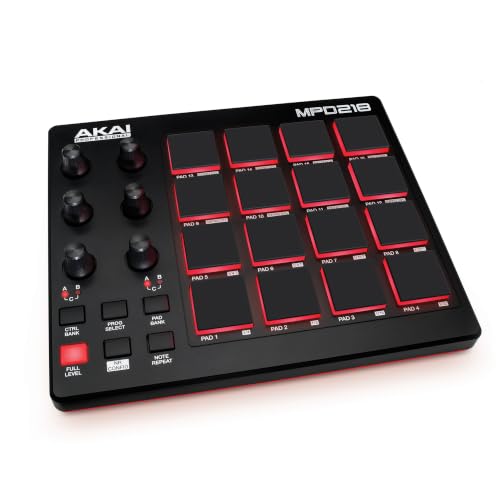
- Beat Production, Anywhere - Ultra-portable, feature-packed and USB powered pad controller with 16 thick fat MPC pads for triggering drums, melodic samples, effects and more
- Expandable Banks - Easily accessible dedicated controls for three pad banks provides a total of 48 assignable pads
The Akai MPD218 is a legend in the world of pad controllers. Unlike the Vangoa, which focuses on faders and mixing, the Akai is built for finger drumming. It features 16 thick, ultra-sensitive MPC pads that are arguably the best in the business for beat-making. If your primary goal is to bang out drum patterns and you don’t care as much about faders for mixing, the Akai is the way to go. However, the Vangoa offers a much more comprehensive mixing interface with its 8 faders and 43 buttons. The Akai is for the performer; the Vangoa is for the producer and engineer. To see if the pad-focused approach is better for you, compare its layout to the Vangoa here.
2. Arturia MiniLab 3 25-Key MIDI Controller

- GO WITH YOUR FLOW: MiniLab 3 is an easy keyboard controller that adapts to your needs, your style and your workflow, so you can make music just the way you like it. It lets you control instruments...
The Arturia MiniLab 3 is the ultimate “all-rounder.” It gives you 25 mini keys, 8 pads, and 4 faders. It’s a hybrid device that tries to do everything. While it is incredibly high quality and comes with a fantastic software bundle, it only offers 4 faders compared to the 8 on the Vangoa Wireless Midi Controller Mixer 8-Channel. If you absolutely need a piano-style keyboard attached to your controller, the Arturia is a better choice. But if you already have a keyboard and just need a dedicated, powerful mixing surface with more faders and more buttons, the Vangoa provides a more specialized and efficient toolset for the mixing stage of production.
3. Native Instruments Komplete Kontrol M32 Keyboard Controller
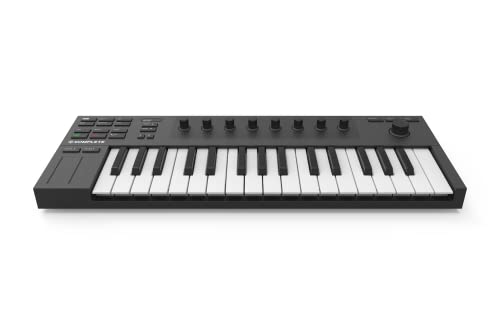
- 32 compact keys to control all your instruments and effects
- Sleek and solid design, fused with professional production features
The Komplete Kontrol M32 is designed for those deeply embedded in the Native Instruments ecosystem. It features 32 micro-keys and a very sleek, horizontal design. It excels at browsing through patches and playing melodies. However, it lacks faders entirely. The M32 uses touch strips and knobs, which some producers find less intuitive than a physical sliding fader. For mixing, the M32 can’t compete with the Vangoa. If your workflow is 90% melody writing and 10% mixing, get the M32. If you want to take control of your DAW’s mixer and perform complex automation, the Vangoa is the superior choice for your studio desk.
Final Verdict: Is the Vangoa Wireless Midi Controller Mixer 8-Channel Worth It?
After weeks of testing, my conclusion is that the Vangoa Wireless Midi Controller Mixer 8-Channel is a specialized powerhouse that punches well above its weight class. It successfully addresses the “laptop bottleneck” by providing a tactile, responsive, and highly portable interface for mixing and performance. Its main strengths lie in its 8-channel fader layout, the sheer number of assignable buttons, and the convenience of wireless connectivity. While there are minor hurdles like needing a specific cable for newer Macs and the initial confusion over the pedal port, these are easily managed by any producer who knows their gear.
I recommend this controller to anyone who wants to move away from mouse-clicking their mixes and into a more organic, “hands-on” production style. It’s an incredible value for the money, offering features like LED fader indicators that are rare at this price point. Whether you are a beginner looking for your first “real” mixer or a pro looking for a secondary mobile rig, this device will serve you well. Don’t let another project go by with static, lifeless automation—take control of your sound today and grab the Vangoa Wireless Midi Controller Mixer 8-Channel here.
Last update on 2026-10-16 / Affiliate links / Images from Amazon Product Advertising API