
Nektar Impact GX61 MIDI Keyboard Review: The Ultimate Balance of Performance and Value?
If you have ever sat down to compose a sweeping orchestral piece or a complex jazz progression on a 25-key controller, you know the frustration of the “octave shift” dance. I have spent years in my home studio trying to find that perfect middle ground—a keyboard that doesn’t take up half the room like a full 88-key digital piano, yet provides enough real estate to actually play with two hands. For many of us, the 61-key format is the “Goldilocks” zone of music production. It fits on a standard desk, but still allows for expressive, piano-style playing. When I first looked into the Nektar Impact GX61 MIDI Keyboard, I was searching for a solution to a common problem: how to get professional DAW integration without paying a “professional” premium price. Many entry-level controllers feel like toys, while high-end ones are cluttered with knobs and faders I rarely use. I needed something streamlined, responsive, and reliable. After spending significant time with this unit, I can confidently share whether it truly bridges that gap for the modern producer.

- 61 Premium midi controller with 61 expressive synth-action keys, on-board pitch bend and modulation wheels for performances
- Nektar DAW Integration for most popular DAWs
What to Consider Before Buying Computer Recording MIDI Controllers
A Computer Recording MIDI Controller is more than just a piece of plastic with keys; it’s the primary interface between your musical ideas and your digital workstation. It serves as a key solution for composers, hobbyists, and professional producers who need to translate human expression into digital data. Without a solid controller, you are stuck clicking notes into a piano roll with a mouse—a process that is not only tedious but also strips the life and “groove” out of your music. A good controller allows for velocity sensitivity, real-time automation, and a tactile connection to your instruments that software alone cannot replicate.
The ideal customer for this type of product is someone facing space constraints but who refuses to compromise on playability, such as a songwriter-producer or a game developer. It is also perfect for beginners who want a full-sized key feel without a massive upfront investment. However, it might not be suitable for those who require “hammer-action” keys that mimic a real grand piano, or for live performers who need dozens of physical faders and drum pads to trigger loops on the fly. If you are a finger-drummer first and a keyboardist second, you might consider a pad-focused controller instead.
Before investing, consider these crucial points in detail:
- Dimensions & Space: Measure your desk twice. A 61-key controller like the Nektar Impact GX61 MIDI Keyboard is approximately 38 inches wide. You need to ensure you have enough clearance for your mouse and monitors while keeping the keyboard centered for proper ergonomic playing.
- Capacity & Performance: Look specifically at the keybed type. “Synth-action” keys are lightweight and fast, which is great for lead lines and organ parts, but you should check if the velocity curves are adjustable to match your playing style.
- Materials & Durability: While most controllers in this price bracket are plastic, the quality of that plastic matters. You want a chassis that doesn’t flex when you press down hard and keys that don’t develop a loud, distracting “clack” over time.
- Ease of Use & Maintenance: High-level integration is a lifesaver. Look for products that offer “Nektar DAW Integration” or similar scripts that automatically map the transport buttons (play, stop, record) to your software, saving you hours of manual MIDI mapping.
Choosing the right controller is a deeply personal decision that depends on your workflow. While the Nektar Impact GX61 MIDI Keyboard is an excellent choice for those seeking a streamlined experience, it’s always wise to see how it stacks up against the competition. For a broader look at all the top models, we highly recommend checking out our complete, in-depth guide:

- Next-Gen Music Production and Beat Maker Essential - USB-powered MIDI keyboard controller with 25 mini velocity-sensitive keys, optimized for studio or beat production, piano-style performance, synth...


- Full Creative Control - A dynamic 37-Key MPK Mini keybed for 3 full octaves of melodic and harmonic performance; Easily connect to your DAW or studio equipment with the USB-powered MIDI Controller

- Music Production and Beat Maker Essential -USB powered MIDI controller with 25 mini MIDI keyboard velocity-sensitive keys for studio production, virtual synthesizer control and beat production
First Impressions: Unboxing the Nektar Impact GX61 MIDI Keyboard
When I first pulled the Nektar Impact GX61 MIDI Keyboard out of the box, the first thing I noticed was how surprisingly light it felt. At only 6 pounds, I initially worried it might feel flimsy. However, once I placed it on my stand, it felt remarkably stable. The design is sleek and understated—a matte black finish with blue and orange accents on the buttons that look modern without being garish. Unlike many other controllers that try to cram in 16 pads and 8 knobs, the GX61 is intentionally minimal. It feels like a dedicated instrument rather than a cluttered control surface. Before you even plug it in, you can see its full feature set and user reviews to understand that this is a “player’s” keyboard. The inclusion of a Bitwig 8-Track license and a sustain pedal in the box is a huge plus, making it a truly “plug-and-play” solution for those just starting out or looking to expand their setup quickly.
Key Benefits
- Exceptional DAW integration that works out of the box with major software.
- Highly portable and lightweight design without sacrificing key count.
- Very affordable price point for a 61-key controller with professional features.
- Includes a dedicated sustain pedal and high-quality Bitwig 8-Track software.
Limitations
- Synth-action keys may feel “clicky” or too light for traditional pianists.
- Lacks physical faders and drum pads for those who need heavy tactile mixing control.
A Deep Dive into the Nektar Impact GX61 MIDI Keyboard’s Performance
Seamless Integration and Effortless Setup
In my years of testing gear, few things are as frustrating as spending two hours configuring MIDI CC maps just to get a “Record” button to work. One of the standout features we found with the Nektar Impact GX61 MIDI Keyboard is the Nektar DAW Integration. I tested this with both Cubase and Logic Pro, and the process was incredibly smooth. After a quick driver installation from the Nektar website, the keyboard’s transport buttons—Play, Stop, Record, Rewind, and Fast Forward—worked instantly. But it goes deeper than that. By using the “Shift” button, these same transport controls allow you to navigate your project, undo takes, and even toggle the metronome.
This level of integration is a feature that really sets it apart from generic controllers. As one user mentioned in their feedback, it became their “DAW’s best friend” immediately upon being plugged in. We noticed that this doesn’t just save time; it keeps you in the creative flow. You aren’t constantly reaching for your mouse to hit record or move the playhead. For a songwriter, that’s the difference between capturing a spark of inspiration and losing it to a technical hurdle. You should definitely explore its incredible integration features if you value a workflow that stays out of your way.
The Keybed: Balancing Feel and Responsiveness
The core of any Nektar Impact GX61 MIDI Keyboard Review has to be the keys. These are “full-sized, synth-action” keys. If you are coming from a background of playing weighted grand pianos, there will be an adjustment period. They are springy and light, which we found to be perfect for fast synth leads and programming drum parts. However, they aren’t “cheap” feeling. There is a decent amount of resistance that allows for nuanced playing. I spent several hours playing through various VST pianos, and while it isn’t a replacement for a $2,000 digital piano, it is arguably the best 61-key controller you can get for piano-style playing under a certain price bracket.
We did notice that the keys have a slight “clicky” sound when played unplugged, which some users have pointed out as a minor annoyance. However, once you have your headphones on or your monitors up, this is a non-issue. The velocity sensitivity is impressive for this price range. We found that the keyboard responds well to the subtle differences between a gentle press and a heavy strike, which is vital for expressive instruments like strings or woodwinds. For those concerned about the touch response, you can check the latest price and availability and see that most users find the “nuance” of these keys to be far superior to competing models in the same category.
Compact Design and Build Quality
Portability is often the enemy of playability, but Nektar seems to have found a loophole. The Nektar Impact GX61 MIDI Keyboard manages to stay compact (only 7.75 inches deep) while offering a full five octaves. I was able to slide this keyboard right in front of my computer monitors without it obstructing my view or taking over my entire workspace. This makes it an ideal choice for game developers or small-team producers who “wear many hats” and need to keep their desk organized. The build quality, despite being lightweight, feels sturdy enough for regular studio use.
We also appreciated the thoughtful touches on the hardware. The pitch bend and modulation wheels have a rubberized texture and a firm, smooth travel, which prevents accidental slips during a performance. The back of the unit features a single USB port for both data and power, which keeps cable clutter to a minimum. Whether you are using a PC, Mac, or even an iOS device (with a camera connection kit), the GX61 is the perfect blend of playability and portability. I’ve taken this unit to a few collaborative sessions, and it’s a breeze to pack up and carry in a standard 61-key gig bag.
Customizable Control and Versatility
While the GX61 looks simple, it hides a lot of power under the hood. There are 14 MIDI assignable buttons. Through the “Setup” menu, you can actually reassign these buttons to send MIDI CC messages, allowing you to control software parameters like filter cutoff or resonance directly from the keyboard. During our testing, we found this particularly useful for “performing” automation in real-time. Instead of drawing automation curves with a mouse, I mapped the modulation wheel and buttons to my favorite synth parameters, resulting in a much more organic sound.
Furthermore, the “Octave” and “Transpose” buttons are equipped with multi-colored LEDs that change color based on your current setting. This might seem like a small detail, but when you are in the middle of a session, knowing exactly which octave you are in at a glance is incredibly helpful. For those building a specialized setup, such as a virtual pipe organ or a complex live rig, the ability to set MIDI channels and program changes on the fly is a life-saver. You can current deals on this 61-key powerhouse and see how it fits into your specific workflow, whether you’re a beginner or a seasoned pro.
What Other Users Are Saying
The general sentiment among users is overwhelmingly positive, especially regarding the value-to-performance ratio. Many users who have transitioned from more expensive brands like Roland or Yamaha have expressed surprise at how well the Nektar Impact GX61 MIDI Keyboard holds up. One user, a songwriter-producer, noted that they preferred it over their previous heavier controllers because it was “just the ticket” for a lightweight yet playable stand-in. Another reviewer highlighted that it works flawlessly with Ableton Live 11, calling it “Ableton’s new best friend” due to how perfectly the pitch bend and transport features integrated.
On the flip side, some critical feedback mentioned that the touch sensitivity can feel “a bit off” for those used to high-end workstations, and a few users noted the keys are louder than expected. One user mentioned a specific issue with “weird white stuff” on the keys after several months, though this appears to be an isolated incident rather than a common manufacturing defect. Overall, the consensus is that for the price, you are getting a professional-grade tool that punches far above its weight class. It is widely considered the best 61-key option for anyone who wants “piano-style playing” without spending $500 or more.
Comparing the Nektar Impact GX61 MIDI Keyboard to the Competition
1. Behringer FCB1010 MIDI Foot Controller with Expression Pedals

- 10 banks with 10 user-editable presets each
- Two expression pedals with freely assignable MIDI channel, controller number and range
The Behringer FCB1010 is a completely different beast compared to the Nektar Impact GX61 MIDI Keyboard. While the GX61 is all about hands-on melodic creation, the FCB1010 is a foot-operated controller designed for guitarists or performers who need their hands free. It features 10 programmable footswitches and two expression pedals. If you are a solo performer who needs to trigger loops or change effects while playing guitar, the Behringer is the better choice. However, if your goal is music composition, piano practice, or DAW control via keys, the FCB1010 cannot replace a traditional keyboard controller. It’s an excellent companion to a keyboard, but not a substitute.
2. Akai Professional MPK Mini Play MK3 MIDI Keyboard with Speaker & Sounds

- Compact yet powerful standalone mini keyboard with built-in speaker and USB MIDI Controller capabilities for beat makers, songwriters and musicians
- 25-Key Gen 2 MPK Mini dynamic keybed, OLED Display, 8 Velocity sensitive backlit MPC drum pads, arpeggiator and note repeat, plus 4 encoder knobs deliver a professional, versatile performance
The Akai MPK Mini Play MK3 is designed for the producer on the go. Unlike the GX61, it features 25 mini-keys, built-in sounds, and a small speaker, allowing you to sketch ideas without even connecting to a computer. It also includes the legendary Akai MPC pads. For those with extremely limited desk space or who want to make music on a plane or train, the Akai is fantastic. However, for real “playing,” the 25 mini-keys are severely limiting compared to the 61 full-sized keys on the Nektar Impact GX61 MIDI Keyboard. If you want to learn piano or compose complex arrangements, the Nektar is the superior choice for your main studio hub.
3. Akai Professional MPD218 USB MIDI Controller with Pads & Knobs
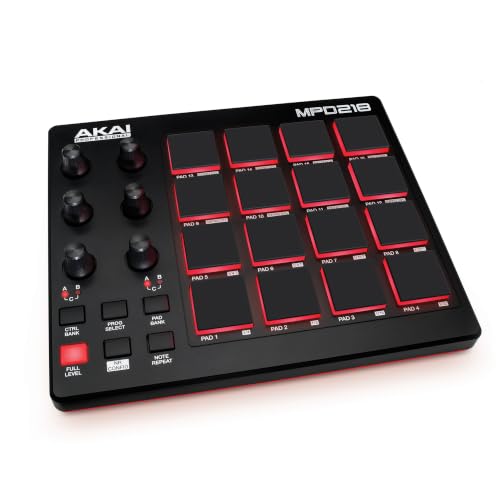
- Beat Production, Anywhere - Ultra-portable, feature-packed and USB powered pad controller with 16 thick fat MPC pads for triggering drums, melodic samples, effects and more
- Expandable Banks - Easily accessible dedicated controls for three pad banks provides a total of 48 assignable pads
The Akai MPD218 is a dedicated pad controller with no keys at all. It focuses entirely on 16 Thick Fat MPC pads and 6 assignable knobs. This is the go-to tool for beatmakers and finger-drummers who want that classic MPC feel for programming drums. While the GX61 is better for melody, harmony, and overall DAW transport control, the MPD218 excels at rhythmic input. Many producers actually choose to own both—using the GX61 for their synth lines and the MPD218 for their drums. If you can only pick one and you want to write “songs” rather than just “beats,” stick with the 61-key Nektar.
The Final Verdict: Is the Nektar Impact GX61 Right for You?
After a thorough evaluation, it is clear that the Nektar Impact GX61 MIDI Keyboard is one of the most cost-effective and workflow-efficient controllers on the market today. It manages to strip away the unnecessary fluff while doubling down on the features that actually matter to a modern producer: seamless DAW integration, a playable 5-octave keybed, and a compact, reliable build. While it may lack the weighted feel of a premium digital piano or the pads of a beat machine, it serves its primary purpose—acting as a bridge between your creativity and your software—with remarkable grace.
I would highly recommend this keyboard to home studio owners, aspiring songwriters, and game developers who need a reliable, space-saving MIDI controller that doesn’t require a PhD to set up. It is a tool that respects your time and your wallet. If you are ready to stop clicking and start playing, I suggest you visit the official product page to see why so many producers have made this their primary studio workhorse. Whether you are composing your first track or your hundredth, the GX61 is a solid foundation for any musical journey.
Last update on 2026-10-17 / Affiliate links / Images from Amazon Product Advertising API