
Nektar WIDIFLEX Wireless MIDI Interface Review: Is This the Ultimate Cable Killer for Modern Studios?
For decades, the studio “spaghetti” of five-pin DIN cables has been a necessary evil for any musician working with synthesizers, drum machines, or classic controllers. We have all been there: reaching behind a rack of gear, fumbling in the dark for a MIDI port, only to realize the cable isn’t long enough or, worse, has developed a short. In a world where headphones, mice, and even high-fidelity speakers have gone wireless, the humble MIDI cable has felt like a relic of a bygone era. When we first heard about the Nektar WIDIFLEX Wireless MIDI Interface, the promise was simple yet revolutionary: total wireless freedom with professional-grade latency. But can a tiny Bluetooth dongle really replace the reliability of a physical copper wire?
If you have ever tried to perform live with a keytar or wanted to trigger a rack-mounted synth from a controller across the room, you know the physical limitations of MIDI cables. They restrict movement, create trip hazards, and eventually fail at the most inconvenient times. For home studio owners, the problem is often about clutter. Every cable added is another piece of “visual noise” that can distract from the creative process. The Nektar WIDIFLEX Wireless MIDI Interface aims to solve this by utilizing advanced Bluetooth Low Energy (BLE) technology to bridge the gap between your hardware and your software. Failing to solve the “cable problem” doesn’t just mean a messy desk; it limits your ability to reconfigure your studio on the fly and stifles the spontaneity that often leads to your best musical ideas.
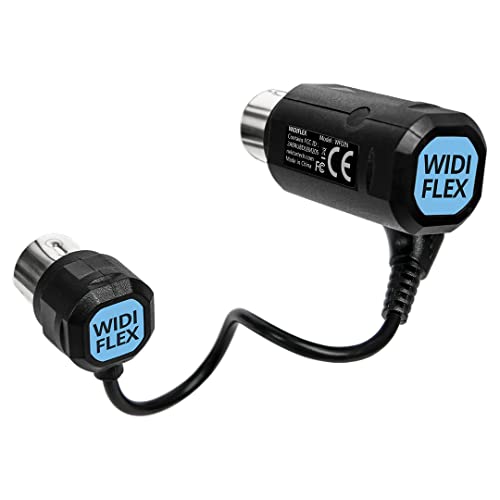
- Free yourself from having to use MIDI cables! Create wireless instrument-to-instrument or instrument-to computer connections by simply plugging WIDIFLEX into the MIDI ports of your synthesizer, drum...
- Adds superfast Bluetooth BLE MIDI to almost any standard MIDI gear using Bluetooth 5 MIDI over Bluetooth BLE
What to Consider Before Buying a Computer Recording MIDI Interface
A Computer Recording MIDI Interface is more than just an item; it’s a key solution for bridging the gap between tactile, expressive hardware and the infinite possibilities of digital production. Whether you are recording a vintage Yamaha DX7 into Ableton Live or using an iPad to sequence a modern poly-synth, the interface is the heartbeat of your data flow. If this connection is slow or unstable, your performance will feel “mushy” and disconnected.
The ideal customer for this type of product is someone facing cable fatigue—musicians who want a clean studio aesthetic or live performers who need to move freely on stage. It is particularly brilliant for mobile producers using iOS devices. However, it might not be suitable for those who use vintage gear that doesn’t provide power through the MIDI port, or for extreme purists who refuse to believe that 3ms of latency is negligible. Before you see its full feature set and user reviews, consider these crucial points in detail:
- Dimensions & Space: In a crowded studio, every inch of real estate matters. A wireless interface should be compact enough to fit into recessed ports without blocking adjacent connections or sticking out so far that it becomes a physical liability. The Nektar WIDIFLEX Wireless MIDI Interface is designed to be unobtrusive, making it perfect for tight setups.
- Capacity & Performance: When it comes to MIDI, performance is measured in latency and jitter. You want an interface that offers ultra-low latency (ideally under 5ms) to ensure that the note you play is the note you hear instantly. It should also handle dense data like MPE (MIDI Polyphonic Expression) and System Exclusive (SysEx) messages without choking.
- Materials & Durability: Since these devices often live on the back of heavy gear or get tossed into gig bags, the plastic casing and the pins themselves must be sturdy. Look for high-quality moldings and gold-plated or high-conductivity pins that won’t bend or corrode over time.
- Ease of Use & Maintenance: The best technology is the kind you forget is even there. A wireless MIDI interface should feature automatic pairing and “plug-and-play” functionality. You don’t want to spend twenty minutes menu-diving every time you power up your studio; you want a connection that is established the moment your gear is turned on.
While the Nektar WIDIFLEX Wireless MIDI Interface is an excellent choice for those seeking to declutter, it’s always wise to see how it stacks up against the competition. For a broader look at all the top models, we highly recommend checking out our complete, in-depth guide:

- [Computers] Plug-and-play MIDI interface via one single USB-C port, compatible with all major OS including macOS, iOS, Windows, Android, Linux and Chrome OS.

- [Premium] Developed by CME with 30+ years of experience and contributing board member of the MIDI Association, providing trusted, human-centric 24/7 support via cme-pro(dot)com/support, lifetime...

- 5-year warranty - From careful selection of components through to manufacture & testing, the MiniFuse range is engineered to last. Each interface is constructed with the most robust & reliable...

Unboxing and First Impressions: A Tiny Giant in MIDI Technology
When we first held the Nektar WIDIFLEX Wireless MIDI Interface, we were struck by its diminutive size. Weighing in at just 33 grams, it’s practically weightless. The design consists of two parts: a main 5-pin DIN plug (the “Master” unit) and a secondary sub-adapter. This clever design allows it to accommodate both the MIDI IN and MIDI OUT ports of your instrument. The branding is subtle, and the build quality feels dense and professional, not like a cheap plastic toy. Unlike some bulkier interfaces that require external power bricks or USB cables, this unit is entirely self-contained. It draws power directly from the MIDI OUT port of your keyboard or controller, which is a massive win for portability. You can check the latest price and availability to see how this compact design compares to older, bulkier wired interfaces.
Key Benefits
- Ultra-low latency of 3ms makes it feel as responsive as a wired connection.
- Automatic pairing saves time and reduces technical headaches during setup.
- Supports all MIDI message types, including MPE and SysEx for advanced synthesizers.
- No external power or batteries required, drawing juice directly from the MIDI port.
Limitations
- Requires a MIDI OUT port that provides power (Standard 5V or 3.3V).
- The short bridge cable between the IN and OUT plugs can be tight on some gear configurations.
A Deep Dive into the Performance of the Nektar WIDIFLEX Wireless MIDI Interface
To truly understand if the Nektar WIDIFLEX Wireless MIDI Interface lives up to the hype, we put it through a battery of tests in a professional studio environment. We didn’t just want to see if it worked; we wanted to see if it could handle the rigors of a complex production workflow.
Latency and Real-World Response
The biggest fear with any Bluetooth technology in music is latency—that annoying delay between pressing a key and hearing the sound. We tested the Nektar WIDIFLEX Wireless MIDI Interface by connecting a MIDI controller to a hardware synth across the room and then to an iPad Pro running various soft-synths. The results were staggering. With a quoted latency of just 3ms, we found it virtually impossible to distinguish between the WIDIFLEX and a standard high-quality MIDI cable. Whether we were playing fast, percussive synth leads or intricate piano passages, the “connectedness” remained intact.
This performance is largely due to the unique Smart Connectivity Algorithms used by Nektar. Unlike standard Bluetooth devices that might prioritize power saving over speed, this interface is tuned specifically for MIDI data. During our testing, we didn’t experience any “note hang” or dropped messages, even when moving around the studio. For anyone worried about the digital “lag,” we can confidently say that this device sets a high bar for wireless performance. It’s a feature that really sets it apart from generic Bluetooth adapters you might find elsewhere.
Connectivity and Ecosystem Integration
One of the standout features of the Nektar WIDIFLEX Wireless MIDI Interface is how it handles multiple connections. It isn’t just a one-to-one bridge; it can support up to 5 WIDI devices simultaneously. This means you can create a “WIDI Group” where multiple instruments talk to each other or to a central computer without a single cable in sight. We set up a three-way connection between a drum machine, a bass synth, and a DAW, and the automatic pairing worked exactly as advertised. You simply plug them in, and they find each other.
Furthermore, it is fully compatible with Bluetooth 4.0 or later, meaning it works seamlessly with modern Macs, iPhones, and iPads. For Windows and Linux users, it functions as a standard MIDI device provided your system supports BLE MIDI. We were particularly impressed by its support for MPE. We tested it with an MPE-capable controller and found that all the complex multidimensional data—pressure, slide, and lift—was transmitted accurately. If you’re looking to modernize your workflow, you should explore the grouping capabilities further to see how it can fit into your specific rig.
The Power Requirement: A Critical Compatibility Check
While the “no external power” feature is a huge plus, it is also the one area where users need to be careful. The Nektar WIDIFLEX Wireless MIDI Interface draws its power from the MIDI OUT port of your device. Specifically, it uses the voltage provided on Pin 4 and Pin 5. While almost all modern MIDI gear follows this standard, some older vintage synths or specific low-power controllers do not provide this voltage.
In our tests, the interface worked perfectly on a wide range of gear, including Novation controllers, Moog synthesizers, and Roland drum machines. However, we did encounter one older boutique pedal that simply didn’t provide enough juice to light up the WIDIFLEX. It is crucial to verify that your gear provides power via MIDI OUT. If your device only has a MIDI IN, you won’t be able to power the unit. This is an important distinction to make before you buy, as it ensures you won’t be disappointed when you try to hook up your specific setup. We recommend you check the technical specifications to confirm compatibility with your hardware list.
Build Quality and Practical Range
Nektar claims a range of up to 20 meters (about 65 feet), which is more than enough for even the largest recording rooms or stages. We tested this by leaving our iPad in the control room and walking into the vocal booth with a keyboard equipped with the WIDIFLEX. Even through a wall, the connection remained stable. This range is four times that of earlier Bluetooth versions, thanks to the Bluetooth 5 implementation.
Physically, the device is built to last. The sub-adapter is connected by a short, flexible cable. This is a smart design choice because it allows the device to fit into instruments where the MIDI ports are close together or recessed at an awkward angle. While some users might find the cable a bit short for very wide-set ports, it worked on every piece of gear in our 10-synth test rack. The casing is a matte black finish that doesn’t show fingerprints and feels like it can survive being stepped on—though we don’t recommend trying that! It is clearly a tool built for professionals who need reliable gear that can handle the road. You can see more detailed photos of the build online to get a better sense of the connector flexibility.
What Other Users Are Saying
The general sentiment among users is overwhelmingly positive, especially regarding the ease of setup. One user mentioned that they have a complex setup with multiple MIDI hubs and the Nektar WIDIFLEX Wireless MIDI Interface found and connected to them instantly with zero audible latency. They specifically highlighted it as a “better value for money” compared to other more expensive brands, noting that it is essentially the same high-end technology under the Nektar branding. Another user simply called it “superb,” stating it worked perfectly out of the box for their drum kit and keyboard.
However, the feedback isn’t without its warnings. As we noted in our deep dive, some users were caught off guard by the power requirements. One reviewer pointed out that if you want to control hardware from a tablet, you still need to plug the master unit into a powered MIDI OUT port somewhere just to provide electricity to the device, which can be frustrating if your specific controller doesn’t have an OUT port. Another user reported stability issues following an Android OS update, suggesting that while the hardware is excellent, software updates on the host device can sometimes introduce hiccups. These reviews emphasize the importance of checking your gear’s power output and keeping your device firmware updated. Overall, the consensus is that for most modern setups, this is a “perfect solution.”
How the Nektar WIDIFLEX Compares to the Competition
While the Nektar WIDIFLEX Wireless MIDI Interface is a top-tier choice, it’s helpful to see how it compares to other options on the market. Depending on your specific needs—whether it’s more ports or a wired connection—one of these might be a better fit.
1. Arturia MiniFuse 2 Audio Interface
- 5-year warranty - From careful selection of components through to manufacture & testing, the MiniFuse range is engineered to last. Each interface is constructed with the most robust & reliable...
- Designed to make your sound happen - MiniFuse is a compact USB recording interface that lets you record your voice, your guitar, your synths, and everything in between! Play, perform, and produce...
The Arturia MiniFuse 2 is a completely different beast. While the WIDIFLEX is a dedicated wireless MIDI bridge, the MiniFuse 2 is a full-featured USB audio interface that includes MIDI ports. This is the better choice for musicians who are building a studio from scratch and need to record vocals and guitars in addition to connecting MIDI gear. It provides a stable, wired connection and comes with an incredible software bundle. However, it is not wireless and is significantly larger. If you only need to go wireless between two MIDI devices, the WIDIFLEX is far more efficient; but if you need an all-in-one hub for your computer, the MiniFuse is the way to go.
2. CME WIDI Master Premium MIDI Adapter

- [Get rid of those cables] Add Bluetooth MIDI to your MIDI devices and reduce the cable clutter in the studio. Enjoy freedom on stage. Powered via MIDI Out. No batteries needed. Check out...
- [Plug, Pair & Play] Pair automatically between WIDI devices and Bluetooth MIDI controllers. Send all MIDI messages, incl. SysEx & MPE. Connect manually with iOS, macOS, Win10/11 & Android via simple...
The CME WIDI Master is the closest direct competitor to the Nektar WIDIFLEX. In fact, they share much of the same underlying technology. The CME version is often considered the “gold standard” and has a massive community behind it. In our comparison, we found the performance to be virtually identical—both offer 3ms latency and auto-pairing. The Nektar version often comes in at a slightly lower price point, making it the better value for those who want the exact same performance without paying for the premium brand name. If you are a professional who wants the original pioneer of this tech, go with CME; if you want the same performance for a few dollars less, stick with the Nektar.
3. FORE MIDI Interface

- FORE 1 MIDI in / 1 MIDI out MIDI interface, 16 MIDI input & output channels. Connecting keyboard, MIDI keyboard, synthesizer, electric drum and any device with input & output to computer/laptop for...
- Plug & Play, with a Built-in driver and Intelligent LED Indicator. No extra difficult driver installation. Easy set up, truly plug and play. MIDI converter shows different light indicators & status...
The FORE MIDI Interface is a budget-friendly, wired USB-to-MIDI cable. It is purely for connecting a single MIDI device to a computer via USB-A. It is significantly cheaper than the wireless options, but you lose all the benefits of freedom and cable management. It’s a “no-frills” solution that works well for hobbyists who don’t mind a 6.5ft cable trailing across their desk. However, compared to the 20m range and the “instrument-to-instrument” capabilities of the WIDIFLEX, the FORE interface feels very limited. We recommend the FORE only for those on a strict budget who don’t need wireless mobility.
The Final Verdict: Is the Nektar WIDIFLEX Right for You?
After extensive testing, it’s clear that the Nektar WIDIFLEX Wireless MIDI Interface is one of the most significant quality-of-life improvements you can add to a modern studio. It successfully tackles the latency issue that plagued early Bluetooth MIDI attempts, delivering a feel that is indistinguishable from a wired connection. Its ability to auto-pair and form groups of up to five devices makes it a powerhouse for complex rigs, while its tiny footprint ensures it stays out of the way. While you must ensure your gear provides the necessary MIDI power, this is a minor hurdle for a device that offers so much freedom.
We recommend the WIDIFLEX to anyone tired of cable clutter, mobile producers working on iPads, and live performers who want to break free from the constraints of the stage floor. It offers professional performance at a price that beats many of its direct competitors. If you are ready to cut the cord and experience a truly wireless studio, we highly suggest you pick up the Nektar WIDIFLEX Wireless MIDI Interface today and see just how much more creative you can be without the wires.
Last update on 2026-11-01 / Affiliate links / Images from Amazon Product Advertising API