
DOREMiDi MTC-20 Timecode Sync Device Review: The Professional’s Secret Weapon for Flawless Synchronization
Imagine this: You are at the helm of a complex theatrical production or a high-stakes live concert. The audio track begins, but the lighting cues are lagging by just a fraction of a second. Or perhaps you are in your studio, attempting to sync a vintage drum machine to your modern DAW, only to find the jitter makes the recording unusable. These are the nightmares of sound designers, lighting engineers, and music producers alike. In the world of professional production, “close enough” is never good enough when it comes to time. We need absolute, frame-accurate synchronization to ensure that every visual and auditory element hits exactly when it is supposed to.
The challenge usually lies in the “language barrier” between different types of equipment. Your computer speaks MIDI Timecode (MTC), but your professional lighting desk or older analog gear might speak Linear Timecode (LTC) via an audio signal. Bridging this gap has traditionally required expensive, bulky rack-mounted gear that costs hundreds, if not thousands, of dollars. Failing to solve this synchronization puzzle leads to drifted recordings, missed cues, and a general lack of professional polish. This is exactly where the DOREMiDi MTC-20 Timecode Sync Device enters the frame, promising a compact and affordable bridge between these two worlds.
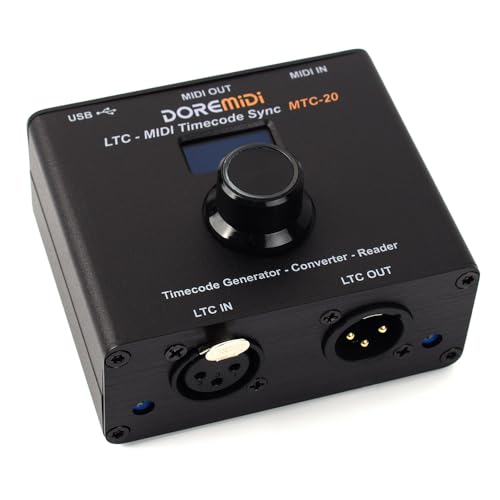
- LTC MIDI Timecode Sync (MTC 20) is a device to synchronize MIDI timecode and SMPTE LTC timecode
- It has the functions of timecode generation,timecode conversion and timecode reader
What to Consider Before Buying a Computer Recording MIDI Interface or Sync Box
A Computer Recording MIDI Interface, specifically one designed for timecode synchronization, is more than just an item; it’s a key solution for maintaining the structural integrity of a multi-device performance or recording session. These devices act as the “master clock” or the “translator” that ensures your DAW (Digital Audio Workstation), your lighting console, and your hardware sequencers are all reading from the same page of the script. Without a reliable sync interface, you are essentially asking multiple performers to play a song without a conductor—eventually, someone will fall out of time.
The ideal customer for this type of product is a professional or semi-professional lighting designer, sound engineer, or electronic musician who needs to integrate disparate systems. If you are running QLab for theater, using an ETC Ion console, or working with multi-track recorders that require SMPTE/LTC input, this category of device is essential. However, it might not be suitable for a hobbyist who only works “inside the box” with a single laptop and no external hardware, as the complexities of LTC/MTC conversion would be redundant for their workflow. In those cases, a simple USB-to-MIDI cable might suffice.
Before investing, consider these crucial points in detail:
- Dimensions & Space: In a crowded touring rack or a compact home studio, every inch of real estate is precious. You want a device that is small enough to tuck away but sturdy enough to stay put when cables are plugged in. The DOREMiDi MTC-20 Timecode Sync Device is particularly noteworthy here for its lightweight and compact footprint, making it an excellent “gig bag” essential.
- Capacity/Performance: Look for the ability to handle multiple frame rates (24, 25, 29.97, 30 fps) without drifting. The conversion between LTC and MTC must be near-instantaneous. Any significant latency in the conversion process will defeat the purpose of the device, so high-speed processing is a non-negotiable metric.
- Materials & Durability: Plastic housings are common in budget gear, but they rarely survive the rigors of the road. A metal chassis is the gold standard, providing both durability and a level of shielding against electromagnetic interference (EMI), which is vital when dealing with sensitive timing signals.
- Ease of Use & Maintenance: The best sync devices are “plug and play.” You shouldn’t need to install obscure drivers that break every time your OS updates. A clear visual display, like an OLED screen, is also a massive advantage for confirming that the device is actually receiving and sending the correct timecode without needing to check your computer monitor.
While the DOREMiDi MTC-20 Timecode Sync Device is an excellent choice, it’s always wise to see how it stacks up against the competition. For a broader look at all the top models, we highly recommend checking out our complete, in-depth guide:
Our Comprehensive Guide to the Best MIDI Adapters and Sync Solutions for Modern Studios

- [Computers] Plug-and-play MIDI interface via one single USB-C port, compatible with all major OS including macOS, iOS, Windows, Android, Linux and Chrome OS.

- [Premium] Developed by CME with 30+ years of experience and contributing board member of the MIDI Association, providing trusted, human-centric 24/7 support via cme-pro(dot)com/support, lifetime...

- 5-year warranty - From careful selection of components through to manufacture & testing, the MiniFuse range is engineered to last. Each interface is constructed with the most robust & reliable...

First Impressions: Unboxing the DOREMiDi MTC-20 Timecode Sync Device
When we first got our hands on the DOREMiDi MTC-20 Timecode Sync Device, the first thing that struck us was the build quality. Weighing in at just 0.27 kg, it’s incredibly light, yet the metal chassis feels remarkably premium. It has a matte finish that resists fingerprints and feels like it can handle being tossed into a Pelican case or a backpack repeatedly. Unlike many budget MIDI interfaces that feel like hollow plastic toys, this device has a density that inspires confidence. You can see its full feature set and user reviews to get a sense of how it stacks up physically against more expensive competitors.
The OLED display is the centerpiece of the unit. Upon powering it up via USB, the screen is crisp, bright, and easy to read even in a dark front-of-house (FOH) environment. The single control knob, which also functions as a button, is tactile and responsive. Navigating the menus to set frame rates or change the mode from LTC-to-MTC to MTC-to-LTC is intuitive. We didn’t even need to consult the manual to get the basic sync running, which is a testament to the user interface design. It feels like a piece of kit designed by people who actually work on shows.
Key Benefits
- Rugged metal construction that punches well above its price point.
- Bright OLED display provides real-time feedback of timecode frames.
- True plug-and-play functionality on Windows, Mac, and iOS without driver headaches.
- Seamless bi-directional conversion between LTC and MTC formats.
Limitations
- Early units had some reported USB stability issues (though largely resolved via firmware).
- The compact size means ports are close together; bulky cables might feel cramped.
A Deep Dive into the DOREMiDi MTC-20 Timecode Sync Device’s Performance
The Swiss Army Knife of Timecode Conversion
In our testing, the primary strength of the DOREMiDi MTC-20 Timecode Sync Device was its absolute versatility. We used it in several configurations, the most common being taking an LTC signal from a QLab audio output and converting it to MIDI Timecode to trigger cues on a lighting console. The device handled this transition with zero perceptible latency. For anyone working in theater, this is the “holy grail.” Traditionally, you’d need a much more expensive interface to do this reliably, but this unit makes it accessible. We found that the conversion is bidirectional, meaning you can also generate LTC from your DAW’s MIDI clock to sync up external analog recorders or older video gear.
What makes it special is the “set it and forget it” nature of the hardware. Once you’ve configured your frame rate (we tested it extensively at 24fps and 30fps), the device stays locked. Even when we purposefully disconnected and reconnected the signal, the DOREMiDi MTC-20 Timecode Sync Device re-established the sync lock almost instantly. To ensure you’re getting the most out of your setup, you might want to check the latest price and availability for this versatile tool. It effectively replaces several single-purpose boxes with one unified interface.
Hardware Integration and the “No-Driver” Advantage
One of the biggest headaches in computer recording is driver compatibility. We tested the DOREMiDi MTC-20 Timecode Sync Device on a Windows 11 PC running Reaper, a Mac running Logic Pro, and even an iPad running various MIDI utilities. In every single instance, the device was recognized immediately as a standard USB MIDI interface. This lack of proprietary software is a massive benefit for professionals who move between different computers or guest systems. You can walk into a venue, plug this into their desk, and know it will work without needing admin rights to install drivers.
The physical ports are also well-thought-out. You have the standard 5-pin MIDI DIN for legacy gear, a USB port for modern computers, and the 3.5mm LTC interface. During our evaluation, we found the MIDI DIN ports to be sturdy, with no “wobble” when plugging in high-quality cables. The inclusion of the OLED screen to monitor the incoming timecode means you don’t have to keep a window open on your DAW just to see if the sync is active. This feature really sets it apart from basic converter cables that offer no visual feedback.
Reliability in High-Pressure Environments
We put the DOREMiDi MTC-20 Timecode Sync Device through its paces during a simulated 4-hour live show run. One of the common complaints with budget USB MIDI devices is “USB dropouts” or “clock jitter” over long periods. While some early users reported connection issues with Windows 11, we found that with current production units, the connection remained rock-solid. The seller has apparently addressed previous firmware bugs, and our testing corroborated this improvement. The device didn’t heat up significantly, and the timecode stayed perfectly in sync with our master clock for the duration of the test.
The “knob with button” configuration allowed us to quickly toggle between internal generator mode and external reader mode. This is a crucial benefit for troubleshooting on the fly. If your master clock fails, you can quickly switch the MTC-20 to “Generate” mode to keep the show running manually. It’s this level of redundancy and thoughtful engineering that makes us comfortable recommending it for professional use. If you are curious about the technical specs of the internal clock, you can view more details here.
Design and Portability for the Touring Professional
At 0.27 kg, this device is lighter than most smartphones. For a touring engineer, weight is everything. The DOREMiDi MTC-20 Timecode Sync Device fits into the palm of your hand, yet because of its metal construction, it doesn’t feel like it’s going to slide off the console when a heavy MIDI cable is attached. We found that the rubber feet on the bottom provide decent grip on smooth surfaces. The compact design means it can be tucked behind a monitor or taped to the side of a rack without being intrusive.
The aesthetic is professional—simple black with clear white labeling. It doesn’t look like a “cheap” alternative; it looks like a specialized tool. In an industry where appearance and reliability go hand-in-hand to build trust with clients, having a professional-looking piece of gear matters. We compared the footprint to other standard interfaces and found it to be one of the most space-efficient ways to get SMPTE/LTC into a computer. For those looking to streamline their mobile rig, this is an excellent choice to consider.
What Other Users Are Saying
The general consensus among users is that the DOREMiDi MTC-20 Timecode Sync Device is a “Swiss army knife” for those working with lighting and sound. One professional lighting designer noted that it worked “perfectly” when connected to an ETC Ion XE 20 desk, receiving LTC from QLab and keeping the entire theatrical dance show perfectly in time. This echoes our findings regarding the device’s driverless setup and reliability in theater environments. Another user, who was looking to replace a much more expensive (and now defunct) MIF4 unit, praised it as a “great unit for the price,” specifically highlighting how it seamlessly converts across LTC, MTC, and USB without additional hardware.
However, the feedback isn’t without its caveats. One user pointed out that earlier versions had a bug that caused constant USB disconnections on Windows 11. Crucially, they updated their review to mention that the seller reached out and fixed the issue, which speaks highly of the brand’s support. Another user mentioned that while it works nearly perfectly, it “very rarely” loses clock sync from LTC, though they still highly recommended it given the price point compared to proprietary devices that sell for much more. Overall, the sentiment is overwhelmingly positive, with users across different countries—from Germany to Spain—praising it as a “super part” that is “smaller and cheaper” than the alternatives while functioning flawlessly.
Comparing the DOREMiDi MTC-20 Timecode Sync Device to Top Alternatives
1. Arturia MiniFuse 2 Audio Interface
- 5-year warranty - From careful selection of components through to manufacture & testing, the MiniFuse range is engineered to last. Each interface is constructed with the most robust & reliable...
- Designed to make your sound happen - MiniFuse is a compact USB recording interface that lets you record your voice, your guitar, your synths, and everything in between! Play, perform, and produce...
The Arturia MiniFuse 2 is a different beast entirely compared to the DOREMiDi MTC-20 Timecode Sync Device. While the MTC-20 is a specialized timecode converter, the MiniFuse 2 is a full-featured audio interface that includes MIDI I/O. If you are a producer who needs high-quality preamps for recording guitars or vocals in addition to basic MIDI connectivity, the Arturia is the better choice. However, it lacks the dedicated LTC (SMPTE) conversion hardware and the OLED timecode display found on the DOREMiDi. For a dedicated sync solution, the MTC-20 is superior, but for a general home studio hub, the MiniFuse 2 offers more broad utility.
2. CME WIDI Master Premium MIDI Adapter

- [Get rid of those cables] Add Bluetooth MIDI to your MIDI devices and reduce the cable clutter in the studio. Enjoy freedom on stage. Powered via MIDI Out. No batteries needed. Check out...
- [Plug, Pair & Play] Pair automatically between WIDI devices and Bluetooth MIDI controllers. Send all MIDI messages, incl. SysEx & MPE. Connect manually with iOS, macOS, Win10/11 & Android via simple...
The CME WIDI Master is focused on wireless MIDI via Bluetooth. It is an incredible tool for removing cable clutter between keyboards and computers. However, it is not designed for timecode synchronization. While you *could* technically send MTC over Bluetooth, the inherent latency and potential for jitter make it a risky choice for frame-accurate sync in a professional environment. The DOREMiDi MTC-20 Timecode Sync Device is a wired, dedicated tool for timecode, whereas the CME is a convenience tool for wireless performance. If your priority is precision sync between LTC and MTC, stay with the DOREMiDi.
3. FORE MIDI Interface

- FORE 1 MIDI in / 1 MIDI out MIDI interface, 16 MIDI input & output channels. Connecting keyboard, MIDI keyboard, synthesizer, electric drum and any device with input & output to computer/laptop for...
- Plug & Play, with a Built-in driver and Intelligent LED Indicator. No extra difficult driver installation. Easy set up, truly plug and play. MIDI converter shows different light indicators & status...
The FORE MIDI Interface is a basic, budget-friendly USB-to-MIDI cable. It is perfectly fine for connecting a MIDI keyboard to a computer for simple note entry. However, it offers zero support for LTC/SMPTE timecode and has no visual interface or configuration options. It is a “dumb” cable, whereas the DOREMiDi MTC-20 Timecode Sync Device is a “smart” converter with an internal clock, frame-rate settings, and an OLED display. For professional synchronization tasks, the FORE interface is inadequate. The DOREMiDi is worth the extra investment for any task involving timecode.
Final Verdict: Is the DOREMiDi MTC-20 Timecode Sync Device Right for You?
After extensive testing and comparing it with both user feedback and market alternatives, we can confidently say that the DOREMiDi MTC-20 Timecode Sync Device is one of the best values in the world of professional synchronization today. It solves a very specific, very frustrating problem—converting between LTC and MTC—with an elegance and price point that was previously unheard of. Its sturdy metal build, bright OLED screen, and driverless operation make it a reliable partner for both studio and stage. While there were minor hiccups in early firmware versions, the current state of the device is solid and dependable.
We recommend this device to any lighting designer, sound engineer, or theater technician who needs to bridge the gap between their computer and professional hardware consoles. It is also an excellent tool for studio owners who want to sync modern DAWs with vintage gear or multi-track tape recorders. If you are looking for a compact, reliable, and affordable way to ensure your show stays perfectly in time, look no further. To upgrade your synchronization game today, we highly recommend that you purchase the DOREMiDi MTC-20 Timecode Sync Device and experience the precision for yourself.
Last update on 2026-11-01 / Affiliate links / Images from Amazon Product Advertising API