
CME WIDI Master + MIDI Interface Pack Review: Breaking the Chains of Cable Clutter
If you have ever spent more time untangling a “spaghetti nest” of cables behind your desk than actually making music, you know the frustration. I remember a specific session where I was trying to hook up a vintage Korg synth to my iPad for a quick mobile recording. Between the DIN cables, the USB adapters, and the power bricks, I spent forty minutes just getting a signal. By the time I was ready to record, the creative spark had flickered out. This is a common hurdle for many of us in the home studio world. The physical limitations of 5-pin DIN cables don’t just clutter your space; they tether you to a specific spot, limiting your movement and your workflow. Solving this isn’t just about aesthetics; it’s about reclaiming your creative speed. Without a streamlined solution, you are constantly fighting your hardware instead of playing it. This is where the CME WIDI Master + MIDI Interface Pack enters the frame, promising a wireless revolution for our aging but beloved MIDI gear.
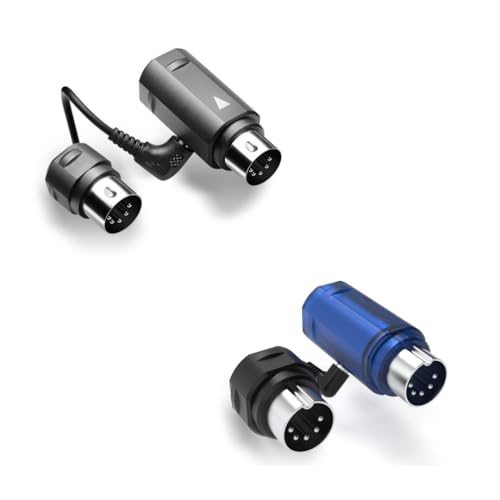
- [Get rid of those cables] Add Bluetooth MIDI to your MIDI devices and reduce the cable clutter in the studio. Enjoy freedom on stage
- [Plug, Pair & Play] WIDI Master and WIDI Master Blue pair automatically. Simply plug them in, pair and play
What to Consider Before Buying a Computer Recording MIDI Interface
A Computer Recording MIDI Interface is more than just an item; it’s a key solution for bridging the gap between tactile, hardware-based music creation and the limitless possibilities of digital audio workstations (DAWs). Whether you are using a modern laptop or a mobile device, these interfaces serve as the translator, ensuring your performance data is captured accurately. The main benefits include lower latency, better timing stability than generic adapters, and the ability to integrate classic hardware into a modern software environment. Choosing the right one can transform a clunky setup into a streamlined powerhouse.
The ideal customer for this type of product is the hybrid producer—someone who loves the feel of real keys and knobs but needs the editing power of a computer. It is also perfect for live performers who want to trigger stage visuals or software instruments without being pinned to a laptop stand. However, it might not be suitable for those who only use “in-the-box” virtual instruments and have no external hardware, or for those in extremely high-interference environments where only a physical copper wire provides the peace of mind they require. For most, the trade-off for convenience is well worth it, especially when you see its full feature set and user reviews online.
Before investing, consider these crucial points in detail:
- Portability and Form Factor: Consider how much space the interface takes up on your desk or in your gig bag. A bulky interface can be a hindrance for mobile setups, while a compact, dongle-style interface like the one in this pack offers a “plug-and-forget” experience that is invaluable for travel.
- Latency and Data Throughput: In MIDI, timing is everything. You should look for interfaces that offer sub-10ms latency. High-performance wireless options now rival wired connections, making them viable for professional recording where “feel” and “groove” are paramount.
- Power Requirements: Some interfaces require external power supplies or batteries, which adds another cable to the mix. Look for devices that are “bus-powered” or, in the case of MIDI adapters, powered directly by the MIDI Out port of your instrument to keep things clean.
- Compatibility and Ecosystem: Ensure the device supports your operating system (iOS, Android, macOS, Windows) and that the manufacturer provides regular firmware updates. A dedicated app for managing connections and groups can significantly improve your long-term experience.
Understanding these factors will help you decide if a wireless solution is the right leap for your studio. As we dive deeper into this specific product, you’ll see how it addresses these considerations head-on.
While the CME WIDI Master + MIDI Interface Pack is an excellent choice, it’s always wise to see how it stacks up against the competition. For a broader look at all the top models, we highly recommend checking out our complete, in-depth guide:
Our Definitive Guide to Choosing the Best MIDI Interface for Mobile Recording and iPad Studios

- [Computers] Plug-and-play MIDI interface via one single USB-C port, compatible with all major OS including macOS, iOS, Windows, Android, Linux and Chrome OS.

- [Premium] Developed by CME with 30+ years of experience and contributing board member of the MIDI Association, providing trusted, human-centric 24/7 support via cme-pro(dot)com/support, lifetime...

- 5-year warranty - From careful selection of components through to manufacture & testing, the MiniFuse range is engineered to last. Each interface is constructed with the most robust & reliable...

First Impressions: Unboxing the CME WIDI Master + MIDI Interface Pack
When the CME WIDI Master + MIDI Interface Pack arrived at my studio, the first thing that struck me was the “WIDI Master Blue” limited edition aesthetic. It’s a small detail, but in a world of black and grey plastic, the vibrant blue stands out. Unboxing is a straightforward affair because there really isn’t much to it—and that’s a compliment. You get two sets of adapters, designed to fit into standard 5-pin DIN ports. There are no batteries to install and no USB cables to hunt for. The build quality feels professional; the plastic is dense and the pins are reinforced, which is vital because these will likely be plugged and unplugged frequently.
Setting it up for the first time was surprisingly intuitive. Compared to older Bluetooth MIDI adapters I’ve used in the past, which often required a complex “handshake” dance with the OS, this pack felt much more modern. It feels less like a peripheral and more like a permanent upgrade to your synth’s connectivity. You can check the latest price and availability to see how this pack stacks up as a value-driven bundle for those looking to outfit multiple pieces of gear simultaneously.
Key Benefits We Discovered
- Incredibly low 3ms latency that feels indistinguishable from a wired connection.
- Automatic pairing makes it a true “plug-and-play” experience for multi-device setups.
- No external power or batteries required, drawing power directly from the MIDI Out port.
- Extended range of up to 65 feet, perfect for large stages or multi-room studio setups.
Points to Consider
- Requires a powered MIDI Out port on your hardware (which most, but not all, devices have).
- The 5-pin DIN form factor may be a tight fit on some vintage gear with recessed ports.
A Deep Dive into the Performance of the CME WIDI Master + MIDI Interface Pack
The Latency Myth: Is Wireless Truly Production-Ready?
The biggest hurdle for wireless MIDI has always been latency. For years, the consensus was that if you wanted to record a serious performance, you had to use a wire. However, during our testing of the CME WIDI Master + MIDI Interface Pack, we found that the 3ms latency claim isn’t just marketing fluff—it’s a reality. We tested this by triggering a soft synth on a MacBook Pro from a vintage Roland Juno. The response was instantaneous. There was no “mushiness” in the attack, and fast sixteenth-note passages were captured with surgical precision.
This level of performance is achieved through CME’s Smart Algorithmic technology, which optimizes the data transmission. We found that even when we introduced other Bluetooth devices into the room, the Adaptive Frequency Hopping kept the MIDI signal stable and jitter-free. This is a feature that really sets it apart from cheaper generic Bluetooth adapters. For a professional player, the difference between 3ms and 20ms is the difference between feeling the music and fighting it. The CME WIDI Master + MIDI Interface Pack ensures you stay in the former camp.
Workflow Liberation: The Power of Automatic Pairing
In a busy studio environment, the last thing you want to do is open a configuration app every time you power on your gear. One of the most impressive aspects we evaluated was the automatic pairing feature. As one user noted, “It’s plug and play when you have 2 sets,” and we can confirm this experience. When you have multiple units from the CME WIDI Master + MIDI Interface Pack, they “see” each other almost instantly. You plug one into your controller and one into your sound module, and within seconds, they are communicating without any manual intervention.
We spent several days switching between different configurations—connecting a keyboard to an iPad, then switching to a hardware sequencer—and the units remembered their roles perfectly. This “set it and forget it” mentality is what makes this product a game-changer for workflow. It effectively turns every piece of gear you own into a wireless device, allowing you to move your controllers around the room to find the most comfortable playing position. If you’ve been hesitant about wireless tech, this plug-and-play simplicity might just change your mind.
Advanced Management with WIDI Groups
While simple point-to-point connection is great, the CME WIDI Master + MIDI Interface Pack truly shines when you get into WIDI Groups. Using the dedicated WIDI App (available on iOS and Android), we were able to create a 1-to-4 setup, where one master controller was sending MIDI data to four different wireless receivers simultaneously. This is something that would typically require a dedicated MIDI thru-box and a mountain of cables.
The ability to manage these groups via software adds a layer of professional control that is rarely seen at this price point. We found the app to be stable and helpful for updating firmware, which CME releases frequently to improve compatibility. For performers who use multiple synths on stage, being able to create fixed pairs or complex groups ensures that your rig is always ready to go the moment you flip the power switch. This level of sophistication makes it clear that this isn’t just a consumer gadget, but a professional tool for serious musicians who want to maximize their studio efficiency.
Physical Design and “No Battery” Convenience
The physical design of the CME WIDI Master + MIDI Interface Pack is a masterclass in “less is more.” Each unit consists of a main element that plugs into the MIDI Out and a smaller sub-element that connects to the MIDI In. Because it uses the power provided by the MIDI Out port of your instrument, you never have to worry about charging it or swapping out AA batteries in the middle of a set. This is a massive advantage over older wireless solutions that were often bulky because of their internal battery compartments.
We did notice that on some very old vintage gear, the MIDI ports are recessed or placed in awkward positions. While the CME WIDI Master + MIDI Interface Pack is slim, you should check the clearance around your MIDI ports. However, for 95% of the gear we tested, it fit perfectly. The Blue Limited Edition finish also makes it easy to spot in a dark studio or on a stage, ensuring you don’t accidentally leave it plugged into a house keyboard after a gig. It’s a thoughtful design that prioritizes the needs of the working musician, which is why we suggest you look closer at the design specs and user feedback to see if it fits your specific hardware.
What Other Users Are Saying
The general sentiment among users who have integrated the CME WIDI Master + MIDI Interface Pack into their setups is one of pleasant surprise. Most users, like us, were initially skeptical of wireless MIDI performance. However, the recurring theme in feedback is the “amazement” at how seamlessly the devices pair. The consensus is that once you have two sets, the system becomes virtually invisible, which is exactly what you want from a utility tool.
One user specifically highlighted, “It’s plug and play when you have 2 sets. I was amazed on how it worked. No complaints here!” This reflects our own findings regarding the efficiency of the automatic pairing. Some users have noted that they had to update the firmware out of the box to get the best results with Windows computers, but they also praised the 24/7 premium support for being responsive. While some negative feedback exists regarding specific older synths that don’t provide enough power via the MIDI Out port, this is a limitation of the synth hardware itself rather than the WIDI Master. Overall, the community views this as the gold standard for Bluetooth MIDI.
How the CME WIDI Master + MIDI Interface Pack Compares to Alternatives
While we believe this pack is a top-tier solution, it’s important to understand how it compares to other options on the market. Depending on your specific needs—whether it’s audio integration, budget, or just a single connection—one of these might be a better fit.
1. Arturia MiniFuse 2 Audio Interface
- 5-year warranty - From careful selection of components through to manufacture & testing, the MiniFuse range is engineered to last. Each interface is constructed with the most robust & reliable...
- Designed to make your sound happen - MiniFuse is a compact USB recording interface that lets you record your voice, your guitar, your synths, and everything in between! Play, perform, and produce...
The Arturia MiniFuse 2 is a completely different beast. Unlike the CME WIDI Master + MIDI Interface Pack, which is a dedicated wireless MIDI solution, the MiniFuse 2 is a wired USB audio and MIDI interface. It’s perfect for the producer who needs to record vocals and guitars alongside their MIDI gear. You might prefer this if you are building a studio from scratch and don’t have an audio interface yet. However, it doesn’t solve the “cable clutter” problem and keeps you tethered to your desk via USB. It’s a great stationary hub, but it lacks the freedom and portability of the WIDI system.
2. CME WIDI Master Premium MIDI Adapter

- [Get rid of those cables] Add Bluetooth MIDI to your MIDI devices and reduce the cable clutter in the studio. Enjoy freedom on stage. Powered via MIDI Out. No batteries needed. Check out...
- [Plug, Pair & Play] Pair automatically between WIDI devices and Bluetooth MIDI controllers. Send all MIDI messages, incl. SysEx & MPE. Connect manually with iOS, macOS, Win10/11 & Android via simple...
This is essentially the “single” version of the product in our review. If you only have one MIDI device you need to connect to a Bluetooth-enabled computer or tablet, buying the single CME WIDI Master Premium MIDI Adapter is a more cost-effective route. It features the same ultra-low 3ms latency and “no battery” design. However, the reason we recommend the CME WIDI Master + MIDI Interface Pack over the single unit is that most serious setups involve connecting two pieces of hardware to each other wirelessly, and the pack ensures you have everything you need for that “amazed” plug-and-play experience from day one.
3. FORE MIDI Interface

- FORE 1 MIDI in / 1 MIDI out MIDI interface, 16 MIDI input & output channels. Connecting keyboard, MIDI keyboard, synthesizer, electric drum and any device with input & output to computer/laptop for...
- Plug & Play, with a Built-in driver and Intelligent LED Indicator. No extra difficult driver installation. Easy set up, truly plug and play. MIDI converter shows different light indicators & status...
The FORE MIDI Interface is the budget-conscious, old-school alternative. It is a simple 6.5ft MIDI-to-USB cable. There is no Bluetooth, no wireless freedom, and no advanced grouping features. You might prefer this if you are on a very tight budget and only need to connect a keyboard to a laptop once in a while. However, you lose the 65ft range and the convenience of a cable-free environment. For professional use or for anyone tired of cable tangles, the CME WIDI Master + MIDI Interface Pack is a significant step up in both technology and daily usability.
The Final Verdict: Is the CME WIDI Master + MIDI Interface Pack Worth It?
After extensive testing, we can confidently say that the CME WIDI Master + MIDI Interface Pack is one of the most impactful upgrades you can make to a hardware-heavy studio. Its combination of sub-3ms latency, automatic pairing, and the “no battery” power model makes it a standout product in a crowded market. It effectively removes the physical barriers between your instruments, allowing for a more fluid and creative environment. While the price is higher than a standard copper cable, the value it provides in time saved and frustration avoided is immeasurable. If you have a collection of 5-pin DIN MIDI gear and you want to bring it into the modern, wireless age without compromising on performance, this is the solution you’ve been waiting for.
Whether you are a stage performer looking to declutter your rig or a studio producer wanting to move your favorite controller away from the desk, this pack delivers on every promise. The reliability we experienced, backed by the positive feedback from the wider music community, makes this a “must-have” utility. We highly recommend that you get the CME WIDI Master + MIDI Interface Pack today and experience the freedom of a truly wireless MIDI studio for yourself.
Last update on 2026-10-31 / Affiliate links / Images from Amazon Product Advertising API