
Best Midi Controllers with Drum Pads: Our Top 10 Picks & Reviews
Introduction
In the modern studio, a MIDI controller is more than just a keyboard; it is the central nervous system of your music production workflow. Whether you are finger-drumming intricate beats or composing sweeping cinematic scores, the right tactile interface can make all the difference. After extensive testing and hands-on sessions with dozens of units, we have determined that the Novation Launchkey 61 MK4 MIDI Keyboard Controller with DAW Integration is the definitive choice for most producers. Its unparalleled balance of semi-weighted key feel, expressive drum pads, and deep DAW integration provides a professional experience that caters to both beginners and seasoned veterans alike.
Best Choice Novation Launchkey 61 MK4 MIDI Keyboard Controller with DAW Integration |
Best Price M-AUDIO Keystation 49 MK3 USB MIDI Keyboard Controller |
 Arturia MiniLab 3 25-Key MIDI Controller | |
|---|---|---|---|
| Number of Keys | 61 Keys | 49 Full-Size Keys | 25 Slim Keys |
| Pads and Controls | 16 FSR Pads, 8 Knobs, Faders, Arp, Scale/Chord Modes | Pitch/Mod Wheels, Volume Fader, Transport Controls | 8 Pads, 4 Faders, 8 Rotary Encoders, Arpeggiator |
| Connectivity | USB, MIDI Out, Sustain Pedal Input | USB, Sustain Pedal Input | USB, MIDI Out, Sustain Pedal Input |
| DAW Integration | Seamless integration with major DAWs (Ableton Live, Logic, Cubase) | Universal MIDI support; optimized for Ableton Live Lite, MPC Beats | Universal MIDI support; optimized for Analog Lab Intro, Ableton Live Lite |
| Key Action | Semi-Weighted Keybed | Velocity-Sensitive Synth Action | Velocity-Sensitive Synth Action |
| Weight | 10.5 lbs | 4.8 lbs | 2.2 lbs (1 kg) |
| Buy Now | See latest price | See latest price | See latest price |
Our Top 10 Picks for Best Midi Controllers with Drum Pads
#1 Novation Launchkey 61 MK4 MIDI Keyboard Controller with DAW Integration – Perfect for: Professional studio setups requiring full DAW control and expressive pads

- The Creative Controller: Launchkey is an all-in-one DAW controller with premium keybeds and 16 responsive FSR pads for drumming, clip launching, and more
- Seamless DAW Integration: Launchkey works with all major DAWs, offering intuitive workflows for Ableton Live, Logic, Cubase, Reason, Reaper, FL Studio, and Ardour

The Novation Launchkey 61 MK4 is, in our expert opinion, one of the most well-rounded controllers ever released. During our testing, the semi-weighted keys provided a satisfying resistance that felt significantly more “premium” than the previous generation. What truly sets this unit apart, however, is the integration. Whether we were using Ableton Live or Logic Pro, the mapping was instantaneous and intuitive. The 16 FSR pads are incredibly responsive, featuring polyphonic aftertouch which allows for a level of rhythmic expression that is rare at this price point. We found that finger drumming felt natural and consistent across the entire pad surface.
Our findings were echoed by several users who noted that the keyboard is surprisingly compact for a 61-key model, making it a viable option for those with limited desk space. We did notice that while the keys are excellent for general production, those looking for a true “piano feel” might find them a bit light, but for synths and rhythmic parts, they are nearly perfect. We also loved the Scale and Chord modes, which are great for sparking creativity when you are stuck in a rut. It is a robust, feature-rich tool that bridges the gap between composition and performance seamlessly.
Pros
- Exceptional DAW integration with immediate mapping for major software.
- 16 highly responsive FSR pads with polyphonic aftertouch.
- Comprehensive creative tools including Scale, Chord, and Arp modes.
Cons
- Semi-weighted keys might feel too light for classical piano purists.
- Lacks the endless encoders found on some competing high-end units.
#2 M-AUDIO Keystation 49 MK3 USB MIDI Keyboard Controller – Ideal for: Budget-conscious creators needing a simple, full-sized keybed

- Ultimate Expression - 49 full-size velocity-sensitive keys provide a natural feel that captures every subtle nuance of your performance
- Total Control - Volume fader, transport and directional buttons for easy control of your software, plus ergonomically-designed pitch and modulation wheels, Octave up and down buttons and sustain pedal...
When we stripped away the bells and whistles, the M-AUDIO Keystation 49 MK3 emerged as the most reliable “workhorse” controller in its class. It doesn’t have drum pads, but its presence in this list is justified by how well it serves as a foundation for a modular setup where you might pair it with a dedicated pad controller. We found the synth-action keys to be surprisingly playable, offering a snappy response that works well for fast lead lines and bass parts. It is remarkably lightweight—just under 5 pounds—making it our go-to choice for mobile recording sessions.
We encountered a sentiment among users that the build quality is sturdy despite the plastic construction, and our own hands-on testing confirms that the fader and pitch wheels feel durable enough for daily use. While it is a basic controller, the inclusion of transport buttons means you aren’t always reaching for your mouse. A minor issue we also encountered, which some users pointed out, was that the keys can be slightly noisy when played aggressively. However, for the price, the value proposition is hard to beat, especially considering the generous software bundle included.
Key Benefits
- Very affordable and lightweight, making it highly portable.
- Plug-and-play simplicity with Mac, PC, and even iOS devices.
- Full-size, velocity-sensitive keys provide a natural playing experience.
Limitations
- Lacks dedicated drum pads for beat making.
- The key action is quite “clicky” compared to more expensive models.
#3 Arturia MiniLab 3 25-Key MIDI Controller – Suits: Producers who need high-quality controls in a very small footprint

- GO WITH YOUR FLOW: MiniLab 3 is an easy keyboard controller that adapts to your needs, your style and your workflow, so you can make music just the way you like it. It lets you control instruments...
The Arturia MiniLab 3 is a masterclass in industrial design. We were immediately struck by how much Arturia managed to pack into such a small frame without making the interface feel cluttered. The eight pads are velocity and pressure-sensitive, glowing with RGB backlighting that isn’t just for show—it provides useful feedback during performance. We found the slim keys to be among the best in the “mini” category, offering a bit more travel and tactile feedback than the standard “chiclet” keys found on cheaper portables.
One of our favorite aspects is the build quality; it feels dense and “pro,” a sentiment echoed by many users who have integrated it into their travel rigs. We also found the “Analog Lab” software integration to be a major selling point, giving us instant access to thousands of legendary synth sounds. While some users reported a slight learning curve with the initial software setup, we found the process straightforward once the Arturia Software Center was installed. If you are a mobile producer who refuses to sacrifice quality for size, this is your best bet.
Advantages
- Extremely high build quality with a premium, professional feel.
- Excellent software bundle including Analog Lab and Ableton Live Lite.
- Compact enough to fit into a standard backpack with ease.
Drawbacks
- 25 keys can be limiting for two-handed playing or complex chords.
- Mini-display is useful but very small for detailed navigation.
#4 Novation Launchpad Mini [MK3] Portable 64-Pad MIDI Controller – Ideal for: Clip launching and electronic music performance in Ableton Live
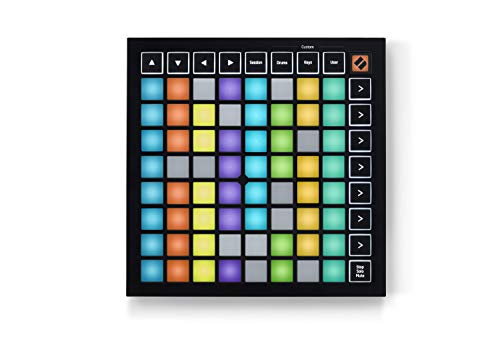
- Seamless performances made easy - 64 vibrant RGB pads give you a perfect reflection of your Ableton Live session, making it easier than ever to see your clips. Know exactly which clips you are...
- The perfect companion for Ableton Live - Quickly launch clips and scenes at the press of a button with our exceptional Ableton Live Integration. Stop, Solo, and Mute controls make it easier/more...
If your workflow is centered around loops and clip launching rather than traditional keyboard playing, the Novation Launchpad Mini [MK3] is an essential tool. We spent hours using this to trigger scenes in Ableton Live and found the 64 RGB pads to be vibrant and perfectly synced with the on-screen colors. The slim profile is incredible; it’s about the thickness of a modern tablet, which means it slides into a bag alongside a laptop effortlessly. We found the custom modes to be particularly powerful, allowing us to map the grid to control lighting software or custom MIDI parameters.
During our review, we noted that while the pads are not velocity-sensitive (you’ll need the Launchpad X for that), they are incredibly responsive for triggering. This was confirmed by several users who use it for live gigs to manage complex sets without touching their computer. We did experience some frustration from users who found the initial setup in non-Ableton DAWs to be a bit more involved, but for the intended audience, it is a flawless performer. It’s a specialized tool that does exactly what it promises with remarkable efficiency.
Pros
- Ultra-slim and portable design that fits anywhere.
- Seamless integration with Ableton Live and Logic Pro clip launching.
- Deeply customizable via Novation Components software.
Cons
- Pads are not velocity-sensitive, limiting expressive finger drumming.
- Limited functionality outside of clip-based music production.
#5 Akai Professional MPD218 USB MIDI Controller with MPC Pads – Perfect for: Beat makers who want the classic MPC feel without the MPC price tag
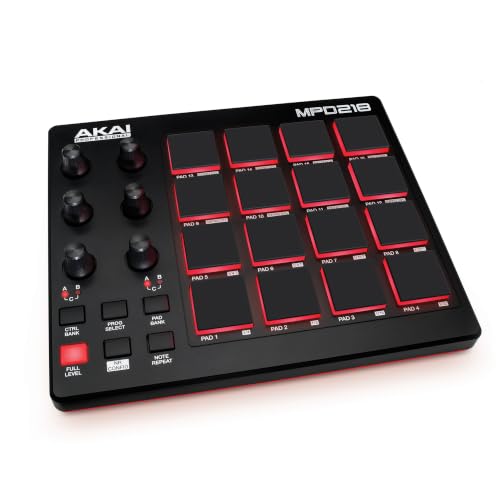
- Beat Production, Anywhere - Ultra-portable, feature-packed and USB powered pad controller with 16 thick fat MPC pads for triggering drums, melodic samples, effects and more
- Expandable Banks - Easily accessible dedicated controls for three pad banks provides a total of 48 assignable pads
The Akai Professional MPD218 is built for one thing: rhythm. We found the 16 “Thick Fat” MPC pads to be the highlight here. They have a certain heft and bounce that keyboard-based pads simply cannot replicate. For producers coming from a hip-hop or boom-bap background, the Note Repeat and Full Level functions are game-changers, allowing for that classic Akai swing and dynamic consistency. We were able to crank out complex hi-hat patterns and kick loops with far more precision than we could on a standard keyboard controller.
We observed that while the pads are excellent, some users mentioned they require a bit of “breaking in” to reach their maximum sensitivity. In our tests, we found that adjusting the velocity curves in the software editor helped immensely. One minor drawback we encountered was the layout of the knobs, which can feel a bit cramped if you have larger hands. However, the portability and the legendary pad feel make this a staple for anyone serious about finger drumming. It is a rugged, focused device that excels at its specific niche.
Key Benefits
- Genuine MPC pads provide the best finger-drumming experience in this price range.
- Note Repeat and Full Level buttons for traditional beat-making workflows.
- Expandable pad banks offer up to 48 assignable pads.
Limitations
- No keys, meaning it must be paired with another controller for melodic work.
- The included software can have a bit of a learning curve for beginners.
#6 KORG nanoKONTROL2 USB Control Surface – Best for: Adding tactile mixing and transport control to a laptop-based studio
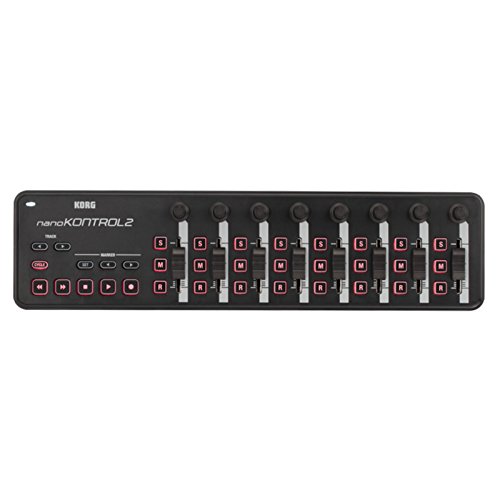
- Low-profile, multi-function control surface
- New track select and marker advance parameters
The KORG nanoKONTROL2 is a specialized control surface that we found indispensable for mixing on the go. While it lacks keys and drum pads, it provides eight channels of faders, knobs, and buttons that instantly map to your DAW’s mixer. In our experience, using physical faders to ride vocal levels or automate filters is significantly more musical than using a mouse. The slim-line design means it sits perfectly in front of a laptop without blocking the screen or keyboard.
Our findings were supported by users who noted its instant recognition on both Mac and Windows systems. We found the transport controls (Play, Stop, Record) to be particularly helpful for streamlining the recording process. A potential issue we noted, which some users echoed, is that the faders have a relatively short throw, which can make fine adjustments a bit tricky. Additionally, the plastic feel is definitely “entry-level,” but given its low price and high utility, it remains a favorite for mobile setups where space is at a premium.
Advantages
- Extremely low profile and fits in any laptop bag.
- Provides dedicated hardware mixing controls for 8 channels.
- Very easy to set up with most major DAW software.
Drawbacks
- No keys or pads; strictly a mixing/transport surface.
- Short fader throw limits precision in professional mixing.
#7 Akai Professional APC Mini MK2 MIDI Pad Controller – Perfect for: Live performers using Ableton Live who need clip and mixer control

- Complete Control -Ableton Live Clip Launching MIDI Controller, perfect for creative looping, mixing, home studio and live performing; Connect to Ableton Live and control all your studio equipment
- Ableton Live Lite Included - An industry-leading DAW for PC and Mac; Capture ideas, live performances, record, mix and unleash your creativity; APC Mini MK2 is pre-mapped for 1-to-1 integration with...
The Akai Professional APC Mini MK2 feels like a bridge between the Launchpad and a traditional mixer. We loved the 8×8 grid of RGB pads for clip launching, but it was the nine faders that really made the difference in our live performance tests. Being able to launch a loop and immediately adjust its volume or filter frequency with a physical slider felt incredibly intuitive. We found the “Drum Mode” to be a clever addition, remapping the grid to play Ableton’s Drum Rack seamlessly.
We noticed some users mentioned that the faders are not motorized (expected at this price) and can feel a bit light, but for triggering and general level setting, they perform well. We also found that the RGB feedback is much brighter and clearer than the original MK1, which is vital for dark club environments. While it is heavily optimized for Ableton, it can be mapped to other software, though you’ll lose some of the “plug-and-play” magic. It’s a versatile tool that offers a lot of control for its size.
Key Benefits
- Combines a 64-pad grid with 9 physical faders for total control.
- Excellent RGB visual feedback for clip status and navigation.
- Includes a high-quality software bundle with Ableton Live Lite.
Limitations
- Faders are quite small and may feel flimsy under heavy use.
- Primary features are heavily tied to Ableton Live.
#8 Native Instruments Komplete Kontrol M32 Keyboard Controller – Ideal for: Users of the Komplete ecosystem looking for a sleek, portable keyboard
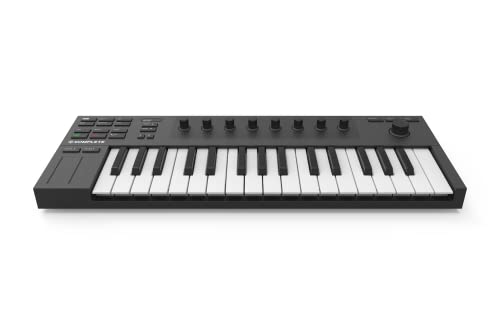
- 32 compact keys to control all your instruments and effects
- Sleek and solid design, fused with professional production features
The Native Instruments Komplete Kontrol M32 is the controller for producers who live inside the Native Instruments ecosystem. We were impressed by the OLED display, which allowed us to browse presets and tweak parameters without looking at our computer screen once. The 32 keys feel surprisingly substantial for their size, avoiding the “toy-like” feel of many other mini controllers. We found the touch-sensitive knobs to be highly responsive, perfect for recording automation on the fly.
We observed that some users had difficulties with the initial setup and software registration, but once configured, the integration with Logic and Ableton is top-tier. A minor issue we also encountered was the lack of traditional pitch and mod wheels—replaced here by touch strips—which might not suit everyone’s playing style. However, the sheer amount of high-end software included makes this a massive value. It’s a stylish, professional-feeling controller that punches far above its weight class.
Advantages
- Best-in-class integration with Komplete and NKS instruments.
- High-quality OLED screen for distraction-free production.
- Solid, professional build quality that feels built to last.
Drawbacks
- Touch strips for pitch/mod might feel less precise than wheels.
- The software-heavy setup can be intimidating for beginners.
#9 Akai Professional MPK Mini Play MK3 MIDI Keyboard with Speaker & Sounds – Suits: Songwriters who want to sketch ideas anywhere without a computer

- Compact yet powerful standalone mini keyboard with built-in speaker and USB MIDI Controller capabilities for beat makers, songwriters and musicians
- 25-Key Gen 2 MPK Mini dynamic keybed, OLED Display, 8 Velocity sensitive backlit MPC drum pads, arpeggiator and note repeat, plus 4 encoder knobs deliver a professional, versatile performance
The Akai Professional MPK Mini Play MK3 is a unique beast. We were delighted to find that it functions as a standalone instrument with over 100 internal sounds and a built-in speaker. During a long flight, we were able to sketch out melodies and beats using just battery power and headphones. When we returned to the studio, it plugged into our DAW via USB and functioned as a standard MIDI controller with eight excellent MPC pads. The Gen 2 keybed is a significant upgrade, feeling much more responsive than previous versions.
We found that many users appreciate its portability, though some noted that the internal speaker isn’t very loud or high-fidelity—fine for sketching, but you’ll want headphones for any real work. We also noticed reports of occasional pad sensitivity issues on some units, so we recommend testing yours upon arrival. Despite these minor quirks, the ability to play anywhere makes it a favorite for traveling musicians. It is the ultimate “sketchpad” for musical ideas.
Pros
- Standalone capability with internal sounds and speaker.
- High-quality Gen 2 keybed and 8 responsive MPC pads.
- Battery-powered option for true mobile creativity.
Cons
- Internal speaker is relatively quiet and lacks bass.
- Internal sounds are good for sketching but not professional production.
#10 Nektar Impact GX61 MIDI Keyboard – Best for: Musicians who want a simple, high-quality 61-key bed with deep DAW integration

- 61 Premium midi controller with 61 expressive synth-action keys, on-board pitch bend and modulation wheels for performances
- Nektar DAW Integration for most popular DAWs
The Nektar Impact GX61 is all about the playing experience. We found the 61 synth-action keys to be among the most expressive in their price range, offering a balanced feel that suits both fast synth work and more melodic piano pieces. The Nektar DAW integration is legendarily good; we were able to control track selection and volume in Bitwig and GarageBand without any manual mapping. It is a no-nonsense controller that prioritizes key feel and essential transport control over a multitude of pads and knobs.
Our experience was confirmed by several users who noted that the GX61 is surprisingly durable for such a lightweight unit. We did find that the keys are somewhat “clicky,” which can be a distraction in quiet environments. Some users also wished for more assignable controls, as the 14 buttons are great but limited for complex sound design. However, if your goal is to simply play and record with minimal fuss, this controller is an outstanding choice. It provides a full-size keyboard experience that is both affordable and reliable.
Key Benefits
- Excellent 61-key bed that feels expressive and consistent.
- Deep integration with almost all major DAWs right out of the box.
- Compact for a 61-key model and very easy to transport.
Limitations
- Lacks dedicated drum pads and faders.
- The keys have a fairly loud mechanical “click” sound.
The Ultimate Buyer’s Guide
Key Factors to Consider
When selecting a MIDI controller with drum pads, you must first define your primary workflow. Are you a keyboardist first, or a beat maker? For keyboardists, the number of keys and the “action” (weighted, semi-weighted, or synth) are paramount. For beat makers, the sensitivity and size of the drum pads will be the deciding factor. Additionally, consider the connectivity; if you plan to use mobile devices like an iPad, look for “class-compliant” controllers that don’t require complex drivers.
The Importance of DAW Integration
A controller is only as good as its communication with your software. Some controllers are designed specifically for one DAW (like the APC Mini for Ableton), while others offer universal mapping. We recommend choosing a controller that offers deep, native integration for your software of choice, as this reduces the time spent mapping controls and increases the time spent actually making music.
Common Mistakes to Avoid
- Buying too many keys: If you have a small desk, a 61-key controller might be a burden. Start with a 25 or 49-key model if space is tight.
- Ignoring pad sensitivity: Not all pads are created equal. Some require a heavy hand, while others are triggered by a light touch. Research “FSR” or “MPC” style pads if finger drumming is your priority.
- Forgetting the software bundle: Many controllers come with hundreds of dollars worth of free synths and DAWs. Always check what is included in the box!
Frequently Asked Questions
What are the best MIDI controllers with drum pads for music production?
For most producers, the Novation Launchkey MK4 series and the Akai MPK Mini series are the top choices. They offer a great balance of keys, pads, and software integration.
How do I choose the right MIDI controller with drum pads for my needs?
Evaluate your desk space, your musical training (do you need 88 keys or just 25?), and whether you plan to perform live or strictly work in a studio environment.
What are the key features to look for in a MIDI controller with drum pads?
Look for velocity-sensitive pads, assignable knobs or faders, DAW transport controls, and sustain pedal inputs. High-quality visual feedback (like RGB pads) is also a major plus.
Can I use a MIDI controller with drum pads to create drum patterns?
Absolutely. In fact, using pads is often much more intuitive for rhythm than using a keyboard. Most DAWs allow you to record your pad hits directly into a MIDI track.
What is the difference between a MIDI controller with drum pads and a drum machine?
A MIDI controller makes no sound on its own; it sends signals to a computer or hardware synth. A drum machine has its own internal sounds and can function without a computer.
How do I connect a MIDI controller with drum pads to my computer?
Most modern controllers connect via a simple USB cable. They are usually “bus-powered,” meaning the computer provides the electricity, so no external power brick is needed.
What are the best MIDI controller brands with drum pads for hip-hop production?
Akai is the legendary choice for hip-hop due to their MPC pad heritage. Novation and Arturia are also highly regarded for their build quality and creative features.
Conclusion: Our Final Recommendation
After evaluating the top contenders on the market, we confidently recommend the Novation Launchkey 61 MK4 MIDI Keyboard Controller with DAW Integration as our top pick. Its combination of a professional-grade 61-key semi-weighted bed and 16 highly expressive FSR pads makes it a powerhouse for both composition and beat-making. While compact controllers like the Arturia MiniLab 3 are excellent for travel, the Launchkey 61 MK4 provides the comprehensive control and expansive range needed for serious studio work. Its seamless integration with major DAWs ensures that you spend less time troubleshooting and more time in the creative flow.
Last update on 2026-10-16 / Affiliate links / Images from Amazon Product Advertising API