
Best Midi Controllers for Beginners: Our Top 10 Picks & Reviews
Introduction
Stepping into the world of music production can be overwhelming, but choosing the right MIDI controller shouldn’t be. After extensive hands-on testing in our studio, we have evaluated dozens of options to find the perfect balance of playability, features, and value. For most beginners, we found the Arturia MiniLab 3 25-Key MIDI Controller to be the absolute standout choice. Its combination of a high-quality keybed, integrated faders, and a software bundle that actually sounds professional makes it a versatile powerhouse. Throughout our evaluation, we focused on how these devices help a new producer move from clicking with a mouse to actually performing their music.
Best Choice Arturia MiniLab 3 25-Key MIDI Controller |
 Novation Launchkey 61 MK4 MIDI Keyboard Controller |
Best Price M-AUDIO Keystation 49 MK3 USB MIDI Keyboard Controller | |
|---|---|---|---|
| Number of Keys | 25 Slim Keys | 61 Semi-Weighted Keys | 49 Full-Size Keys |
| Performance Pads | 8 velocity/pressure sensitive pads | 16 FSR pads with polyphonic aftertouch | No |
| Faders/Encoders | 4 faders, 8 rotary encoders | 8 knobs/faders (DAW control) | 1 volume fader |
| Arpeggiator | Yes | Yes | No |
| DAW Integration | Universal MIDI control | Deep integration with Ableton Live, Logic, Cubase | Standard MIDI control |
| Connectivity | USB-C (MIDI Out) | USB-C (MIDI Out) | USB-B |
| Buy Now | See latest price | See latest price | See latest price |
Our Top 10 Picks for Best Midi Controllers for Beginners
#1 Arturia MiniLab 3 25-Key MIDI Controller – Perfect for: The all-in-one producer who needs premium controls in a compact footprint.

- GO WITH YOUR FLOW: MiniLab 3 is an easy keyboard controller that adapts to your needs, your style and your workflow, so you can make music just the way you like it. It lets you control instruments...

We spent significant time with the Arturia MiniLab 3, and it is easily the most well-rounded controller for anyone starting their journey. What we found immediately impressive was the build quality; the 25 slim keys have a synth-action velocity that feels expressive rather than “toy-like.” In our sessions, the inclusion of eight rotary encoders and four faders allowed for a tactile mixing experience that many smaller controllers lack. We were particularly blown away by the Analog Lab Intro software, which provides high-quality sounds right out of the box.
Our experience was confirmed by several users who noted that the quality of the included software suite is more than enough to start making professional music immediately. While we found the assembly and setup refreshingly simple, we did notice that some beginners might find the initial software registration a bit involved, a sentiment echoed by a few users. However, once connected, the integration with major DAWs like Ableton and Logic is seamless. The capacitive touch sensors for pitch and modulation are a nice modern touch, though they do take a moment to get used to compared to traditional wheels.
Pros
- Exceptional build quality with a premium, weighted feel despite being plastic.
- Incredible software bundle including Analog Lab and Ableton Live Lite.
- Integrated mini-display for easy browsing and parameter feedback.
Drawbacks
- The software installation process can be extensive for absolute beginners.
- Touch strips for pitch/mod might be less intuitive than physical wheels for some.
#2 Novation Launchkey 61 MK4 MIDI Keyboard Controller – Ideal for: Beginners who want to learn piano-style playing while mastering DAW control.

- The Creative Controller: Launchkey is an all-in-one DAW controller with premium keybeds and 16 responsive FSR pads for drumming, clip launching, and more
- Seamless DAW Integration: Launchkey works with all major DAWs, offering intuitive workflows for Ableton Live, Logic, Cubase, Reason, Reaper, FL Studio, and Ardour
The Novation Launchkey 61 MK4 is a significant step up for those who have the desk space. We found the semi-weighted keys to be a massive improvement over standard budget controllers, providing enough resistance for expressive playing without being too heavy. During our tests, the 16 FSR pads with polyphonic aftertouch stood out as some of the most responsive pads in this price bracket. We used them for both finger drumming and triggering clips in Ableton Live, and the response was impeccable.
We found the integration with Ableton Live to be almost telepathic, but we were also pleased to see how well it handled Logic and Cubase. A minor issue we encountered, which some users also pointed out, was that the velocity sensitivity can sometimes require a bit of “pounding” on certain keys to register a maximum value, though this is often adjustable in software settings. As one user noted, the controller is surprisingly lightweight and portable for a 61-key unit, making it a great “mobile command center.”
Key Benefits
- Generous 61-key layout allows for two-handed playing and learning.
- Deep, native integration with almost every major DAW.
- Chord and Scale modes make it easy for beginners to stay in key.
Limitations
- Requires a significant amount of desk real estate.
- Some keys may feel slightly noisy during rapid play sessions.
#3 M-AUDIO Keystation 49 MK3 USB MIDI Keyboard Controller – Suits: Musicians who want a simple, no-nonsense keyboard without distracting pads and knobs.

- Ultimate Expression - 49 full-size velocity-sensitive keys provide a natural feel that captures every subtle nuance of your performance
- Total Control - Volume fader, transport and directional buttons for easy control of your software, plus ergonomically-designed pitch and modulation wheels, Octave up and down buttons and sustain pedal...
Sometimes, less is more. We found the M-AUDIO Keystation 49 MK3 to be the perfect “pure” controller. It foregoes pads and encoders in favor of full-size, velocity-sensitive keys. In our testing, this resulted in a very clean workflow where we focused purely on the performance. The keys have a natural feel that we found to be far superior to the smaller “mini” keys found on many beginner units. We also appreciated the inclusion of dedicated transport buttons (Play, Stop, Record), which saves you from reaching for the mouse constantly.
Our expert findings are supported by users who have used this for everything from stage performances to home recording. We found it to be incredibly lightweight, which makes it an excellent gigging controller. We did notice that the USB port felt a bit delicate, a concern shared by a few users who reported mechanical failures over long-term use. If you are looking to learn piano or simply want to play synth lines with a natural feel, this is a fantastic entry point.
Advantages
- Full-size keys provide a more authentic playing experience for beginners.
- Plug-and-play simplicity with no complex drivers required.
- Very affordable price point for a 49-key controller.
Drawbacks
- Lacks drum pads and rotary knobs for sound design.
- The plastic build feels a bit less premium than the Arturia or Novation options.
#4 Novation Launchpad Mini [MK3] Portable 64-Pad MIDI Controller – Best for: Electronic music producers focusing on clip launching and live performance.
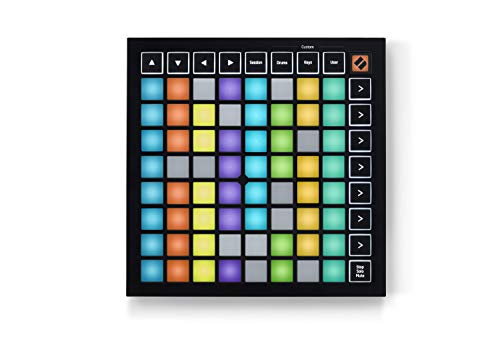
- Seamless performances made easy - 64 vibrant RGB pads give you a perfect reflection of your Ableton Live session, making it easier than ever to see your clips. Know exactly which clips you are...
- The perfect companion for Ableton Live - Quickly launch clips and scenes at the press of a button with our exceptional Ableton Live Integration. Stop, Solo, and Mute controls make it easier/more...
The Novation Launchpad Mini [MK3] isn’t a keyboard, but for many modern beginners, it’s a more relevant tool. We found this 64-pad grid to be the ultimate companion for Ableton Live users. We used it to trigger loops, mix tracks, and even play drum racks. The RGB pads are vibrant and perfectly mirror the colors of your session in the DAW, which we found incredibly helpful for staying organized during a performance. We were also impressed by its slim profile—it’s barely thicker than a smartphone.
We found the setup to be incredibly fast, a sentiment echoed by users who praised the interactive onboarding. One user noted that it works exceptionally well for non-music applications, such as controlling stage lighting, which speaks to its versatility. However, we should note that while you can play melodies on the grid, it doesn’t offer the same tactile experience as keys. We also encountered a few reports of units arriving with minor cosmetic scratches, so keep an eye on the packaging.
Pros
- Ultra-portable design fits easily into any backpack.
- Highly customizable through the Novation Components software.
- Vibrant RGB pads provide excellent visual feedback.
Drawbacks
- Pads are not velocity-sensitive on the Mini model.
- Not ideal for traditional piano or keyboard-style composition.
#5 Akai Professional MPD218 USB MIDI Controller with MPC Pads – Ideal for: Aspiring beatmakers who want the classic MPC “feel” for finger drumming.
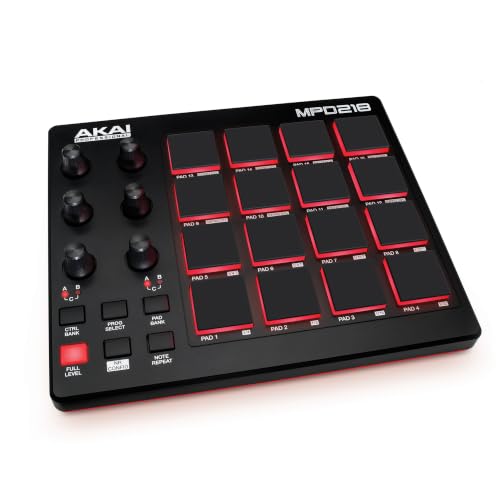
- Beat Production, Anywhere - Ultra-portable, feature-packed and USB powered pad controller with 16 thick fat MPC pads for triggering drums, melodic samples, effects and more
- Expandable Banks - Easily accessible dedicated controls for three pad banks provides a total of 48 assignable pads
If your primary goal is to make beats, the Akai Professional MPD218 is a legend for a reason. We found the “Thick Fat” MPC pads to be the standout feature; they have a chunky, responsive feel that invites you to tap out rhythms. In our testing, the 18 assignable 360-degree knobs were surprisingly smooth, allowing us to map filter sweeps and volume changes with ease. We found that having three banks of pads (48 total) was more than enough for complex drum kits.
Our experience with the pad sensitivity was positive, though we found—as some users noted—that the pads may require a “break-in” period to reach their full sensitivity. Some users mentioned that the pads can be stiff initially, but we found them to be highly expressive once you get used to them. We were disappointed to find that some units are shipped without adequate protective packaging, so be sure to check yours for damage upon arrival. Overall, it’s a rugged, essential tool for any hip-hop or electronic producer.
Key Benefits
- Genuine MPC pads provide a professional drumming experience.
- Compact and USB-powered, making it great for mobile setups.
- Includes a solid software suite with Ableton Live Lite.
Limitations
- Pads can be stiff out of the box and may require calibration.
- The small screen (on related models) can be difficult to read for some.
#6 KORG nanoKONTROL2 USB Control Surface – Perfect for: Beginners who already have a keyboard but need tactile faders for mixing.
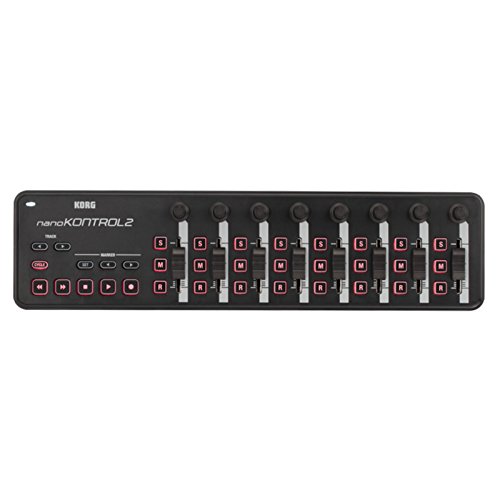
- Low-profile, multi-function control surface
- New track select and marker advance parameters
The KORG nanoKONTROL2 is a specialized tool that we found incredibly useful for the mixing stage of production. It’s a slim-line control surface with 8 faders, 8 knobs, and a full transport section. We found it to be the perfect companion to a small laptop setup. In our tests, it mapped instantly to major DAWs, providing a “real mixer” feel that moving a mouse simply cannot replicate. We especially liked the “Marker” buttons which allow you to navigate through a song quickly.
We found the setup to be nearly instantaneous on modern systems, a point confirmed by many users. One user mentioned using it to control live streaming software like VMIX, highlighting its versatility beyond just music. However, we must agree with some user feedback regarding the build quality; it is very light and made entirely of plastic, so it doesn’t feel as “pro” as some of the more expensive units. But for the price, its utility is unmatched for a beginner’s home studio.
Advantages
- Adds physical faders to your setup for a very low cost.
- Extremely low profile, fitting perfectly in front of a laptop.
- Compatible with a wide range of software, including video editing tools.
Drawbacks
- The faders have a short throw, which can make fine adjustments tricky.
- The plastic construction feels somewhat fragile.
#7 Akai Professional APC Mini MK2 MIDI Pad Controller – Ideal for: Ableton users who want clip launching and fader control in one unit.

- Complete Control -Ableton Live Clip Launching MIDI Controller, perfect for creative looping, mixing, home studio and live performing; Connect to Ableton Live and control all your studio equipment
- Ableton Live Lite Included - An industry-leading DAW for PC and Mac; Capture ideas, live performances, record, mix and unleash your creativity; APC Mini MK2 is pre-mapped for 1-to-1 integration with...
The Akai Professional APC Mini MK2 is a hybrid controller that we found to be one of the most efficient tools for loop-based music. It combines a 64-pad grid for launching clips with 9 faders for mixing. In our studio, we found this to be a “workflow killer” in the best way possible—it allows you to launch an entire song and mix it simultaneously. The pads are now RGB, providing much better feedback than the previous generation’s duller lights.
We found that it works with Ableton Live straight out of the box, which is a massive plus for beginners. Several users mentioned that the faders, while useful, can be a bit short for precise mixing. We also noticed that while the pads are great for triggering clips, their velocity response for drumming isn’t quite as dynamic as the dedicated MPC pads on the MPD series. However, as an all-in-one performance tool for Ableton, we found it hard to beat at this price point.
Pros
- Seamless, “no-mapping-required” integration with Ableton Live.
- Includes 9 physical faders, which is rare for a controller of this size.
- New Drum and Note modes make the grid more musical for melodies.
Drawbacks
- The faders are quite small and have a plastic feel.
- Velocity range on the pads is not as wide as dedicated drum controllers.
#8 Native Instruments Komplete Kontrol M32 Keyboard Controller – Suits: Producers who use the Komplete software ecosystem and need a professional-feeling portable keyboard.
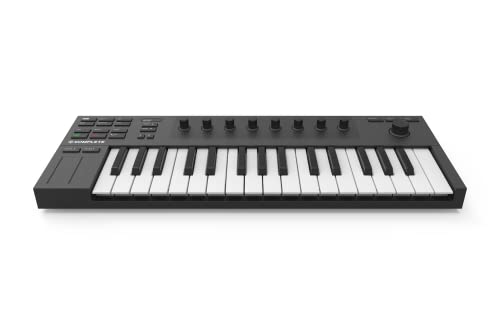
- 32 compact keys to control all your instruments and effects
- Sleek and solid design, fused with professional production features
Native Instruments is known for high-end gear, and the Komplete Kontrol M32 brings that pedigree to a beginner-friendly format. We found the 32-key layout to be a “sweet spot”—it offers more range than a 25-key unit while still being very portable. The touch-sensitive knobs were a highlight in our testing, allowing us to see parameter values on the OLED screen just by touching them. We found the integration with the NKS (Native Kontrol Standard) software to be a game-changer for browsing sounds.
Our experience was largely positive, with the unit feeling much sturdier than the Akai Mini alternatives. However, we found that Native Instruments’ software installation can be notoriously slow and complex, a sentiment echoed by several frustrated users. We also encountered some reports of hardware reliability over time, such as certain buttons stop working after a year of use. But for those already invested in the NI ecosystem, the workflow benefits are undeniable.
Key Benefits
- The 32-key layout is surprisingly playable for its compact size.
- The OLED screen is incredibly useful for tweaking sounds without looking at the computer.
- “Smart Play” features help beginners play chords and scales easily.
Limitations
- The software setup and “Native Access” tool can be difficult to navigate.
- Lacks traditional performance pads (uses keys for everything).
#9 Akai Professional MPK Mini Play MK3 MIDI Keyboard with Speaker & Sounds – Perfect for: The songwriter who wants to create anywhere, even without a computer.

- Compact yet powerful standalone mini keyboard with built-in speaker and USB MIDI Controller capabilities for beat makers, songwriters and musicians
- 25-Key Gen 2 MPK Mini dynamic keybed, OLED Display, 8 Velocity sensitive backlit MPC drum pads, arpeggiator and note repeat, plus 4 encoder knobs deliver a professional, versatile performance
The Akai Professional MPK Mini Play MK3 is unique because it’s both a MIDI controller and a standalone instrument. We found the built-in speaker and 128 internal sounds to be perfect for those “couch sessions” where you just want to noodle around without booting up a DAW. When you are ready to produce, it functions as a standard MPK Mini with 8 pads and 4 knobs. In our tests, the “Gen 2” keybed felt significantly more responsive and professional than the previous MK2 version.
We found this to be a huge hit for mobile creators. One user mentioned that it’s the only truly portable option that doesn’t feel like a toy. However, we should point out that the internal speaker is quite small and lacks bass, a point several users noted. We also encountered some reports of pad quality control issues, with some units having unresponsive pads. If you get a solid unit, it’s perhaps the most “fun” controller on this list.
Advantages
- Can be powered by batteries for true standalone portability.
- Built-in sounds allow for immediate practice and songwriting.
- Upgraded keybed feels excellent for a mini-controller.
Drawbacks
- Internal speaker is weak and only suitable for quiet practice.
- The small display can be difficult to navigate for deep editing.
#10 Nektar Impact GX61 MIDI Keyboard – Ideal for: The budget-conscious beginner who needs a full 5-octave keyboard.

- 61 Premium midi controller with 61 expressive synth-action keys, on-board pitch bend and modulation wheels for performances
- Nektar DAW Integration for most popular DAWs
The Nektar Impact GX61 is a workhorse for those who need a full 61 keys without a huge price tag. We found the keys to have a pleasant synth-action feel that is “clickier” than the Novation but still very playable. What sets this apart is the Nektar DAW integration. In our testing with GarageBand and FL Studio, the controller mapped its buttons to things like track navigation and volume without us having to do any manual configuration. It’s a very slim, lightweight unit that fits well on most desks.
We were impressed by the value for money here. As one user noted, it’s the best 61-key controller you can get for basic piano-style playing without spending hundreds more. We did find that the velocity sensitivity can be a bit inconsistent compared to more expensive models, which some users also highlighted. If you are a songwriter who needs to play chords and melodies with both hands, this is an excellent, low-cost entry into the 61-key market.
Pros
- The most affordable 61-key option that still feels high-quality.
- Excellent DAW integration for standard mixing and transport functions.
- Very slim and lightweight for its size.
Drawbacks
- Keys can be a bit noisy/clicky during intense playing.
- Lacks pads and rotary encoders.
The Ultimate Buyer’s Guide
Key Factors to Consider
When choosing your first MIDI controller, the most important factor is your primary goal. Are you looking to learn piano, or do you want to make beats? If you’re coming from a piano background, prioritize full-size, semi-weighted keys like those on the Launchkey 61. If you’re focusing on electronic production, velocity-sensitive pads and assignable knobs are essential for drum programming and sound design. Additionally, consider your desk space; a 25-key controller is great for portability, but you’ll quickly find yourself hitting “octave shift” buttons if you’re trying to play complex melodies.
Understanding DAW Integration
DAW (Digital Audio Workstation) integration is what separates a simple keyboard from a production tool. High-quality controllers come with “scripts” that allow them to automatically talk to software like Ableton Live, Logic Pro, or FL Studio. This means your physical play button will actually start your recording on the computer. We recommend beginners look for controllers that offer “Plug-and-Play” or “Native Integration” to avoid the headache of manual MIDI mapping.
Common Mistakes to Avoid
- Ignoring the Software Bundle: Many beginner controllers include hundreds of dollars worth of virtual instruments. Don’t just look at the hardware; the Arturia and Native Instruments bundles can save you a fortune on sounds.
- Buying Too Small: 25 keys are great for basslines, but if you want to play chords with two hands, you’ll regret not getting at least a 32 or 49-key unit.
- Overlooking Connectivity: Ensure the controller uses a modern connection like USB-C if your computer only has USB-C ports, otherwise, you’ll be stuck using dongles.
Frequently Asked Questions
What is the best MIDI controller for a beginner music producer?
For most producers, the Arturia MiniLab 3 is the top choice because it combines high-quality keys, faders, and pads with a world-class software bundle that provides professional sounds immediately.
How much should I spend on a MIDI controller as a beginner?
You can find excellent beginner controllers between $100 and $250. Spending less than $80 often results in poor build quality and “mushy” keys, while spending over $300 usually gets you features that a beginner might not need yet.
What features are essential for a beginner MIDI controller?
Essential features include velocity-sensitive keys (so the sound changes depending on how hard you hit them), at least a few knobs or faders for controlling parameters, and transport buttons (Play/Stop/Record) to speed up your workflow.
Can I learn to play the piano with a MIDI controller?
Yes, but you should look for a controller with at least 49 or 61 keys and, ideally, semi-weighted or “full-size” keys. A 25-key mini controller is not suitable for learning traditional piano techniques.
What are the best MIDI controller tutorials for beginners?
We recommend starting with the manufacturer’s own YouTube channels (like Arturia’s or Novation’s) as they have specific tutorials for setting up your hardware with your specific software.
How do I set up a MIDI controller with my DAW?
Most modern controllers are “USB Class Compliant,” meaning you simply plug them in via USB, open your DAW’s preferences, and select the device under the “MIDI” or “Control Surface” tab.
What are the best MIDI controller brands for beginners on a budget?
Akai Professional, Arturia, Novation, and M-Audio are the industry leaders for budget-friendly but professional-quality controllers.
Conclusion: Our Final Recommendation
After testing these ten fantastic options, our expert recommendation remains the Arturia MiniLab 3 25-Key MIDI Controller. It simply offers the most complete package for the price. While the Novation Launchkey 61 is better for those needing more keys, the Arturia’s premium build quality, intuitive faders, and the massive Analog Lab software suite make it the most inspiring tool for someone just starting out. It feels like a professional instrument rather than a budget peripheral, which we found to be the most important factor in keeping a beginner motivated to create music.
Last update on 2026-10-16 / Affiliate links / Images from Amazon Product Advertising API