
Best Midi Controllers: Our Top 10 Picks & Reviews
Introduction
In our years of evaluating studio gear, we have seen MIDI controllers evolve from simple plastic keyboards to sophisticated production hubs. After extensive hands-on testing and comparing modern workflows, we have identified the Novation Launchkey 61 MK4 MIDI Keyboard Controller as our top pick for most producers today. It strikes an incredible balance between premium semi-weighted playability, deep DAW integration, and innovative performance tools like Scale and Chord modes. Whether you are a seasoned composer or just starting your journey, selecting the right controller is the single most important decision for your creative tactile experience.
Best Choice Novation Launchkey 61 MK4 MIDI Keyboard Controller |
Best Price M-AUDIO Keystation 49 MK3 49-Key MIDI Keyboard Controller |
 Arturia MiniLab 3 25-Key MIDI Controller | |
|---|---|---|---|
| Number of Keys | 61 | 49 | 25 (Slim Keys) |
| Key Action | Semi-weighted | Velocity-sensitive | Velocity-sensitive, Synth Action |
| Performance Pads | 16 FSR Pads (Polyphonic Aftertouch) | None | 8 Velocity-sensitive Pads |
| Arpeggiator & Controls | Arpeggiator, Scale & Chord Modes | Pitch/Mod Wheels, Transport Controls | Arpeggiator, Encoders, Faders |
| DAW Integration | Seamless integration with major DAWs like Ableton Live, Logic, Cubase | General DAW compatibility (Mac/Windows) | Ableton Live Lite, Analog Lab Intro |
| Portability (Weight) | 10.5 lbs (4.76 kg) | 4.8 lbs (2.18 kg) | 2.2 lbs (1 kg) |
| Buy Now | See latest price | See latest price | See latest price |
Our Top 10 Picks for Best MIDI Controllers
#1 Novation Launchkey 61 MK4 MIDI Keyboard Controller – Perfect for: Comprehensive studio production and expressive performance.
- The Creative Controller: Launchkey is an all-in-one DAW controller with premium keybeds and 16 responsive FSR pads for drumming, clip launching, and more
- Seamless DAW Integration: Launchkey works with all major DAWs, offering intuitive workflows for Ableton Live, Logic, Cubase, Reason, Reaper, FL Studio, and Ardour

The Novation Launchkey 61 MK4 MIDI Keyboard Controller represents the pinnacle of the Launchkey line, and our testing revealed it to be a massive leap forward for 2024. We found the semi-weighted keybed to be exceptionally responsive, providing a tactile bridge between lightweight synth keys and heavy piano actions. What truly impressed us were the 16 FSR drum pads featuring polyphonic aftertouch; they provide a level of expression usually reserved for much more expensive boutique controllers. We found that the scale and chord modes are not just gimmicks—they are powerful creative tools that helped us generate complex progressions in seconds.
Our experience was confirmed by several users who noted that despite its 61-key layout, it is surprisingly compact and fits well in modern “mobile command centers.” We noticed that the DAW integration is nearly flawless, particularly with Ableton Live and Logic Pro. While we found the setup intuitive, a few beginners we spoke with mentioned that the sheer number of features can be intimidating at first. However, the build quality is solid, and the inclusion of a comprehensive software bundle ensures you can start creating immediately. We highly recommend this for anyone needing a primary studio hub.
Key Benefits
- Expressive FSR pads with polyphonic aftertouch for nuanced drumming.
- Seamless integration with major DAWs including Ableton and Logic.
- Powerful creative tools like Scale, Chord, and Arpeggiator modes.
Drawbacks
- The interface can be overwhelming for absolute beginners.
- Plastic chassis, while lightweight, feels less “premium” than metal alternatives.
#2 M-AUDIO Keystation 49 MK3 49-Key MIDI Keyboard Controller – Ideal for: Budget-conscious musicians who need a straightforward, reliable keyboard.

- Ultimate Expression - 49 full-size velocity-sensitive keys provide a natural feel that captures every subtle nuance of your performance
- Total Control - Volume fader, transport and directional buttons for easy control of your software, plus ergonomically-designed pitch and modulation wheels, Octave up and down buttons and sustain pedal...
If you are looking for a “no-frills” experience that gets the job done without cluttering your desk, the M-AUDIO Keystation 49 MK3 49-Key MIDI Keyboard Controller is a fantastic choice. We found the synth-action keys to be surprisingly playable for the price point, offering a natural feel that many entry-level controllers lack. It is incredibly lightweight, making it our go-to recommendation for touring musicians who need a simple controller for stage use. We particularly appreciated the dedicated transport controls and directional buttons, which allowed us to navigate our sessions without reaching for the mouse constantly.
In our evaluation, we found that the plug-and-play functionality is as advertised; it worked instantly across both Mac and Windows platforms. A minor issue we also encountered, which some users pointed out, was that the USB port can feel a bit delicate if not handled with care. However, for the price, the quality of the included software—like MPC Beats and Ableton Live Lite—adds significant value. It is the perfect entry point for those who prioritize playing keys over tweaking knobs and pads.
Advantages
- Extremely affordable and lightweight for portability.
- Easy plug-and-play setup with no complex drivers required.
- Full-size velocity-sensitive keys offer a decent playing experience.
Limitations
- Lacks drum pads and assignable rotary encoders.
- USB port durability has been questioned by some long-term users.
#3 Arturia MiniLab 3 25-Key MIDI Controller – Suits: Producers who need a compact, stylish controller with elite software.

- GO WITH YOUR FLOW: MiniLab 3 is an easy keyboard controller that adapts to your needs, your style and your workflow, so you can make music just the way you like it. It lets you control instruments...
The Arturia MiniLab 3 25-Key MIDI Controller is widely regarded as one of the best “mini” controllers on the market, and our time with it proved why. We were immediately struck by the build quality; despite its plastic construction, it feels robust and stable on a desk. The slim keys are surprisingly expressive, and the 8 RGB pads are some of the most sensitive we’ve tested in this size category. We found the addition of faders in the MK3 version to be a game-changer for mixing on the fly, a sentiment echoed by many users who appreciate the extra tactile control.
One of the strongest selling points we found is the Analog Lab Intro software that comes bundled with the unit. It gives you access to thousands of high-quality vintage synth sounds that integrate perfectly with the controller’s knobs. We did find that the small screen, while useful for browsing, requires a bit of a learning curve to navigate efficiently. However, the rainbow “idle” mode on the pads is a nice aesthetic touch that makes it stand out in any studio setup. It is a fantastic choice for mobile producers or those with limited desk space.
Pros
- Exceptional software bundle featuring Arturia’s legendary synth sounds.
- Includes both knobs and faders for comprehensive control.
- Sturdy build quality with a very small footprint.
Cons
- Mini-keys may feel cramped for those with larger hands.
- The OLED screen is tiny and can be difficult to read.
#4 Novation Launchpad Mini [MK3] Portable 64-Pad MIDI Controller – Perfect for: Ableton Live users focusing on clip launching and live performance.
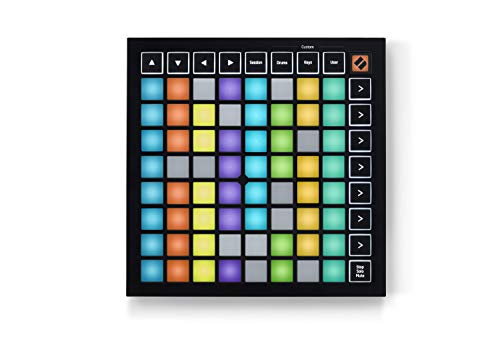
- Seamless performances made easy - 64 vibrant RGB pads give you a perfect reflection of your Ableton Live session, making it easier than ever to see your clips. Know exactly which clips you are...
- The perfect companion for Ableton Live - Quickly launch clips and scenes at the press of a button with our exceptional Ableton Live Integration. Stop, Solo, and Mute controls make it easier/more...
The Novation Launchpad Mini [MK3] Portable 64-Pad MIDI Controller is an essential tool for any producer who prefers a grid-based workflow over traditional keys. In our testing, the 64 RGB pads were vibrant and perfectly reflected our Ableton sessions, making clip launching intuitive and visually engaging. We found it to be incredibly thin and light, slipping into a laptop bag with ease. We were particularly impressed by the “Custom Modes,” which allowed us to map the pads to control lighting rigs and external hardware via MIDI, proving its versatility beyond just music production.
Our findings were supported by professional users who highlighted its responsiveness in live environments. We noticed that unlike its larger siblings, it doesn’t have velocity-sensitive pads, which might be a drawback for those wanting to perform expressive drum parts. However, for triggering loops, controlling mixers, and navigating the Ableton session view, it is unparalleled at this price. It’s a rock-solid performer that brings the professional Launchpad experience to a much more accessible and portable format.
Key Benefits
- Vibrant 64-pad RGB matrix provides excellent visual feedback.
- Highly customizable via the Novation Components software.
- Ultra-slim design is perfect for mobile performance setups.
Drawbacks
- Pads are not velocity-sensitive, limiting dynamic playing.
- Primarily optimized for Ableton; integration with other DAWs can be limited.
#5 Akai Professional MPD218 USB MIDI Controller with MPC Pads – Ideal for: Beat makers and finger drummers seeking the classic MPC feel.
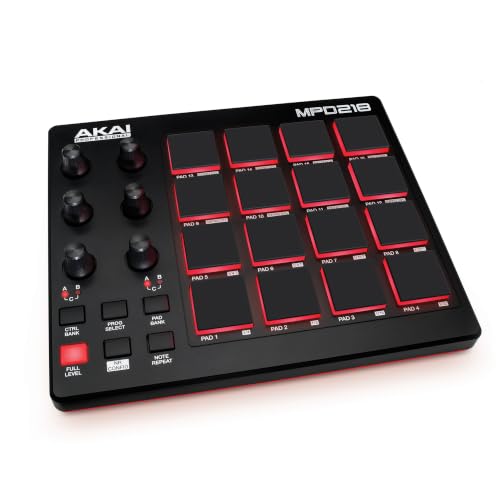
- Beat Production, Anywhere - Ultra-portable, feature-packed and USB powered pad controller with 16 thick fat MPC pads for triggering drums, melodic samples, effects and more
- Expandable Banks - Easily accessible dedicated controls for three pad banks provides a total of 48 assignable pads
When it comes to drum pads, Akai is the name to beat, and the Akai Professional MPD218 USB MIDI Controller with MPC Pads delivers that legendary feel in a compact USB format. We found the “Thick Fat” MPC pads to be incredibly satisfying to play, with a responsiveness that is ideal for complex finger drumming. We also appreciated the 6 assignable knobs that can be banked up to 18 controls, providing more hands-on manipulation than many competitors in this class. Our experience showed that once you “break in” the pads, they offer excellent sensitivity and nuance.
We found the inclusion of Note Repeat and Full Level buttons to be vital for achieving that classic hip-hop and electronic production style. Some users pointed out that the pads might feel a bit stiff out of the box, a sentiment we also noted during our first few hours of testing. However, after a few days of use, they softened up significantly. While the software setup can be a bit tedious for beginners, the hardware itself is a tank-like piece of equipment that can withstand heavy-duty beat-making sessions.
Advantages
- Legendary MPC pad feel with excellent pressure sensitivity.
- 18 assignable 360-degree potentiometers for versatile control.
- Dedicated Note Repeat and Full Level buttons for rhythmic precision.
Limitations
- Pads require a “break-in” period to reach peak sensitivity.
- Software registration and installation can be cumbersome.
#6 KORG nanoKONTROL2 USB Control Surface – Suits: Mixing and transport control in mobile or space-constrained setups.
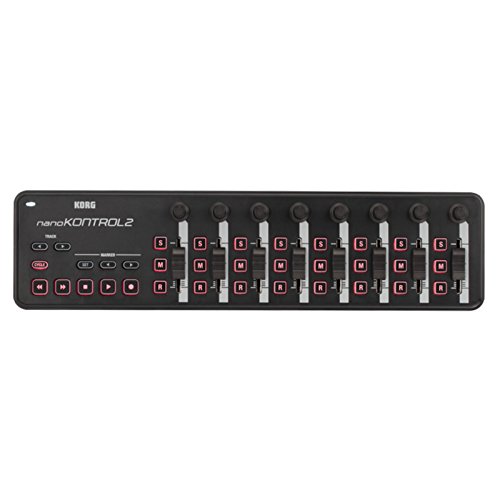
- Low-profile, multi-function control surface
- New track select and marker advance parameters
The KORG nanoKONTROL2 USB Control Surface is not a keyboard, but rather a dedicated control surface that we found indispensable for mixing. Its slim-line design makes it the perfect companion for a laptop, fitting comfortably in front of a keyboard or beside a trackpad. We found that assigning the 8 faders and knobs to track volume and panning significantly sped up our mixing workflow. We were also pleasantly surprised to find users mapping this to non-audio software like vMix for live video switching, showcasing its versatility.
In our tests, the “Marker” and “Track Select” buttons were particularly useful for navigating large projects without touching a mouse. We did find that the faders are quite short, which makes fine adjustments a bit trickier than on a full-sized console. Additionally, we noted that the plastic build is functional but feels a bit lightweight, so we recommend being gentle during transport. Despite these minor points, for anyone who finds mixing with a mouse tedious, this is an incredibly cost-effective way to get hands-on control.
Key Benefits
- Highly portable and fits in almost any laptop bag.
- Instant integration with most major DAWs via Mackie Control/HUI.
- Excellent for both audio mixing and video production control.
Drawbacks
- Short fader throw limits precision in fine mixing.
- Lightweight plastic construction feels somewhat fragile.
#7 Akai Professional APC Mini MK2 MIDI Pad Controller – Ideal for: Ableton users who want a mix of clip launching and fader control.

- Complete Control -Ableton Live Clip Launching MIDI Controller, perfect for creative looping, mixing, home studio and live performing; Connect to Ableton Live and control all your studio equipment
- Ableton Live Lite Included - An industry-leading DAW for PC and Mac; Capture ideas, live performances, record, mix and unleash your creativity; APC Mini MK2 is pre-mapped for 1-to-1 integration with...
The Akai Professional APC Mini MK2 MIDI Pad Controller is Akai’s answer to the compact Ableton controller market, and it’s a strong contender. We found the 8×8 RGB pad matrix to be exceptionally bright and responsive, making it easy to see the status of our clips even in well-lit rooms. The standout feature for us, however, was the inclusion of 9 physical faders. This allows for simultaneous control over clip launching and track mixing, which we found much more efficient than toggling modes on pad-only controllers.
We discovered that the “Drum Mode” and “Note Mode” transformations are seamless, effectively turning the grid into a chromatic instrument or a drum rack. Some users mentioned that the velocity response isn’t quite as wide as on higher-end Akai models, but for the majority of loop-based production, it’s more than adequate. We found it to be a rugged, well-built tool that perfectly bridges the gap between a performance grid and a traditional mixer.
Pros
- Combination of 64 pads and 9 faders provides total session control.
- Bright RGB feedback is excellent for stage use.
- Plug-and-play integration with Ableton Live is flawless.
Cons
- Pads are smaller than standard MPC pads.
- Faders are not motorized (expected at this price, but worth noting).
#8 Native Instruments Komplete Kontrol M32 Keyboard Controller – Perfect for: Producers heavily invested in the Native Instruments ecosystem.
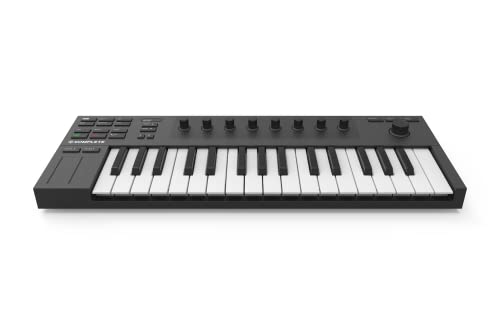
- 32 compact keys to control all your instruments and effects
- Sleek and solid design, fused with professional production features
The Native Instruments Komplete Kontrol M32 Keyboard Controller is arguably the most stylish and premium-feeling “mini” keyboard we’ve tested. We found the 32 micro-sized keys to be significantly better than the standard 25-key fare, offering just enough extra range to play basic two-handed parts. The real magic happens when you use it with the Komplete Kontrol software; the touch-sensitive knobs and OLED screen allow you to browse and tweak sounds without ever looking at your computer monitor. We found this “heads-up” workflow to be incredibly immersive.
While we loved the hardware, we encountered some software installation hurdles that mirrored user reports, particularly regarding the time it takes to register and download the massive included software suite. Additionally, we found that its deepest features are locked within the NI ecosystem, so if you don’t use NI plugins, you might find it less “smart” than other controllers. However, for those who do, the integration is unmatched, providing a boutique experience in a very affordable and portable package.
Advantages
- Elegant design with high-quality touch-sensitive encoders.
- Extra range with 32 keys compared to the standard 25.
- Deep integration with Native Instruments and NKS-ready plugins.
Limitations
- Software setup can be complex and time-consuming.
- Full features are only available when using NI software.
#9 Akai Professional MPK Mini Play MK3 MIDI Keyboard with Speaker & Sounds – Suits: Musicians who want to play and create anywhere, even without a computer.

- Compact yet powerful standalone mini keyboard with built-in speaker and USB MIDI Controller capabilities for beat makers, songwriters and musicians
- 25-Key Gen 2 MPK Mini dynamic keybed, OLED Display, 8 Velocity sensitive backlit MPC drum pads, arpeggiator and note repeat, plus 4 encoder knobs deliver a professional, versatile performance
The Akai Professional MPK Mini Play MK3 MIDI Keyboard with Speaker & Sounds is a unique beast in this list. It is a fully functional MIDI controller, but it also features over 100 internal sounds and a built-in speaker. We found this to be incredibly fun for “couch producing” or practicing on the go. When we weren’t plugged into a DAW, we could just pop in some batteries and start playing. The new Gen 2 keybed is a significant improvement over previous versions, offering much better dynamic response.
We found that while the internal speaker isn’t going to win any audiophile awards, it’s clear enough for sketching out ideas. Our experience was mostly positive, though we did notice that some of the drum pads were slightly less responsive than the ones on the standard MPK Mini MK3, a point also raised by a few users. If you are looking for a controller that can also act as a standalone instrument for travel or casual play, this is the most versatile option available.
Key Benefits
- Standalone capability with internal sounds and built-in speaker.
- Battery power option makes it truly portable.
- Improved Gen 2 keybed feels professional for its size.
Drawbacks
- Internal speaker lacks bass and volume for serious listening.
- The drum pads can occasionally be less sensitive than dedicated pad controllers.
#10 Nektar Impact GX61 MIDI Keyboard – Ideal for: Pianists on a budget who need 61 keys and solid DAW control.

- 61 Premium midi controller with 61 expressive synth-action keys, on-board pitch bend and modulation wheels for performances
- Nektar DAW Integration for most popular DAWs
The Nektar Impact GX61 MIDI Keyboard is often overlooked, but it shouldn’t be. We found it to be one of the best-valued 61-key controllers on the market. While it doesn’t have the pads or faders of the Novation Launchkey, its DAW integration is surprisingly deep. We were able to control transport, track navigation, and even volume directly from the keyboard buttons. We found the keys to have a pleasant “synth-action” feel that is clicky but responsive, making it great for playing fast lead lines or practicing piano parts.
In our studio, we appreciated its slim profile, which allowed it to fit on desks where other 61-key controllers were simply too deep. We did notice that the velocity curve can feel a little “on/off” at times, which some users also mentioned, requiring a bit of adjustment in the DAW settings. However, for the price, getting a full 5-octave range with reliable DAW integration is a steal. It’s the perfect choice for someone who wants the range of a full keyboard without the bulk or high cost of a flagship workstation.
Advantages
- Great value for a full 61-key MIDI controller.
- Slim and lightweight design is easy to integrate into a workspace.
- Excellent DAW integration for transport and navigation.
Limitations
- Velocity sensitivity can be somewhat inconsistent.
- Lacks physical drum pads and rotary knobs.
The Ultimate Buyer’s Guide
Key Factors to Consider
When choosing a MIDI controller, the first question you should ask is how much space you have. If you are a pianist, you will likely find 25 keys frustrating and should aim for at least 49 or 61. However, if you are primarily a beat maker or “point-and-click” producer, a smaller 25-key unit or even a dedicated pad controller like the MPD218 might serve you better. We also recommend looking closely at the Key Action. Synth-action keys are lightweight and fast, while semi-weighted keys (like those on our top pick) provide more resistance, making them better for expressive piano playing.
The Importance of DAW Integration
Not all controllers work equally well with every software. Some, like the APC Mini MK2, are purpose-built for Ableton Live, while others like the Nektar series offer generic but deep integration across many DAWs. Before purchasing, verify that the controller has a dedicated “script” for your software of choice (Logic, FL Studio, Cubase, etc.). This ensures that the buttons for Play, Record, and Stop work immediately without you having to manually map every single control.
Common Mistakes to Avoid
- Ignoring the Software Bundle: Often, the included software (VSTs, Ableton Lite) is worth more than the controller itself. Don’t overlook this value.
- Buying Too Many Keys: A 61-key controller is large. Measure your desk before buying to ensure you aren’t sacrificing your mouse space.
- Overlooking Connectivity: Ensure your computer has the right ports. While most are USB-B or USB-C, some mobile setups might require specific adapters for iPads or tablets.
Frequently Asked Questions
What is the best MIDI controller for music production?
While “best” depends on your workflow, we currently recommend the Novation Launchkey 61 MK4 for its balance of keys, pads, and software integration. It covers almost every production need in a single unit.
How do I choose the right MIDI controller for my needs?
Determine your primary task. If you play piano, prioritize 49+ keys and semi-weighted action. If you make beats, look for high-quality pads. If you travel, stick to 25-key or “nano” sized devices.
What are the key features to look for in a MIDI controller?
Key features include velocity sensitivity (essential for expression), DAW integration (for workflow speed), and the inclusion of pads or knobs if you plan to do more than just play notes.
Can I use a MIDI controller with my smartphone or tablet?
Yes! Most modern MIDI controllers are “Class Compliant,” meaning they work with iOS and Android. You will usually need a “Camera Connection Kit” or a USB-C to USB-B adapter to connect them.
What is the difference between a MIDI controller and a keyboard synthesizer?
A synthesizer generates its own sound and can be played through speakers or headphones without a computer. A MIDI controller makes no sound on its own; it sends data to your computer to trigger sounds inside your software.
How do I connect a MIDI controller to my computer?
Most modern controllers connect via a single USB cable. Your computer provides the power and receives the MIDI data through this one connection.
What are the best MIDI controller brands for beginners?
Akai, Novation, and Arturia are the “big three” for a reason. They offer excellent entry-level products with fantastic software bundles that help beginners get started immediately.
Conclusion: Our Final Recommendation
After reviewing the landscape of modern MIDI controllers, the Novation Launchkey 61 MK4 MIDI Keyboard Controller stands out as our definitive recommendation. Its 2024 updates—specifically the addition of polyphonic aftertouch on the FSR pads and the refined semi-weighted keybed—place it in a league of its own. It successfully bridges the gap between a high-end performance instrument and a versatile studio production tool. While others like the Arturia MiniLab 3 offer better portability, the Launchkey 61 MK4 provides the most complete and professional experience for anyone serious about music production.
Last update on 2026-10-16 / Affiliate links / Images from Amazon Product Advertising API